# Convert VTK ASCII to Binary to save space
**URL:** https://discourse.paraview.org/t/convert-vtk-ascii-to-binary-to-save-space/2660
**Category:** ParaView Support
**Tags:** vtk
**Created:** [September 30, 2019, 7:48pm UTC](https://discourse.paraview.org/t/convert-vtk-ascii-to-binary-to-save-space/2660 "2019-09-30T19:48:50Z")
**Posts on this page:** 5
**Page:** 1
### Author:  [@Raj2019](https://discourse.paraview.org/u/Raj2019)
#### Post date: [September 30, 2019, 7:48pm UTC](https://discourse.paraview.org/t/convert-vtk-ascii-to-binary-to-save-space/2660/1 "2019-09-30T19:48:50Z")
I have a .vtk file (0.25 TB) n ASCII format which I visualize in ParaView. I like to transfer the data to my collaborators for which I would like to convert it into a binary format.
I tried to search through the internet and was unsuccessful in obtaining a solution.
Can anyone help me with this ?
Thanks.
---
### Author:  [@cory.quammen](https://discourse.paraview.org/u/cory.quammen)
#### Post date: [September 30, 2019, 8:08pm UTC](https://discourse.paraview.org/t/convert-vtk-ascii-to-binary-to-save-space/2660/2 "2019-09-30T20:08:11Z")
If you are able to load it into ParaView, then you can easily save the data to a binary format through the _File_ -\> _Save Data…_ menu item, then choose the VTK Legacy writer. Once you set the file name and click OK, an options dialog for the writer appears.
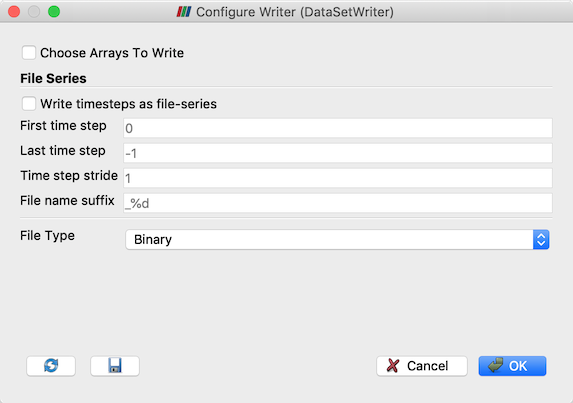
By default, the output will be binary, so you can click OK and you have now saved out a binary .vtk file.
You may also be interested in saving to the XML output file type that also supports binary encoding and compression with various compression algorithms. Those options are presented in the same dialog as above when you save to an XML format.
---
### Author:  [@Raj2019](https://discourse.paraview.org/u/Raj2019)
#### Post date: [September 30, 2019, 8:26pm UTC](https://discourse.paraview.org/t/convert-vtk-ascii-to-binary-to-save-space/2660/3 "2019-09-30T20:26:21Z")
Thanks Cory.
The file is too large (0.25 TB) to be loaded into ParaView for visualization. Is there a way to do it using Python script ?
---
### Author:  [@vrkssai](https://discourse.paraview.org/u/vrkssai)
#### Post date: [February 21, 2020, 5:41pm UTC](https://discourse.paraview.org/t/convert-vtk-ascii-to-binary-to-save-space/2660/4 "2020-02-21T17:41:12Z")
```auto
from paraview.simple import *
r = LegacyVTKReader( FileNames=['Yourfilename.vtk'] )
SaveData('Yourfilename_binary.vtk', proxy=r)
```
Should save as binary by default.
used from: [https://stackoverflow.com/a/58209834](https://stackoverflow.com/a/58209834)
---
### Author:  [@acmresende](https://discourse.paraview.org/u/acmresende)
#### Post date: [September 8, 2020, 6:59pm UTC](https://discourse.paraview.org/t/convert-vtk-ascii-to-binary-to-save-space/2660/6 "2020-09-08T18:59:43Z")
The function `SaveData()` is not working with Paraview’s older versions (like 3.98.1). I found its implementation [here](https://kitware.github.io/paraview-docs/latest/python/_modules/paraview/simple.html) and moved it to my code. How can I save my file as ASCII? Calling it like `SaveData(filename, proxy=px, FileType='Ascii')` is not working (it saves my files as binaries).