# crashing when using clip over Image (Uniform Rectilinear Grid)
**URL:** https://discourse.paraview.org/t/crashing-when-using-clip-over-image-uniform-rectilinear-grid/17320
**Category:** ParaView Support
**Created:** [November 19, 2025, 12:39pm UTC](https://discourse.paraview.org/t/crashing-when-using-clip-over-image-uniform-rectilinear-grid/17320 "2025-11-19T12:39:22Z")
**Posts on this page:** 12
**Page:** 1
### Author:  [@otaolafr](https://discourse.paraview.org/u/otaolafr)
#### Post date: [November 19, 2025, 12:39pm UTC](https://discourse.paraview.org/t/crashing-when-using-clip-over-image-uniform-rectilinear-grid/17320/1 "2025-11-19T12:39:22Z")
Hello,
I am opening a raw image file using the following function:
`def readRawFile(volFilePath=‘’,volInfoFilePath=‘’,format=‘.vol’):`
` if volFilePath[-4:]!=format:`
` volFilePath+=format`
` if volInfoFilePath==‘’:`
` volInfoFilePath=volFilePath+‘.info’`
` infoValues = {}`
` with open(volInfoFilePath, “r”) as f:`
` for line in f:`
` line = line.strip()`
` if “=” in line:`
` key, value = line.split(“=”)`
` key = key.strip()`
` value = value.strip()`
` infoValues[key] = value`
`imageReaderSource=ImageReader(registrationName=volFilePath.split(‘/’[-1].replace(format,‘’), FileNames=[volFilePath])`
` imageReaderSource.Set(`
`DataScalarType=‘float’,`
`DataByteOrder=‘LittleEndian’,`
`DataSpacing=[float(infoValues[“voxelSize”]) for i in range(3)],`
`DataExtent=[0, int(infoValues[“NUM_X”])-1, 0, int(infoValues[“NUM_Y”])-1, 0, int(infoValues[“NUM_Z”])-1],)`
` UpdatePipeline()`
` return imageReaderSource,infoValues`
and while I am not having issues with slicing the source generated, when I use clip paraview crashes with the following error:
`( 76.501s) [paraview]vtkGenericDataArray.txx:377 ERR| vtkDoubleArray (0x33040200): Unable to allocate 8589934592 elements of size 8 bytes. `
`terminate called after throwing an instance of 'std::bad_alloc' `
` what(): std::bad_alloc`
`error: exception occurred: Subprocess aborted `
`critical: In unknown, line 0 `
`critical: Cannot open data file " "" "`
---
### Author:  [@mwestphal](https://discourse.paraview.org/u/mwestphal)
#### Post date: [November 19, 2025, 3:17pm UTC](https://discourse.paraview.org/t/crashing-when-using-clip-over-image-uniform-rectilinear-grid/17320/2 "2025-11-19T15:17:52Z")
> [@otaolafr](#):
>
> Unable to allocate 8589934592 elements of size 8 bytes.
Here is your answer, looks like there is too big of an allocation (70Gb).
Is that data big ?
---
### Author:  [@otaolafr](https://discourse.paraview.org/u/otaolafr)
#### Post date: [November 19, 2025, 3:22pm UTC](https://discourse.paraview.org/t/crashing-when-using-clip-over-image-uniform-rectilinear-grid/17320/3 "2025-11-19T15:22:10Z")
yes it is! but what I dont understand is that even if i do a clip box with a few elements (really small box) it crashes also (when I am having 10gb remaining, and I am consuming 32gb for the original data and i am selecting less than 1% of the volume of it).
---
### Author:  [@mwestphal](https://discourse.paraview.org/u/mwestphal)
#### Post date: [November 19, 2025, 3:25pm UTC](https://discourse.paraview.org/t/crashing-when-using-clip-over-image-uniform-rectilinear-grid/17320/4 "2025-11-19T15:25:11Z")
> [@otaolafr](#):
>
> i am selecting less than 1% of the volume of it).
I suspect an allocation on the entire domain, definitely a bug to fix here.
---
### Author:  [@otaolafr](https://discourse.paraview.org/u/otaolafr)
#### Post date: [November 19, 2025, 3:26pm UTC](https://discourse.paraview.org/t/crashing-when-using-clip-over-image-uniform-rectilinear-grid/17320/5 "2025-11-19T15:26:39Z")
if internal to kitware i dont have an issue to share the data (i send it to you in a private link) you want me to report an issue or do something else?
---
### Author:  [@mwestphal](https://discourse.paraview.org/u/mwestphal)
#### Post date: [November 19, 2025, 3:27pm UTC](https://discourse.paraview.org/t/crashing-when-using-clip-over-image-uniform-rectilinear-grid/17320/6 "2025-11-19T15:27:16Z")
Ill try to repro first.
---
### Author:  [@otaolafr](https://discourse.paraview.org/u/otaolafr)
#### Post date: [November 20, 2025, 6:37am UTC](https://discourse.paraview.org/t/crashing-when-using-clip-over-image-uniform-rectilinear-grid/17320/7 "2025-11-20T06:37:07Z")
here if you want you can get the save state (althought there is absolutily nothing fancy on it, only the source filter fo the image reader). i really need to be able to extract the data so i can work on (right now i am stock with this). the data I send you a private message with the .vol file and .vol.info file to be downloaded from a tar file
---
### Author:  [@mwestphal](https://discourse.paraview.org/u/mwestphal)
#### Post date: [November 21, 2025, 1:25pm UTC](https://discourse.paraview.org/t/crashing-when-using-clip-over-image-uniform-rectilinear-grid/17320/8 "2025-11-21T13:25:45Z")
Indeed, please share a state file, as I dont know how you configured the ImageReader.
---
### Author:  [@otaolafr](https://discourse.paraview.org/u/otaolafr)
#### Post date: [November 21, 2025, 1:41pm UTC](https://discourse.paraview.org/t/crashing-when-using-clip-over-image-uniform-rectilinear-grid/17320/9 "2025-11-21T13:41:09Z")
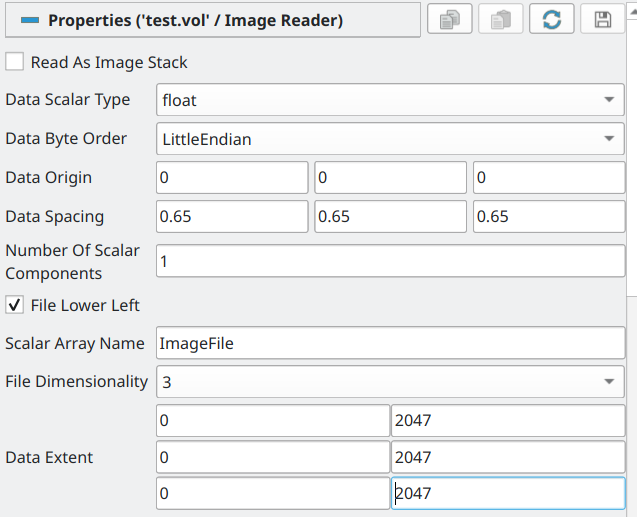
here you have the parameters,
---
### Author:  [@mwestphal](https://discourse.paraview.org/u/mwestphal)
#### Post date: [November 21, 2025, 2:24pm UTC](https://discourse.paraview.org/t/crashing-when-using-clip-over-image-uniform-rectilinear-grid/17320/10 "2025-11-21T14:24:06Z")
I confirm that during the application of clip, I see a spike usage of RAM which is then release immediatly. This definitely looks llike an allocation that should not be done, please open an issue.
---
### Author:  [@otaolafr](https://discourse.paraview.org/u/otaolafr)
#### Post date: [November 26, 2025, 9:33am UTC](https://discourse.paraview.org/t/crashing-when-using-clip-over-image-uniform-rectilinear-grid/17320/12 "2025-11-26T09:33:21Z")
So, the issue comes from clip transforming the `image (uniform rectilinear grid)` ie., `vtkImageData` to `unstructured grid` ie., `vtkUnstructuredGrid` this provokes a spike of memory ( **3 times the original ram consomed by the source image** ) where all the original data is converted before doing the cliping, reason why even if the clip is really small, my ram was not enought.
a solution is to use the Crop filter (by default it is not exposed in the paraview interface) by:
`Crop(Input=sourceFilterOfImage, OutputWholeExtent=[vXMin, vXMax, vYMin, vYMax, vZMin, vZMax])`
with the vXMin, vXMax, vYMin, vYMax, vZMin, vZMax being the voxels where one will cut the image.
this will give back still a `image (uniform rectilinear grid)` but this time cutted by a box of the sizes mentionned.
I created a little function to still use clip without the ram consomtion, by simply using as middle men the Crop filter and then the clip one.
```auto
def clipBoxOnImage(filter=[], typeOfClip='Box', Length = [20.0, 20.0, 20.0], Position = [1.0, 0.0, 0.0], Normal = [2.0, 0.0, 0.0], Origin = [], Invert = 0):
if filter==[]:
filter= GetActiveSource()
if filter.GetDataInformation().GetDataSetTypeAsString()=='vtkImageData':
#get the voxel size
oneVoxel=Crop(Input=filter,OutputWholeExtent = [0, 1, 0, 1, 0, 1])
[xMin,yMin,zMin,xMax,yMax,zMax]=getBoundingBox(filter=oneVoxel , alignOfAxis=False)
voxelSize=[xMax-xMin,yMax-yMin,zMax-zMin]
if typeOfClip=='Box':
if Origin:
positionInVoxels=[math.ceil(Origin[i]/voxelSize[i]) for i in range(3)]
else:
positionInVoxels=[math.ceil(Position[i]/voxelSize[i]) for i in range(3)]
LengthInVoxelsHalfs=[math.ceil(Length[i]/(2*voxelSize[i]))+2 for i in range(3)]
inputForClip=Crop(Input=filter, OutputWholeExtent=[positionInVoxels[0]-LengthInVoxelsHalfs[0], positionInVoxels[0]+LengthInVoxelsHalfs[0], positionInVoxels[1]-LengthInVoxelsHalfs[1], positionInVoxels[1]+LengthInVoxelsHalfs[1],positionInVoxels[2]-LengthInVoxelsHalfs[2],positionInVoxels[2]+LengthInVoxelsHalfs[2]])
if typeOfClip=='Plane':
if Normal.count(0)!=2:
print('only supported for axis aligned planes')
return
OriginInVoxels=[math.ceil(Origin[i]/voxelSize[i]) for i in range(3)]
Normal=[abs(i) for i in Normal]
voxelBounds=filter.GetInformation().bounds
maxVoxelBounds=[voxelBounds[1],voxelBounds[3],voxelBounds[5]]
LengthInVoxelsHalfs=[OriginInVoxels[i] if Normal[i]!=0 else maxVoxelBounds[i] for i in range(3)]
if Invert:
inputForClip=Crop(Input=filter, OutputWholeExtent=[0, LengthInVoxelsHalfs[0], 0, LengthInVoxelsHalfs[1], 0, LengthInVoxelsHalfs[2]])
else:
inputForClip=Crop(Input=filter, OutputWholeExtent=[LengthInVoxelsHalfs[0], maxVoxelBounds[0], LengthInVoxelsHalfs[1], maxVoxelBounds[1] ,LengthInVoxelsHalfs[2], maxVoxelBounds[2]])
else:
inputForClip=filter
print('this function should be used only in vtkImageData, getting same result as default behavior of simply clipping the data directly')
if typeOfClip=='Box':
if Origin!=[]:
Position=[Origin[i]-Length[i]/2 for i in range(3)]
clip1 = Clip(Input=inputForClip,ClipType = 'Box')
clip1.ClipType.Set(
Position=Position,
Length=Length,)
elif typeOfClip=='Plane':
clip1 = Clip(Input=inputForClip)
clip1.ClipType.Set(
Origin=Origin,
Normal=Normal,
Invert=Invert)
return clip1
LengthInVoxelsHalfs=[math.ceil(Length[i]/(2*voxelSize[i]))+2 for i in range(3)]
inputForClip=Crop(Input=filter, OutputWholeExtent=[positionInVoxels[0]-LengthInVoxelsHalfs[0], positionInVoxels[0]+LengthInVoxelsHalfs[0], positionInVoxels[1]-LengthInVoxelsHalfs[1], positionInVoxels[1]+LengthInVoxelsHalfs[1],positionInVoxels[2]-LengthInVoxelsHalfs[2],positionInVoxels[2]+LengthInVoxelsHalfs[2]])
else:
inputForClip=filter
print('this function should be used only in vtkImageData')
clip1 = Clip(Input=inputForClip,ClipType = 'Box')
clip1.ClipType.Set(
Position=Position,
Length=Length,)
return clip1
```
also, it worth noticing that the Crop filter is NOT shown by default in paraview, but usable only in python, if one wants to apear in like Ctr+space bar/ crop one needs to download this [file](https://gitlab.kitware.com/paraview/paraview/-/blob/master/Remoting/Application/Resources/filters_imagingcore.xml) and go in paraview `tools/manage plugings/load new…` and select the xlm file. then there will be a new pluging called ‘`filters_imagingcore`’ and if one clicks over it, one can set to `auto load` to have access each time one uses paraview.
---
### Author:  [@mwestphal](https://discourse.paraview.org/u/mwestphal)
#### Post date: [November 26, 2025, 9:34am UTC](https://discourse.paraview.org/t/crashing-when-using-clip-over-image-uniform-rectilinear-grid/17320/13 "2025-11-26T09:34:30Z")
[https://gitlab.kitware.com/paraview/paraview/-/issues/23151#note\_1736978](https://gitlab.kitware.com/paraview/paraview/-/issues/23151#note_1736978)