# Create a label from file
**URL:** https://discourse.paraview.org/t/create-a-label-from-file/4029
**Category:** ParaView Support
**Created:** [April 11, 2020, 4:22pm UTC](https://discourse.paraview.org/t/create-a-label-from-file/4029 "2020-04-11T16:22:36Z")
**Posts on this page:** 11
**Page:** 1
### Author:  [@drudox00](https://discourse.paraview.org/u/drudox00)
#### Post date: [April 11, 2020, 4:22pm UTC](https://discourse.paraview.org/t/create-a-label-from-file/4029/1 "2020-04-11T16:22:37Z")
I would like to product an animation from 1000 polydata vtk file , this is easy to do now for me … but suppose I would like to include a value annotated in the animation windows who report the value read from a column of a csv file line by line corresponding to each frame of the 1000 vtk file ! I have receive this suggestion :
> [@Insert custom caption](https://discourse.paraview.org/t/insert-custom-caption/4008/11):
>
> - rename your snf\_quads.dat into snf\_quads.csv
> - File → Open → snf\_quads.csv
> - Uncheck “Have Headers”
> - Use a space as delimiter
> - Check “Merge consecutive delimiters”
> - Apply
> - Filters → Calculator
> - Field0 (or the name of the field you want to show a value from)
> - Apply
> - Filters → AnnotateAttibuteDataSet
> - Select “Results”
> - Apply
unfortunately if I follow this procedure I’am able to print with Annotation Attribute Date (… I did not found any AnnotateAttibuteDataSet ) just the first value of the coulumns … how can I fix it ?
---
### Author:  [@drudox00](https://discourse.paraview.org/u/drudox00)
#### Post date: [April 13, 2020, 2:53pm UTC](https://discourse.paraview.org/t/create-a-label-from-file/4029/2 "2020-04-13T14:53:51Z")
somebody can give me an advice of where I can found an answer ??
---
### Author:  [@Kenneth\_Moreland](https://discourse.paraview.org/u/Kenneth_Moreland)
#### Post date: [April 13, 2020, 4:31pm UTC](https://discourse.paraview.org/t/create-a-label-from-file/4029/3 "2020-04-13T16:31:18Z")
If you want the result of `Annotate Attribute Data` to output the value from a different row each time, do the following (after completing the original instructions).
1. Open the `Animation View` (`View` -\> `Animation View`).
2. Create a track for `AnnotateAttributeData1` and `Element Id`.
3. Double-click on the newly-created track.
4. Set the `Value` of the first keyframe to `0`. Set the `Value` of the second keyframe to the number of rows in spreadsheet minus 1.
Now when you play the animation, the value reported by `Annotate Attribute Data` will change. If you find working with the `Animation View` confusing, I suggest going through the animation exercises in the ParaView Tutorial.
One more thing, I would suggest renaming `snf_quads.dat` to `snf_quads.txt` instead of `snf_quads.csv`. ParaView will treat these two filenames the same, but other programs will assume that a `.csv` file will have comma separated values (which is what csv stands for). A file with space delimiters is usually named with a `.txt` extension.
---
### Author:  [@drudox00](https://discourse.paraview.org/u/drudox00)
#### Post date: [April 13, 2020, 5:12pm UTC](https://discourse.paraview.org/t/create-a-label-from-file/4029/4 "2020-04-13T17:12:29Z")
I will try !! Thank you very very much !
---
### Author:  [@drudox00](https://discourse.paraview.org/u/drudox00)
#### Post date: [April 13, 2020, 5:44pm UTC](https://discourse.paraview.org/t/create-a-label-from-file/4029/5 "2020-04-13T17:44:31Z")
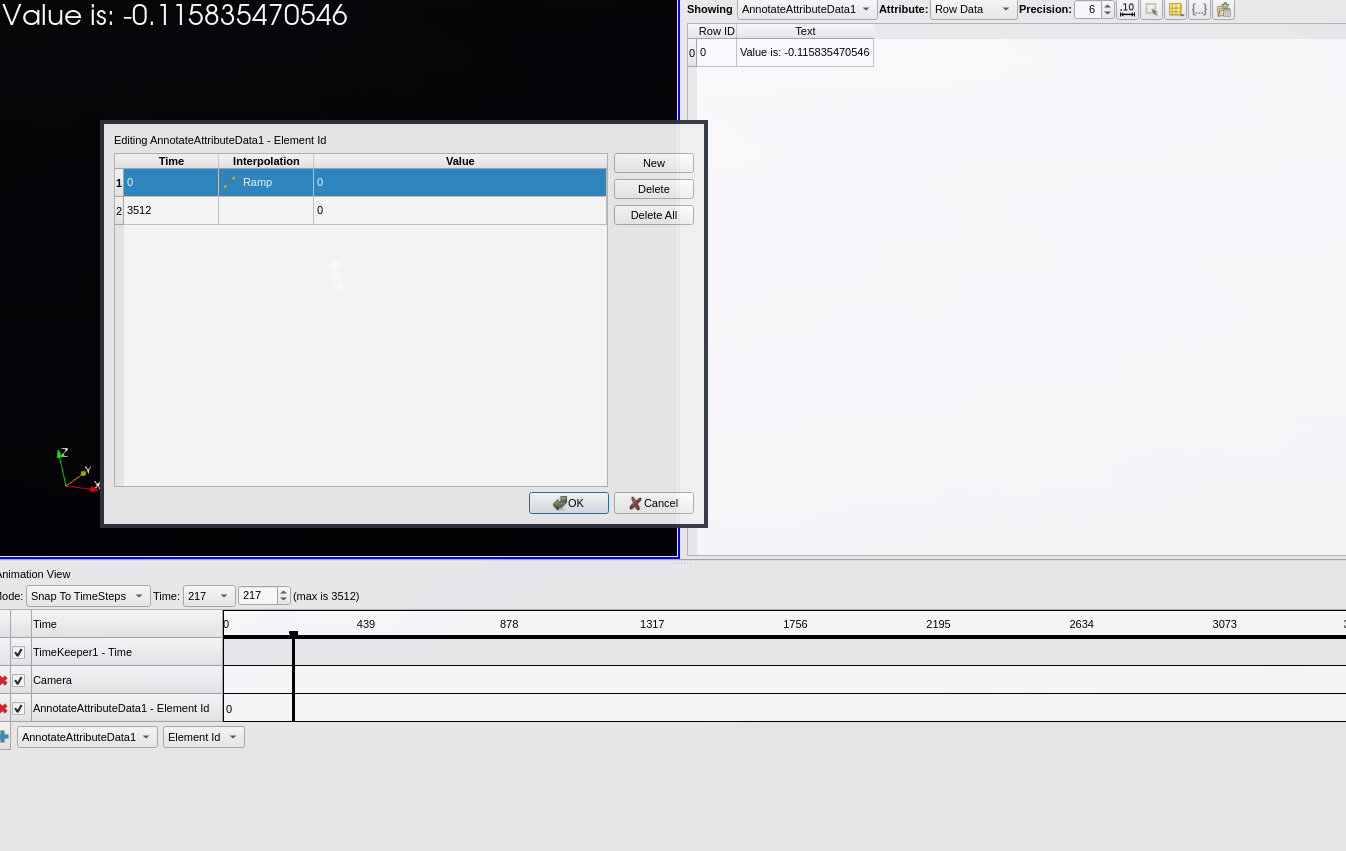
I have try but … but does not works …
look the ictures in order to see if is correct !
---
### Author:  [@Kenneth\_Moreland](https://discourse.paraview.org/u/Kenneth_Moreland)
#### Post date: [April 13, 2020, 5:46pm UTC](https://discourse.paraview.org/t/create-a-label-from-file/4029/6 "2020-04-13T17:46:39Z")
In that “Editing…” dialog box, double click the cell in the row labeled `2` and the column labeled `Value` (the lower-right cell) and change the value to `3511`.
---
### Author:  [@drudox00](https://discourse.paraview.org/u/drudox00)
#### Post date: [April 13, 2020, 5:46pm UTC](https://discourse.paraview.org/t/create-a-label-from-file/4029/7 "2020-04-13T17:46:40Z")
may you kindly help me about ?
---
### Author:  [@drudox00](https://discourse.paraview.org/u/drudox00)
#### Post date: [April 13, 2020, 5:48pm UTC](https://discourse.paraview.org/t/create-a-label-from-file/4029/8 "2020-04-13T17:48:34Z")
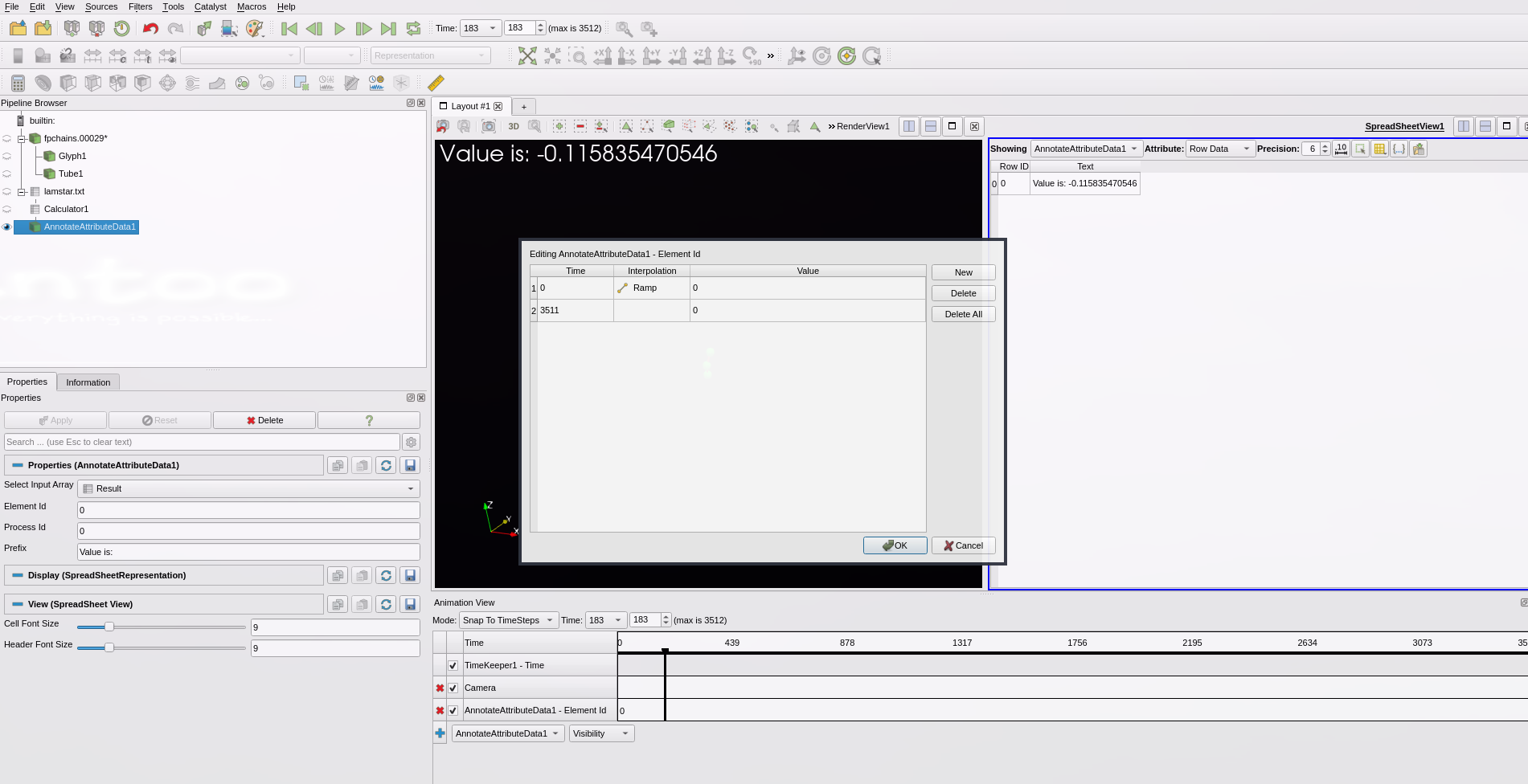
No there is something wrong … what could be ?
---
### Author:  [@Kenneth\_Moreland](https://discourse.paraview.org/u/Kenneth_Moreland)
#### Post date: [April 13, 2020, 5:52pm UTC](https://discourse.paraview.org/t/create-a-label-from-file/4029/9 "2020-04-13T17:52:14Z")
What is wrong is that the value in the lower- **right** cell should read 3511. So the table in that dialog box should look like:
| Time | Interpolation | Value |
| --- | --- | --- |
| 0 | Ramp | 0 |
| 3511 | | 3511 |
---
### Author:  [@drudox00](https://discourse.paraview.org/u/drudox00)
#### Post date: [April 13, 2020, 5:54pm UTC](https://discourse.paraview.org/t/create-a-label-from-file/4029/10 "2020-04-13T17:54:02Z")
it works !!! THANK YOU really really much !! you save my works! thanks a lot !
---
### Author:  [@drudox00](https://discourse.paraview.org/u/drudox00)
#### Post date: [April 17, 2020, 10:13am UTC](https://discourse.paraview.org/t/create-a-label-from-file/4029/11 "2020-04-17T10:13:09Z")
Hello!! just a question, the file is in Exponential format … bun whe I display the value I get a decima value … how is it possible to change ?