# Creating an animation over multiple timestep loops
**URL:** https://discourse.paraview.org/t/creating-an-animation-over-multiple-timestep-loops/14355
**Category:** ParaView Support
**Created:** [April 7, 2024, 11:12am UTC](https://discourse.paraview.org/t/creating-an-animation-over-multiple-timestep-loops/14355 "2024-04-07T11:12:57Z")
**Posts on this page:** 4
**Page:** 1
### Author:  [@debbie-z](https://discourse.paraview.org/u/debbie-z)
#### Post date: [April 7, 2024, 11:12am UTC](https://discourse.paraview.org/t/creating-an-animation-over-multiple-timestep-loops/14355/1 "2024-04-07T11:12:57Z")
Hi - I would like to create an animation which spans over multiple loops of all timesteps (and alter the visibility of certain objects, change the camera position etc) in order to show different perspectives of the same time series on repeat. For example, I have a simulation with a max of N timesteps, and I would like to create an animation which spans [0, 1, 2, … N, 0, 1, 2, … N, 0, 1, 2, …N]. Unfortunately, I cannot see any options in the animation pane to extend the time beyond the max timesteps.
Is this possible? Or is the only way to achieve this by exporting separate animations for each single loop?
---
### Author:  [@nicolas.vuaille](https://discourse.paraview.org/u/nicolas.vuaille)
#### Post date: [April 9, 2024, 7:26am UTC](https://discourse.paraview.org/t/creating-an-animation-over-multiple-timestep-loops/14355/2 "2024-04-09T07:26:06Z")
What you should do is some advanced configuration of the time management:
- pass into the `Sequence` mode
- update the number of frames to be `NbOfLoops * NbOfTimesteps`
- use the `TimeKeeper` to create the time loop
See more here: [7. Animation — ParaView Documentation 5.12.0 documentation](https://docs.paraview.org/en/latest/UsersGuide/animation.html)
---
### Author:  [@debbie-z](https://discourse.paraview.org/u/debbie-z)
#### Post date: [April 10, 2024, 8:30am UTC](https://discourse.paraview.org/t/creating-an-animation-over-multiple-timestep-loops/14355/3 "2024-04-10T08:30:26Z")
Hi Nicolas - thanks for your suggestion. Unfortunately this does not make the sequence repeat itself in a loop. Suppose I am after `NbOfLoops = 3`, then the resultant frames become [0, 0, 0, 1, 1, 1, 2, 2, 2, … N, N, N], rather than [0, 1, 2, … N, 0, 1, 2, … N, 0, 1, 2, …N].
---
### Author:  [@nicolas.vuaille](https://discourse.paraview.org/u/nicolas.vuaille)
#### Post date: [April 10, 2024, 2:41pm UTC](https://discourse.paraview.org/t/creating-an-animation-over-multiple-timestep-loops/14355/4 "2024-04-10T14:41:25Z")
Here comes the `TimeKeeper`. As said above, that’s quite advanced.
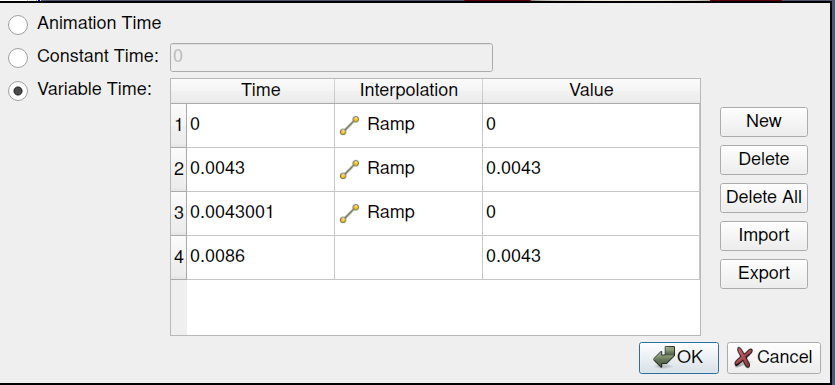
You should Edit the TimeKeeper track to update pipeline time in a loop fashion
## Example
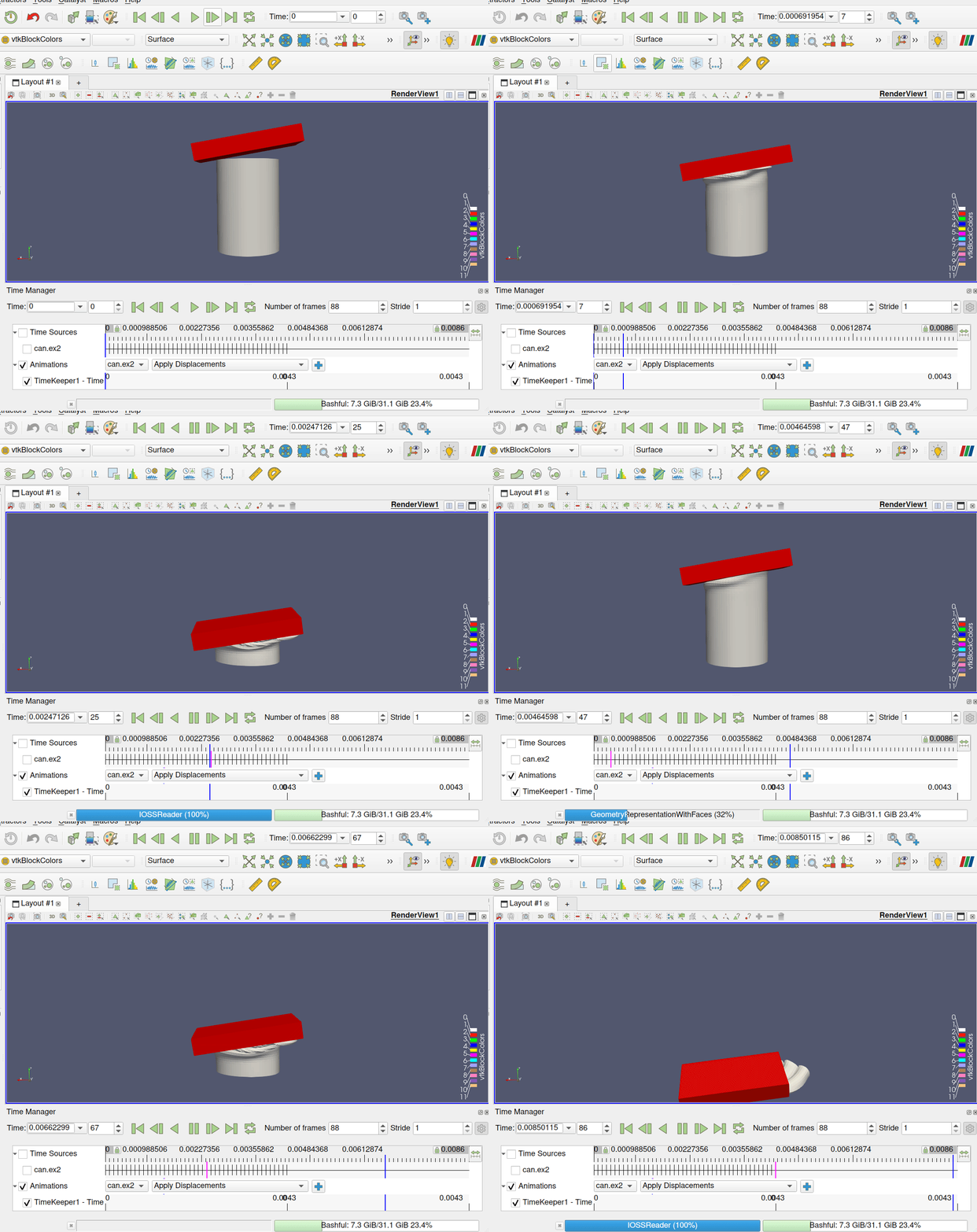
With a dataset that have 44 timesteps, from 0 to 0.0043, I can have double execution as follow:
- sequence mode
- 88 frames
- max time is 0.0086
- double click on TimeKeeper to Edit it:
For a more “dynamic” configuration, one still do some python helper …