# cross product
**URL:** https://discourse.paraview.org/t/cross-product/15681
**Category:** ParaView Support
**Created:** [November 4, 2024, 12:15pm UTC](https://discourse.paraview.org/t/cross-product/15681 "2024-11-04T12:15:45Z")
**Posts on this page:** 10
**Page:** 1
### Author:  [@xq520](https://discourse.paraview.org/u/xq520)
#### Post date: [November 4, 2024, 12:15pm UTC](https://discourse.paraview.org/t/cross-product/15681/1 "2024-11-04T12:15:45Z")
Hello,
I want to compute the Lamb vector as shown as below, which is vortical vector cross product velocity vector. The vortical vector can be computed by Gradent filiter, but how to get cross product? Could someone give me some advice?

---
### Author:  [@jfavre](https://discourse.paraview.org/u/jfavre)
#### Post date: [November 4, 2024, 1:15pm UTC](https://discourse.paraview.org/t/cross-product/15681/2 "2024-11-04T13:15:55Z")
see the documentation [5. Filtering Data — ParaView Documentation 5.12.0 documentation](https://docs.paraview.org/en/latest/UsersGuide/filteringData.html#calculator)
There is no button for cross(), but it is supported by the Calculator, so you can simply write the following code:
```auto
fastUniformGrid1 = FastUniformGrid(registrationName='FastUniformGrid1')
fastUniformGrid1.GenerateDistanceSquaredScalars = 0
# create a new 'Gradient'
gradient1 = Gradient(registrationName='Gradient1', Input=fastUniformGrid1)
gradient1.ScalarArray = ['POINTS', 'Swirl']
gradient1.ComputeGradient = 0
gradient1.ComputeVorticity = 1
# create a new 'Calculator'
calculator1 = Calculator(registrationName='Calculator1', Input=gradient1)
calculator1.Function = 'cross(Vorticity, Swirl)'
```
---
### Author:  [@xq520](https://discourse.paraview.org/u/xq520)
#### Post date: [November 4, 2024, 1:36pm UTC](https://discourse.paraview.org/t/cross-product/15681/3 "2024-11-04T13:36:37Z")
Thanks for your kind reply. But forgive my stubid question, how to use this code? I tried to import in the Calculator, but it failed.
---
### Author:  [@Kenneth\_Moreland](https://discourse.paraview.org/u/Kenneth_Moreland)
#### Post date: [November 4, 2024, 2:01pm UTC](https://discourse.paraview.org/t/cross-product/15681/4 "2024-11-04T14:01:56Z")
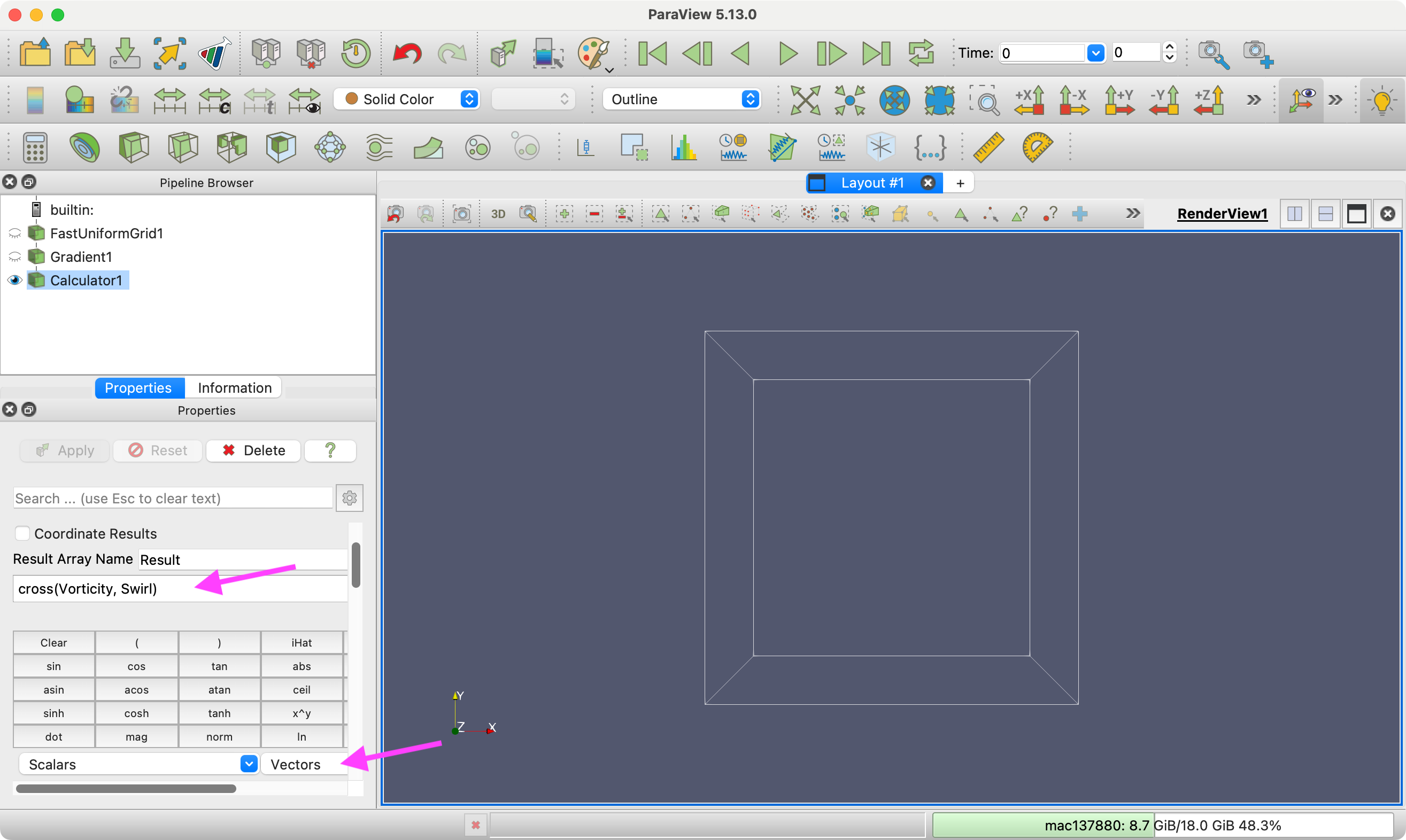
@jfavre’s posted a Python script. If you are using the GUI, just add the `Calculator` filter  and enter `cross(omega, u)` as the expression. (Of course, replace `omega` and `u` with the actual names of your vector fields. The `Vectors` combo box in the `Calculator`’s GUI makes it easy to insert the field names into the expression.)
---
### Author:  [@xq520](https://discourse.paraview.org/u/xq520)
#### Post date: [November 4, 2024, 2:28pm UTC](https://discourse.paraview.org/t/cross-product/15681/5 "2024-11-04T14:28:48Z")
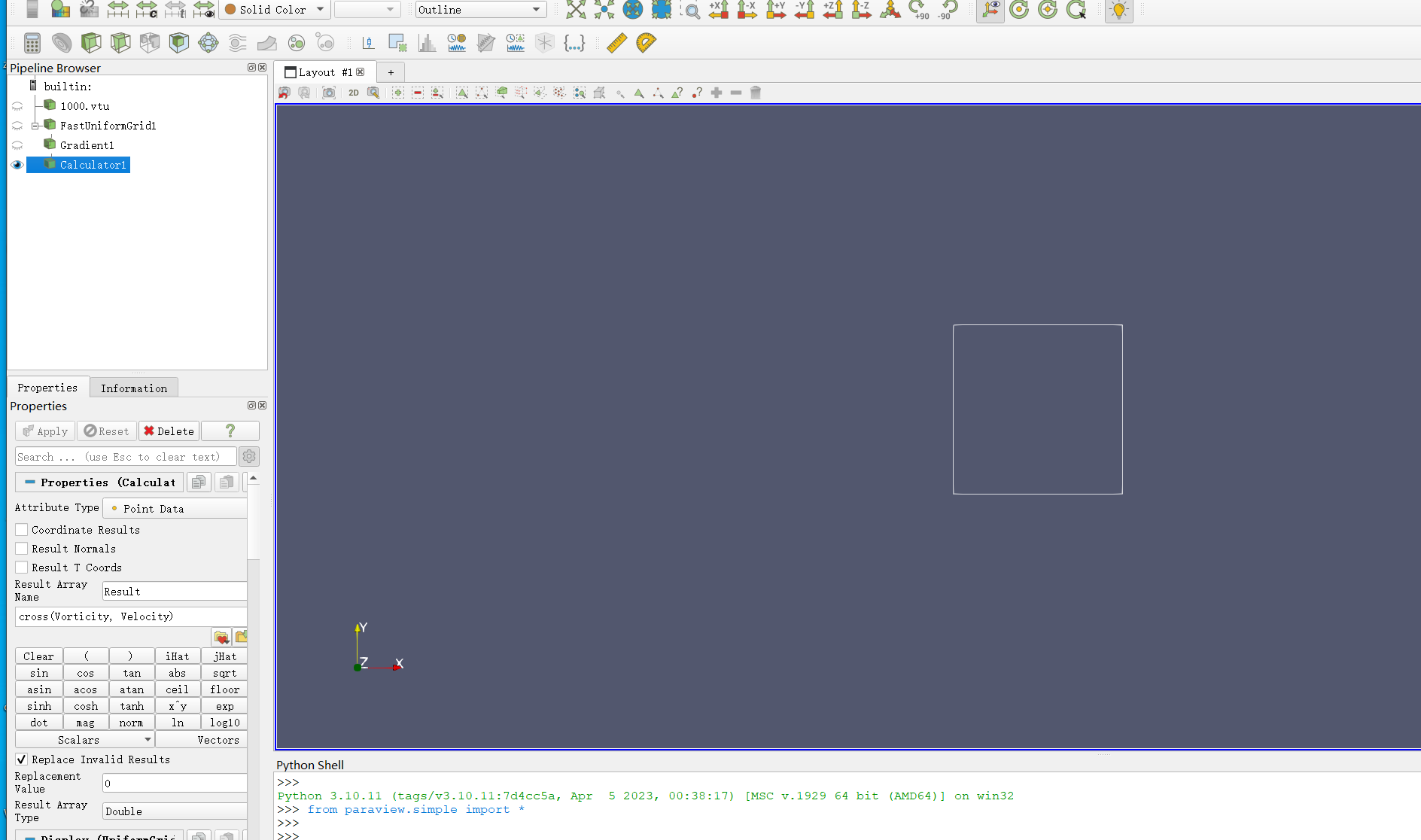
Thanks a lot. But how to import this code? I paste the code in python shell, and run scrip, but it didn’t work.
---
### Author:  [@Kenneth\_Moreland](https://discourse.paraview.org/u/Kenneth_Moreland)
#### Post date: [November 4, 2024, 2:42pm UTC](https://discourse.paraview.org/t/cross-product/15681/6 "2024-11-04T14:42:05Z")
> [@xq520](#):
>
> But how to import this code? I paste the code in python shell, and run scrip, but it didn’t work.
What are you trying to do? In your screenshot you’ve already added the `Calculator` filter and set the expression. Why do you need to run a Python script?
---
### Author:  [@xq520](https://discourse.paraview.org/u/xq520)
#### Post date: [November 4, 2024, 2:55pm UTC](https://discourse.paraview.org/t/cross-product/15681/7 "2024-11-04T14:55:44Z")
Ok, I got it. After I run this python scrip, then I can use gradient and calculator to compute what I need. Thanks a lot.
---
### Author:  [@whereismymoney](https://discourse.paraview.org/u/whereismymoney)
#### Post date: [November 5, 2024, 5:49pm UTC](https://discourse.paraview.org/t/cross-product/15681/8 "2024-11-05T17:49:56Z")
Another calculator function that does not have a button is sign(). Do you have a list of calculator functions that do not have buttons?
---
### Author:  [@Kenneth\_Moreland](https://discourse.paraview.org/u/Kenneth_Moreland)
#### Post date: [November 5, 2024, 5:57pm UTC](https://discourse.paraview.org/t/cross-product/15681/9 "2024-11-05T17:57:53Z")
> [@whereismymoney](#):
>
> Do you have a list of calculator functions that do not have buttons?
@jfavre referenced the link earlier:
[https://docs.paraview.org/en/latest/UsersGuide/filteringData.html#calculator](https://docs.paraview.org/en/latest/UsersGuide/filteringData.html#calculator)
You can get to this from ParaView by selecting `Help` → `ParaView Guide`. Then you can navigate to `Filtering Data`, `Filters for attribute manipulation`, and `Calculator` (or just search for calculator).
---
### Author:  [@whereismymoney](https://discourse.paraview.org/u/whereismymoney)
#### Post date: [November 5, 2024, 6:46pm UTC](https://discourse.paraview.org/t/cross-product/15681/10 "2024-11-05T18:46:47Z")
Kenneth,
Thanks very much for the info.
Just thought I would mention that the underlying VTK technology has only the sign() function, but ParaView supports both sign() and sgn(), although only sgn() is mentioned in the UserGuide document that you mentioned.
Matthias