# custom legend
**URL:** https://discourse.paraview.org/t/custom-legend/10417
**Category:** ParaView Support
**Created:** [September 27, 2022, 7:09am UTC](https://discourse.paraview.org/t/custom-legend/10417 "2022-09-27T07:09:39Z")
**Posts on this page:** 9
**Page:** 1
### Author:  [@garcfd](https://discourse.paraview.org/u/garcfd)
#### Post date: [September 27, 2022, 7:09am UTC](https://discourse.paraview.org/t/custom-legend/10417/1 "2022-09-27T07:09:39Z")
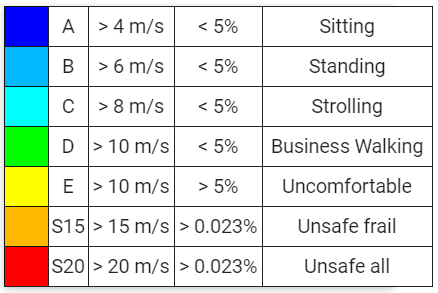
Is it possible to create custom legend in Paraview, like this one attached for Lawson wind comfort criteria?
---
### Author:  [@nicolas.vuaille](https://discourse.paraview.org/u/nicolas.vuaille)
#### Post date: [September 27, 2022, 8:45am UTC](https://discourse.paraview.org/t/custom-legend/10417/2 "2022-09-27T08:45:16Z")
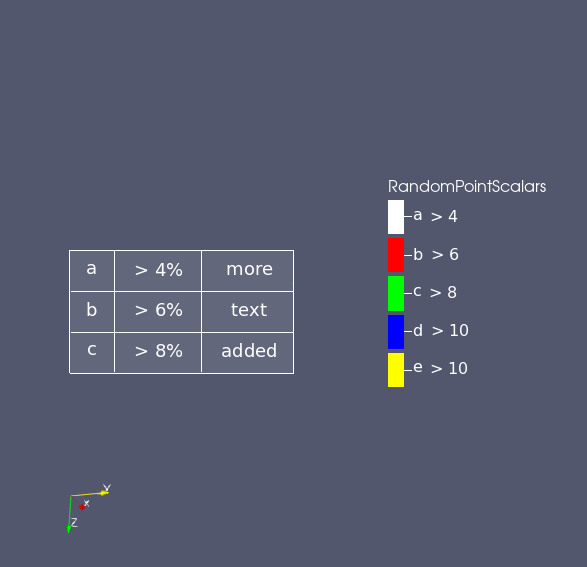
I fear you cannot setup several columns for the color legend.
What you can do:
- have a discrete color legend and use custom text for each color
- display a table in the view, but without the colors
Example:
---
### Author:  [@garcfd](https://discourse.paraview.org/u/garcfd)
#### Post date: [September 27, 2022, 10:07am UTC](https://discourse.paraview.org/t/custom-legend/10417/3 "2022-09-27T10:07:09Z")
Hi Nicolas, thanks for your quick reply.
yes, that looks good - how do you create legend like that?
---
### Author:  [@nicolas.vuaille](https://discourse.paraview.org/u/nicolas.vuaille)
#### Post date: [September 27, 2022, 10:24am UTC](https://discourse.paraview.org/t/custom-legend/10417/4 "2022-09-27T10:24:08Z")
If your data only contains a small number of discrete values (in my examples, data is an integer with only 5 differents values used), use the “interpret values as categories” and fill the “Annotation” column
More options with the `Edit Color legend properties` from the top right corner button.
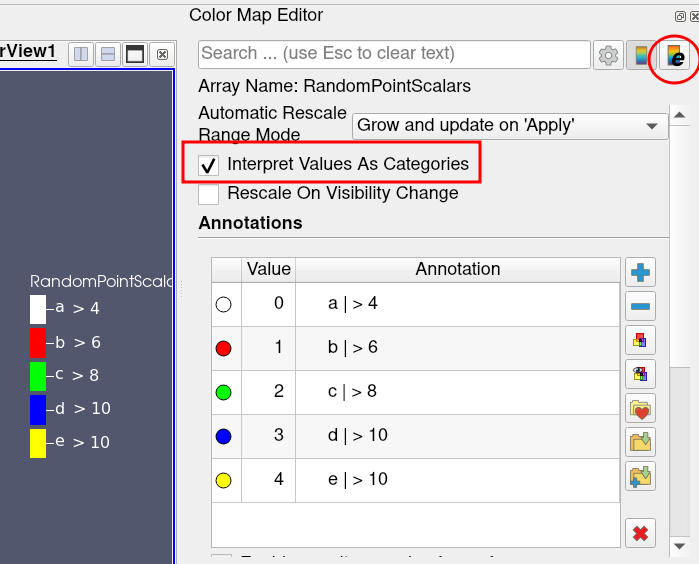
The table is just a “Text” source
---
### Author:  [@garcfd](https://discourse.paraview.org/u/garcfd)
#### Post date: [September 27, 2022, 10:48am UTC](https://discourse.paraview.org/t/custom-legend/10417/5 "2022-09-27T10:48:53Z")
thats perfect - thanks very much
---
### Author:  [@garcfd](https://discourse.paraview.org/u/garcfd)
#### Post date: [September 27, 2022, 12:43pm UTC](https://discourse.paraview.org/t/custom-legend/10417/6 "2022-09-27T12:43:26Z")
Actually it doesnt seem to work for me right now - I just get the Nan colour on my surface.
Have you got a working example - or perhaps I could send you my slice of data to look at?
Thanks
---
### Author:  [@garcfd](https://discourse.paraview.org/u/garcfd)
#### Post date: [September 27, 2022, 5:37pm UTC](https://discourse.paraview.org/t/custom-legend/10417/7 "2022-09-27T17:37:28Z")
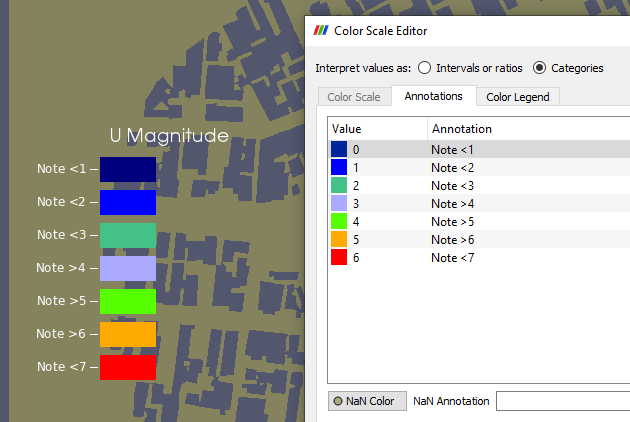
yeah - Ive set it up as suggested (I think) but the surface stays grey which is the NaN colour.
I dont know why the colourmap is not being applied to the surface - any ideas (please)?
---
### Author:  [@nicolas.vuaille](https://discourse.paraview.org/u/nicolas.vuaille)
#### Post date: [September 28, 2022, 8:02am UTC](https://discourse.paraview.org/t/custom-legend/10417/8 "2022-09-28T08:02:23Z")
Well, if surface is colored with NaN color, I would suspect that your data contains NaN …
The standard way to color object following a color map:
- select the array to use for coloration
- then edit the color map
A lot of doc [here](https://docs.paraview.org/en/latest/ReferenceManual/colorMapping.html).
Also, which version of ParaView are you using ? Your editor looks like it is an old version.
---
### Author:  [@garcfd](https://discourse.paraview.org/u/garcfd)
#### Post date: [September 28, 2022, 11:03am UTC](https://discourse.paraview.org/t/custom-legend/10417/9 "2022-09-28T11:03:04Z")
I was able to do a demo surface plane, and plot the x-coordinate on that with categories and it seemed to work ok. So I will have to go back and check the original data.