# Custom plugin properties panel.
**URL:** https://discourse.paraview.org/t/custom-plugin-properties-panel/3025
**Category:** ParaView Support
**Created:** [November 22, 2019, 12:47pm UTC](https://discourse.paraview.org/t/custom-plugin-properties-panel/3025 "2019-11-22T12:47:36Z")
**Posts on this page:** 6
**Page:** 1
### Author:  [@RisingYoung-Learn](https://discourse.paraview.org/u/RisingYoung-Learn)
#### Post date: [November 22, 2019, 12:47pm UTC](https://discourse.paraview.org/t/custom-plugin-properties-panel/3025/1 "2019-11-22T12:47:36Z")
Hello,
I refer to the Examples/Plugins/PropertyWidgets example, I customized a plugin, I found that the property panel can be customized, but after the Apply button is triggered, the other public parts of the property panel are displayed.
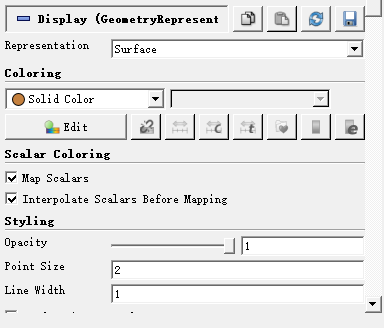
Question: Can the plugin’s properties panel be fully customizable? (if the public part is not displayed)
Thank you!
---
### Author:  [@mwestphal](https://discourse.paraview.org/u/mwestphal)
#### Post date: [November 22, 2019, 7:05pm UTC](https://discourse.paraview.org/t/custom-plugin-properties-panel/3025/2 "2019-11-22T19:05:00Z")
These are the properties for the views and the representation. If you want to hide them, you can either :
- Click on the blue minus to fold it or
- Fully hide it by :
---
### Author:  [@RisingYoung-Learn](https://discourse.paraview.org/u/RisingYoung-Learn)
#### Post date: [November 25, 2019, 2:04am UTC](https://discourse.paraview.org/t/custom-plugin-properties-panel/3025/3 "2019-11-25T02:04:54Z")
> [@mwestphal](#):
>
> Properties
Thank you very much for your help, thank you!
According to your method, the public properties of the property panel can be hidden; but after this setting, the public properties of all objects are hidden. If only for a certain type of object, you need to hide its public properties; other types of objects , need to display public properties, is there a way to do it?
---
### Author:  [@mwestphal](https://discourse.paraview.org/u/mwestphal)
#### Post date: [November 25, 2019, 10:44am UTC](https://discourse.paraview.org/t/custom-plugin-properties-panel/3025/4 "2019-11-25T10:44:38Z")
Please specify which properties you want to hide and which properties you want to keep visible.
---
### Author:  [@RisingYoung-Learn](https://discourse.paraview.org/u/RisingYoung-Learn)
#### Post date: [November 25, 2019, 1:07pm UTC](https://discourse.paraview.org/t/custom-plugin-properties-panel/3025/5 "2019-11-25T13:07:28Z")
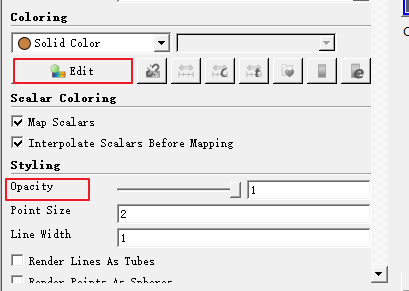
What do you mean? I did not understand? For example, if you have a type of object, you don’t need to display “color” and “Opacity”. What should you do?
---
### Author:  [@mwestphal](https://discourse.paraview.org/u/mwestphal)
#### Post date: [November 25, 2019, 2:27pm UTC](https://discourse.paraview.org/t/custom-plugin-properties-panel/3025/6 "2019-11-25T14:27:53Z")
If you want to hide specific properties, like in your case, the edit color or the opacity property, you need to create a XML plugin that will override the visibilities of the properties.
This is doable but not easy if you never heard of XML only plugins.