# Custom Reader for vtkImageData - cells load but aren't shown
**URL:** https://discourse.paraview.org/t/custom-reader-for-vtkimagedata-cells-load-but-arent-shown/3327
**Category:** Development
**Tags:** python
**Created:** [January 13, 2020, 1:47pm UTC](https://discourse.paraview.org/t/custom-reader-for-vtkimagedata-cells-load-but-arent-shown/3327 "2020-01-13T13:47:16Z")
**Posts on this page:** 11
**Page:** 1
### Author:  [@vbuck](https://discourse.paraview.org/u/vbuck)
#### Post date: [January 13, 2020, 1:47pm UTC](https://discourse.paraview.org/t/custom-reader-for-vtkimagedata-cells-load-but-arent-shown/3327/1 "2020-01-13T13:47:16Z")
Hi everyone,
I am currently trying to load a custom data format through a python plugin.
An external python module returns a 2D numpy array, which I want to process further in Paraview.
I initialized the plugin with
`VTKPythonAlgorithmBase. __init__ (self, nInputPorts=0, nOutputPorts=1, outputType='vtkImageData')`
For `RequestData` I modified the routine from the python plugin example in the paraview github repo as follows:
```auto
def RequestData(self, request, inInfoVec, outInfoVec):
from vtkmodules.vtkCommonDataModel import vtkImageData
from vtkmodules.vtkCommonCore import VTK_DOUBLE
#Get data for requested timestep
data_time = self._get_update_time(outInfoVec.GetInformationObject(0))
raw_data = self._get_raw_data(data_time)
#Create output adapter
output = vtkImageData.GetData(outInfoVec, 0)
#Convert numpy array to image
frame_data = paraview.python_view.numpy_to_image(raw_data)
#Set extent of data
frame_data.SetExtent(0,499,0,119,0,1)
#Give it a name
frame_data.GetPointData().GetScalars().SetName("sonar data")
#Copy to output
output.ShallowCopy(frame_data)
#Set scalars to "active" (no idea what that does, found another code example that did that)
output.GetPointData().SetActiveScalars("sonar data")
#Again, copied from another code example
output.Modified()
#Copied from the code example from the paraview github repo
if data_time is not None:
output.GetInformation().Set(output.DATA_TIME_STEP(), data_time)
#Return success
return 1
```
When I load a file using this code, Paraview seems to load the correct number of points and even the correct values (at least I think it does, because the scale is scaled correctly), but doesn’t show anything. I tried pressing the Reset Camera and Zoom To Data buttons, but to no avail.
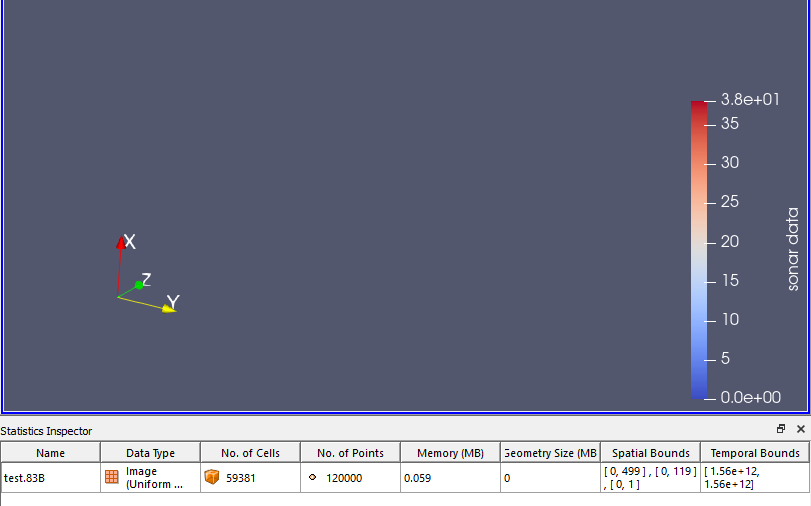
Any idea why that would happen?
Thanks in advance!
---
### Author:  [@mwestphal](https://discourse.paraview.org/u/mwestphal)
#### Post date: [January 13, 2020, 1:48pm UTC](https://discourse.paraview.org/t/custom-reader-for-vtkimagedata-cells-load-but-arent-shown/3327/2 "2020-01-13T13:48:35Z")
Could you save and share this data as a .vtp or .vtu ?
---
### Author:  [@vbuck](https://discourse.paraview.org/u/vbuck)
#### Post date: [January 13, 2020, 1:52pm UTC](https://discourse.paraview.org/t/custom-reader-for-vtkimagedata-cells-load-but-arent-shown/3327/3 "2020-01-13T13:52:32Z")
Paraview offers me [Data.pvti](https://discourse.paraview.org/uploads/short-url/zzNApLhFvRqRazR5s97TrhPvBJv.pvti) (533 Bytes) , .pvd and [Data.vti](https://discourse.paraview.org/uploads/short-url/orjCQQXy5XZDHXRIAGq62gMTeHz.vti) (870 Bytes), would that help?
---
### Author:  [@mwestphal](https://discourse.paraview.org/u/mwestphal)
#### Post date: [January 13, 2020, 1:52pm UTC](https://discourse.paraview.org/t/custom-reader-for-vtkimagedata-cells-load-but-arent-shown/3327/4 "2020-01-13T13:52:51Z")
perfect, thanks.
---
### Author:  [@mwestphal](https://discourse.paraview.org/u/mwestphal)
#### Post date: [January 13, 2020, 1:57pm UTC](https://discourse.paraview.org/t/custom-reader-for-vtkimagedata-cells-load-but-arent-shown/3327/5 "2020-01-13T13:57:09Z")
Looks like the data is actually empty.
You may need to declare the extent in RequestInformation.
See here for more info [https://www.paraview.org/Wiki/Python\_Programmable\_Filter#Changing\_Data\_Type](https://www.paraview.org/Wiki/Python_Programmable_Filter#Changing_Data_Type)
---
### Author:  [@vbuck](https://discourse.paraview.org/u/vbuck)
#### Post date: [January 13, 2020, 2:04pm UTC](https://discourse.paraview.org/t/custom-reader-for-vtkimagedata-cells-load-but-arent-shown/3327/6 "2020-01-13T14:04:54Z")
Thank you for the quick response!
I added
```auto
from paraview import util
pdi = self.GetInput()
util.SetOutputWholeExtent(self,(0,499,0,120, 0,1))
```
to the RequestInformation function, but the only thing that did, is that the time shown in Paraview now only goes from zero to one (instead of the previous bounds).
Do I need to add it another way?
---
### Author:  [@mwestphal](https://discourse.paraview.org/u/mwestphal)
#### Post date: [January 14, 2020, 11:31am UTC](https://discourse.paraview.org/t/custom-reader-for-vtkimagedata-cells-load-but-arent-shown/3327/7 "2020-01-14T11:31:51Z")
Make sure to call all there in the right order in your request data :
```auto
ido.SetDimensions(numPts+1,2,2)
ido.SetOrigin(-1,-1,-1)
ido.SetSpacing(.1,.1,.1)
ido.SetExtent(0,numPts,0,1,0,1)
ido.AllocateScalars(vtk.VTK_FLOAT,1)
```
---
### Author:  [@vbuck](https://discourse.paraview.org/u/vbuck)
#### Post date: [January 14, 2020, 12:03pm UTC](https://discourse.paraview.org/t/custom-reader-for-vtkimagedata-cells-load-but-arent-shown/3327/8 "2020-01-14T12:03:44Z")
I don’t think I quite understand.
If I use paraview.python\_view.numpy\_to\_image on a 2D-array, do I still need to set dimensions, origin and spacing and allocate the scalars?
Or do I need to do that when copying the vtkImageData I get from numpy\_to\_image to the output?
In other words, is `ido` in your example `frame_data` or `output` from the RequestData function I pasted above?
---
### Author:  [@vbuck](https://discourse.paraview.org/u/vbuck)
#### Post date: [January 15, 2020, 10:13am UTC](https://discourse.paraview.org/t/custom-reader-for-vtkimagedata-cells-load-but-arent-shown/3327/9 "2020-01-15T10:13:49Z")
I tried writing a source plugin that would return a random image as a minimum case.
```auto
from paraview.util.vtkAlgorithm import *
import numpy as np
from paraview import python_view
from vtk.numpy_interface import algorithms as algs
from vtk.numpy_interface import dataset_adapter as dsa
from vtkmodules.vtkCommonDataModel import vtkImageData
from vtkmodules.vtkCommonDataModel import vtkDataSet
import vtk
@smproxy.source(name="Random image source",
label="Python-based test source for random images")
class PythonTestPointSource(VTKPythonAlgorithmBase):
def __init__ (self):
VTKPythonAlgorithmBase. __init__ (self,
nInputPorts=0,
nOutputPorts=1,
outputType='vtkImageData')
def RequestData(self, request, inInfo, outInfo):
#output = vtkPolyData.GetData(outInfo, 0)
output = dsa.WrapDataObject(vtkDataSet.GetData(outInfo))
dims = (320,240)
random_array = np.random.rand(dims[0],dims[1])
image = python_view.numpy_to_image(random_array)
#from the discourse post
image.SetDimensions(320,240,1)
image.SetOrigin(0,0,0)
image.SetSpacing(1,1,1)
image.AllocateScalars(vtk.VTK_FLOAT, 1)
output.ShallowCopy(image)
return 1
```
This gives me the correct number of points and the correct dimensions in Paraview, but neither on the “Slice”, nor on the “Points” nor on the “Outline” views, anything is rendered.
If I remove the block with your previous suggestions, the only thing that changes is, that my x and y extent swap places.
If I read [https://kitware.github.io/paraview-docs/latest/python/\_modules/paraview/python\_view.html](https://kitware.github.io/paraview-docs/latest/python/_modules/paraview/python_view.html) correctly, `numpy_to_image` already sets the bounds and allocates the scalars.
What am I doing wrong?
---
### Author:  [@vbuck](https://discourse.paraview.org/u/vbuck)
#### Post date: [January 15, 2020, 10:22am UTC](https://discourse.paraview.org/t/custom-reader-for-vtkimagedata-cells-load-but-arent-shown/3327/10 "2020-01-15T10:22:41Z")
Figured it out!
vtkImageData needs the extent information in the RequestInformation-step already:
```auto
def RequestInformation(self, request, inInfoVec, outInfoVec):
util.SetOutputWholeExtent(self,[0,319,0,239,0,0])
return 1
```
with `from paraview import util`.
Now it works!
---
### Author:  [@mwestphal](https://discourse.paraview.org/u/mwestphal)
#### Post date: [January 15, 2020, 10:25am UTC](https://discourse.paraview.org/t/custom-reader-for-vtkimagedata-cells-load-but-arent-shown/3327/11 "2020-01-15T10:25:57Z")
Yes indeed, this is what I tried to convey in my first post. Glad that you figured it out.