# Customize application with paraview's framework
**URL:** https://discourse.paraview.org/t/customize-application-with-paraviews-framework/3304
**Category:** Development
**Tags:** vtk
**Created:** [January 10, 2020, 9:59am UTC](https://discourse.paraview.org/t/customize-application-with-paraviews-framework/3304 "2020-01-10T09:59:02Z")
**Posts on this page:** 10
**Page:** 1
### Author:  [@Yoshino](https://discourse.paraview.org/u/Yoshino)
#### Post date: [January 10, 2020, 9:59am UTC](https://discourse.paraview.org/t/customize-application-with-paraviews-framework/3304/1 "2020-01-10T09:59:02Z")
I want to create an application with PV’s framework and Qt-based UI. I understand PV is back by VTK, which is written in C++, but how to use C++ interface in Paraview? I know PV has _programmable filter_ with python, I have been reading API from VTK class but not clear about where to put my C++ code.
Should this be done by building paraview from source(I haven’t make it yet) and then add my code on the project?
I read examples in PV’s source but still didn’t get it. I’m thankful for any guidelines.
---
### Author:  [@mwestphal](https://discourse.paraview.org/u/mwestphal)
#### Post date: [January 10, 2020, 10:28am UTC](https://discourse.paraview.org/t/customize-application-with-paraviews-framework/3304/2 "2020-01-10T10:28:27Z")
> [@Yoshino](#):
>
> I know PV has _programmable filter_ with python
Unrelated to a custom application
> I have been reading API from VTK class but not clear about where to put my C++ code.
VTK C++ filter code goes into standard paraview plugins.
ParaView applicative C++ code goes into your custom application.
> Should this be done by building paraview from source
Yes, that is the first step.
> then add my code on the project?
No, use the custom application framework
See Example/CustomApplications for custom applications examples. SimpleParaView comes to mind.
---
### Author:  [@Yoshino](https://discourse.paraview.org/u/Yoshino)
#### Post date: [January 10, 2020, 11:25am UTC](https://discourse.paraview.org/t/customize-application-with-paraviews-framework/3304/3 "2020-01-10T11:25:34Z")
Much thanks for your detailed explaination, Mathieu.
I learnt that PV has its definitions for algorithm from [ParaviewGuide.pdf](https://www.paraview.org/paraview-downloads/download.php?submit=Download&version=v5.7&type=data&os=Sources&downloadFile=ParaViewGuide-5.7.0.pdf)(e.g _ **RequestData** _, _ **RequestInformation** _), I think this mechanism fits me.
But what do you mean
> custom application framework
I see only “customizing paraview”, which is about altering PV’s preference, other than “customize application”. I hope for more details about it.
Thanks for your help!
---
### Author:  [@mwestphal](https://discourse.paraview.org/u/mwestphal)
#### Post date: [January 10, 2020, 12:02pm UTC](https://discourse.paraview.org/t/customize-application-with-paraviews-framework/3304/4 "2020-01-10T12:02:42Z")
The ParaView guide does not contains information about the custom applications.
See here :
[https://www.paraview.org/Wiki/Writing\_Custom\_Applications](https://www.paraview.org/Wiki/Writing_Custom_Applications)
---
### Author:  [@Yoshino](https://discourse.paraview.org/u/Yoshino)
#### Post date: [January 10, 2020, 12:43pm UTC](https://discourse.paraview.org/t/customize-application-with-paraviews-framework/3304/5 "2020-01-10T12:43:31Z")
That helps a lot, great thanks Mathieu.
---
### Author:  [@Yoshino](https://discourse.paraview.org/u/Yoshino)
#### Post date: [January 20, 2020, 10:20am UTC](https://discourse.paraview.org/t/customize-application-with-paraviews-framework/3304/6 "2020-01-20T10:20:20Z")
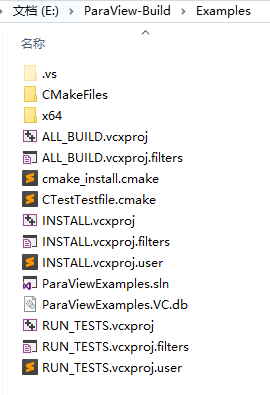
Well, I have built PV from source successfully with CMake Variable **PARAVIEW\_ENABLE\_EXAMPLES** being selected, feeling so close to running example app, then I found a project in Example directory
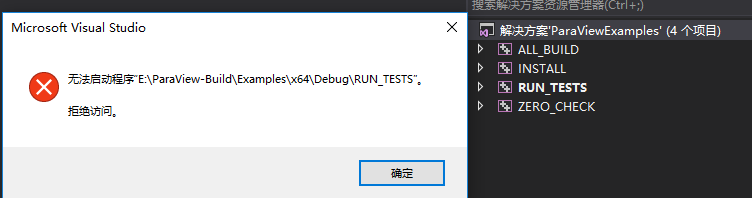
And it reports error when **RUN\_TESTS** being executed(_ **error: Access Denied** _)
Honestly, though I’m able to understand CMake languages and PV’s Customizing Application tutorial [DIYVisApps.IEEEVis2010.Paraview.pdf](https://www.paraview.org/Wiki/File:DIYVisApps.IEEEVis2010.ParaView.pdf), I have no idea the common routine of customizing application.
I’m slow on this and so a little guide is certained needed.
---
### Author:  [@mwestphal](https://discourse.paraview.org/u/mwestphal)
#### Post date: [January 21, 2020, 5:03am UTC](https://discourse.paraview.org/t/customize-application-with-paraviews-framework/3304/7 "2020-01-21T05:03:05Z")
You do not need to build all the examples within ParaView.
Once ParaView is built, just copy one of the examples anywhere and built it from there.
---
### Author:  [@Yoshino](https://discourse.paraview.org/u/Yoshino)
#### Post date: [January 21, 2020, 9:50am UTC](https://discourse.paraview.org/t/customize-application-with-paraviews-framework/3304/8 "2020-01-21T09:50:07Z")
I realized that I was mistaken in building ParaView without installing it, I thought building ParaView is all I need to customize App. However, all the ParaView-branded App should depend on ParaView’s Package to implement its function.
Unfortunately, I met a lot of errors while installing ParaView:
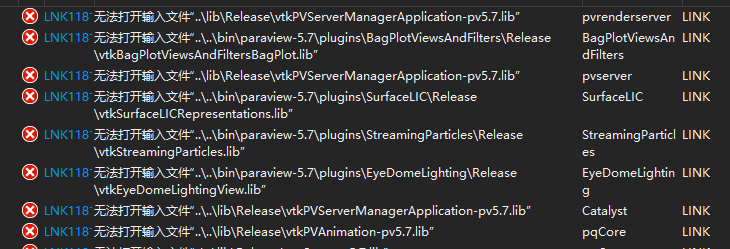
“ **无法打开输入文件** ” means “ **cannot open input file** ”, and accordingly I didn’t find these **.lib** files under the directory, either.
as well as:
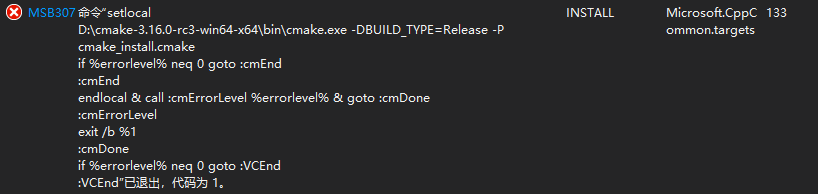
Since I could build and run **paraview.exe** correctly, I have no idea what’s wrong.
I set project to **Release** to install paraview
Thanks for any help.
---
### Author:  [@mwestphal](https://discourse.paraview.org/u/mwestphal)
#### Post date: [January 21, 2020, 9:51am UTC](https://discourse.paraview.org/t/customize-application-with-paraviews-framework/3304/9 "2020-01-21T09:51:12Z")
You do not need to install paraview to build a paraview branded application.
---
### Author:  [@Yoshino](https://discourse.paraview.org/u/Yoshino)
#### Post date: [January 21, 2020, 10:10am UTC](https://discourse.paraview.org/t/customize-application-with-paraviews-framework/3304/10 "2020-01-21T10:10:00Z")
You are right, all I need is to set CMake Variable **PARAVIEW\_DIR** correctly. Thanks 🤣