# Data Arrays ranges in the Information tab may be at too high precision
**URL:** https://discourse.paraview.org/t/data-arrays-ranges-in-the-information-tab-may-be-at-too-high-precision/11561
**Category:** Development
**Created:** [March 3, 2023, 8:28pm UTC](https://discourse.paraview.org/t/data-arrays-ranges-in-the-information-tab-may-be-at-too-high-precision/11561 "2023-03-03T20:28:49Z")
**Posts on this page:** 9
**Page:** 1
### Author:  [@Andy\_Bauer](https://discourse.paraview.org/u/Andy_Bauer)
#### Post date: [March 3, 2023, 8:28pm UTC](https://discourse.paraview.org/t/data-arrays-ranges-in-the-information-tab-may-be-at-too-high-precision/11561/1 "2023-03-03T20:28:49Z")
Hi,
I’m working with an OpenFOAM dataset and when I try to look at the range bounds for the field variables in the GUI it becomes a bit unwieldy.
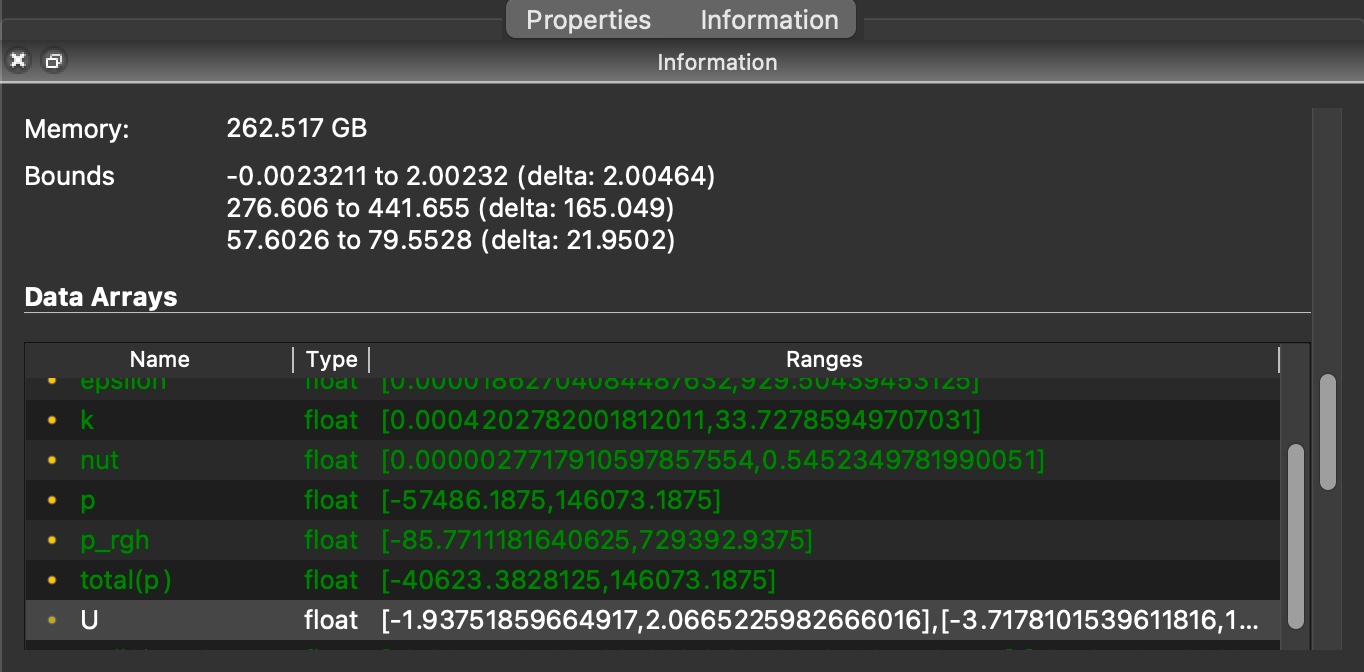
It’s not too bad for single component arrays but for 3 component arrays (like the highlighted one in the attached image) it’s pretty hard to see the third component range. I’m wondering if the precision should be reduced (and maybe formatting changed to something like scientific notation) to make this information more accessible.
Note that I’m using the 5.11 installer from the PV download site and this is on MacOS 12.6.3, in case any of that helps.
Thanks,
Andy
---
### Author:  [@nicolas.vuaille](https://discourse.paraview.org/u/nicolas.vuaille)
#### Post date: [March 6, 2023, 8:33am UTC](https://discourse.paraview.org/t/data-arrays-ranges-in-the-information-tab-may-be-at-too-high-precision/11561/2 "2023-03-06T08:33:49Z")
There is a settings to control notation and precision of double number display. It should use it. If not, it is an issue 😃
---
### Author:  [@Andy\_Bauer](https://discourse.paraview.org/u/Andy_Bauer)
#### Post date: [March 6, 2023, 1:03pm UTC](https://discourse.paraview.org/t/data-arrays-ranges-in-the-information-tab-may-be-at-too-high-precision/11561/3 "2023-03-06T13:03:35Z")
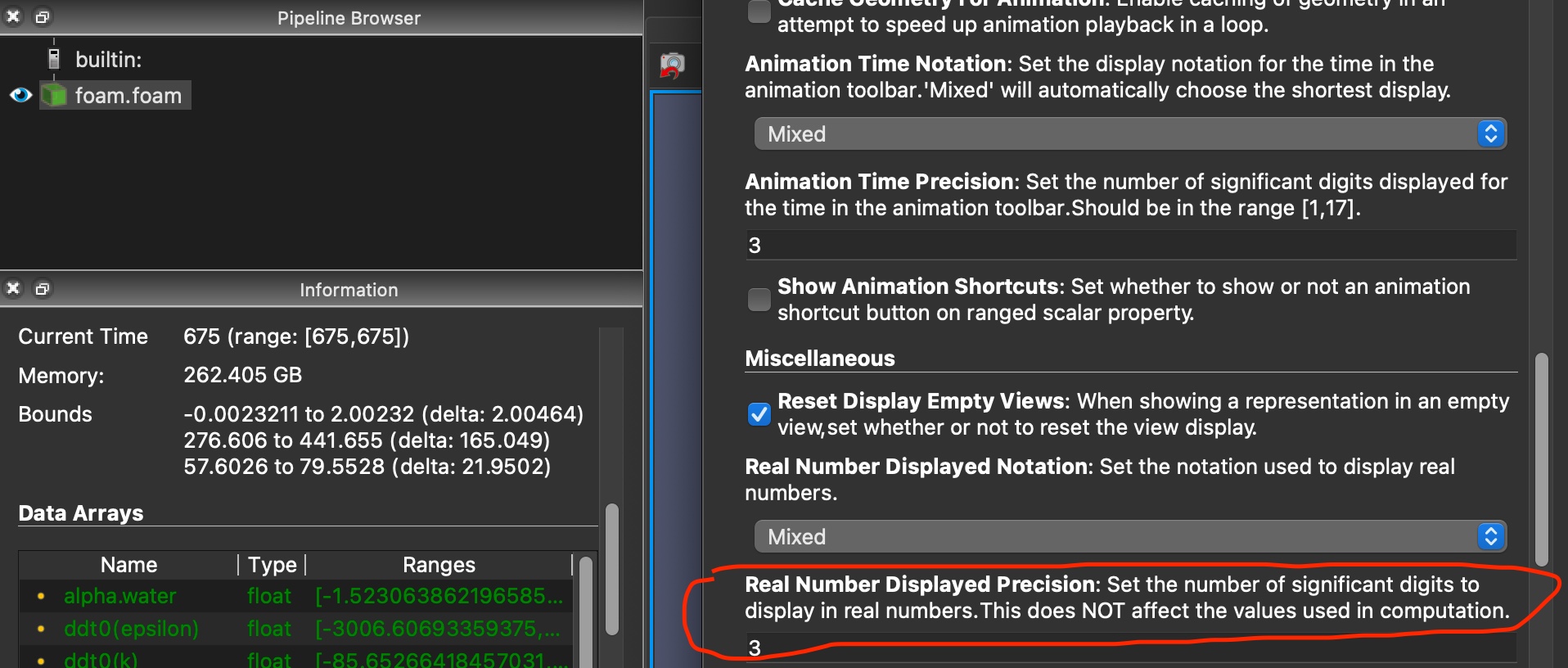
Maybe I’m using the incorrect settings but the highlighted one doesn’t seem to affect the precision in the Information Tab
---
### Author:  [@nicolas.vuaille](https://discourse.paraview.org/u/nicolas.vuaille)
#### Post date: [March 6, 2023, 3:34pm UTC](https://discourse.paraview.org/t/data-arrays-ranges-in-the-information-tab-may-be-at-too-high-precision/11561/4 "2023-03-06T15:34:17Z")
It was indeed not formatted from settings …
[Here](https://gitlab.kitware.com/paraview/paraview/-/merge_requests/6219) is a MR to fix it.
---
### Author:  [@Andy\_Bauer](https://discourse.paraview.org/u/Andy_Bauer)
#### Post date: [March 6, 2023, 3:42pm UTC](https://discourse.paraview.org/t/data-arrays-ranges-in-the-information-tab-may-be-at-too-high-precision/11561/5 "2023-03-06T15:42:27Z")
Thanks for the quick response! I’ll test it out with master once the changes are merged.
---
### Author:  [@utkarsh.ayachit](https://discourse.paraview.org/u/utkarsh.ayachit)
#### Post date: [March 6, 2023, 4:21pm UTC](https://discourse.paraview.org/t/data-arrays-ranges-in-the-information-tab-may-be-at-too-high-precision/11561/6 "2023-03-06T16:21:35Z")
I wonder if we should add a quick option to toggle the precision to full res on the Information tab. The reason why we showed full resolution for numbers on the Information panel is because these values may be used as filter params etc, where full precision is necessary for accurate results. Forcing the user to have to change the global setting to see full res each time may become odious.
---
### Author:  [@cory.quammen](https://discourse.paraview.org/u/cory.quammen)
#### Post date: [March 6, 2023, 7:33pm UTC](https://discourse.paraview.org/t/data-arrays-ranges-in-the-information-tab-may-be-at-too-high-precision/11561/7 "2023-03-06T19:33:04Z")
Yep, that would be a good feature to add 🙂
---
### Author:  [@wascott](https://discourse.paraview.org/u/wascott)
#### Post date: [March 7, 2023, 3:07am UTC](https://discourse.paraview.org/t/data-arrays-ranges-in-the-information-tab-may-be-at-too-high-precision/11561/8 "2023-03-07T03:07:38Z")
[https://gitlab.kitware.com/paraview/paraview/-/issues/21800](https://gitlab.kitware.com/paraview/paraview/-/issues/21800)
---
### Author:  [@Andy\_Bauer](https://discourse.paraview.org/u/Andy_Bauer)
#### Post date: [March 9, 2023, 4:24pm UTC](https://discourse.paraview.org/t/data-arrays-ranges-in-the-information-tab-may-be-at-too-high-precision/11561/9 "2023-03-09T16:24:33Z")
I was thinking another potential solution may be having an option to expand out to each component of the tuple. For example instead of a velocity vector range in a single line the display would show x-velocity range, y-velocity range and z-velocity range on separate lines. I’m not suggesting that this is the proper solution. Just throwing alternate ideas out there.