# Delaunay Triangulation with Hollow Portion
**URL:** https://discourse.paraview.org/t/delaunay-triangulation-with-hollow-portion/5334
**Category:** ParaView Support
**Created:** [September 14, 2020, 3:23pm UTC](https://discourse.paraview.org/t/delaunay-triangulation-with-hollow-portion/5334 "2020-09-14T15:23:04Z")
**Posts on this page:** 3
**Page:** 1
### Author:  [@rw20](https://discourse.paraview.org/u/rw20)
#### Post date: [September 14, 2020, 3:23pm UTC](https://discourse.paraview.org/t/delaunay-triangulation-with-hollow-portion/5334/1 "2020-09-14T15:23:04Z")
Hello,
I am importing a point cloud with a hollow region into ParaView. The point cloud is of a scanned cell culture with the hollow region representing the nucleus. I have been using the Delaunay 3D filter to recreate the surface. I still want the hollow portion to remain and was wondering if there is anyway the filter can be adjusted to keep this hollow region or if there is another filter that can be used.
Thanks,
RW
---
### Author:  [@rw20](https://discourse.paraview.org/u/rw20)
#### Post date: [September 14, 2020, 6:22pm UTC](https://discourse.paraview.org/t/delaunay-triangulation-with-hollow-portion/5334/2 "2020-09-14T18:22:36Z")
Within the filter is there way to adjust the tolerance of the circumsphere so that a point too far away is not included and can preserve the hollowed region.
---
### Author:  [@ChristosT](https://discourse.paraview.org/u/ChristosT)
#### Post date: [September 17, 2020, 2:51pm UTC](https://discourse.paraview.org/t/delaunay-triangulation-with-hollow-portion/5334/3 "2020-09-17T14:51:26Z")
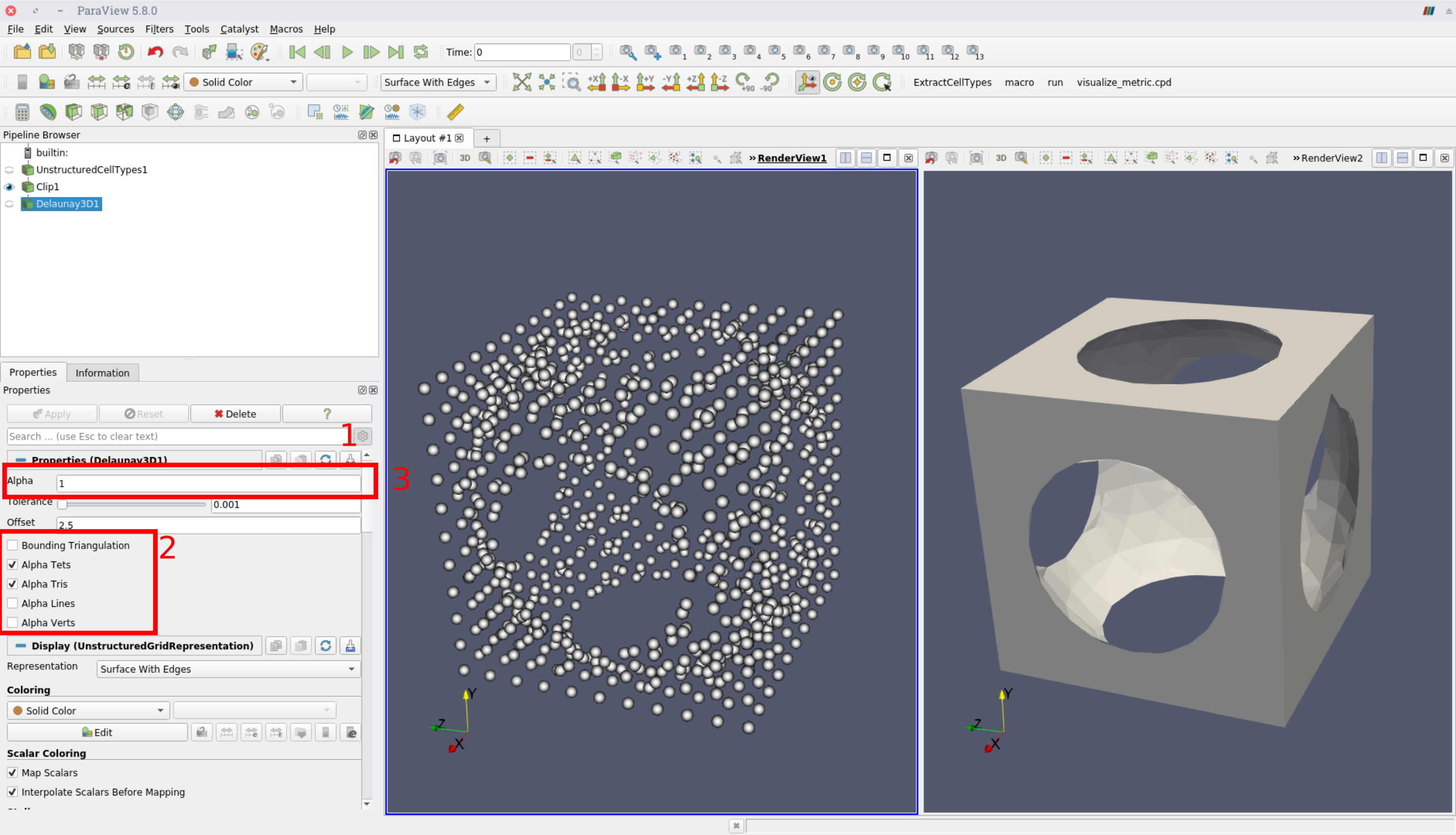
Yes you can preserve holes. You need to experiment with the alpha parameter in the Delaunay 3D filter.
See the example below:
I have a point set with a hole in the middle (left figure).
1. Enable the advanced option from the gear icon
2. Enable Alpha Tets and Tris this will remove tetrahedra and triangles that do not conform to the criterion.
3. Finally adjust the alpha parameter until you get the desired results.