# Deselect a single GPU not to be used when starting Paraview
**URL:** https://discourse.paraview.org/t/deselect-a-single-gpu-not-to-be-used-when-starting-paraview/6110
**Category:** ParaView Support
**Created:** [December 22, 2020, 9:30am UTC](https://discourse.paraview.org/t/deselect-a-single-gpu-not-to-be-used-when-starting-paraview/6110 "2020-12-22T09:30:16Z")
**Posts on this page:** 9
**Page:** 1
### Author:  [@XavierStuvw](https://discourse.paraview.org/u/XavierStuvw)
#### Post date: [December 22, 2020, 9:30am UTC](https://discourse.paraview.org/t/deselect-a-single-gpu-not-to-be-used-when-starting-paraview/6110/1 "2020-12-22T09:30:16Z")
Paraview 5.8.1 out of the compiled binaries distributed from the Paraview website works like a breeze in the computer I installed it in.
However, at start-up, Paraview launches an application VisRTX and lets it grab all GPUs in the computer as graphics devices. The screen output is:
```
VisRTX 0.1.6, using devices:
0: Quadro GP100 (Total: 17.1 GB, Available: 3.8 GB)
1: Quadro GP100 (Total: 17.1 GB, Available: 13.0 GB)
2: Quadro P600 (Total: 2.1 GB, Available: 2.1 GB)
```
Consistenly, the CPU management interface `nvidia-smi` signals that the Paraview processes have taken memory in devices 0 and 1. (Device 2 is used as a graphics card for local screen rendering, I presume; I am connected to the computer in point via a network.)
For reasons of task management, I want to keep one GPU only for computing (device 1, in the example above). I have not spotted in the paraview command line (`paraview --help`) a command instructing ParaView about which GPU to use.
**How can I launch Paraview and tell it to only use device 0?**
Naive attempt, taking inspiration from [https://github.com/NVIDIA/VisRTX#multi-gpu](https://github.com/NVIDIA/VisRTX#multi-gpu), If I launch Paraview with the augmented command
```
CUDA_VISIBLE_DEVICES='0' [path to paraview binaries]/paraview
```
the response is
```
VisRTX 0.1.6, using devices:
0: Quadro GP100 (Total: 17.1 GB, Available: 3.2 GB)
```
as wished. However, unlike in the first launch, `nvidia-smi` shows that the GPU did not not load any ParaView process and memory share. So I wonder whether fixing the one has spoiled the other: I can see the ParaView process working on the CPU, alas.
Take note. This post is the opposite of [Select which GPU to use when starting ParaView](https://discourse.paraview.org/t/select-which-gpu-to-use-when-starting-paraview/3605) in which the fellow poster wanted to enable a device. I want to disable one.
---
### Author:  [@utkarsh.ayachit](https://discourse.paraview.org/u/utkarsh.ayachit)
#### Post date: [December 23, 2020, 12:37pm UTC](https://discourse.paraview.org/t/deselect-a-single-gpu-not-to-be-used-when-starting-paraview/6110/2 "2020-12-23T12:37:49Z")
Try setting the enviroment variable `VTK_DEBUG_SKIP_VISRTX_CHECK` ([ref](https://kitware.github.io/paraview-docs/nightly/cxx/EnvironmentVariables.html)). That should skip VisRTX and hopefully avoid this “device-grabbing”.
---
### Author:  [@XavierStuvw](https://discourse.paraview.org/u/XavierStuvw)
#### Post date: [December 24, 2020, 9:47am UTC](https://discourse.paraview.org/t/deselect-a-single-gpu-not-to-be-used-when-starting-paraview/6110/3 "2020-12-24T09:47:38Z")
Thanks for the tip.
I have set
`export VTK_DEBUG_SKIP_VISRTX_CHECK=1`
and launched Paraview. No uploading of VisRTX as expected.
However, the system falls back to CPUs, regardless of whether pvINVIAIndex plugin (version 2.4) is autoloaded. The ParaView tasks are multithreaded CPU processes visible with `pstree` or the like; no show on `nvidia-smi`.
Please note that the aim is not to turn off using the GPUs but to steer ParaView to a specific device out of several, so as not interfere with calculations going on there. The greedy behaviour of VisRTX ought to be tamed, not suppressed, ideally.
If ParaView falls back to the CPU this is suboptimal in another way.
---
### Author:  [@utkarsh.ayachit](https://discourse.paraview.org/u/utkarsh.ayachit)
#### Post date: [December 24, 2020, 4:26pm UTC](https://discourse.paraview.org/t/deselect-a-single-gpu-not-to-be-used-when-starting-paraview/6110/4 "2020-12-24T16:26:42Z")
Note, VisRTX only comes into play when you’re using ray tracing…are you doing that? If not, whether VisRTX is enabled or not should not have any effect on whether GPU is used on not.
Whether GPU is used for rasterized rendering depends on your OpenGL drivers. Check the **Help \> About** dialog. It should show the OpenGL vendor. It should show something like NVIdia.

---
### Author:  [@utkarsh.ayachit](https://discourse.paraview.org/u/utkarsh.ayachit)
#### Post date: [December 24, 2020, 4:28pm UTC](https://discourse.paraview.org/t/deselect-a-single-gpu-not-to-be-used-when-starting-paraview/6110/5 "2020-12-24T16:28:35Z")
Also, just loading a plugin has no effect. Are you showing any rendering that is using IndeX in your visualization setup? If not, it need not reflect in `nvidia-smi`.
---
### Author:  [@XavierStuvw](https://discourse.paraview.org/u/XavierStuvw)
#### Post date: [December 24, 2020, 5:07pm UTC](https://discourse.paraview.org/t/deselect-a-single-gpu-not-to-be-used-when-starting-paraview/6110/6 "2020-12-24T17:07:53Z")
Thanks for bringing in more context.
I am not using ray tracing.
This is the information on the OpneGL drivers:

and this is the process overview according to `nvidia-smi`:
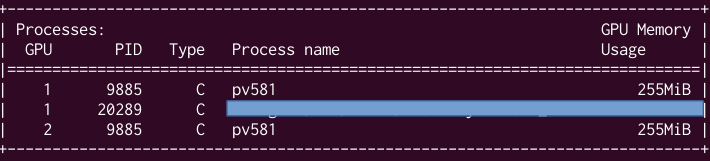
after starting Paraview without flag specifications.
As long as Paraview guarantees me not to erode memory from GPU 1 nor impose transactions with the CPU there, I am fine.
However, when I used the same set of GPU devices as servers of a remote connection, I could steer the rendering jobs towards either GPU and see from `nvidia-smi` the pvserver working hard on one device and leaving the other be. I felt this was a guarantee.
By linking the two situations, am I comparing apples and pears, perhaps? The objective is having ParaView use one GPU out of two. Thanks for additional clarifications.
---
### Author:  [@utkarsh.ayachit](https://discourse.paraview.org/u/utkarsh.ayachit)
#### Post date: [December 24, 2020, 5:46pm UTC](https://discourse.paraview.org/t/deselect-a-single-gpu-not-to-be-used-when-starting-paraview/6110/7 "2020-12-24T17:46:45Z")
From the about dialog information, your OpenGL drivers are indeed not GPU-enabled. ParaView is not using GPU for anything from what I can tell. I do not know what `nvidia-smi` is referring to. Maybe VisRTX allocates some buffers during init,I do not now. In anycase, like I said before, set the VisRTX skip flag as you are not using raytracing at all. So it has no impact whatsoever.
Next, fix your OpenGL drivers so that ParaView can use a GPU for rendering. Currently, it’s not. It’s not using any GPU at all since the OpenGL driver is Mesa / software.
---
### Author:  [@XavierStuvw](https://discourse.paraview.org/u/XavierStuvw)
#### Post date: [December 24, 2020, 6:08pm UTC](https://discourse.paraview.org/t/deselect-a-single-gpu-not-to-be-used-when-starting-paraview/6110/8 "2020-12-24T18:08:21Z")
Thanks. This clarifies any equivocation. So Paraview is not able to recognise out of the box that the GPUs are available in that machine. I will study the matter further.
---
### Author:  [@utkarsh.ayachit](https://discourse.paraview.org/u/utkarsh.ayachit)
#### Post date: [December 24, 2020, 6:23pm UTC](https://discourse.paraview.org/t/deselect-a-single-gpu-not-to-be-used-when-starting-paraview/6110/9 "2020-12-24T18:23:48Z")
Note that’s not specific to ParaView. Any rendering-capable application you may be running on your system that uses OpenGL for rendering is not using the GPU. Try `glxinfo` or `glxgears` for example. It should indicate the same thing.
The fix is typically simply installing OpenGL drivers provided by your GPU vendor – in your case NVidia.