# Different colors using OSPRay pathtracer since PV 5.9
**URL:** https://discourse.paraview.org/t/different-colors-using-ospray-pathtracer-since-pv-5-9/7282
**Category:** ParaView Support
**Created:** [May 24, 2021, 9:55am UTC](https://discourse.paraview.org/t/different-colors-using-ospray-pathtracer-since-pv-5-9/7282 "2021-05-24T09:55:43Z")
**Posts on this page:** 18
**Page:** 1
### Author:  [@Lukas](https://discourse.paraview.org/u/Lukas)
#### Post date: [May 24, 2021, 9:55am UTC](https://discourse.paraview.org/t/different-colors-using-ospray-pathtracer-since-pv-5-9/7282/1 "2021-05-24T09:55:43Z")
Dear ParaView-Team,
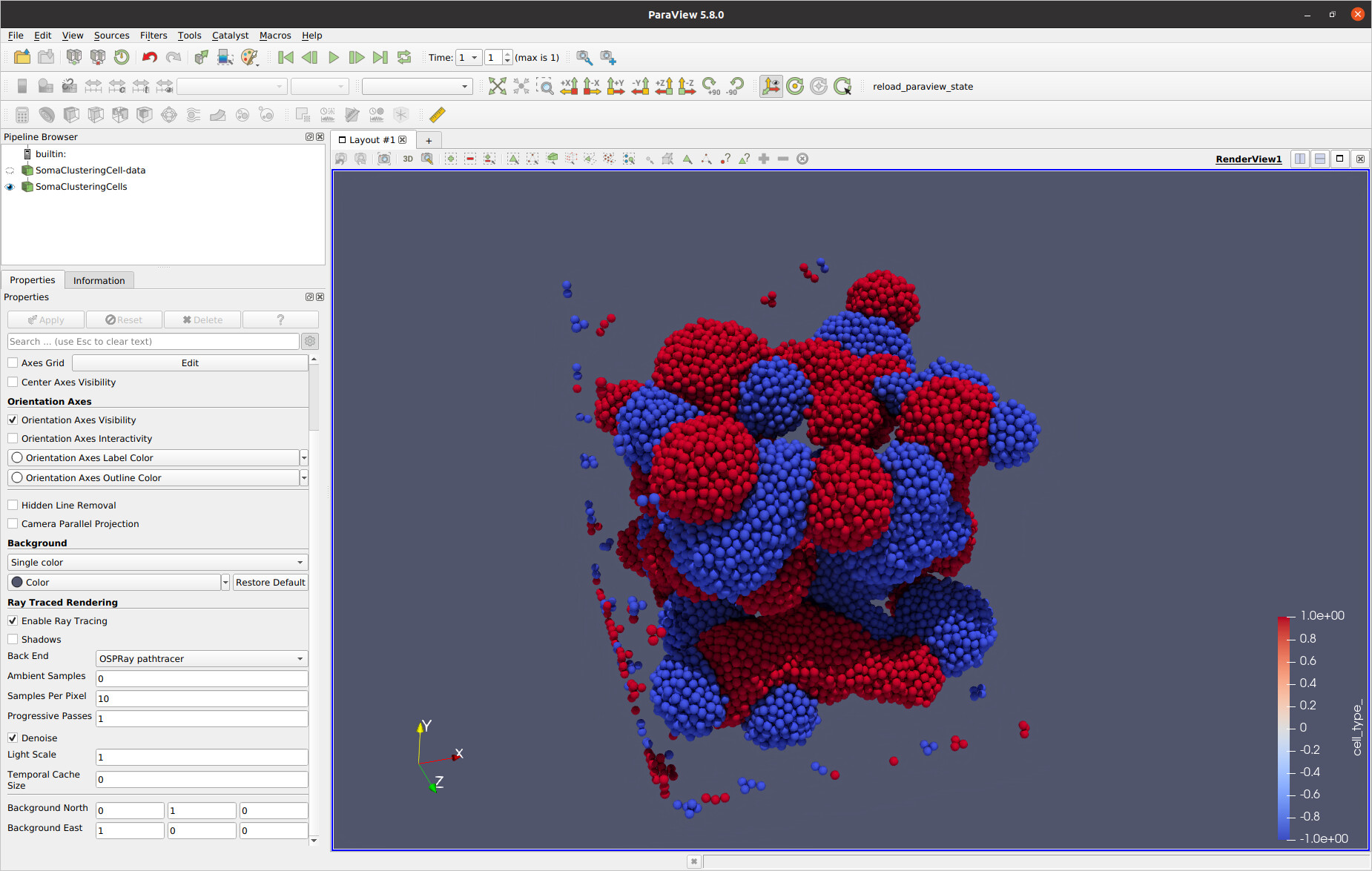
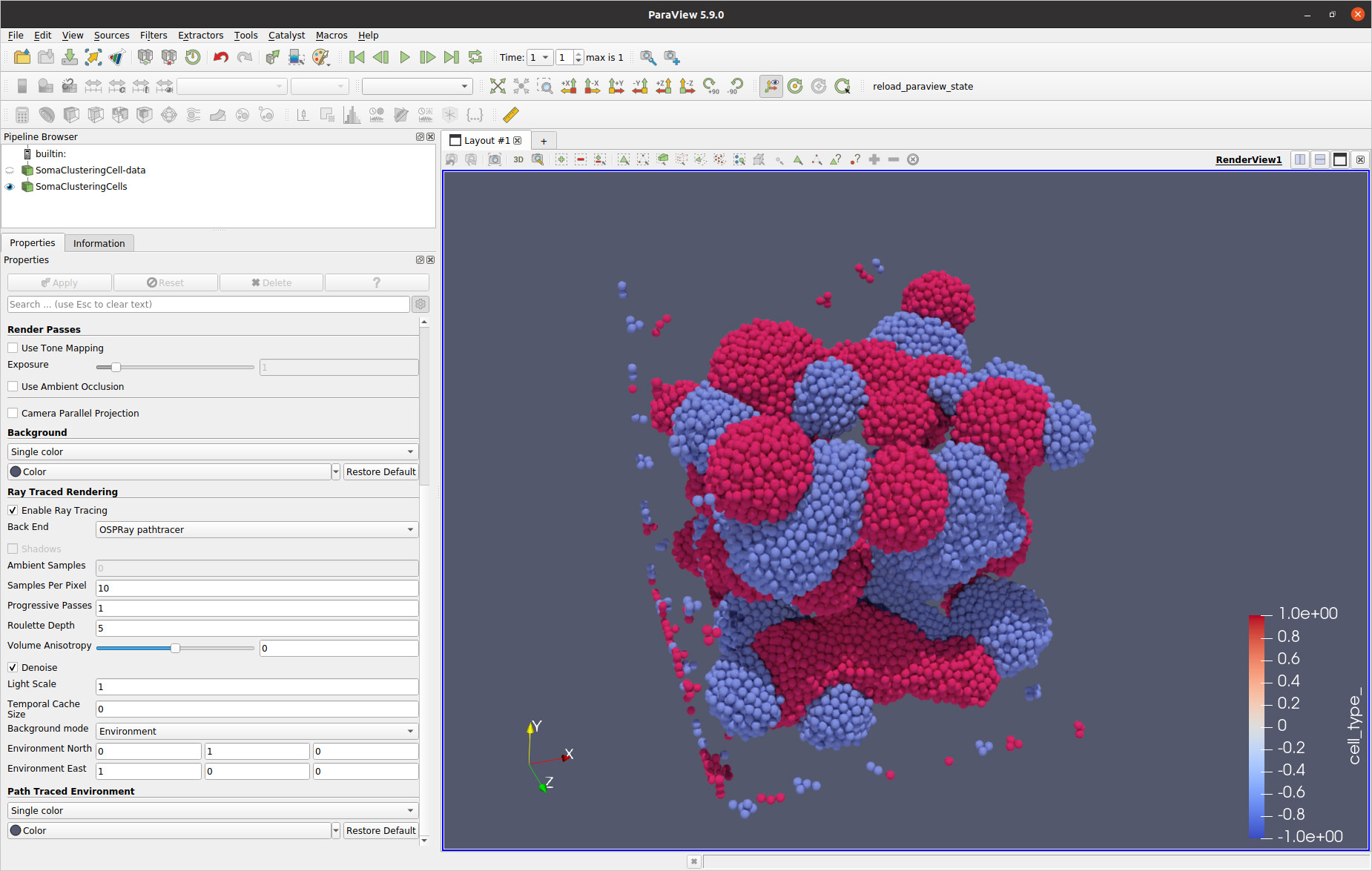
I noticed that ParaView 5.9.0 renders images with different colors compared to ParaView 5.8.0 when using the OSPRay pathtracer. Please see the attached screenshots.
I used the following PV binaries from your website and ran it on Ubuntu 20.04:
- `ParaView-5.9.0-MPI-Linux-Python3.8-64bit`
- `ParaView-5.8.0-MPI-Linux-Python3.7-64bit`
I used the following steps to obtain the screenshots:
- started PV with `paraview output/soma-clustering/soma-clusterin.pvsm` (data files attached)
- clicked on `Enable Ray Tracing`
- changed the back end to `OSPRay pathtracer`
- set the samples per pixel to 10.
Which settings should I use on 5.9.0 to obtain the same result as on 5.8.0?
Many thanks in advance for your help!
Lukas
[data.zip](https://discourse.paraview.org/uploads/short-url/rvrPZtxfksGks7k1Lxi1IZBbern.zip) (1.7 MB)
---
### Author:  [@mwestphal](https://discourse.paraview.org/u/mwestphal)
#### Post date: [May 24, 2021, 10:04am UTC](https://discourse.paraview.org/t/different-colors-using-ospray-pathtracer-since-pv-5-9/7282/2 "2021-05-24T10:04:35Z")
o̶s̶m̶e̶s̶a ospray changed form 1.X to 2.0, that may explains it.
@Dave_DeMarle
---
### Author:  [@Dave\_DeMarle](https://discourse.paraview.org/u/Dave_DeMarle)
#### Post date: [May 27, 2021, 7:01pm UTC](https://discourse.paraview.org/t/different-colors-using-ospray-pathtracer-since-pv-5-9/7282/3 "2021-05-27T19:01:35Z")
@mwestphal - I believe you meant OSPRay and autocorrect probably left it with osmesa.
Hi Lukas. It is more likely that the new backplate and environmental color options briefly mentioned in the 5.9 release notes are the culprit here. Try setting the path traced background to solid black and then switch the background mode to backplate. That way the object will only receive light energy from the lights themselves, not the “sky”,
---
### Author:  [@Lukas](https://discourse.paraview.org/u/Lukas)
#### Post date: [May 28, 2021, 5:06pm UTC](https://discourse.paraview.org/t/different-colors-using-ospray-pathtracer-since-pv-5-9/7282/4 "2021-05-28T17:06:22Z")
Hi Dave,
Thanks for your reply! I applied your recommended settings, but the difference is barely noticeable.
Is there anything else which could cause this problem?
The colors in the pathtraced image do not correspond to the colors in the legend.
---
### Author:  [@mconti](https://discourse.paraview.org/u/mconti)
#### Post date: [May 28, 2021, 7:44pm UTC](https://discourse.paraview.org/t/different-colors-using-ospray-pathtracer-since-pv-5-9/7282/5 "2021-05-28T19:44:02Z")
Hey Lukas, do you have the “light kit” toggled on in 5.9 but not 5.8? Just looking at the images it seems like the 5.9 scene is receiving light from somewhere that the 5.8 isn’t. That could be due to an either an env map providing light (Like Dave mentioned turning background mode to backplate turns this off), or there are new lights in the scene somewhere.
Finally, tons of stuff changed with OSPRay with the new 5.9 update. I wouldn’t be shocked if renders with the same settings were slightly different between versions. If nothing else works to darken your 5.9 scene just set the “light scale” toggle lower.
---
### Author:  [@Lukas](https://discourse.paraview.org/u/Lukas)
#### Post date: [June 1, 2021, 8:30am UTC](https://discourse.paraview.org/t/different-colors-using-ospray-pathtracer-since-pv-5-9/7282/6 "2021-06-01T08:30:31Z")
Hi Marston,
The light kit is enabled in both versions with identical settings.
I created the following python script so you can see the whole pipeline.
The script generates the same output as shown in the screenshots in my initial post for 5.8 and 5.9 using the binaries from your website.
```auto
from paraview.simple import *
paraview.simple._DisableFirstRenderCameraReset()
# create a new 'XML Partitioned Unstructured Grid Reader'
somaClusteringCell = XMLPartitionedUnstructuredGridReader(registrationName='SomaClusteringCell-*', FileName=['output/soma-clustering/SomaClusteringCell-6000.pvtu'])
somaClusteringCell.PointArrayStatus = ['cell_type_', 'diameter_']
# get animation scene
animationScene1 = GetAnimationScene()
# update animation scene based on data timesteps
animationScene1.UpdateAnimationUsingDataTimeSteps()
# get active view
renderView1 = GetActiveViewOrCreate('RenderView')
# reset view to fit data
renderView1.ResetCamera()
# get the material library
materialLibrary1 = GetMaterialLibrary()
# update the view to ensure updated data information
renderView1.Update()
# create a new 'Glyph'
glyph1 = Glyph(registrationName='Glyph1', Input=somaClusteringCell,
GlyphType='Sphere')
glyph1.OrientationArray = ['POINTS', 'No orientation array']
glyph1.ScaleArray = ['POINTS', 'diameter_']
glyph1.ScaleFactor = 1.0
glyph1.GlyphTransform = 'Transform2'
glyph1.GlyphMode = 'All Points'
# show data in view
glyph1Display = Show(glyph1, renderView1, 'GeometryRepresentation')
# init the 'PiecewiseFunction' selected for 'ScaleTransferFunction'
glyph1Display.ScaleTransferFunction.Points = [-0.9965844750404358, 0.0, 0.5, 0.0, 0.9965844750404358, 1.0, 0.5, 0.0]
# init the 'PiecewiseFunction' selected for 'OpacityTransferFunction'
glyph1Display.OpacityTransferFunction.Points = [-0.9965844750404358, 0.0, 0.5, 0.0, 0.9965844750404358, 1.0, 0.5, 0.0]
# update the view to ensure updated data information
renderView1.Update()
# set scalar coloring
ColorBy(glyph1Display, ('POINTS', 'cell_type_'))
# rescale color and/or opacity maps used to include current data range
glyph1Display.RescaleTransferFunctionToDataRange(True, False)
# show color bar/color legend
glyph1Display.SetScalarBarVisibility(renderView1, True)
# get color transfer function/color map for 'cell_type_'
cell_type_LUT = GetColorTransferFunction('cell_type_')
# get opacity transfer function/opacity map for 'cell_type_'
cell_type_PWF = GetOpacityTransferFunction('cell_type_')
# reset view to fit data
renderView1.ResetCamera()
# set camera
renderView1.CameraPosition = [-147.90239225387725, 987.3370677382073, 1256.9188143692575]
renderView1.CameraFocalPoint = [253.3733764288308, 198.8307305001966, 209.17141330374292]
renderView1.CameraParallelScale = 354.92567318384994
# Enable OSPRay
renderView1.BackEnd = 'OSPRay pathtracer'
pm = paraview.servermanager.vtkSMProxyManager
if pm.GetVersionMajor() == 5 and pm.GetVersionMinor() == 9:
renderView1.EnvironmentalBG = [0.0, 0.0, 0.0]
renderView1.Backgroundmode = 'Backplate'
renderView1.SamplesPerPixel = 10
renderView1.EnableRayTracing = 1
renderView1.Update()
```
Thanks,
Lukas
---
### Author:  [@Lukas](https://discourse.paraview.org/u/Lukas)
#### Post date: [June 1, 2021, 8:53am UTC](https://discourse.paraview.org/t/different-colors-using-ospray-pathtracer-since-pv-5-9/7282/7 "2021-06-01T08:53:09Z")
Forgot to mention that I tried to reduce the light-scale setting, but it didn’t give the desired result.
---
### Author:  [@bastian](https://discourse.paraview.org/u/bastian)
#### Post date: [September 9, 2021, 4:28pm UTC](https://discourse.paraview.org/t/different-colors-using-ospray-pathtracer-since-pv-5-9/7282/8 "2021-09-09T16:28:19Z")
probably related:
> [@OSPRay pathtracer: How to get more vivid colors](https://discourse.paraview.org/t/7951):
>
> With the OSPRay pathtracer I am observing that surfaces are generally less saturated than the actual color they are painted with. I guess that this has to do with the color of the lighting, and that it could also be tackled by choosing a more sophisticated material than the default. I am wondering though if there is a quick and easy way of shifting colors more towards the actual color. Even enhancing the overall saturation could help. Here is a small example: [state.pvsm](https://discourse.paraview.org/uploads/short-url/50kA11LXpwEHHfdMW8IlIsbQwyO.pvsm) (1.2 MB) After turnin…
---
### Author:  [@Dave\_DeMarle](https://discourse.paraview.org/u/Dave_DeMarle)
#### Post date: [October 28, 2021, 1:17pm UTC](https://discourse.paraview.org/t/different-colors-using-ospray-pathtracer-since-pv-5-9/7282/9 "2021-10-28T13:17:38Z")
See: [https://gitlab.kitware.com/vtk/vtk/-/merge\_requests/8577](https://gitlab.kitware.com/vtk/vtk/-/merge_requests/8577)
---
### Author:  [@bastian](https://discourse.paraview.org/u/bastian)
#### Post date: [January 16, 2022, 4:46pm UTC](https://discourse.paraview.org/t/different-colors-using-ospray-pathtracer-since-pv-5-9/7282/10 "2022-01-16T16:46:01Z")
Any news on this?
---
### Author:  [@Lukas](https://discourse.paraview.org/u/Lukas)
#### Post date: [April 26, 2022, 9:14am UTC](https://discourse.paraview.org/t/different-colors-using-ospray-pathtracer-since-pv-5-9/7282/11 "2022-04-26T09:14:54Z")
Do you have an update regarding this issue?
---
### Author:  [@bastian](https://discourse.paraview.org/u/bastian)
#### Post date: [May 23, 2023, 7:15pm UTC](https://discourse.paraview.org/t/different-colors-using-ospray-pathtracer-since-pv-5-9/7282/12 "2023-05-23T19:15:02Z")
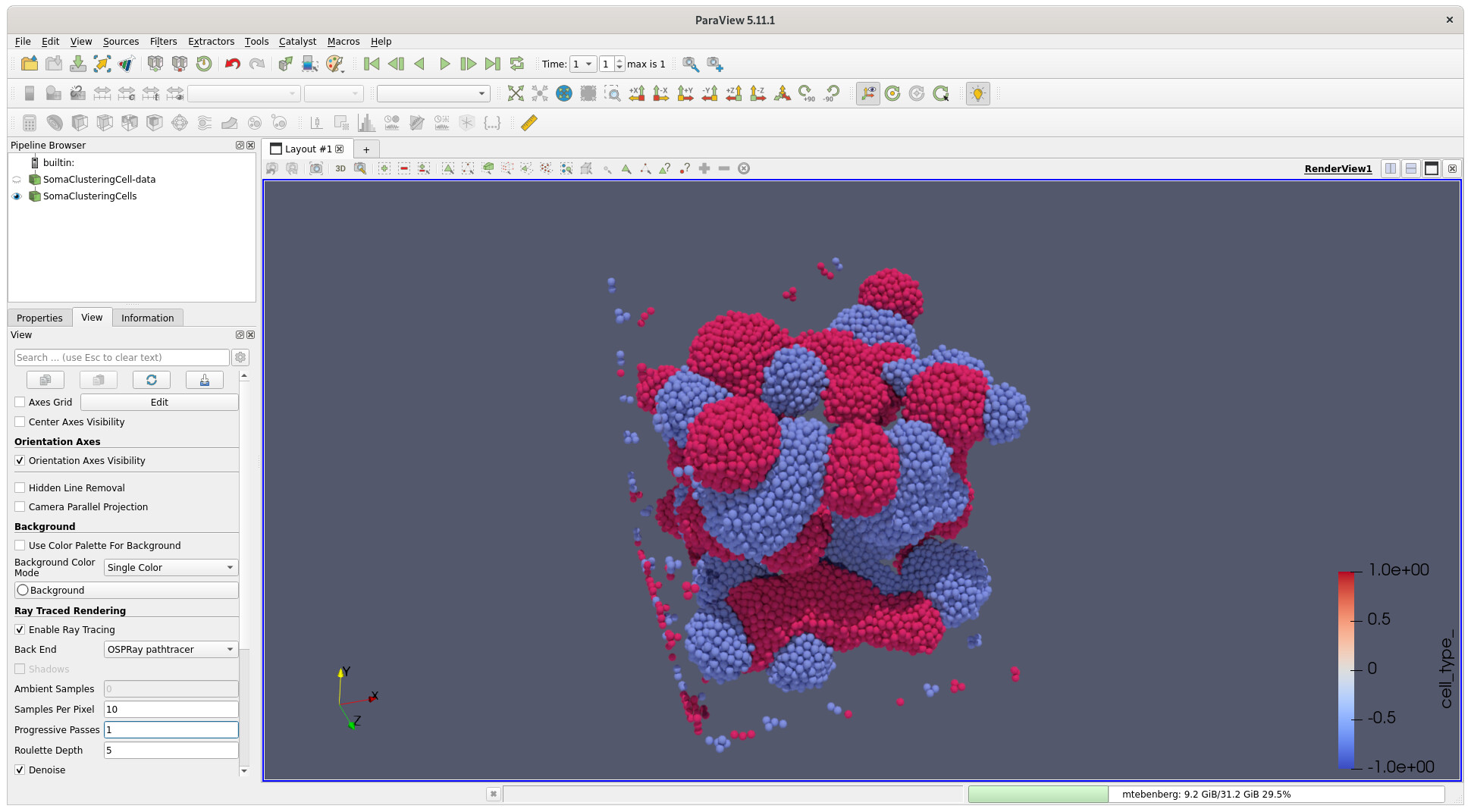
all my visualizations look so dull, also in 2023 😔
---
### Author:  [@flotus1](https://discourse.paraview.org/u/flotus1)
#### Post date: [May 24, 2023, 11:51am UTC](https://discourse.paraview.org/t/different-colors-using-ospray-pathtracer-since-pv-5-9/7282/13 "2023-05-24T11:51:26Z")
Same here. I am fairly new to the whole pathtracing thing in ParaView.
All I could produce with OSPRay were fairly washed-out looking images. I thought it was my lack of experience which knobs need adjusting. But turns out I am not alone here.
---
### Author:  [@bastian](https://discourse.paraview.org/u/bastian)
#### Post date: [July 12, 2023, 6:55am UTC](https://discourse.paraview.org/t/different-colors-using-ospray-pathtracer-since-pv-5-9/7282/14 "2023-07-12T06:55:42Z")
🙁 @Lukas do you mind updating the subject? This does not only affect PV 5.9 but all versions since then.
---
### Author:  [@Lukas](https://discourse.paraview.org/u/Lukas)
#### Post date: [July 12, 2023, 7:59am UTC](https://discourse.paraview.org/t/different-colors-using-ospray-pathtracer-since-pv-5-9/7282/15 "2023-07-12T07:59:28Z")
Good point @bastian, but I don’t seem to have the permission to do it.
Perhaps one of the admins could edit the title to indicate that not only v5.9 is affected.
---
### Author:  [@mwestphal](https://discourse.paraview.org/u/mwestphal)
#### Post date: [July 12, 2023, 9:05am UTC](https://discourse.paraview.org/t/different-colors-using-ospray-pathtracer-since-pv-5-9/7282/16 "2023-07-12T09:05:16Z")
done
---
### Author:  [@bastian](https://discourse.paraview.org/u/bastian)
#### Post date: [November 29, 2023, 10:44am UTC](https://discourse.paraview.org/t/different-colors-using-ospray-pathtracer-since-pv-5-9/7282/17 "2023-11-29T10:44:20Z")
Looks like it’s fixed in 5.12! 😀
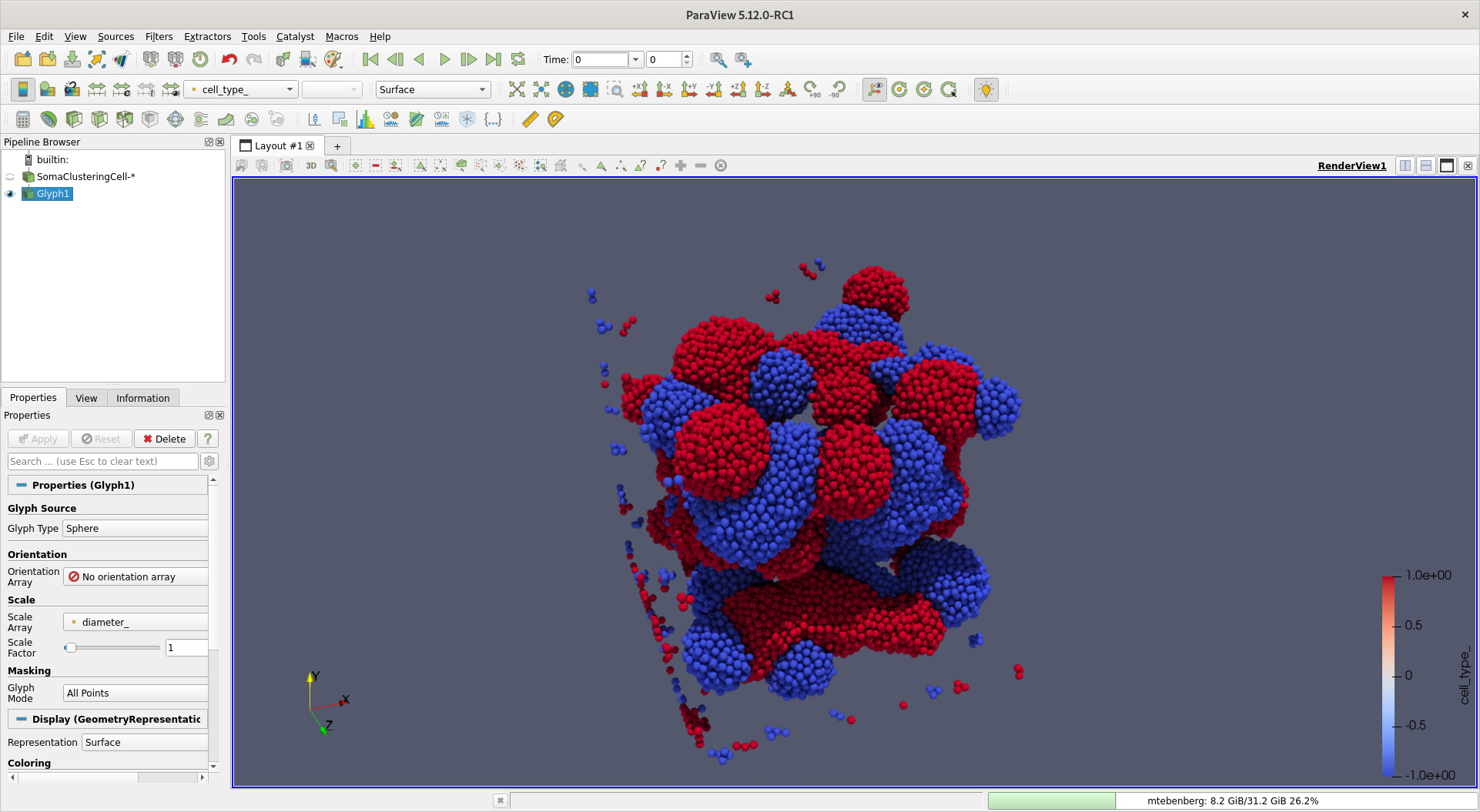
Many thanks to @Dave_DeMarle @carsonsbrownlee @mwestphal and the others involved in fixing this!
---
### Author:  [@mwestphal](https://discourse.paraview.org/u/mwestphal)
#### Post date: [November 29, 2023, 12:09pm UTC](https://discourse.paraview.org/t/different-colors-using-ospray-pathtracer-since-pv-5-9/7282/18 "2023-11-29T12:09:30Z")
Indeed, I forgot to mention that @Dave_DeMarle fixed it mid 2023.