# Display coordinates of a point
**URL:** https://discourse.paraview.org/t/display-coordinates-of-a-point/5737
**Category:** ParaView Support
**Created:** [November 6, 2020, 5:02pm UTC](https://discourse.paraview.org/t/display-coordinates-of-a-point/5737 "2020-11-06T17:02:07Z")
**Posts on this page:** 3
**Page:** 1
### Author:  [@Kihiro\_Bando](https://discourse.paraview.org/u/Kihiro_Bando)
#### Post date: [November 6, 2020, 5:02pm UTC](https://discourse.paraview.org/t/display-coordinates-of-a-point/5737/1 "2020-11-06T17:02:07Z")
Hi,
Is there a more convenient way to probe the coordinates of a point than the following (let’s say I want the x,y coordinates of a point in a 2D dataset):
- use the `Calculator` to compute a variable `X` from `coordX`
- use the `Calculator` to compute a variable `Y` from `coordY`
- either use the spreadsheet view and restrict to the current selection or go to `Selection Display Inspector` and select variables `X` and `Y` for point labels
This is inconvenient to do everytime you want to just have an idea of the location of some point in a dataset.
Thanks.
---
### Author:  [@ymjia](https://discourse.paraview.org/u/ymjia)
#### Post date: [November 11, 2020, 8:25am UTC](https://discourse.paraview.org/t/display-coordinates-of-a-point/5737/3 "2020-11-11T08:25:21Z")
if you just want to show point coordinate, use Hover Points on in the Frame Decoration Region
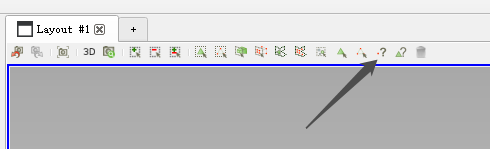
For more complicated operations:
1. you can write a python script running your process
2. **Macro-\>add new macro…** to add the script as a Macro
3. then **Tools-\>Customize Shortcuts** bind a shortcut your like.
Next time after you select some point just press shortcut you defined.
---
### Author:  [@Kihiro\_Bando](https://discourse.paraview.org/u/Kihiro_Bando)
#### Post date: [November 11, 2020, 4:00pm UTC](https://discourse.paraview.org/t/display-coordinates-of-a-point/5737/4 "2020-11-11T16:00:48Z")
Exactly what I aws looking for. Thanks!