# Display/resolution error when opening .vtu file
**URL:** https://discourse.paraview.org/t/display-resolution-error-when-opening-vtu-file/3439
**Category:** ParaView Support
**Created:** [January 28, 2020, 6:20pm UTC](https://discourse.paraview.org/t/display-resolution-error-when-opening-vtu-file/3439 "2020-01-28T18:20:37Z")
**Posts on this page:** 3
**Page:** 1
### Author:  [@nguy1347](https://discourse.paraview.org/u/nguy1347)
#### Post date: [January 28, 2020, 6:20pm UTC](https://discourse.paraview.org/t/display-resolution-error-when-opening-vtu-file/3439/1 "2020-01-28T18:20:38Z")
Hi, I am new to ParaView and am having trouble opening .vtu files. I currently have ParaView 5.8.0-RC1 installed. Whenever I try to open the file and show/visualize the results contained within, ParaView does not respond for ~30 seconds, then when the file loads, all the tools/toolbars outside of the main display window are relocated and/or missing entirely, as if the resolution or display settings are incorrect. Clicking on the visible icons/tools does not work, and it seems as though the software maintains the original positions of the tools but displays them incorrectly.
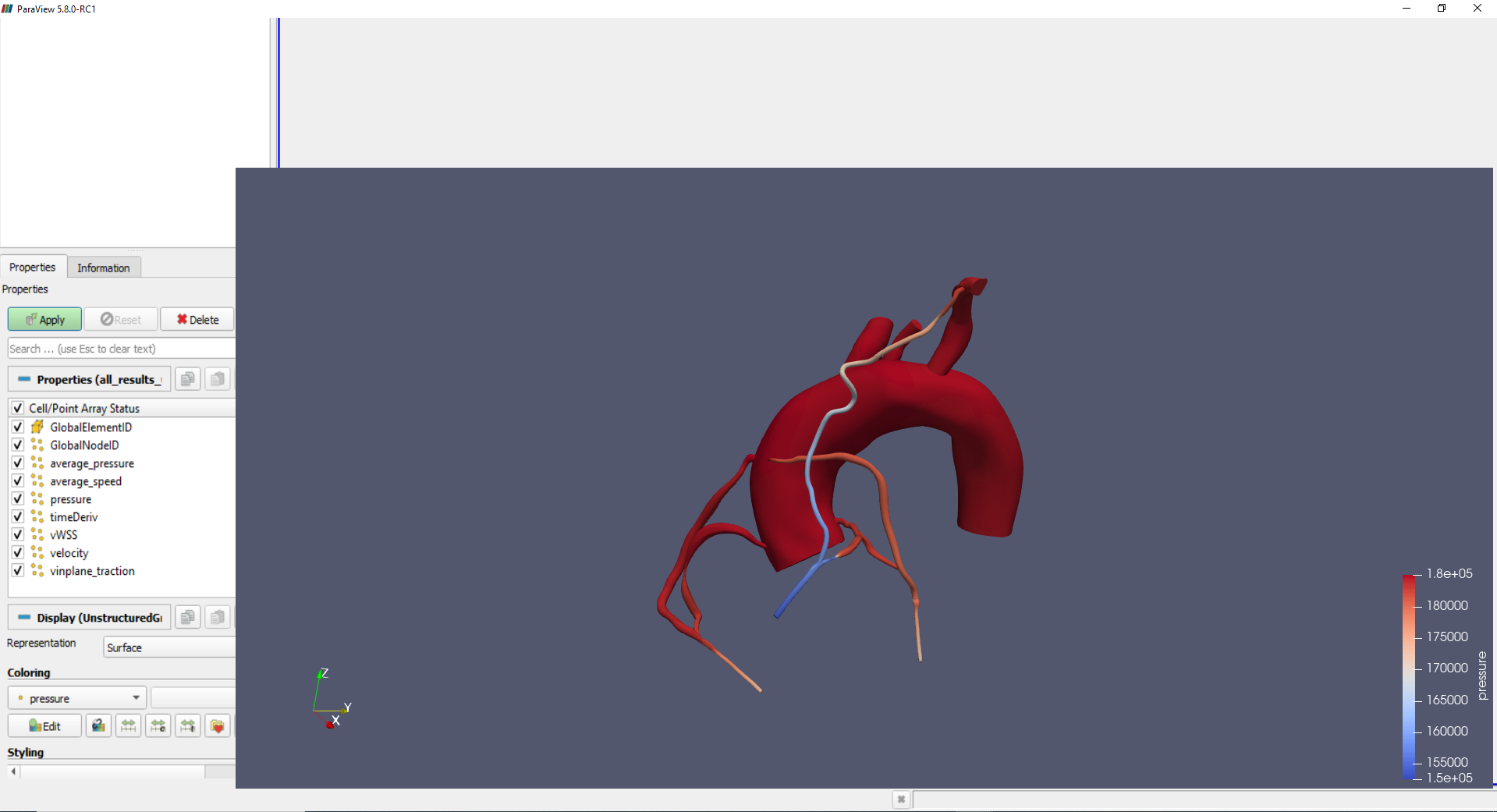
I have tried uninstalling and reinstalling ParaView on my computer. All settings are currently set to their default. The files themselves are also not the issue, as my colleagues are able to open the same files using their local installation of ParaView with no trouble. Any help on how to fix this error would be greatly appreciated.
---
### Author:  [@nguy1347](https://discourse.paraview.org/u/nguy1347)
#### Post date: [January 28, 2020, 9:33pm UTC](https://discourse.paraview.org/t/display-resolution-error-when-opening-vtu-file/3439/2 "2020-01-28T21:33:23Z")
UPDATE: I have resolved this issue by using an earlier version of Paraview (5.5.2).
---
### Author:  [@Kenneth\_Moreland](https://discourse.paraview.org/u/Kenneth_Moreland)
#### Post date: [January 28, 2020, 9:59pm UTC](https://discourse.paraview.org/t/display-resolution-error-when-opening-vtu-file/3439/3 "2020-01-28T21:59:48Z")
This looks like it could be caused by a bug we have been seeing in the latest Intel graphics drivers:
- [https://gitlab.kitware.com/paraview/paraview/issues/19364](https://gitlab.kitware.com/paraview/paraview/issues/19364)
- [ParaView automatically zooms in](https://discourse.paraview.org/t/paraview-automatically-zooms-in/3211)