# Displaying data outside the color map
**URL:** https://discourse.paraview.org/t/displaying-data-outside-the-color-map/7915
**Category:** ParaView Support
**Created:** [September 2, 2021, 9:06am UTC](https://discourse.paraview.org/t/displaying-data-outside-the-color-map/7915 "2021-09-02T09:06:44Z")
**Posts on this page:** 3
**Page:** 1
### Author:  [@Andrei](https://discourse.paraview.org/u/Andrei)
#### Post date: [September 2, 2021, 9:06am UTC](https://discourse.paraview.org/t/displaying-data-outside-the-color-map/7915/1 "2021-09-02T09:06:44Z")
Dear Colleagues!
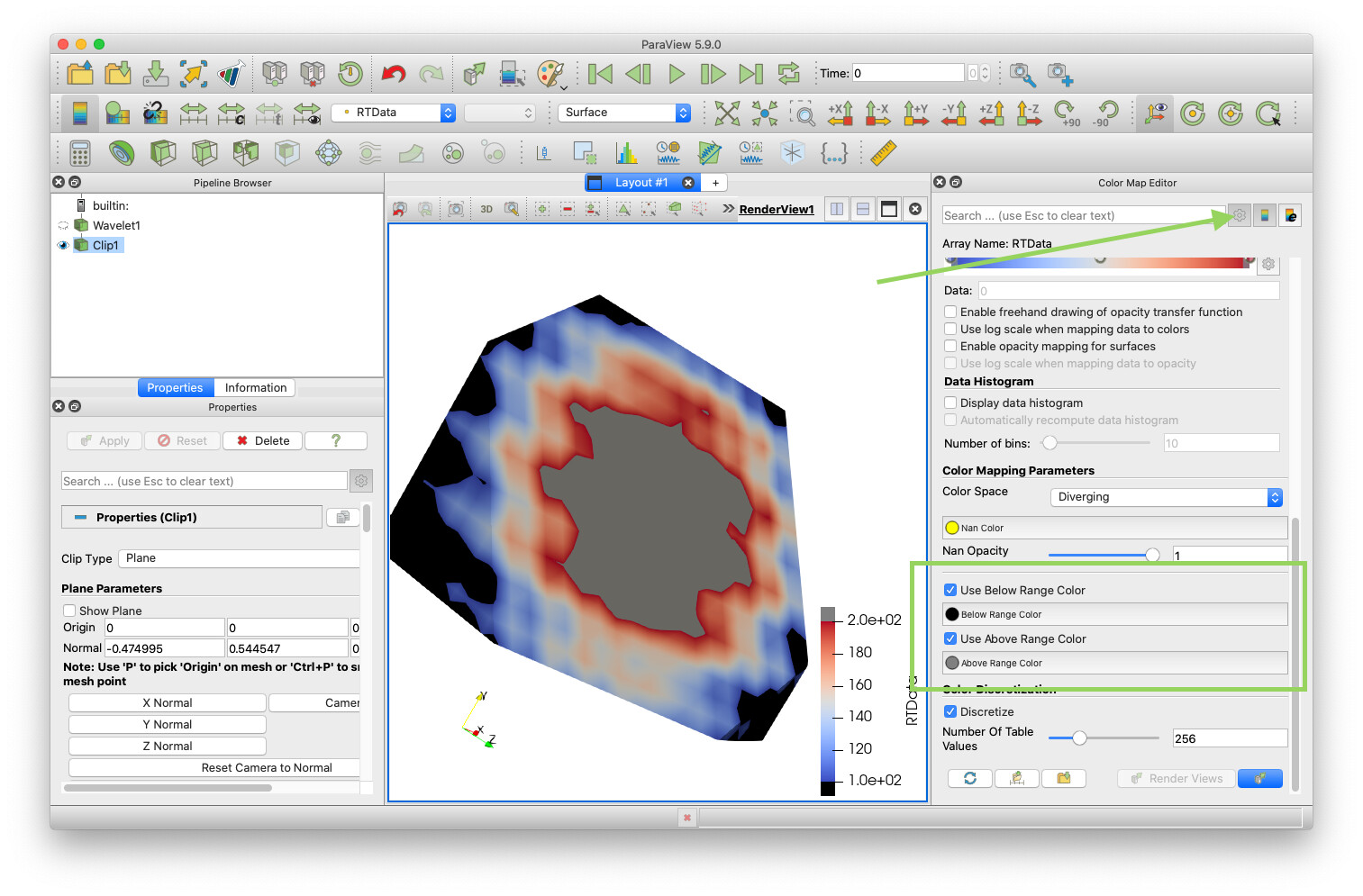
How to force areas outside the range of the color map appear differently (for example, gray fill)
---
### Author:  [@Kenneth\_Moreland](https://discourse.paraview.org/u/Kenneth_Moreland)
#### Post date: [September 2, 2021, 5:51pm UTC](https://discourse.paraview.org/t/displaying-data-outside-the-color-map/7915/2 "2021-09-02T17:51:04Z")
In the color map editor, turn on the advanced properties. Then find the `Below Range Color` and `Above Range Color`. (You can find them even faster by typing `Range Color` in the search bar at the top of the color map editor.)
---
### Author:  [@Andrei](https://discourse.paraview.org/u/Andrei)
#### Post date: [September 3, 2021, 5:45am UTC](https://discourse.paraview.org/t/displaying-data-outside-the-color-map/7915/3 "2021-09-03T05:45:47Z")
@Kenneth_Moreland , many thanks for the help!