# Displaying the corresponding value as the file changes during animation
**URL:** https://discourse.paraview.org/t/displaying-the-corresponding-value-as-the-file-changes-during-animation/4044
**Category:** ParaView Support
**Tags:** vtk, python
**Created:** [April 13, 2020, 10:55am UTC](https://discourse.paraview.org/t/displaying-the-corresponding-value-as-the-file-changes-during-animation/4044 "2020-04-13T10:55:23Z")
**Posts on this page:** 13
**Page:** 1
### Author:  [@Samanvith\_A](https://discourse.paraview.org/u/Samanvith_A)
#### Post date: [April 13, 2020, 10:55am UTC](https://discourse.paraview.org/t/displaying-the-corresponding-value-as-the-file-changes-during-animation/4044/1 "2020-04-13T10:55:23Z")
I have a set of 15 vtk files. Each vtk file represents data at a given redshift " z ".
I want to create the animation of the given vtk files. i.e animation playing 15 vtk files
But during the animation, as the file changes, in the GUI I want to display the corresponding redshift " z " value too.
(
For reference
VTK file | Redshift Z
HI002 | 13.221
HI004 | 9.938
HI006 | 9.611
HI008 | 9.308
.
.
. up to HI030 redshift z = 7.221 )
So during the animation, first HI002 will be displayed then HI004 so on. So during the display of HI002 I want redshift z = 13.221 to be displayed alongside. Next, as HI004 is displayed I want redshift = 9.938 to be displayed and it should be continued up to HI030
I have created animation, The method I used was to use the python annotation filter and use the expression " Redshift Z =( 16.095 - ((16.095-7.221)\*t\_value)/12)"
But the problem here is that as the files change in the animation the corresponding redshift value isn’t displayed. It displays a different value. Please find the attached video here.
> **[HI\_1.avi (video)](https://drive.google.com/file/d/1JiI3uqrl30TgYqabKy6BcWJFk97yYyNn/view?usp=drive_open)**
>
> Google Drive file.
I can provide the VTK files too. Here is a file for reference
VTK: [https://drive.google.com/open?id=16NE3L2Ue\_Rz23ZHbhIpWgH0-Wdg\_szJd](https://drive.google.com/open?id=16NE3L2Ue_Rz23ZHbhIpWgH0-Wdg_szJd)
But can anyone help me with the problem that I am facing?
I will be grateful as I am working on my thesis project
---
### Author:  [@mwestphal](https://discourse.paraview.org/u/mwestphal)
#### Post date: [April 14, 2020, 9:50am UTC](https://discourse.paraview.org/t/displaying-the-corresponding-value-as-the-file-changes-during-animation/4044/3 "2020-04-14T09:50:42Z")
please avoid one-upping topic, especially less than 24h after posting.
---
### Author:  [@mwestphal](https://discourse.paraview.org/u/mwestphal)
#### Post date: [April 17, 2020, 8:18am UTC](https://discourse.paraview.org/t/displaying-the-corresponding-value-as-the-file-changes-during-animation/4044/5 "2020-04-17T08:18:43Z")
Looking at your video, I see the redshift changing, not sure what makes the visible value invalid.
I can’t download 1Gb of data right now.
---
### Author:  [@Samanvith\_A](https://discourse.paraview.org/u/Samanvith_A)
#### Post date: [April 17, 2020, 9:20am UTC](https://discourse.paraview.org/t/displaying-the-corresponding-value-as-the-file-changes-during-animation/4044/6 "2020-04-17T09:20:18Z")
Each file represents data at a particular redshfit “z” . So during the animation of 15 files, the visualization changes as the files changes right.
The present redshift values is invalid because it shows a different redshift value rather than the redshift value the file is corresponding to.
---
### Author:  [@cory.quammen](https://discourse.paraview.org/u/cory.quammen)
#### Post date: [April 17, 2020, 1:32pm UTC](https://discourse.paraview.org/t/displaying-the-corresponding-value-as-the-file-changes-during-animation/4044/7 "2020-04-17T13:32:32Z")
You are applying the solution determined in [Display of variable](https://discourse.paraview.org/t/display-of-variable/4021) to a different set of values. I wouldn’t expect that to work with an entirely different set of values.
Probably the simplest thing to do for this situation is to set the Expression in the **Python Annotation** filter to
```auto
[13.221, 9.938, 9.611, 9.308 ... 7.221][time_index]
```
Basically, you are explicitly defining the time values for each value in a Python list, then using ParaView’s current `time_index` to pick the value to display. This isn’t a general solution for every set of VTK files with variable defined for the entire dataset, but should be good enough to get you the result you need for your thesis project.
---
### Author:  [@Samanvith\_A](https://discourse.paraview.org/u/Samanvith_A)
#### Post date: [April 17, 2020, 4:32pm UTC](https://discourse.paraview.org/t/displaying-the-corresponding-value-as-the-file-changes-during-animation/4044/8 "2020-04-17T16:32:40Z")
Hey, @cory.quammen thank you for your reply.
I am getting the following error when I used your method.
I am using " sequence mode " in animation.
This works in " snap to timestamps mode" in animation. But it won’t work in “sequence mode”. Since saving animation in sequence mode gives a better result, I want to make it work in sequence mode.
Is there anything I am missing here?
> following exception stack should provide additional developer specific information. This typically implies a malformed expression. Verify that the expression is valid.
>
> Variables in current scope are [‘input’, ‘time\_value’, ‘t\_value’, ‘time\_steps’, ‘t\_steps’, ‘time\_range’, ‘t\_range’, ‘time\_index’, ‘t\_index’, ‘HIdensity’]
>
> Traceback (most recent call last):
> File “E:\Studies\ParaView-5.7.0-Windows-Python3.7-msvc2015-64bit\bin\Lib\site-packages\paraview\detail\annotation.py”, line 95, in execute
> result = calculator.compute(inputs, expression, ns=ns)
> File “E:\Studies\ParaView-5.7.0-Windows-Python3.7-msvc2015-64bit\bin\Lib\site-packages\paraview\detail\calculator.py”, line 143, in compute
> retVal = eval(expression, globals(), mylocals)
> File “”, line 1, in
> TypeError: list indices must be integers or slices, not float
---
### Author:  [@cory.quammen](https://discourse.paraview.org/u/cory.quammen)
#### Post date: [April 17, 2020, 6:04pm UTC](https://discourse.paraview.org/t/displaying-the-corresponding-value-as-the-file-changes-during-animation/4044/9 "2020-04-17T18:04:08Z")
It works for me in 5.7 and 5.8 with “Sequence Mode” enabled. Make sure your list of values is the same length as the number of data files you have. If it is too short, you will get the error you are seeing.
---
### Author:  [@Samanvith\_A](https://discourse.paraview.org/u/Samanvith_A)
#### Post date: [April 18, 2020, 9:01am UTC](https://discourse.paraview.org/t/displaying-the-corresponding-value-as-the-file-changes-during-animation/4044/10 "2020-04-18T09:01:30Z")
@cory.quammen
I have attached the state file.
I have kept the list of values the same as the number of data files. But I am still getting the same error. I am using ParaView 5.8
This file takes a lot of time to load and run
[Paraview\_HI\_state.pvsm](https://discourse.paraview.org/uploads/short-url/klDyEgZo6wU6zVRgyCrpJMr9DsV.pvsm) (176.0 KB)
I have done the same thing using smaller data. You can check using this file
[HI\_data.pvsm](https://discourse.paraview.org/uploads/short-url/fCX31N1qBLnKpdkDjbvnKCSS6uG.pvsm) (193.0 KB)
---
### Author:  [@Samanvith\_A](https://discourse.paraview.org/u/Samanvith_A)
#### Post date: [April 28, 2020, 4:12pm UTC](https://discourse.paraview.org/t/displaying-the-corresponding-value-as-the-file-changes-during-animation/4044/11 "2020-04-28T16:12:48Z")
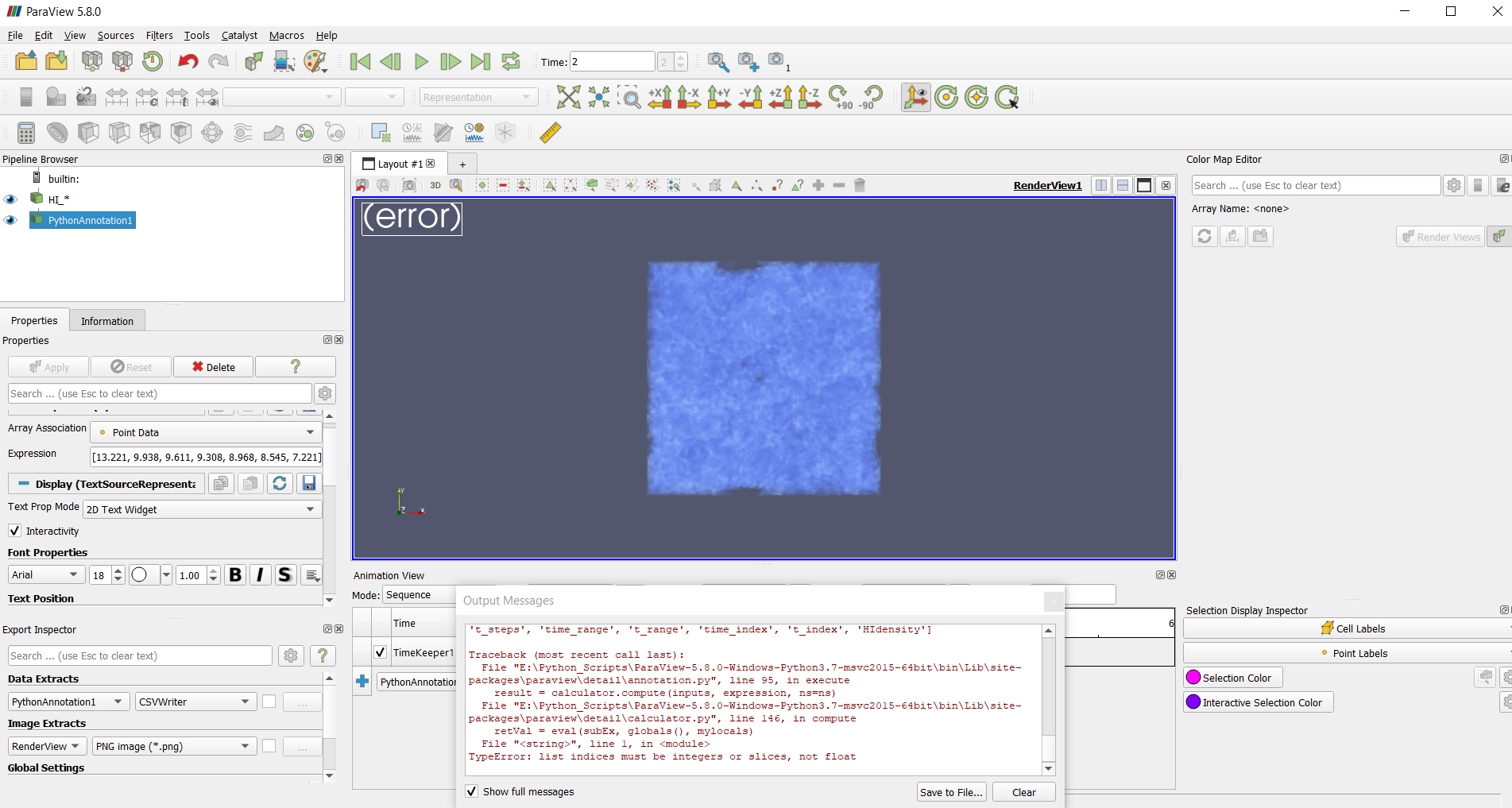
Hello
I am still not able to rectify the problem
---
### Author:  [@cory.quammen](https://discourse.paraview.org/u/cory.quammen)
#### Post date: [April 28, 2020, 6:14pm UTC](https://discourse.paraview.org/t/displaying-the-corresponding-value-as-the-file-changes-during-animation/4044/12 "2020-04-28T18:14:32Z")
Your expression in the state file is: `[13.221, 9.938, 9.661, 9.308][time_value]`. You need to change `time_value` to `time_index` and it should work fine.
---
### Author:  [@Samanvith\_A](https://discourse.paraview.org/u/Samanvith_A)
#### Post date: [April 28, 2020, 7:10pm UTC](https://discourse.paraview.org/t/displaying-the-corresponding-value-as-the-file-changes-during-animation/4044/13 "2020-04-28T19:10:50Z")
Hello @cory.quammen
**time\_index** doesn’t work in sequence mode hence I have kept it as **time\_value**.
I am using sequence mode for better animation.
The first line of the error states this,
> following exception stack should provide additional developer specific information. This typically implies a malformed expression. Verify that the expression is valid.
I am not able to understand why exactly the error is occurring.
---
### Author:  [@cory.quammen](https://discourse.paraview.org/u/cory.quammen)
#### Post date: [April 28, 2020, 8:20pm UTC](https://discourse.paraview.org/t/displaying-the-corresponding-value-as-the-file-changes-during-animation/4044/14 "2020-04-28T20:20:01Z")
**time\_index** is available in ‘Sequence mode for me’. I don’t know why it isn’t available for you.
If it truly isn’t available on your system, you’ll have to figure out how to convert your floating point **time\_value** to the right integer to use in the list index lookup. You can cast a floating point number to integer with `int(5.5)` for example. Good luck.
---
### Author:  [@Samanvith\_A](https://discourse.paraview.org/u/Samanvith_A)
#### Post date: [April 30, 2020, 8:08am UTC](https://discourse.paraview.org/t/displaying-the-corresponding-value-as-the-file-changes-during-animation/4044/15 "2020-04-30T08:08:34Z")
@cory.quammen
Really appreciate your time and help. I have got the solution for my problem.
> [13.221, 9.938…][int(time\_value)].