# dll error while performing interpolation using pykrige
**URL:** https://discourse.paraview.org/t/dll-error-while-performing-interpolation-using-pykrige/12452
**Category:** ParaView Support
**Tags:** python
**Created:** [July 5, 2023, 3:35pm UTC](https://discourse.paraview.org/t/dll-error-while-performing-interpolation-using-pykrige/12452 "2023-07-05T15:35:16Z")
**Posts on this page:** 19
**Page:** 1
### Author:  [@dosel](https://discourse.paraview.org/u/dosel)
#### Post date: [July 5, 2023, 3:35pm UTC](https://discourse.paraview.org/t/dll-error-while-performing-interpolation-using-pykrige/12452/1 "2023-07-05T15:35:16Z")
Hello,
I downloaded pykrige to interpolate the UCS point data to volume.
I followed this workflow
> [@Interpolation/Kriging](https://discourse.paraview.org/t/interpolation-kriging/8273/2):
>
> An external Kriging python library can be applied using the Programmable Filter. For example, if you want to use PyKrige ([PyKrige — PyKrige 1.6.1 documentation](https://geostat-framework.readthedocs.io/projects/pykrige/en/stable/)), first, prepare the same version of the Python environment that ParaView uses, and install Pykrige on it. Then, copy: Anaconda3/envs/pyKrige/Lib/site-packages/pykrige Anaconda3/envs/pyKrige/Lib/site-packages/scipy (This is an Anaconda example) under (ParaView install folder)/bin/Lib/site-packages. After this preparation, star…
But when I used some codes to use this module, this error occured.
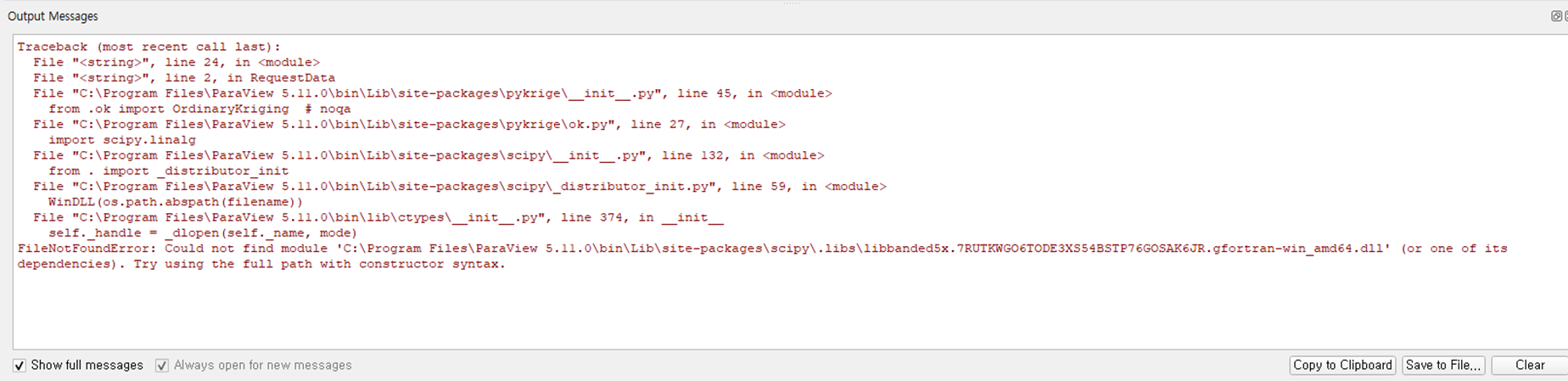
But the dll file was in the path.
I searched why this error occurs, and I finaly found that it was because of the missing dependency files for that dll file.
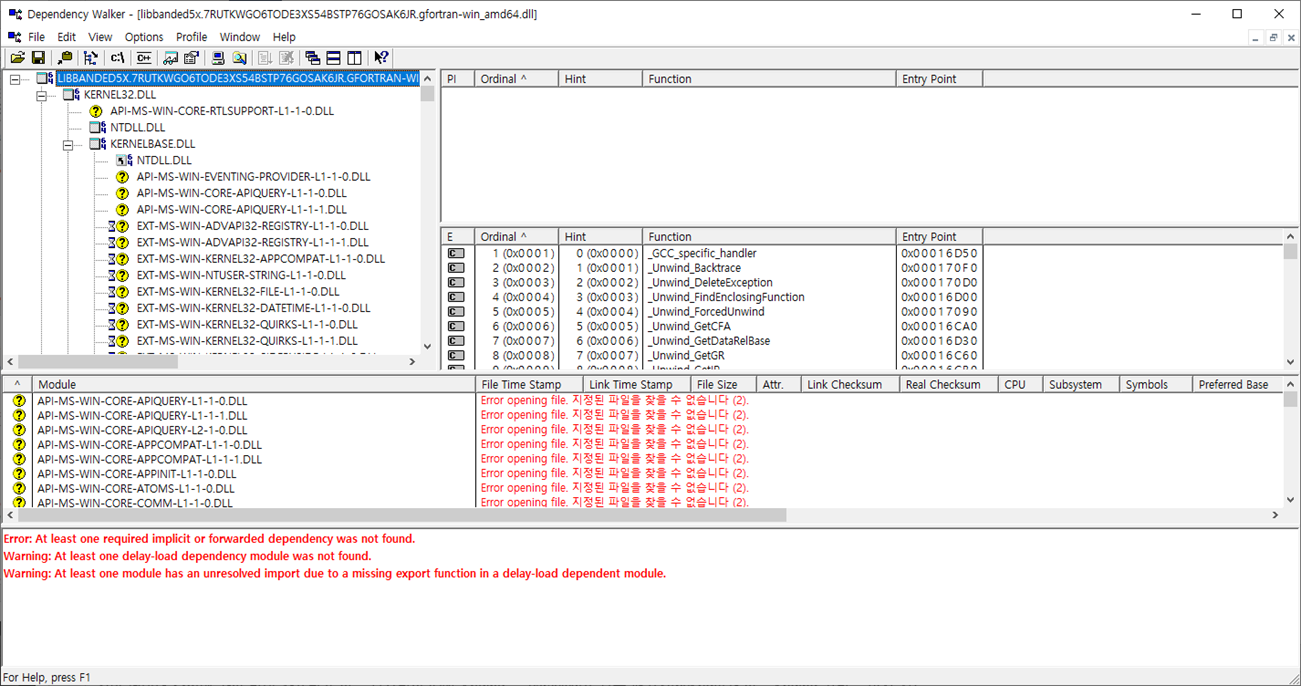
The missing files are not in my computer. I re-download several times but all was the same.
The missing files were more than 600, so I couldn’t download them one by one.
Do you have some ideas about this problem?
---
### Author:  [@Kenichiro-Yoshimi](https://discourse.paraview.org/u/Kenichiro-Yoshimi)
#### Post date: [July 6, 2023, 4:03am UTC](https://discourse.paraview.org/t/dll-error-while-performing-interpolation-using-pykrige/12452/2 "2023-07-06T04:03:44Z")
The version of numpy in ParaView 5.11.1 is 1.21.1, which is older than the one used by PyKrige, so you will get a Warning, but if you use the Anaconda environment on Windows, you can achieve this as follows.
1. Creating the pykrige environment:
```auto
conda create -n pykrige python=3.9
conda activate pykrige
```
1. Install PyKrige
```auto
pip install pykrige
```
1. Backup the numpy folder in ParaView
In C:\Program Files\ParaView 5.11.1\bin\Lib\site-packages, rename the `numpy` folder name to `numpy_bak`.
2. Copy the folders
Copy the folders under C:\Users\aaa\anaconda3\envs\pykrige\Lib\site-packages:
・numpy
・pykrige
・scipy
・scipy.libs
to C:\Program Files\ParaView 5.11.1\bin\Lib\site-packages
---
### Author:  [@dosel](https://discourse.paraview.org/u/dosel)
#### Post date: [July 6, 2023, 4:45am UTC](https://discourse.paraview.org/t/dll-error-while-performing-interpolation-using-pykrige/12452/3 "2023-07-06T04:45:22Z")
Thank you for your help.
I tried, but I got this error message.
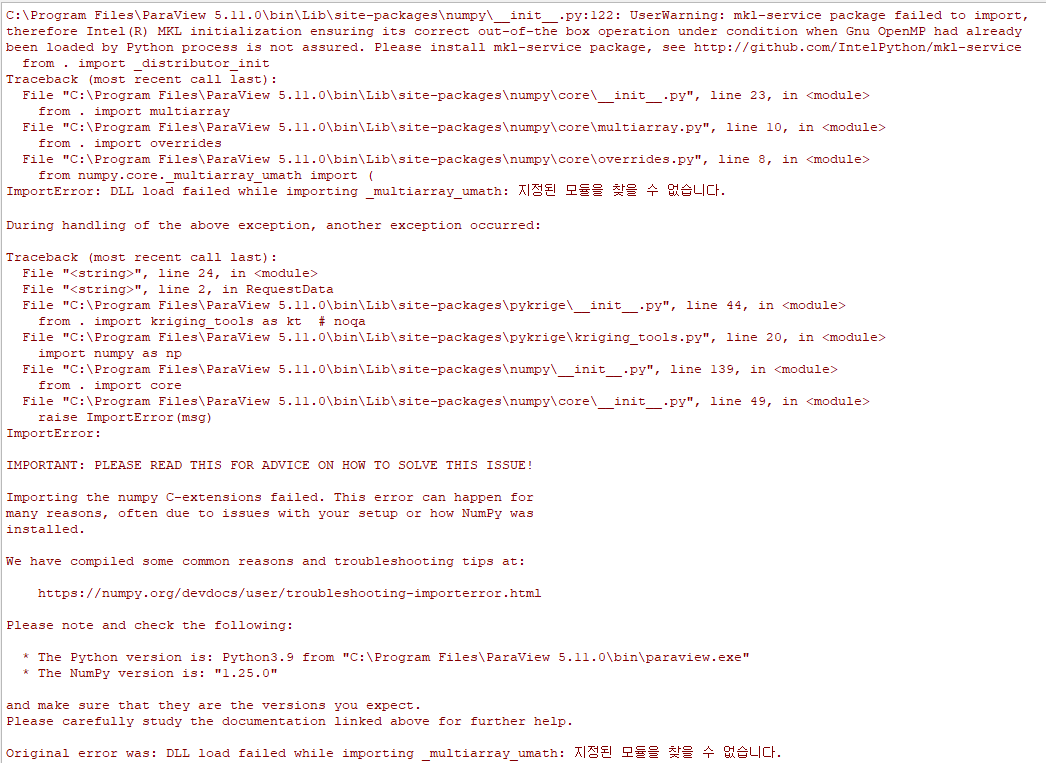
---
### Author:  [@dosel](https://discourse.paraview.org/u/dosel)
#### Post date: [July 6, 2023, 5:00am UTC](https://discourse.paraview.org/t/dll-error-while-performing-interpolation-using-pykrige/12452/4 "2023-07-06T05:00:00Z")
(I used anaconda3 powershell prompt and created environment from the start.
But I didn’t rename the numpy folder and copy the scipy.libs folder.
So I did those 2 in this try.)
---
### Author:  [@Kenichiro-Yoshimi](https://discourse.paraview.org/u/Kenichiro-Yoshimi)
#### Post date: [July 6, 2023, 5:10am UTC](https://discourse.paraview.org/t/dll-error-while-performing-interpolation-using-pykrige/12452/5 "2023-07-06T05:10:48Z")
Your error message states that it is an MKL error with respect to numpy.
Are you installing using the `pip` command? If you are installing with `pip`, NumPy should be installed as built with `OpenBLAS`. On the other hand, if you install with the `conda` command from conda-forge, it will be built with `Intel MKL`, which seems to be difficult to integrate into ParaView.
---
### Author:  [@dosel](https://discourse.paraview.org/u/dosel)
#### Post date: [July 6, 2023, 5:49am UTC](https://discourse.paraview.org/t/dll-error-while-performing-interpolation-using-pykrige/12452/6 "2023-07-06T05:49:38Z")
Thank you for your help.
I installed the OpenBLAS and re-installed numpy and pykrige.
And I got the same DLL error message.
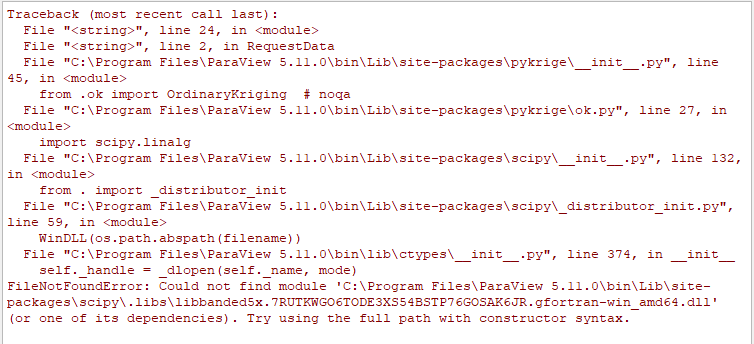
---
### Author:  [@Kenichiro-Yoshimi](https://discourse.paraview.org/u/Kenichiro-Yoshimi)
#### Post date: [July 6, 2023, 5:57am UTC](https://discourse.paraview.org/t/dll-error-while-performing-interpolation-using-pykrige/12452/7 "2023-07-06T05:57:34Z")
Was pykrige installed with the conda command? This also seems to be hard to integrate into ParaView. Is it possible to install pykrige (and scipy) with the pip command?
---
### Author:  [@dosel](https://discourse.paraview.org/u/dosel)
#### Post date: [July 6, 2023, 6:16am UTC](https://discourse.paraview.org/t/dll-error-while-performing-interpolation-using-pykrige/12452/8 "2023-07-06T06:16:20Z")
Thank you for your help.
But I installed pykrige and scipy with pip command.
I re-installed scipy just in case. Then the scipy folder disappeared in the C:\Users\aaa\anaconda3\envs\pykrige\Lib\site-packages.
so I copied just 3 folders and there was the same dll error.
---
### Author:  [@Kenichiro-Yoshimi](https://discourse.paraview.org/u/Kenichiro-Yoshimi)
#### Post date: [July 6, 2023, 6:37am UTC](https://discourse.paraview.org/t/dll-error-while-performing-interpolation-using-pykrige/12452/9 "2023-07-06T06:37:21Z")
I am not sure about the disappearance of the scipy folder after reinstalling scipy. Have you activated the virtual environment with the
> activate pykrige
command and then installed pykrige or scipy?
---
### Author:  [@dosel](https://discourse.paraview.org/u/dosel)
#### Post date: [July 6, 2023, 6:40am UTC](https://discourse.paraview.org/t/dll-error-while-performing-interpolation-using-pykrige/12452/10 "2023-07-06T06:40:19Z")
Yes, I used the environment. (I named the environment “paraview”)

---
### Author:  [@dosel](https://discourse.paraview.org/u/dosel)
#### Post date: [July 6, 2023, 6:44am UTC](https://discourse.paraview.org/t/dll-error-while-performing-interpolation-using-pykrige/12452/11 "2023-07-06T06:44:06Z")

---
### Author:  [@dosel](https://discourse.paraview.org/u/dosel)
#### Post date: [July 14, 2023, 8:59am UTC](https://discourse.paraview.org/t/dll-error-while-performing-interpolation-using-pykrige/12452/12 "2023-07-14T08:59:32Z")
Hello, thank you for your help.
I resolved this problem by creating new environment.
But there is another problem.
I got this error message after running your code
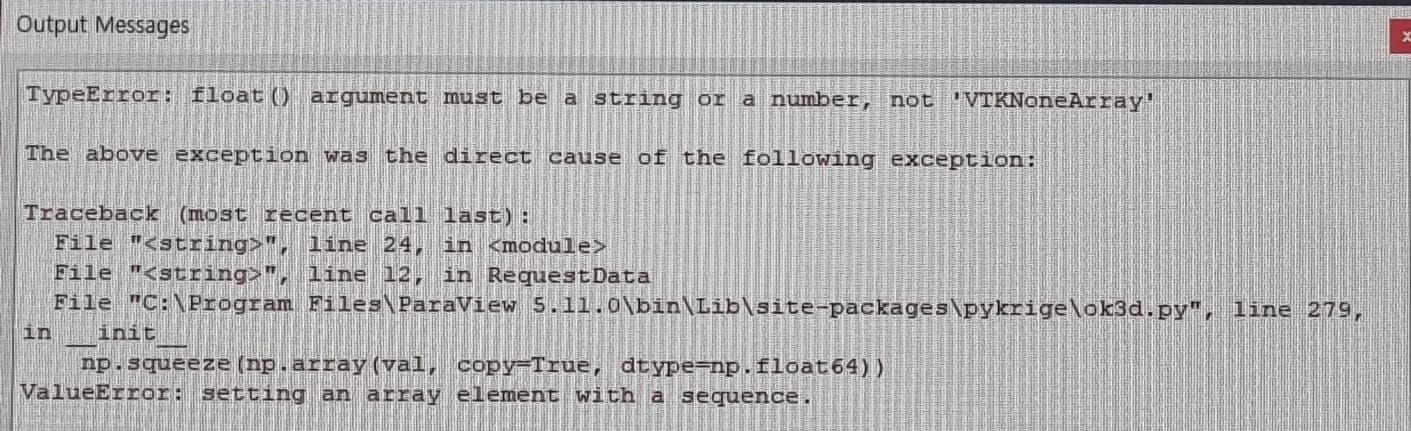
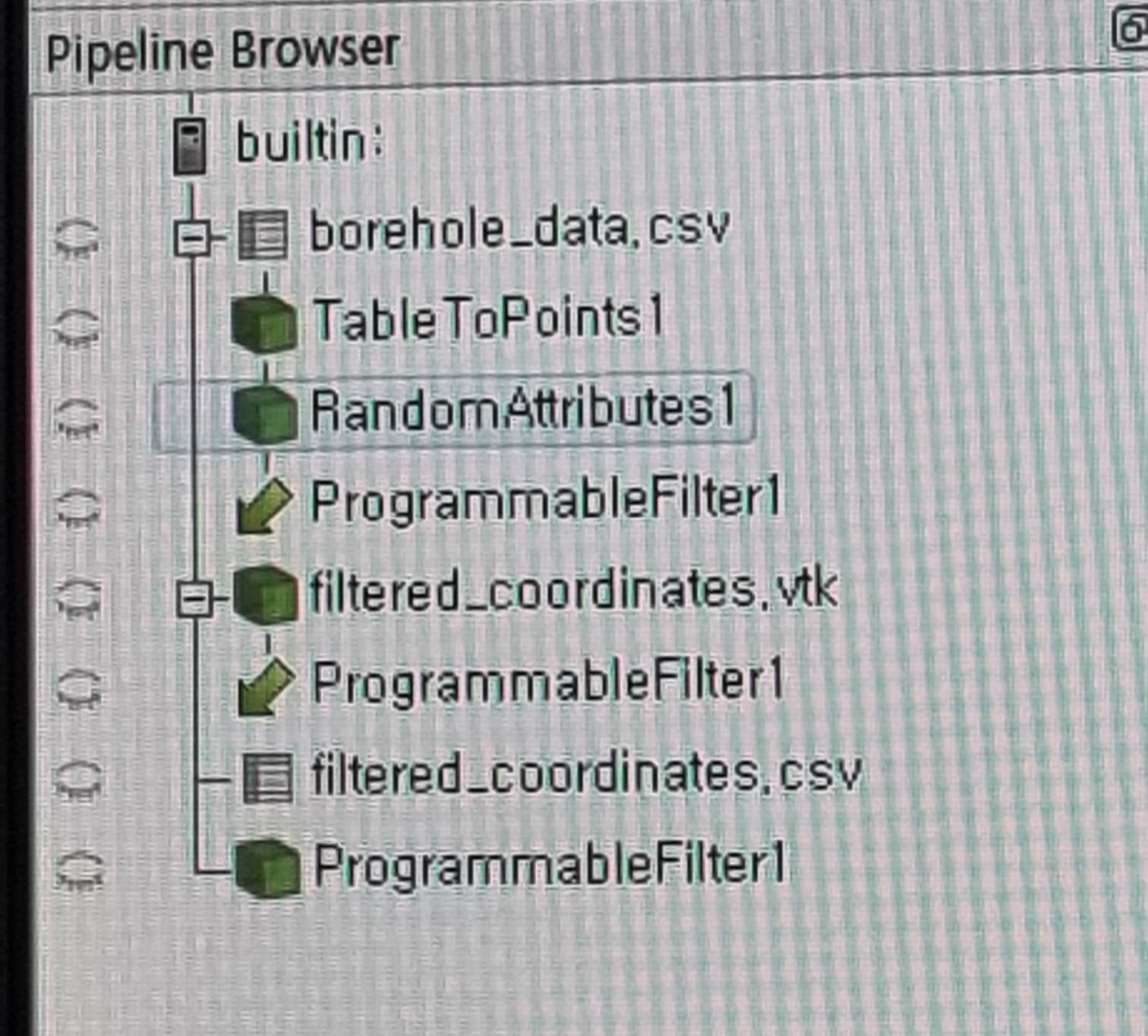
(I used “RandomAttributes1” as the data for interpolation and “filtered\_coordinates.vtk” as the space data to assign interpolation results.)
Thank you for reading!
---
### Author:  [@dosel](https://discourse.paraview.org/u/dosel)
#### Post date: [July 14, 2023, 9:12am UTC](https://discourse.paraview.org/t/dll-error-while-performing-interpolation-using-pykrige/12452/13 "2023-07-14T09:12:44Z")
I think this error means that the imported library dosen’t have the function which is in the code.
But I know your code worked well the other cases.
So I have no idea what was wrong.
---
### Author:  [@Kenichiro-Yoshimi](https://discourse.paraview.org/u/Kenichiro-Yoshimi)
#### Post date: [July 14, 2023, 9:33am UTC](https://discourse.paraview.org/t/dll-error-while-performing-interpolation-using-pykrige/12452/14 "2023-07-14T09:33:53Z")
If you could share the data and state file(\*.pvsm or \*.py), I may be able to confirm the phenomenon.
---
### Author:  [@dosel](https://discourse.paraview.org/u/dosel)
#### Post date: [July 14, 2023, 9:47am UTC](https://discourse.paraview.org/t/dll-error-while-performing-interpolation-using-pykrige/12452/15 "2023-07-14T09:47:31Z")
[https://drive.google.com/drive/folders/1pHwYalv8YU8RpawvQqLbiQwWJ\_\_3Rtos?usp=sharing](https://drive.google.com/drive/folders/1pHwYalv8YU8RpawvQqLbiQwWJ__3Rtos?usp=sharing)
You can download the data and state file.
Thank you.
---
### Author:  [@Kenichiro-Yoshimi](https://discourse.paraview.org/u/Kenichiro-Yoshimi)
#### Post date: [July 14, 2023, 11:53am UTC](https://discourse.paraview.org/t/dll-error-while-performing-interpolation-using-pykrige/12452/16 "2023-07-14T11:53:03Z")
Adding a header line to borehole\_data.csv seems to work. Also, the Kriging method requires a very large amount of memory, as can be seen in the semi-variogram definition. Hence, it is difficult to treat many observation points as input.
Attached below is the State file when Kriging is applied when the number of observation points and the points to be predicted are reduced.
[pykrige\_small.7z](https://discourse.paraview.org/uploads/short-url/58Mi0WsmnXYl0uNMVst21fFKfO8.7z) (23.8 KB)
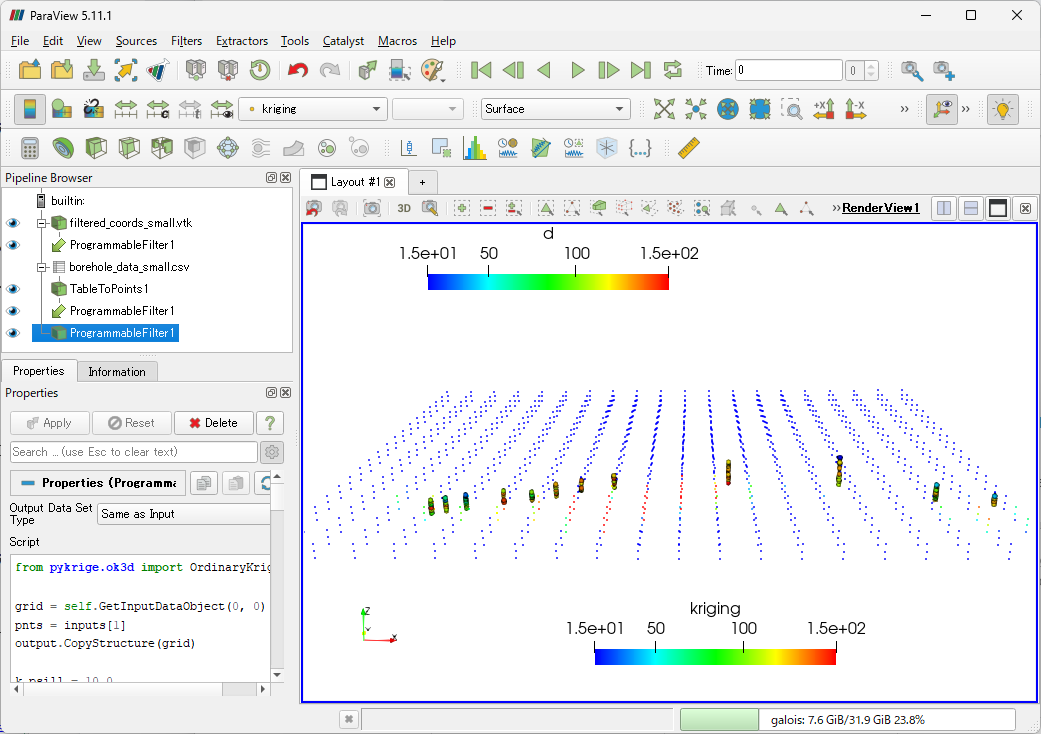
Of course, to use Kriging properly, an empirical variogram must be created from the observation point data and fitted to the appropriate variogram model to determine the sill, range, and nugget.
---
### Author:  [@dosel](https://discourse.paraview.org/u/dosel)
#### Post date: [July 17, 2023, 4:02am UTC](https://discourse.paraview.org/t/dll-error-while-performing-interpolation-using-pykrige/12452/17 "2023-07-17T04:02:11Z")
Thank you for your help.
I understood the process.
When I load your state, the figure was same as the image you uploaded.
But if I do this work in my computer, the figure dosen’t created.
And I got this error message. (This error occured when I loaded your state, too.)
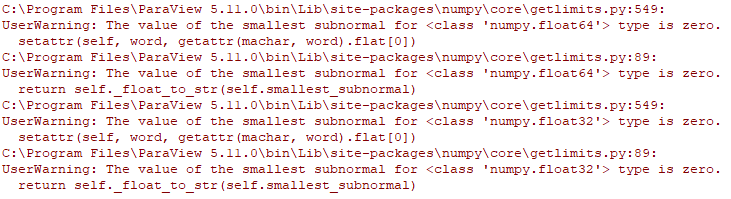
I thought this error occured because of the version of numpy.
So I updated numpy at anaconda powershell prompt and copied the numpy folder.
But this error occured again.
Do you have an idea about this error?
Again, I really appreciate for your help.
---
### Author:  [@Kenichiro-Yoshimi](https://discourse.paraview.org/u/Kenichiro-Yoshimi)
#### Post date: [July 17, 2023, 4:23am UTC](https://discourse.paraview.org/t/dll-error-while-performing-interpolation-using-pykrige/12452/18 "2023-07-17T04:23:59Z")
The numpy messages are warnings and can be ignored. I think what is not working with your data is another cause, such as memory overflow.
---
### Author:  [@dosel](https://discourse.paraview.org/u/dosel)
#### Post date: [July 17, 2023, 8:50am UTC](https://discourse.paraview.org/t/dll-error-while-performing-interpolation-using-pykrige/12452/19 "2023-07-17T08:50:29Z")
Okay, thank you for your help!
I’ll find another solution.