# Editing edge colors
**URL:** https://discourse.paraview.org/t/editing-edge-colors/983
**Category:** ParaView Support
**Created:** [November 29, 2018, 2:15pm UTC](https://discourse.paraview.org/t/editing-edge-colors/983 "2018-11-29T14:15:08Z")
**Posts on this page:** 13
**Page:** 1
### Author:  [@ashahba](https://discourse.paraview.org/u/ashahba)
#### Post date: [November 29, 2018, 2:15pm UTC](https://discourse.paraview.org/t/editing-edge-colors/983/1 "2018-11-29T14:15:09Z")
I just installed the latest version of paraview, 5.6.0 64-bit, on my laptop. I want to visualize the results of my FE simulation given the attached vtk file.
[plotsUnDeformedConfiguration\_phasefield\_10.zip](https://discourse.paraview.org/uploads/default/original/1X/583b3e92422e762cad0b44bf4839f678b909afe7.zip) (1.2 MB)
I would like to visualize my scalar field (called phasefield in the file) using “feature edge” representation. I am struggling to change the color of the edges. No matter what color I choose in edge --\> edge styling, the edge color does not change. I appreciate if you can help me with this
---
### Author:  [@Kenneth\_Moreland](https://discourse.paraview.org/u/Kenneth_Moreland)
#### Post date: [November 29, 2018, 2:29pm UTC](https://discourse.paraview.org/t/editing-edge-colors/983/2 "2018-11-29T14:29:06Z")
I can see how the name of those controls are confusing, but you do not use the `Edge Styling` controls when using the `Feature Edges` representation. (Those controls are only for representations that show both edges and something else at the same time.)
Instead, use the controls in the `Coloring` section. These controls are also replicated in the second toolbar on the left.
In your data, by default the `Feature Edges` will be colored by the `phasefield` scalar variable. If you want a solid color, change `phasefield` to `Solid Color`. The default solid color is white. To change it from white, click the  `Edit` color button.
---
### Author:  [@ashahba](https://discourse.paraview.org/u/ashahba)
#### Post date: [November 29, 2018, 3:31pm UTC](https://discourse.paraview.org/t/editing-edge-colors/983/3 "2018-11-29T15:31:03Z")
Thanks, Ken, for your reply. I chose `Solid Color` instead of `phaseField` and the edge colors turned white. However, I cannot still change the color to some other color using the  botton
---
### Author:  [@Kenneth\_Moreland](https://discourse.paraview.org/u/Kenneth_Moreland)
#### Post date: [November 29, 2018, 3:50pm UTC](https://discourse.paraview.org/t/editing-edge-colors/983/4 "2018-11-29T15:50:51Z")
Ugg, Right you are. That does not sound like good behavior. I raised a bug to fix that: [https://gitlab.kitware.com/paraview/paraview/issues/18635](https://gitlab.kitware.com/paraview/paraview/issues/18635).
Until that is fixed, there are a couple of ways to work around the problem. The first is to click on the palette pull-down menu (  in the first toolbar) and select `Edit Current Palette...`. In the resulting settings dialog, change the `Foreground` color to the color you want your feature edges and then hit `OK`.
The other way around the problem is to run a couple of filters to extract the edges and then use the surface representation to control the colors. To do that, first add the `Extract Surface` filter. Then add the `Feature Edges` filter to that. (That is, the `Feature Edges` **filter** , not the representation.) Then turn off the visibility of the `Extract Surface` filter in the `Pipeline Browser`. Now finally you can change the color as I described previously.
---
### Author:  [@ashahba](https://discourse.paraview.org/u/ashahba)
#### Post date: [November 29, 2018, 4:43pm UTC](https://discourse.paraview.org/t/editing-edge-colors/983/5 "2018-11-29T16:43:46Z")
Thanks for reporting the bug. I am newbie to Paraview and I can follow your instructions step-by-step. Thank you sincerely for such detailed responses
Regarding the `Edit Current Palette` approach: I can now choose the desired edge color, green. In order to arrive at my desired visualization, I then applied the `Extract Component` filter. Now in my pipeline, I have two entities, the original input data and the filter results. For the original input data, I have chosen `Solid Color` with `Feature Edges` representation. For the filter results, I have chosen `phasefield` with `Surface` representation. This is how the visualization looks at the end. I wonder if this is generally the way to do it. Is there a simpler way to get this visualization?
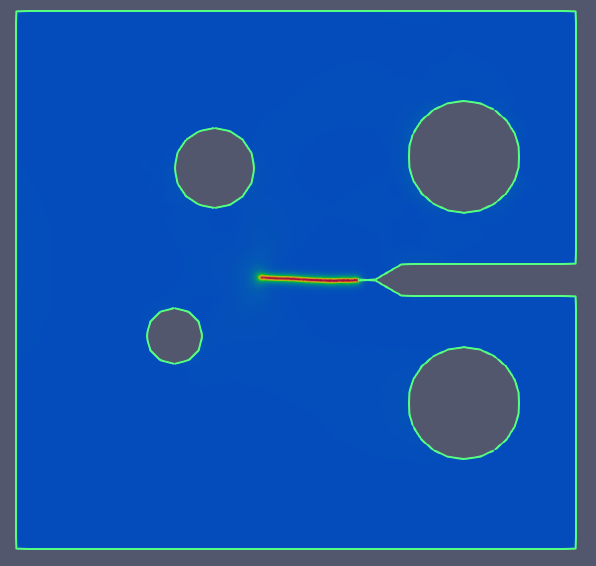
Regarding the other workaround involving `Extract Surface` and `Feature Edges` filters: This workaround works, too and I can arrive at the desired visualization.
---
### Author:  [@Kenneth\_Moreland](https://discourse.paraview.org/u/Kenneth_Moreland)
#### Post date: [November 29, 2018, 5:15pm UTC](https://discourse.paraview.org/t/editing-edge-colors/983/6 "2018-11-29T17:15:00Z")
The `Extract Component` filter is not really doing anything. That filter takes a vector field and pulls out one of the components to make a scalar field. If you start with a scalar field (as `phasefield` is), you get the same thing in the output.
If your intention is just to get the same data listed in the pipeline browser twice so that you can apply to representations at once, then this is fine. I would probably use the `Pass Arrays` filter instead, but in the end they will do the same thing.
One more piece of unsolicited advice: it appears you have applied rainbow colors to your data. Although they look pretty, I generally recommend not using them because, from a data-understanding perspective, they do not work well. There is lots of literature on this subject, but here are some quick blog post reads that describe some of the issues with rainbow colors:
- [https://d35c7d8c.web.cern.ch/rainbow-color-map](https://d35c7d8c.web.cern.ch/rainbow-color-map)
- [https://blogs.egu.eu/divisions/gd/2017/08/23/the-rainbow-colour-map/](https://blogs.egu.eu/divisions/gd/2017/08/23/the-rainbow-colour-map/)
- [https://eagereyes.org/basics/rainbow-color-map](https://eagereyes.org/basics/rainbow-color-map)
---
### Author:  [@ashahba](https://discourse.paraview.org/u/ashahba)
#### Post date: [November 29, 2018, 5:25pm UTC](https://discourse.paraview.org/t/editing-edge-colors/983/7 "2018-11-29T17:25:35Z")
As you pointed out, `Pass Arrays` does the job, too. Thank you for sharing the articles on the rainbow colors
---
### Author:  [@wascott](https://discourse.paraview.org/u/wascott)
#### Post date: [November 29, 2018, 6:21pm UTC](https://discourse.paraview.org/t/editing-edge-colors/983/8 "2018-11-29T18:21:31Z")
I could be wrong, but I believe that the pass arrays filter is extremely lite weight. It is basically a shallow copy (i.e., just a pointer to the data).
---
### Author:  [@Kenneth\_Moreland](https://discourse.paraview.org/u/Kenneth_Moreland)
#### Post date: [November 29, 2018, 6:35pm UTC](https://discourse.paraview.org/t/editing-edge-colors/983/9 "2018-11-29T18:35:32Z")
Yup, Alan. That is the point. To create a shallow copy so that their are two items in the pipeline browser. (That’s the easiest way I know to draw something with two different representations at the same time.)
---
### Author:  [@jvoor](https://discourse.paraview.org/u/jvoor)
#### Post date: [February 7, 2019, 12:20pm UTC](https://discourse.paraview.org/t/editing-edge-colors/983/10 "2019-02-07T12:20:36Z")
Another work around that worked for me (to color the Feature Edges representation) was to tick ‘Render Lines As Tubes’ under Styling in the Properties bar.
---
### Author:  [@win](https://discourse.paraview.org/u/win)
#### Post date: [March 21, 2024, 2:36pm UTC](https://discourse.paraview.org/t/editing-edge-colors/983/11 "2024-03-21T14:36:04Z")
Hi Kenneth,
I tried your suggestion to change the edge color of my geometry (cube) from the default white to black; however, I am getting the broken black line on top of the white line. Would you please suggest something to get the black continuous edge?
Thanks
---
### Author:  [@Kenneth\_Moreland](https://discourse.paraview.org/u/Kenneth_Moreland)
#### Post date: [March 21, 2024, 2:52pm UTC](https://discourse.paraview.org/t/editing-edge-colors/983/12 "2024-03-21T14:52:17Z")
That sounds like Z-buffer fighting, which happens when 2 things are being drawn in the same space. Sometimes the renderer thinks the black thing is on top, sometimes the white thing.
There is a lot that could be going wrong, but the easiest solution could be to turn off the rendering of the white edge on your cube.
---
### Author:  [@win](https://discourse.paraview.org/u/win)
#### Post date: [March 22, 2024, 6:34am UTC](https://discourse.paraview.org/t/editing-edge-colors/983/13 "2024-03-22T06:34:57Z")
Thanks for your help. Something else worked, though.
I did not use Feature edge filter or any other. I just changed the color in the existing pipeline Python calculator, considering solid, and edited it to black. It worked.