# Enable 3D Visualization versus Coloring only
**URL:** https://discourse.paraview.org/t/enable-3d-visualization-versus-coloring-only/10605
**Category:** ParaView Support
**Created:** [October 26, 2022, 11:48am UTC](https://discourse.paraview.org/t/enable-3d-visualization-versus-coloring-only/10605 "2022-10-26T11:48:05Z")
**Posts on this page:** 4
**Page:** 1
### Author:  [@davethomaspilot](https://discourse.paraview.org/u/davethomaspilot)
#### Post date: [October 26, 2022, 11:48am UTC](https://discourse.paraview.org/t/enable-3d-visualization-versus-coloring-only/10605/1 "2022-10-26T11:48:05Z")
Newbie question…
I’m following an OpenEMS tutorial which includes visualization of simulation results using ParaView. The tutorial example uses 3.8.0.2:
[https://openems.de/index.php/File:Paraview\_screenshot1.png.html](https://openems.de/index.php/File:Paraview_screenshot1.png.html)
Things have changed a bit, but I can get a 2D image with E-field coloring:
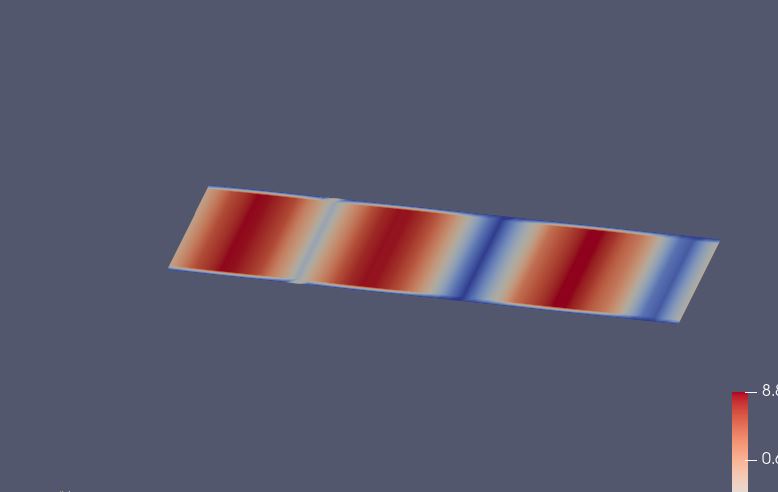
I’ve tried reading the online manual and skimming the FAQs, but I can’t figure out how to get the 3D visualization (2D/3D button does not do it).
Can someone tell me how to get a visualization like shown in the openEMS tutorial?
Thanks!
---
### Author:  [@davethomaspilot](https://discourse.paraview.org/u/davethomaspilot)
#### Post date: [October 26, 2022, 11:53am UTC](https://discourse.paraview.org/t/enable-3d-visualization-versus-coloring-only/10605/2 "2022-10-26T11:53:50Z")
Found a post where “warp by scalar” was suggested.
> [@Visualizing 2D image as a surface](https://discourse.paraview.org/t/visualizing-2d-image-as-a-surface/2282):
>
> Hello, I would like to know how to visualize a 2D matrix/array stored in a greyscale image file (e.g. tiff) as a surface in Paraview. This sounds straightforward, but just no tutorial to be found on this topic…Many thanks!
Couldn’t find that filter, but “Warp by Vector” seemed to work.
---
### Author:  [@Kenneth\_Moreland](https://discourse.paraview.org/u/Kenneth_Moreland)
#### Post date: [October 26, 2022, 12:28pm UTC](https://discourse.paraview.org/t/enable-3d-visualization-versus-coloring-only/10605/3 "2022-10-26T12:28:16Z")
> [@davethomaspilot](#):
>
> Couldn’t find that filter
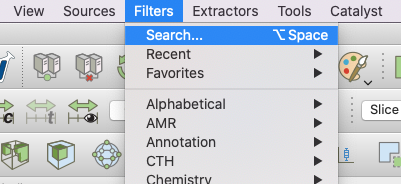
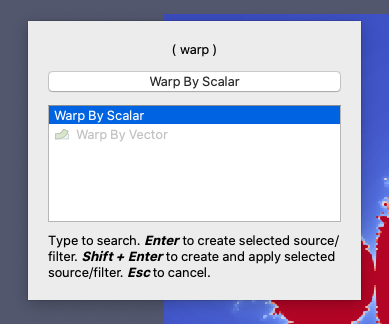
The easiest way to find a filter by name in ParaView is to use the filter search dialog. You can quickly get the dialog by hitting ctrl-space (or option-space on mac). You can also get to it from the `Filters` menu. Then just type part of the filter name.
---
### Author:  [@davethomaspilot](https://discourse.paraview.org/u/davethomaspilot)
#### Post date: [October 26, 2022, 1:04pm UTC](https://discourse.paraview.org/t/enable-3d-visualization-versus-coloring-only/10605/4 "2022-10-26T13:04:44Z")
Thanks!