# Enabling ray tracing with glyphs
**URL:** https://discourse.paraview.org/t/enabling-ray-tracing-with-glyphs/7603
**Category:** ParaView Support
**Created:** [July 13, 2021, 3:19pm UTC](https://discourse.paraview.org/t/enabling-ray-tracing-with-glyphs/7603 "2021-07-13T15:19:36Z")
**Posts on this page:** 7
**Page:** 1
### Author:  [@Miguel\_Angel\_Salazar](https://discourse.paraview.org/u/Miguel_Angel_Salazar)
#### Post date: [July 13, 2021, 3:19pm UTC](https://discourse.paraview.org/t/enabling-ray-tracing-with-glyphs/7603/1 "2021-07-13T15:19:36Z")
Whenever I click on “Enable Ray Tracing” and I have a Glyph object in my scene, a big object appears out of nowhere:
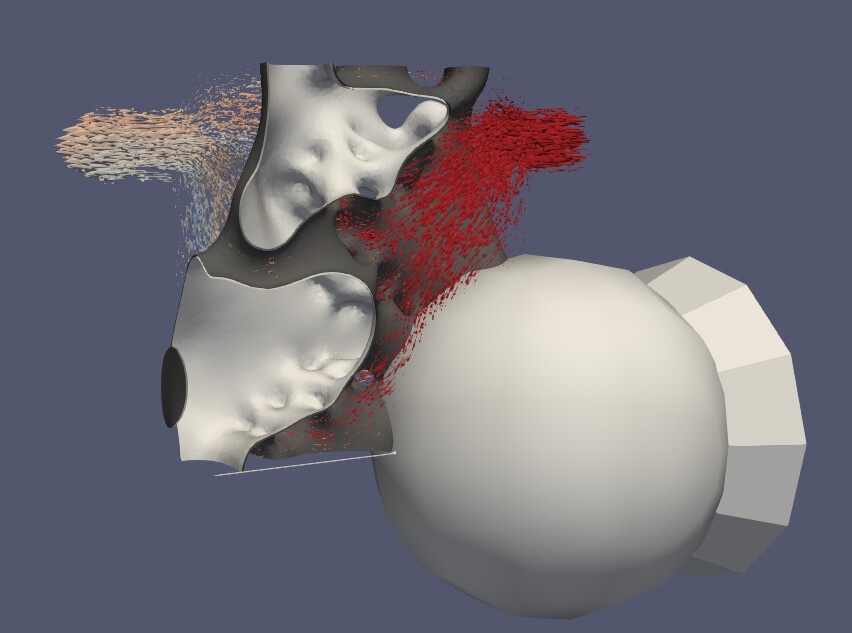
I am referring to the ball and the cone in the bottom left. Is this somehow a light used by the ray tracing? How can I make it invisible? Thanks.
---
### Author:  [@Dave\_DeMarle](https://discourse.paraview.org/u/Dave_DeMarle)
#### Post date: [July 13, 2021, 8:36pm UTC](https://discourse.paraview.org/t/enabling-ray-tracing-with-glyphs/7603/2 "2021-07-13T20:36:01Z")
This bug has to do with the vtk widgets that are placed into the scene that you normally use to do things like move a clipping plane or place a line segment or whatnot that the filters use. VTK’s interaction widgets are not hooked up correctly yet in many cases in the VTK/Renderering/RayTracing code path yet unfortunately and that causes bugs like this one.
You might try disabling the widgets in the properties tab. For instance the clip and slice filters have a “Show Plane” button on them. Note that there is a related bug where you may have to turn off the visibility before turning on ray tracing.
@utkarsh.ayachit - this is an example of what we were talking about the other day.
---
### Author:  [@Miguel\_Angel\_Salazar](https://discourse.paraview.org/u/Miguel_Angel_Salazar)
#### Post date: [July 19, 2021, 3:34pm UTC](https://discourse.paraview.org/t/enabling-ray-tracing-with-glyphs/7603/3 "2021-07-19T15:34:23Z")
Thanks for your response. I have a clip operation (box) that seems to be the source of the problem. However, disabling the widget (“Show Box”) does not make the artificial object go away. I have tried several combinations of turning off the visibility and the ray tracing, but none of them works. I am using paraview 5.8.0
---
### Author:  [@utkarsh.ayachit](https://discourse.paraview.org/u/utkarsh.ayachit)
#### Post date: [July 22, 2021, 2:10pm UTC](https://discourse.paraview.org/t/enabling-ray-tracing-with-glyphs/7603/4 "2021-07-22T14:10:14Z")
cc: @berkgeveci
---
### Author:  [@berkgeveci](https://discourse.paraview.org/u/berkgeveci)
#### Post date: [July 22, 2021, 2:59pm UTC](https://discourse.paraview.org/t/enabling-ray-tracing-with-glyphs/7603/5 "2021-07-22T14:59:23Z")
Can you provide data & steps to reproduce? I tried a few things but could not reproduce. Thanks.
---
### Author:  [@mwestphal](https://discourse.paraview.org/u/mwestphal)
#### Post date: [August 3, 2021, 10:12am UTC](https://discourse.paraview.org/t/enabling-ray-tracing-with-glyphs/7603/6 "2021-08-03T10:12:24Z")
FYI @timothee.chabat
---
### Author:  [@timothee.chabat](https://discourse.paraview.org/u/timothee.chabat)
#### Post date: [August 3, 2021, 12:12pm UTC](https://discourse.paraview.org/t/enabling-ray-tracing-with-glyphs/7603/7 "2021-08-03T12:12:10Z")
+1 same here, I also tried to reproduce with no success.