# Evenly Spaced Streamlines 2D filter - streamlines ending too soon
**URL:** https://discourse.paraview.org/t/evenly-spaced-streamlines-2d-filter-streamlines-ending-too-soon/8687
**Category:** ParaView Support
**Created:** [December 23, 2021, 3:52pm UTC](https://discourse.paraview.org/t/evenly-spaced-streamlines-2d-filter-streamlines-ending-too-soon/8687 "2021-12-23T15:52:18Z")
**Posts on this page:** 10
**Page:** 1
### Author:  [@FEngineer](https://discourse.paraview.org/u/FEngineer)
#### Post date: [December 23, 2021, 3:52pm UTC](https://discourse.paraview.org/t/evenly-spaced-streamlines-2d-filter-streamlines-ending-too-soon/8687/1 "2021-12-23T15:52:18Z")
Hi,
from what I’ve read, a regular Stream Tracer filter can’t generate streamlines on 2D slices and a special filter called Evenly Spaced Streamlines 2D has to be used. What’s more, that filter works only when the slice is in XY plane. In one of the previous threads, I’ve found a workaround and used it - creating a slice from 3D domain, saving it vtm file (File → Save Data), then opening in a new instance of ParaView and finally using the Transform filter to rotate the slice so that it lies in the XY plane. So far it all works well and I am able to apply the Evenly Spaced Streamlines 2D filter to that transformed slice. After a few adjustments, I get the desired distribution of streamlines. The only problem is that no matter how I change the parameters of that filter, the streamlines always end too soon, without reaching farther regions of the fluid domain.
Here’s how it looks like, including settings:
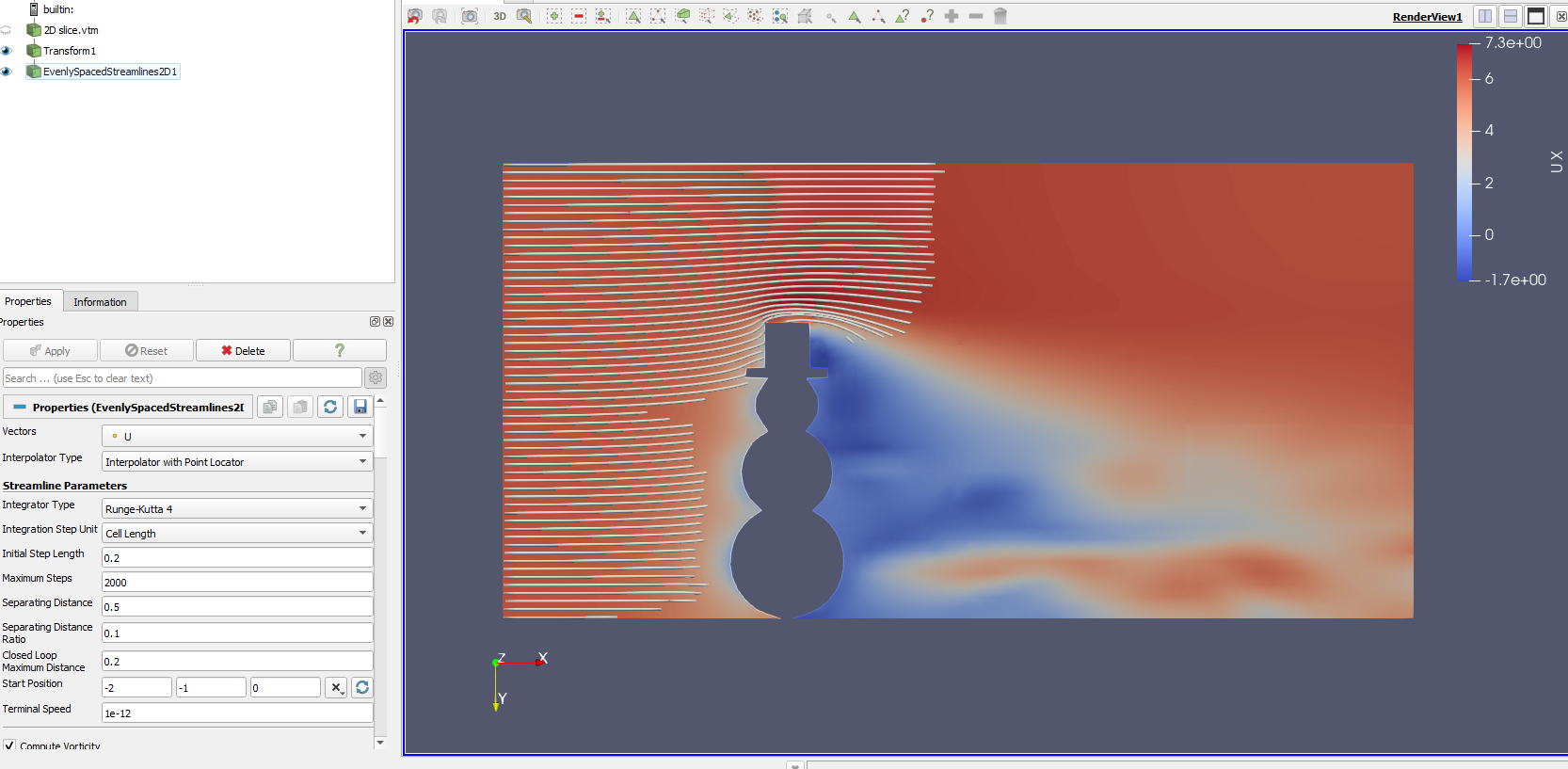
As you can see, the lower streamlines don’t even reach the object in the fluid domain while the upper ones pass it but end shortly after that.
The simulation is Christmas-themed by the way 😉
Do you know if anything can be done to make the streamlines propagate through the entire slice ?
---
### Author:  [@mwestphal](https://discourse.paraview.org/u/mwestphal)
#### Post date: [December 27, 2021, 10:00am UTC](https://discourse.paraview.org/t/evenly-spaced-streamlines-2d-filter-streamlines-ending-too-soon/8687/2 "2021-12-27T10:00:09Z")
is your slice actually on the XY plane ? If not, you can just use a calculator to force it.
---
### Author:  [@FEngineer](https://discourse.paraview.org/u/FEngineer)
#### Post date: [December 27, 2021, 12:12pm UTC](https://discourse.paraview.org/t/evenly-spaced-streamlines-2d-filter-streamlines-ending-too-soon/8687/3 "2021-12-27T12:12:36Z")
Thanks for the reply. Originally it was in the XZ plane but I managed to rotate it after export using the Transform filter. I didn’t know that this could be done with Calculator as well. But the result will likely be the same.
Do you know how to make the streamlines propagate farther on the slice ?
---
### Author:  [@mwestphal](https://discourse.paraview.org/u/mwestphal)
#### Post date: [December 27, 2021, 1:06pm UTC](https://discourse.paraview.org/t/evenly-spaced-streamlines-2d-filter-streamlines-ending-too-soon/8687/4 "2021-12-27T13:06:55Z")
> [@FEngineer](#):
>
> Thanks for the reply. Originally it was in the XZ plane but I managed to rotate it after export using the Transform filter. I didn’t know that this could be done with Calculator as well. But the result will likely be the same.
No, you use both. Transform to orien the slice correctly and calculator to remove the small approx error that may cause the streamlines to stop.
> Do you know how to make the streamlines propagate farther on the slice ?
Your slice may not be aligned perfectly with the plane, check the values in the spreadsheet.
---
### Author:  [@jaswantp](https://discourse.paraview.org/u/jaswantp)
#### Post date: [January 17, 2022, 4:21pm UTC](https://discourse.paraview.org/t/evenly-spaced-streamlines-2d-filter-streamlines-ending-too-soon/8687/5 "2022-01-17T16:21:13Z")
As @mwestphal said, you have to use both.
Rotate it to XY plane → Enforce z = 0.0 by chaining these filters Transform → Calculator.
I’ve seen that filter stop abruptly due to minor z fluctuations. This is because the z gradient is non-zero.
---
### Author:  [@fra](https://discourse.paraview.org/u/fra)
#### Post date: [July 6, 2022, 9:58am UTC](https://discourse.paraview.org/t/evenly-spaced-streamlines-2d-filter-streamlines-ending-too-soon/8687/6 "2022-07-06T09:58:53Z")
Hi!
Sorry to revive an old thread. How do you mean exactly by using the Calculator to enforce z=0?
---
### Author:  [@jaswantp](https://discourse.paraview.org/u/jaswantp)
#### Post date: [July 6, 2022, 4:22pm UTC](https://discourse.paraview.org/t/evenly-spaced-streamlines-2d-filter-streamlines-ending-too-soon/8687/7 "2022-07-06T16:22:27Z")
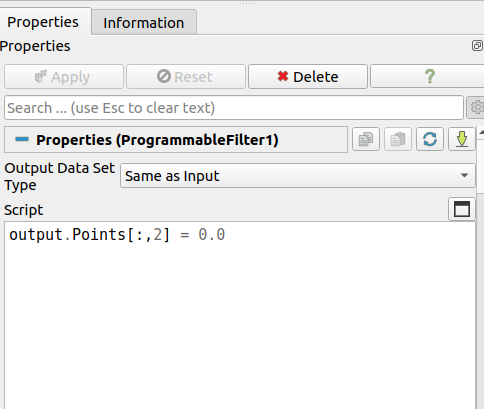
Hey, sorry I made a mistake, don’t use the Calculator. Instead, use a Programmable Filter like this.
---
### Author:  [@fra](https://discourse.paraview.org/u/fra)
#### Post date: [July 6, 2022, 4:29pm UTC](https://discourse.paraview.org/t/evenly-spaced-streamlines-2d-filter-streamlines-ending-too-soon/8687/8 "2022-07-06T16:29:29Z")
Aaah, simple and clean. This works. Thanks!
---
### Author:  [@mwestphal](https://discourse.paraview.org/u/mwestphal)
#### Post date: [July 7, 2022, 12:45pm UTC](https://discourse.paraview.org/t/evenly-spaced-streamlines-2d-filter-streamlines-ending-too-soon/8687/9 "2022-07-07T12:45:25Z")
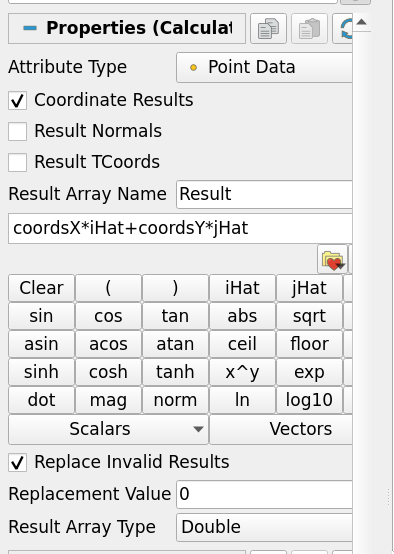
Calculator can be used like this:
---
### Author:  [@Il\_Briga](https://discourse.paraview.org/u/Il_Briga)
#### Post date: [February 7, 2026, 10:04am UTC](https://discourse.paraview.org/t/evenly-spaced-streamlines-2d-filter-streamlines-ending-too-soon/8687/10 "2026-02-07T10:04:38Z")
Hello there,
As i have reported [here](https://discourse.paraview.org/t/tutorial-streamlines-on-a-2d-slice-using-only-stream-tracer-filter/17435), Stream Tracer is actually able to track streamlines on a slice extracted from a 3D fluid domain.
Follow my very brief tutorial to know how to do it!