# Example on how to use proxies
**URL:** https://discourse.paraview.org/t/example-on-how-to-use-proxies/13902
**Category:** Development
**Created:** [February 9, 2024, 8:12am UTC](https://discourse.paraview.org/t/example-on-how-to-use-proxies/13902 "2024-02-09T08:12:44Z")
**Posts on this page:** 13
**Page:** 1
### Author:  [@joint](https://discourse.paraview.org/u/joint)
#### Post date: [February 9, 2024, 8:12am UTC](https://discourse.paraview.org/t/example-on-how-to-use-proxies/13902/1 "2024-02-09T08:12:44Z")
Hello, dear Paraview developers!
Could you please give me an example on how to use proxies from C++ to manipulate vtk objects?
I was not able to find a credible and simple example
Best regards,
Mike
---
### Author:  [@mwestphal](https://discourse.paraview.org/u/mwestphal)
#### Post date: [February 9, 2024, 8:37am UTC](https://discourse.paraview.org/t/example-on-how-to-use-proxies/13902/2 "2024-02-09T08:37:03Z")
Proxies are generally created using `pqObjectBuilder::createProxy`
[https://kitware.github.io/paraview-docs/latest/cxx/classpqObjectBuilder.html#afb38d983a5f90ee0cb9b26656fbb77f0](https://kitware.github.io/paraview-docs/latest/cxx/classpqObjectBuilder.html#afb38d983a5f90ee0cb9b26656fbb77f0)
---
### Author:  [@joint](https://discourse.paraview.org/u/joint)
#### Post date: [February 9, 2024, 8:40am UTC](https://discourse.paraview.org/t/example-on-how-to-use-proxies/13902/3 "2024-02-09T08:40:13Z")
Could you clarify please, what should one specify for the parameters of createProxy?
An example would help a lot
---
### Author:  [@mwestphal](https://discourse.paraview.org/u/mwestphal)
#### Post date: [February 9, 2024, 8:42am UTC](https://discourse.paraview.org/t/example-on-how-to-use-proxies/13902/4 "2024-02-09T08:42:16Z")
creating a sphere source proxy:
```auto
pqServer* server = pqActiveObject::instance().activeServer();
pqObjectBuilder::createProxy("sources", "SphereSource", server, "Sphere1");
```
---
### Author:  [@joint](https://discourse.paraview.org/u/joint)
#### Post date: [February 9, 2024, 9:28am UTC](https://discourse.paraview.org/t/example-on-how-to-use-proxies/13902/5 "2024-02-09T09:28:39Z")
```auto
pqServer* server = pqActiveObjects::instance().activeServer();
pqObjectBuilder builder = pqObjectBuilder(nullptr);
vtkSMProxy * sphere_proxy = builder.createProxy("sources", "SphereSource", server, "Sphere1");
vtkSMProperty* radius = sphere_proxy->GetProperty("Radius");
//How to set the value?
//How to actually create the sphere?
sphere_proxy->UpdateVTKObjects();
```
Mathieu, I still don’t get how to make use of it, could you help me please
---
### Author:  [@mwestphal](https://discourse.paraview.org/u/mwestphal)
#### Post date: [February 9, 2024, 9:33am UTC](https://discourse.paraview.org/t/example-on-how-to-use-proxies/13902/6 "2024-02-09T09:33:58Z")
```auto
pqServer* server = pqActiveObjects::instance().activeServer();
const auto* builder = pqApplicationCore::instance()->getObjectBuilder();
vtkSMProxy * sphere_proxy = builder.createProxy("sources", "SphereSource", server, "Sphere1");
vtkSMPropertyHelper(sphere_proxy, "radius").Set(20);
pqPVApplicationCore::applyPipeline();
```
Do not hesitate to look at paraview source code for that or to consider joining a ParaView advanced course.
---
### Author:  [@joint](https://discourse.paraview.org/u/joint)
#### Post date: [February 9, 2024, 10:13am UTC](https://discourse.paraview.org/t/example-on-how-to-use-proxies/13902/7 "2024-02-09T10:13:59Z")
I use an older version of paraview and I dont have applyPipeline, so I have tried
```auto
pqServer* server = pqActiveObjects::instance().activeServer();
pqObjectBuilder* builder = pqApplicationCore::instance()->getObjectBuilder();
vtkSMProxy* sphere_proxy = builder->createProxy("sources", "SphereSource", server, "Sphere1");
vtkSMPropertyHelper(sphere_proxy, "radius").Set(20);
//pqPVApplicationCore::applyPipeline();
sphere_proxy->UpdateVTKObjects();
```
But it has not worked, what could be wrong?
---
### Author:  [@mwestphal](https://discourse.paraview.org/u/mwestphal)
#### Post date: [February 9, 2024, 10:19am UTC](https://discourse.paraview.org/t/example-on-how-to-use-proxies/13902/8 "2024-02-09T10:19:11Z")
> [@joint](#):
>
> But it has not worked,
what did not work ?
In any case, here is how to “Apply” with older version of ParaView:
```auto
pqServer* server = pqActiveObjects::instance().activeServer();
const auto* builder = pqApplicationCore::instance()->getObjectBuilder();
pqPipelineSource* source = builder.createSource("sources", "SphereSource", server);
proxy = source->getProxy();
vtkSMPropertyHelper(proxy, "radius").Set(20);
proxy->UpdateVTKObjects();
source->updatePipeline();
source->setModifiedState(pqProxy::UNMODIFIED);
```
---
### Author:  [@joint](https://discourse.paraview.org/u/joint)
#### Post date: [February 9, 2024, 11:11am UTC](https://discourse.paraview.org/t/example-on-how-to-use-proxies/13902/9 "2024-02-09T11:11:06Z")
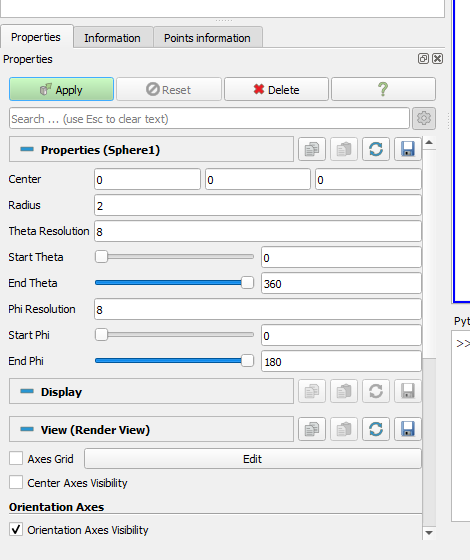
Mathieu, it creates a menu, with an Apply button to click
Could this be achieved without creating any menus?
---
### Author:  [@mwestphal](https://discourse.paraview.org/u/mwestphal)
#### Post date: [February 9, 2024, 11:12am UTC](https://discourse.paraview.org/t/example-on-how-to-use-proxies/13902/10 "2024-02-09T11:12:11Z")
> [@joint](#):
>
> it creates a menu, with an Apply button to click
Do you mean that it create a source that is visible in the pipeline ?
Yes, this is what it does. You do not want that ?
---
### Author:  [@joint](https://discourse.paraview.org/u/joint)
#### Post date: [February 9, 2024, 11:17am UTC](https://discourse.paraview.org/t/example-on-how-to-use-proxies/13902/11 "2024-02-09T11:17:14Z")
I would like to skip the user interface and have a sphere created with C++ code only, without any user interface actions
---
### Author:  [@mwestphal](https://discourse.paraview.org/u/mwestphal)
#### Post date: [February 9, 2024, 1:18pm UTC](https://discourse.paraview.org/t/example-on-how-to-use-proxies/13902/12 "2024-02-09T13:18:41Z")
` source->setModifiedState(pqProxy::UNMODIFIED);` should take care of that.
---
### Author:  [@joint](https://discourse.paraview.org/u/joint)
#### Post date: [February 9, 2024, 1:51pm UTC](https://discourse.paraview.org/t/example-on-how-to-use-proxies/13902/13 "2024-02-09T13:51:52Z")
With this line of code I have the picture on the screenshot above