# Executing custom applications examples
**URL:** https://discourse.paraview.org/t/executing-custom-applications-examples/3015
**Category:** Development
**Created:** [November 21, 2019, 12:35am UTC](https://discourse.paraview.org/t/executing-custom-applications-examples/3015 "2019-11-21T00:35:23Z")
**Posts on this page:** 13
**Page:** 1
### Author:  [@maria\_vlas](https://discourse.paraview.org/u/maria_vlas)
#### Post date: [November 21, 2019, 12:35am UTC](https://discourse.paraview.org/t/executing-custom-applications-examples/3015/1 "2019-11-21T00:35:23Z")
I’m researching making a Qt-based desktop application to use Paraview framework and make a simpler ParaView GUI. The documentation says that there are some examples here
[https://gitlab.kitware.com/paraview/paraview/tree/master/Examples/CustomApplications](https://gitlab.kitware.com/paraview/paraview/tree/master/Examples/CustomApplications)
But are there any indications on how to execute this example?
---
### Author:  [@nicolas.vuaille](https://discourse.paraview.org/u/nicolas.vuaille)
#### Post date: [November 21, 2019, 9:06am UTC](https://discourse.paraview.org/t/executing-custom-applications-examples/3015/2 "2019-11-21T09:06:52Z")
First, you need to build ParaView.
Then, choose one of the subfolder you points out: there all are independent examples. Build it in a new build directory. You will need to specify the path to the ParaView build directory in CMake with `ParaView_DIR` .
---
### Author:  [@maria\_vlas](https://discourse.paraview.org/u/maria_vlas)
#### Post date: [November 21, 2019, 9:17am UTC](https://discourse.paraview.org/t/executing-custom-applications-examples/3015/3 "2019-11-21T09:17:45Z")
Okay, thanks!
I have download and install Paraview app 5.7, do I still need to build ParaView?
---
### Author:  [@nicolas.vuaille](https://discourse.paraview.org/u/nicolas.vuaille)
#### Post date: [November 21, 2019, 9:20am UTC](https://discourse.paraview.org/t/executing-custom-applications-examples/3015/4 "2019-11-21T09:20:03Z")
Yes you still need to build it. Because your custom app will include header files that are not present in the distributed binaries.
---
### Author:  [@maria\_vlas](https://discourse.paraview.org/u/maria_vlas)
#### Post date: [November 23, 2019, 9:42pm UTC](https://discourse.paraview.org/t/executing-custom-applications-examples/3015/5 "2019-11-23T21:42:04Z")
> [@nicolas.vuaille](#):
>
> You will need to specify the path to the ParaView build directory in CMake with `ParaView_DIR`
I’m a little lost here.
I have the fallowing structure
```auto
dev
|- pv
| |- build
| |- paraview-superbuild
|
|
|- qt-examples
|- one
|- build
|- Clone1
```
i tried adding `set(ParaView_DIR /Users/username/Desktop/dev/pv/build)` at the beggining of `CMakeLists.txt` of `Clone1` and then I executeed `cmake ../Clone1` from the `build` folder.
And got
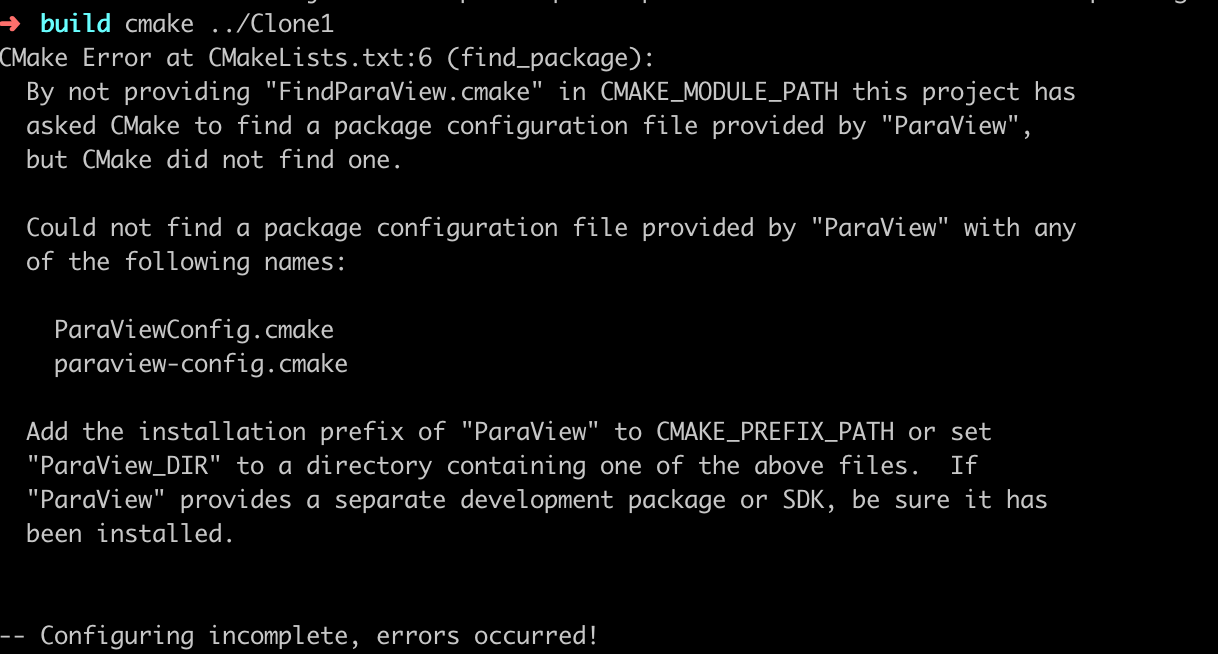
What I am missing? Where are those file?
Thanks!
---
### Author:  [@nicolas.vuaille](https://discourse.paraview.org/u/nicolas.vuaille)
#### Post date: [November 25, 2019, 1:47pm UTC](https://discourse.paraview.org/t/executing-custom-applications-examples/3015/6 "2019-11-25T13:47:32Z")
As you use the Superbuild, `ParaView_DIR` must point to your install directory. By default, it is in `build` and in your case (if you did not specify another install directory), it should be something like `/Users/username/Desktop/dev/pv/build/install`
Also note that modifying CMakeLists.txt is not the prefered way to set options. On command line, add
`-DParaView_DIR=/Users/username/Desktop/dev/pv/build/install`
On gui, click on `add entry` button.
---
### Author:  [@maria\_vlas](https://discourse.paraview.org/u/maria_vlas)
#### Post date: [November 25, 2019, 2:11pm UTC](https://discourse.paraview.org/t/executing-custom-applications-examples/3015/7 "2019-11-25T14:11:30Z")
Okay! Thanks for the replay!
I do have the build at `/Users/username/Desktop/dev/pv/build/install`
Now, on the command line, in the `qt-examples/one/build` directory if I execute `-DParaView_DIR=/Users/username/Desktop/dev/pv/build/install` I got
`zsh: no such file or directory: -DParaView_DIR=/Users/username/Desktop/dev/pv/build/install`
You know what can be?
---
### Author:  [@nicolas.vuaille](https://discourse.paraview.org/u/nicolas.vuaille)
#### Post date: [November 25, 2019, 2:14pm UTC](https://discourse.paraview.org/t/executing-custom-applications-examples/3015/8 "2019-11-25T14:14:25Z")
How do you run cmake ?
---
### Author:  [@maria\_vlas](https://discourse.paraview.org/u/maria_vlas)
#### Post date: [November 25, 2019, 2:19pm UTC](https://discourse.paraview.org/t/executing-custom-applications-examples/3015/9 "2019-11-25T14:19:57Z")
Yes, I tried `cmake -DParaView_DIR=/Users/username/Desktop/dev/pv/build/install ../Clone1` and got the same message the screenshot above shows.
---
### Author:  [@nicolas.vuaille](https://discourse.paraview.org/u/nicolas.vuaille)
#### Post date: [November 25, 2019, 2:24pm UTC](https://discourse.paraview.org/t/executing-custom-applications-examples/3015/10 "2019-11-25T14:24:18Z")
Is there a `paraview-config.cmake` or `ParaViewConfig.cmake` somewhere in your install directory (and subdirectories) ? Where ?
---
### Author:  [@maria\_vlas](https://discourse.paraview.org/u/maria_vlas)
#### Post date: [November 25, 2019, 2:29pm UTC](https://discourse.paraview.org/t/executing-custom-applications-examples/3015/11 "2019-11-25T14:29:06Z")
There are `paraview-config.cmake` files at
```auto
/Users/username/Desktop/dev/pv/build/superbuild/paraview/build/paraview-config.cmake
/Users/username/Desktop/dev/pv/build/superbuild/paraview/build/lib/cmake/paraview-5.7/paraview-config.cmake
/Users/username/Desktop/dev/pv/build/install/lib/cmake/paraview-5.7/paraview-config.cmake
```
I executed
`cmake -D ParaView_DIR=/Users/username/Desktop/dev/pv/build/install/lib/cmake/paraview-5.7 ../Clone1`

It seems to have worked but `make` command does nothing? 🤔
---
### Author:  [@maria\_vlas](https://discourse.paraview.org/u/maria_vlas)
#### Post date: [November 25, 2019, 3:23pm UTC](https://discourse.paraview.org/t/executing-custom-applications-examples/3015/12 "2019-11-25T15:23:20Z")
I also tried to enable `PARAVIEW_BUILD_QT_GUI`
```auto
cd /Users/username/Desktop/dev/pv/build
ccmake ../paraview-superbuild
```
But I don’t find that variable. Is that correct?
---
### Author:  [@nicolas.vuaille](https://discourse.paraview.org/u/nicolas.vuaille)
#### Post date: [November 26, 2019, 9:17am UTC](https://discourse.paraview.org/t/executing-custom-applications-examples/3015/13 "2019-11-26T09:17:19Z")
> [@maria\_vlas](#):
>
> I also tried to enable `PARAVIEW_BUILD_QT_GUI`
Indeed, you need this option. But it is an option of the ParaView project and not the Superbuild on.
In the superbuild, the variable you are looking for is `ENABLE_qt5`. By the way, take a look at each `ENABLE_XXXX` variables, they mostly are to OFF. But you may want to activate python or some other.