# Export vtk to gltf or other format compatible with AR
**URL:** https://discourse.paraview.org/t/export-vtk-to-gltf-or-other-format-compatible-with-ar/1677
**Category:** ParaView Support
**Tags:** vr
**Created:** [April 16, 2019, 1:42pm UTC](https://discourse.paraview.org/t/export-vtk-to-gltf-or-other-format-compatible-with-ar/1677 "2019-04-16T13:42:10Z")
**Posts on this page:** 11
**Page:** 1
### Author:  [@lorak41](https://discourse.paraview.org/u/lorak41)
#### Post date: [April 16, 2019, 1:42pm UTC](https://discourse.paraview.org/t/export-vtk-to-gltf-or-other-format-compatible-with-ar/1677/1 "2019-04-16T13:42:11Z")
Hi,
I am looking for a reliable solution to export datasets to some Augmented Reality environment.
Is it possible to export from paraview to gltf format? Will this preserve Color Maps?
I also tried using blender and then export to gltf or pod, but none of those preserve any material/color\_map properties. Anyone tried to tackle this problem before?
I would be grateful for any help.
---
### Author:  [@mwestphal](https://discourse.paraview.org/u/mwestphal)
#### Post date: [April 16, 2019, 2:03pm UTC](https://discourse.paraview.org/t/export-vtk-to-gltf-or-other-format-compatible-with-ar/1677/2 "2019-04-16T14:03:45Z")
gltf export does not yet support color map afaik.
@martink
---
### Author:  [@martink](https://discourse.paraview.org/u/martink)
#### Post date: [April 16, 2019, 7:42pm UTC](https://discourse.paraview.org/t/export-vtk-to-gltf-or-other-format-compatible-with-ar/1677/3 "2019-04-16T19:42:17Z")
I believe the current gltf exporter does export the colormap. Most of the web based gltf viewers seem to have a bug in them where if the data is inline, they fail to properly handle the texture, but they do handle it correctly when the data is not inline.
---
### Author:  [@lorak41](https://discourse.paraview.org/u/lorak41)
#### Post date: [May 24, 2019, 11:29am UTC](https://discourse.paraview.org/t/export-vtk-to-gltf-or-other-format-compatible-with-ar/1677/4 "2019-05-24T11:29:38Z")
How to use this gltf exporter?
---
### Author:  [@mwestphal](https://discourse.paraview.org/u/mwestphal)
#### Post date: [May 24, 2019, 11:36am UTC](https://discourse.paraview.org/t/export-vtk-to-gltf-or-other-format-compatible-with-ar/1677/5 "2019-05-24T11:36:34Z")
File -\> Export Scene
---
### Author:  [@lorak41](https://discourse.paraview.org/u/lorak41)
#### Post date: [May 24, 2019, 11:39am UTC](https://discourse.paraview.org/t/export-vtk-to-gltf-or-other-format-compatible-with-ar/1677/6 "2019-05-24T11:39:05Z")
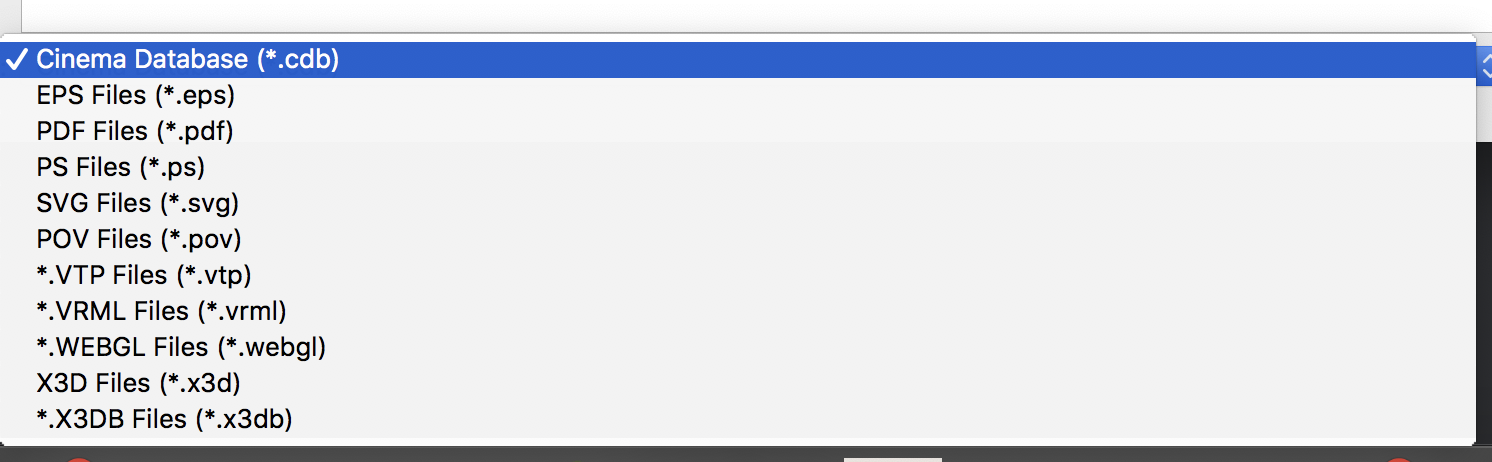
There is no such option on macOS ☹
---
### Author:  [@mwestphal](https://discourse.paraview.org/u/mwestphal)
#### Post date: [May 24, 2019, 11:41am UTC](https://discourse.paraview.org/t/export-vtk-to-gltf-or-other-format-compatible-with-ar/1677/7 "2019-05-24T11:41:05Z")
Which version of ParaView are you using ?
---
### Author:  [@lorak41](https://discourse.paraview.org/u/lorak41)
#### Post date: [May 24, 2019, 11:56am UTC](https://discourse.paraview.org/t/export-vtk-to-gltf-or-other-format-compatible-with-ar/1677/8 "2019-05-24T11:56:33Z")
5.6.0
---
### Author:  [@mwestphal](https://discourse.paraview.org/u/mwestphal)
#### Post date: [May 24, 2019, 11:57am UTC](https://discourse.paraview.org/t/export-vtk-to-gltf-or-other-format-compatible-with-ar/1677/9 "2019-05-24T11:57:36Z")
the gltf exporter is not in the release yet. You may want to use the nightly release.
---
### Author:  [@lorak41](https://discourse.paraview.org/u/lorak41)
#### Post date: [August 14, 2019, 3:40pm UTC](https://discourse.paraview.org/t/export-vtk-to-gltf-or-other-format-compatible-with-ar/1677/10 "2019-08-14T15:40:26Z")
Still being in the context of exporting 3D models to VR, is it possible in Paraview to unwrap the surface and save the color map as a texture (jpg, png)?
---
### Author:  [@martink](https://discourse.paraview.org/u/martink)
#### Post date: [September 26, 2019, 2:25pm UTC](https://discourse.paraview.org/t/export-vtk-to-gltf-or-other-format-compatible-with-ar/1677/11 "2019-09-26T14:25:06Z")
By default the gltf exporter does this. Assuming you have “Interpolate Scalars Before Coloring” on and the type of data supports it.