# Exporting a vtk file to vtkjs
**URL:** https://discourse.paraview.org/t/exporting-a-vtk-file-to-vtkjs/12613
**Category:** Web Support
**Created:** [August 1, 2023, 4:24am UTC](https://discourse.paraview.org/t/exporting-a-vtk-file-to-vtkjs/12613 "2023-08-01T04:24:52Z")
**Posts on this page:** 9
**Page:** 1
### Author:  [@WarinSpace\_Game](https://discourse.paraview.org/u/WarinSpace_Game)
#### Post date: [August 1, 2023, 4:24am UTC](https://discourse.paraview.org/t/exporting-a-vtk-file-to-vtkjs/12613/1 "2023-08-01T04:24:52Z")
I’m able to load a `.vtk` file using the Python `vtk` library and view it on a little window (i.e., I can confirm the import works correctly), but how exactly may I export it to a `.vtkjs` file? Couldn’t find much in the docs.
In ParaView I can do this by simply opening the file and then going to **File** → **Export** → `.vtkjs` extension.
Here’s the file: [pattern.vtk](https://discourse.paraview.org/uploads/short-url/vooXl2VhYRhnfEpilKaLjsc1U7D.vtk) (437.9 KB)
```python
import vtk
# Create a reader for your input file
reader = vtk.vtkStructuredGridReader()
reader.SetFileName("pattern.vtk")
reader.Update()
# Create a mapper
mapper = vtk.vtkDataSetMapper()
mapper.SetInputConnection(reader.GetOutputPort())
# Create an actor
actor = vtk.vtkActor()
actor.SetMapper(mapper)
# Create a rendering window and renderer
renderer = vtk.vtkRenderer()
renderer.SetBackground(1, 1, 1) # Set background color to white
renderWindow = vtk.vtkRenderWindow()
renderWindow.SetSize(500, 500) # Set window size
renderWindow.AddRenderer(renderer)
# Assign actor to the renderer
renderer.AddActor(actor)
# Reset camera and zoom in a little
renderer.ResetCamera()
renderer.GetActiveCamera().Zoom(1.5)
# Create a renderwindowinteractor
interactor = vtk.vtkRenderWindowInteractor()
interactor.SetRenderWindow(renderWindow)
# Enable user interface interactor
interactor.Initialize()
renderWindow.Render()
interactor.Start()
```
(Happy to use PyVista in case that makes things easier)
Thanks a lot!
---
### Author:  [@jourdain](https://discourse.paraview.org/u/jourdain)
#### Post date: [August 1, 2023, 4:12pm UTC](https://discourse.paraview.org/t/exporting-a-vtk-file-to-vtkjs/12613/2 "2023-08-01T16:12:54Z")
Are you sure you want a .vtkjs? Looking at your data, it seems to be a surface mesh so extracting the surface to generate a polydata and saving it as a vtp would allow vtk.js to read it back and render it.
The .vtkjs format is capturing the full scene, not just the data.

Otherwise, ParaView is using the `vtkJSONSceneExporter` under the cover to generate that vtkjs export.
---
### Author:  [@WarinSpace\_Game](https://discourse.paraview.org/u/WarinSpace_Game)
#### Post date: [August 3, 2023, 2:54am UTC](https://discourse.paraview.org/t/exporting-a-vtk-file-to-vtkjs/12613/3 "2023-08-03T02:54:52Z")
Exporting to a VTP works great, but for some reason it seems to create a small artifact when running on a headless server:
```python
from vtk import (vtkAppendFilter, vtkDataSetSurfaceFilter,
vtkStructuredGridReader, vtkXMLPolyDataWriter)
# Read VTK
reader = vtkStructuredGridReader()
reader.SetFileName('pattern.vtk') # replace with your filename
reader.Update()
# Convert structured grid to unstructured grid
append_filter = vtkAppendFilter()
append_filter.AddInputData(reader.GetOutput())
append_filter.Update()
# Extract surface
surface_filter = vtkDataSetSurfaceFilter()
surface_filter.SetInputConnection(append_filter.GetOutputPort())
surface_filter.Update()
# Save output to a VTP file
writer = vtkXMLPolyDataWriter()
writer.SetFileName("pattern.vtp")
writer.SetInputData(surface_filter.GetOutput())
writer.Write()
```
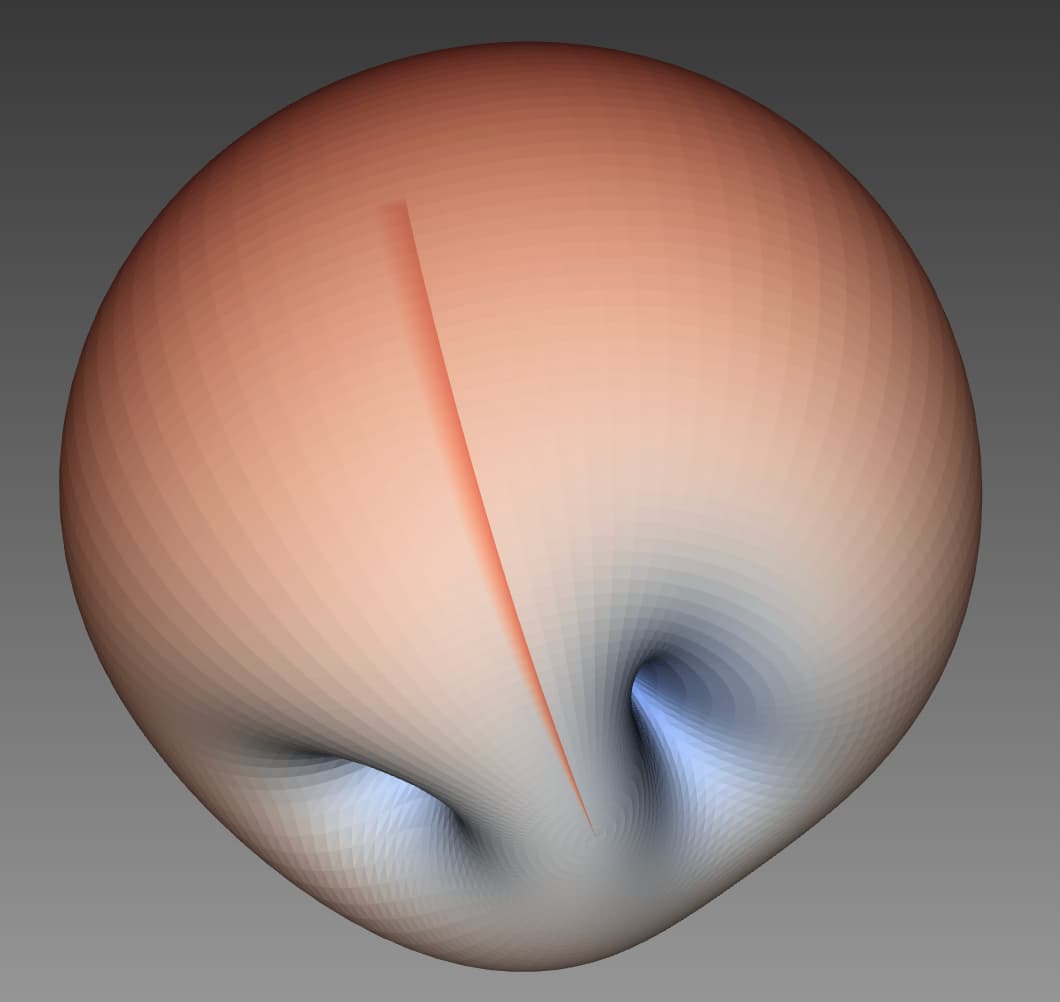
On my laptop, it works perfectly fine, but for some reason when the code runs on a headless server it creates this odd line, seemingly around 360 deg (this is a spherical plot):
---
### Author:  [@jourdain](https://discourse.paraview.org/u/jourdain)
#### Post date: [August 3, 2023, 3:11pm UTC](https://discourse.paraview.org/t/exporting-a-vtk-file-to-vtkjs/12613/4 "2023-08-03T15:11:13Z")
Not sure why, but you should not need the `vtkAppendFilter`.
Actually the issue might come from duplicate points. Try adding `vtkCleanPolyData`
```python
# Read VTK
reader = vtkStructuredGridReader()
reader.SetFileName('pattern.vtk') # replace with your filename
# Extract surface
surface_filter = vtkDataSetSurfaceFilter()
surface_filter.SetInputConnection(reader.GetOutputPort())
clean_filter = vtkCleanPolyData()
clean_filter.SetInputConnection(surface_filter.GetOutputPort())
# Save output to a VTP file
writer = vtkXMLPolyDataWriter()
writer.SetFileName("pattern.vtp")
writer.SetInputConnection(clean_filter.GetOutputPort())
writer.Write()
```
---
### Author:  [@WarinSpace\_Game](https://discourse.paraview.org/u/WarinSpace_Game)
#### Post date: [August 4, 2023, 1:48am UTC](https://discourse.paraview.org/t/exporting-a-vtk-file-to-vtkjs/12613/5 "2023-08-04T01:48:38Z")
Looks like the artifact remains. 😕
In case it helps debug the problem: [bad\_pattern.vtp](https://discourse.paraview.org/uploads/short-url/1Clbn75ocnypgvyWzdYhztb86YC.vtp) (373.4 KB)
---
### Author:  [@jourdain](https://discourse.paraview.org/u/jourdain)
#### Post date: [August 4, 2023, 4:18pm UTC](https://discourse.paraview.org/t/exporting-a-vtk-file-to-vtkjs/12613/6 "2023-08-04T16:18:46Z")
Are you sure about your data to actually match at the seam? Unless there is overlap?
---
### Author:  [@WarinSpace\_Game](https://discourse.paraview.org/u/WarinSpace_Game)
#### Post date: [August 4, 2023, 8:07pm UTC](https://discourse.paraview.org/t/exporting-a-vtk-file-to-vtkjs/12613/7 "2023-08-04T20:07:34Z")
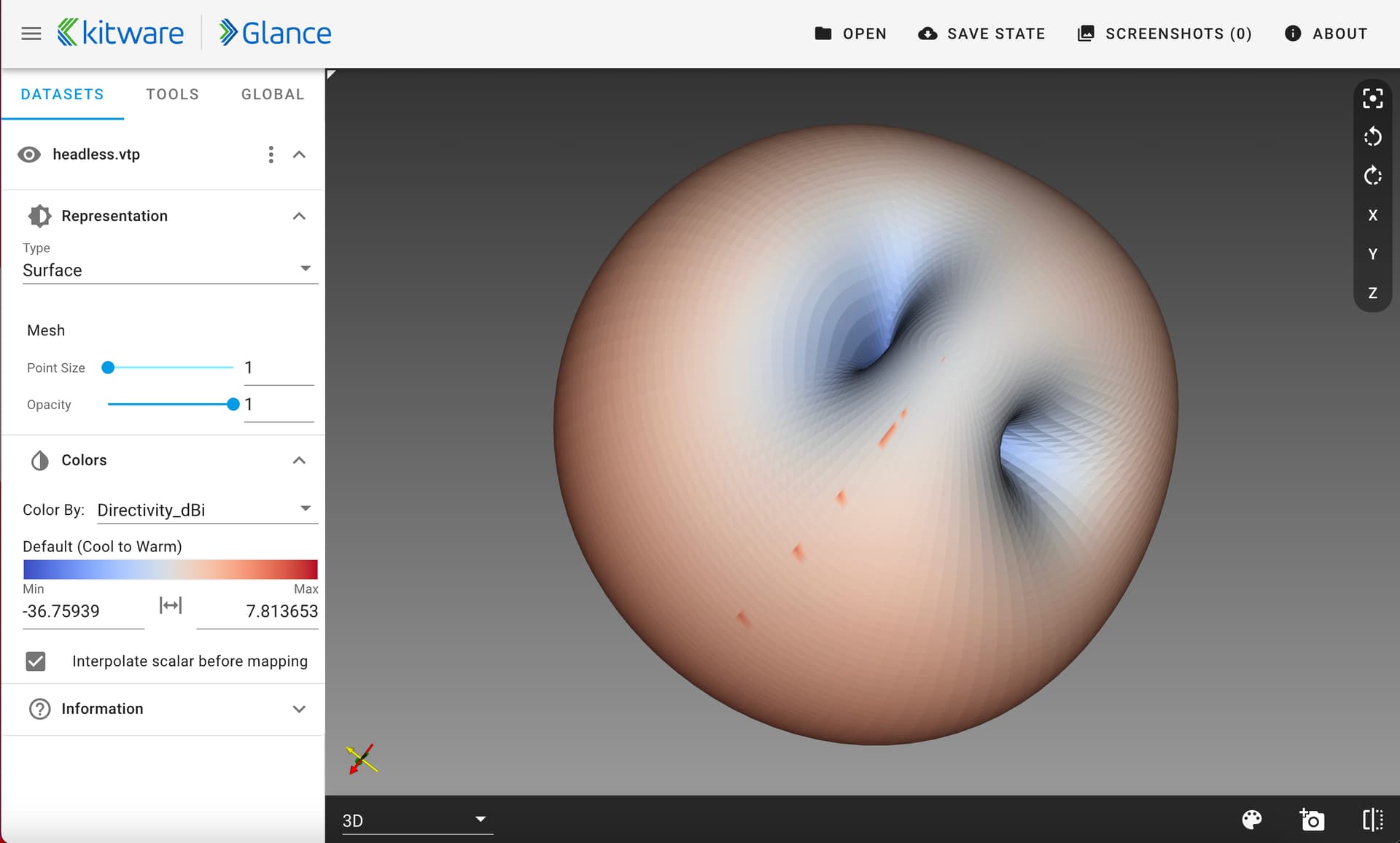
Yeah, because the artifact only occurs when running the script on the headless server (works normally on my laptop).
Here’s a concrete example…
**VTK input:** [test.vtk](https://discourse.paraview.org/uploads/short-url/xUCxA5SrkcgUBd4KckEW8AbMPWF.vtk) (439.8 KB)

* * *
**Output by headless server:** [headless.vtp](https://discourse.paraview.org/uploads/short-url/lMXrivrWsaopcumlX4Xq0fltAzi.vtp) (343.5 KB)
* * *
**Output by my laptop:** [laptop.vtp](https://discourse.paraview.org/uploads/short-url/6aZnboftuSIByKZ7fYnujrjhoT4.vtp) (343.5 KB)

* * *
The artifact clearly only shows up when ran from the headless server for some reason.
---
### Author:  [@jourdain](https://discourse.paraview.org/u/jourdain)
#### Post date: [August 4, 2023, 10:12pm UTC](https://discourse.paraview.org/t/exporting-a-vtk-file-to-vtkjs/12613/8 "2023-08-04T22:12:31Z")
This is really strange as this is just data processing. Are you sure, you are using the same version (not the rendering part but the version of the code 9.2) of VTK between your two machines?
---
### Author:  [@WarinSpace\_Game](https://discourse.paraview.org/u/WarinSpace_Game)
#### Post date: [August 4, 2023, 11:09pm UTC](https://discourse.paraview.org/t/exporting-a-vtk-file-to-vtkjs/12613/9 "2023-08-04T23:09:35Z")
~~Good call! I thought I had the same version, but apparently the server one (running on arm64) used `osmesa`. After installing this one though ([Release vtk-9.2.6.dev0-cp310-cp310-linux\_aarch64 · finsberg/vtk-aarch64 · GitHub](https://github.com/finsberg/vtk-aarch64/releases/tag/vtk-9.2.6-cp310)), it works perfectly!~~
**Edit:** actually, that wasn’t it… After re-installing, I got the same issue, but I noticed I added an extra indentation causing the VTP generation to occur while the VTK file was being written (or something like that). That seems to be it rather than the different build. In any case, works now! 🙏