# Extract Time Steps from Point Data
**URL:** https://discourse.paraview.org/t/extract-time-steps-from-point-data/4343
**Category:** ParaView Support
**Created:** [May 16, 2020, 1:28am UTC](https://discourse.paraview.org/t/extract-time-steps-from-point-data/4343 "2020-05-16T01:28:10Z")
**Posts on this page:** 6
**Page:** 1
### Author:  [@amarcozzi11](https://discourse.paraview.org/u/amarcozzi11)
#### Post date: [May 16, 2020, 1:28am UTC](https://discourse.paraview.org/t/extract-time-steps-from-point-data/4343/1 "2020-05-16T01:28:10Z")
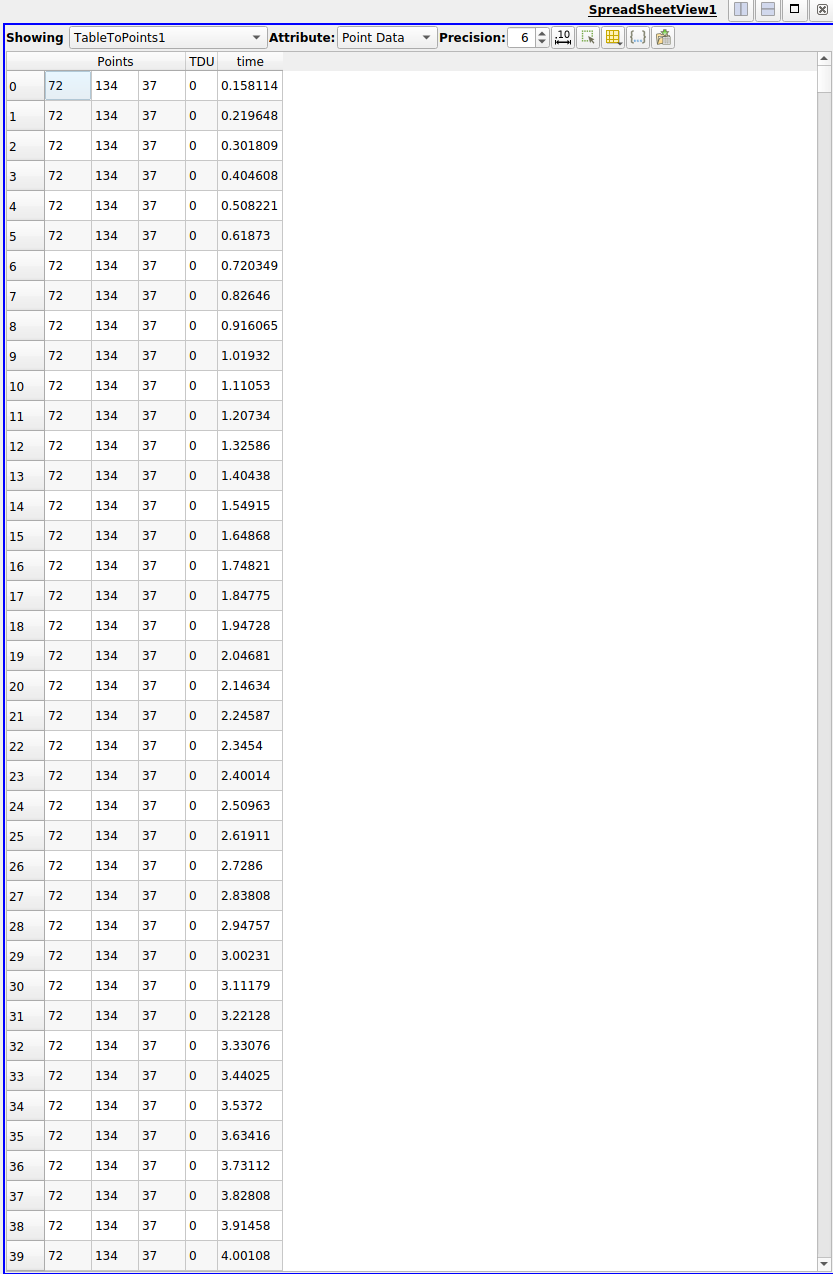
I’ve imported a .csv with x, y, z coordinate information for one single point, a value that I’m interested in colormapping, and a time stamp. I’d like to extract the time steps from the time variable and apply that to the Paraview animation feature. So ideally each row would represent a discrete time step.
Is there a way to do this without loading in a separate .csv for every time step? I’ve included a screenshot of my spreadsheet view that hopefully clarifies what I’m trying to do.
Thank you,
Anthony
---
### Author:  [@utkarsh.ayachit](https://discourse.paraview.org/u/utkarsh.ayachit)
#### Post date: [May 16, 2020, 8:06am UTC](https://discourse.paraview.org/t/extract-time-steps-from-point-data/4343/2 "2020-05-16T08:06:08Z")
This is not directly supported. However, if you download this [example](https://gitlab.kitware.com/paraview/paraview/-/blob/master/Examples/Plugins/PythonAlgorithm/PythonAlgorithmExamples.py) and load it as a plugin and then use the [Python-based CSV reader](https://gitlab.kitware.com/paraview/paraview/-/blob/master/Examples/Plugins/PythonAlgorithm/PythonAlgorithmExamples.py#L130) to open the csv file instead of the standard CSV reader, it would treat the “time” column as time.
---
### Author:  [@amarcozzi11](https://discourse.paraview.org/u/amarcozzi11)
#### Post date: [May 16, 2020, 3:29pm UTC](https://discourse.paraview.org/t/extract-time-steps-from-point-data/4343/3 "2020-05-16T15:29:01Z")
Thank you very much for your help! That’s exactly what I needed.
As a quick followup question, is there a way to map the remaining TDU column to a color map for a source, say a cylinder object? I’m having trouble figuring out how to link the imported .csv with the created cylinder source.
Thank you,
Anthony
---
### Author:  [@utkarsh.ayachit](https://discourse.paraview.org/u/utkarsh.ayachit)
#### Post date: [May 17, 2020, 1:21pm UTC](https://discourse.paraview.org/t/extract-time-steps-from-point-data/4343/4 "2020-05-17T13:21:01Z")
> [@amarcozzi11](#):
>
> is there a way to map the remaining TDU column to a color map for a source, say a cylinder object
TDU should be added as an array in the output dataset. You pick that array as the array to the color by from the color-selector dropdown in the tool bar or the Properties panel.
---
### Author:  [@amarcozzi11](https://discourse.paraview.org/u/amarcozzi11)
#### Post date: [May 18, 2020, 8:23pm UTC](https://discourse.paraview.org/t/extract-time-steps-from-point-data/4343/5 "2020-05-18T20:23:20Z")
Thank you for your help!
---
### Author:  [@datathing](https://discourse.paraview.org/u/datathing)
#### Post date: [May 29, 2021, 8:01pm UTC](https://discourse.paraview.org/t/extract-time-steps-from-point-data/4343/6 "2021-05-29T20:01:13Z")
Hi, bumping an old thread here, but I have a question about the [Python-based CSV reader](https://gitlab.kitware.com/paraview/paraview/-/blob/master/Examples/Plugins/PythonAlgorithm/PythonAlgorithmExamples.py#L130) linked above by @utkarsh.ayachit. Happy to move to a new thread if that is preferable.
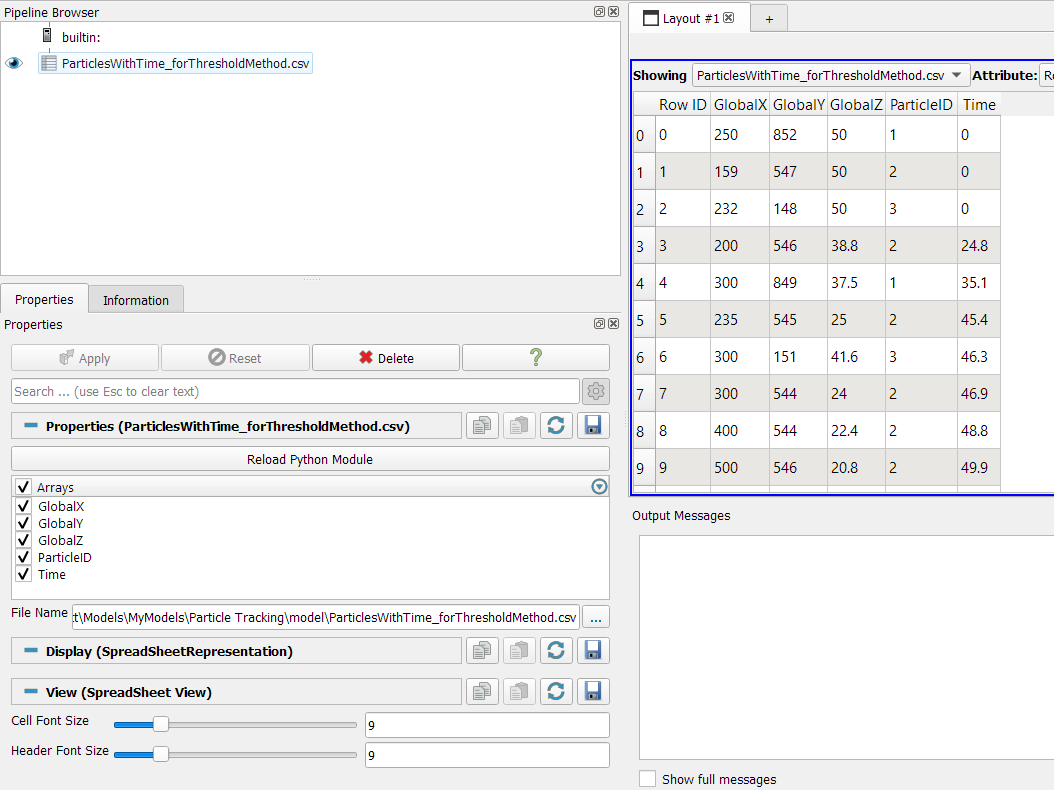
I have installed the plug-in and have used it to import a csv file of particle locations with X Y Z and time columns, but I can’t figure out how to actually access the time column so that I can plot the particles moving as time progress.
@utkarsh.ayachit / @amarcozzi11 would you be able to give me any pointers on how to get this workflow…working?!
Thanks!