# Extracting profiles with vtk working but not always...
**URL:** https://discourse.paraview.org/t/extracting-profiles-with-vtk-working-but-not-always/13584
**Category:** ParaView Support
**Tags:** vtk
**Created:** [December 21, 2023, 10:32am UTC](https://discourse.paraview.org/t/extracting-profiles-with-vtk-working-but-not-always/13584 "2023-12-21T10:32:08Z")
**Posts on this page:** 6
**Page:** 1
### Author:  [@Boone](https://discourse.paraview.org/u/Boone)
#### Post date: [December 21, 2023, 10:32am UTC](https://discourse.paraview.org/t/extracting-profiles-with-vtk-working-but-not-always/13584/1 "2023-12-21T10:32:08Z")
Hi all,
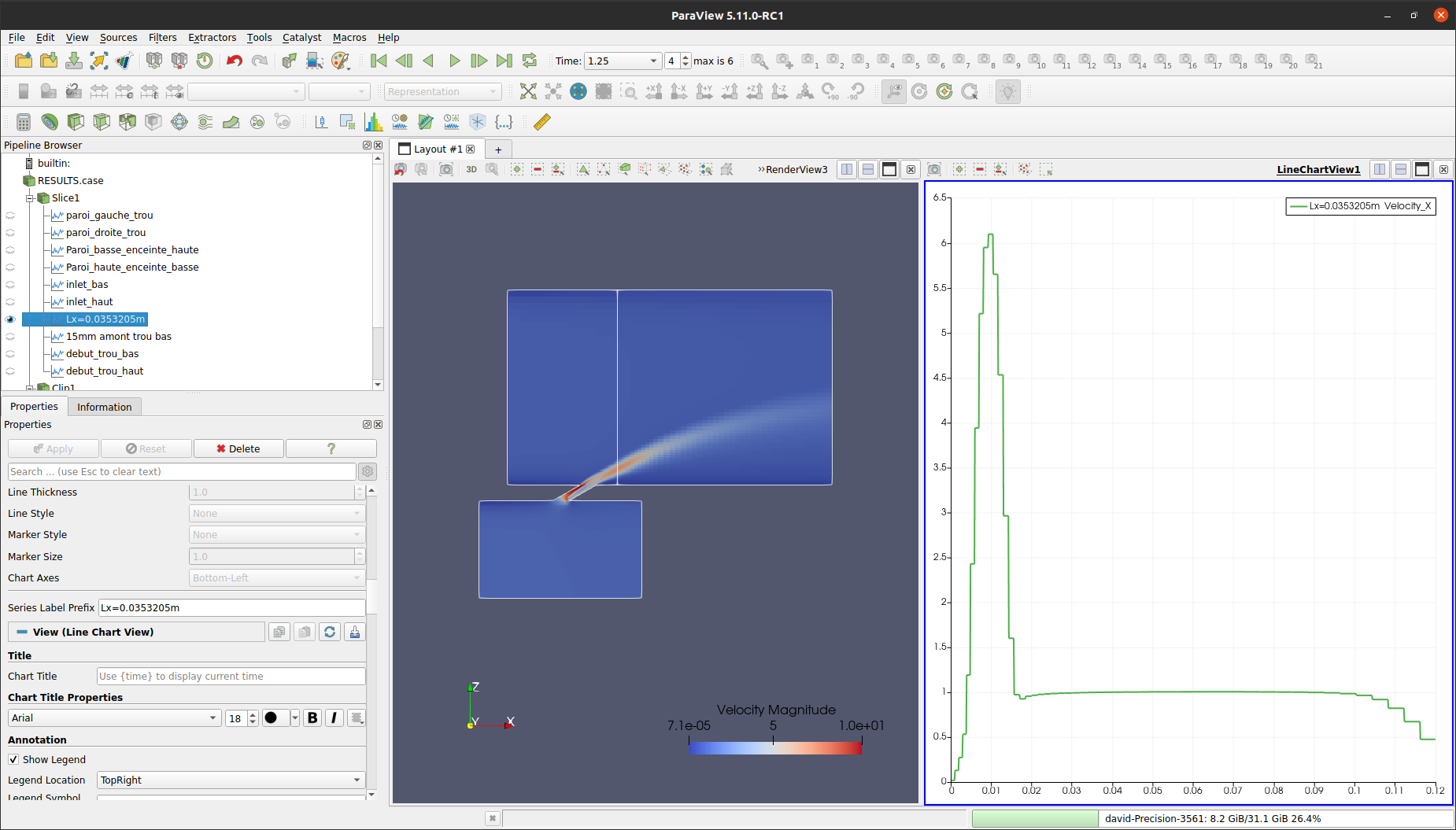
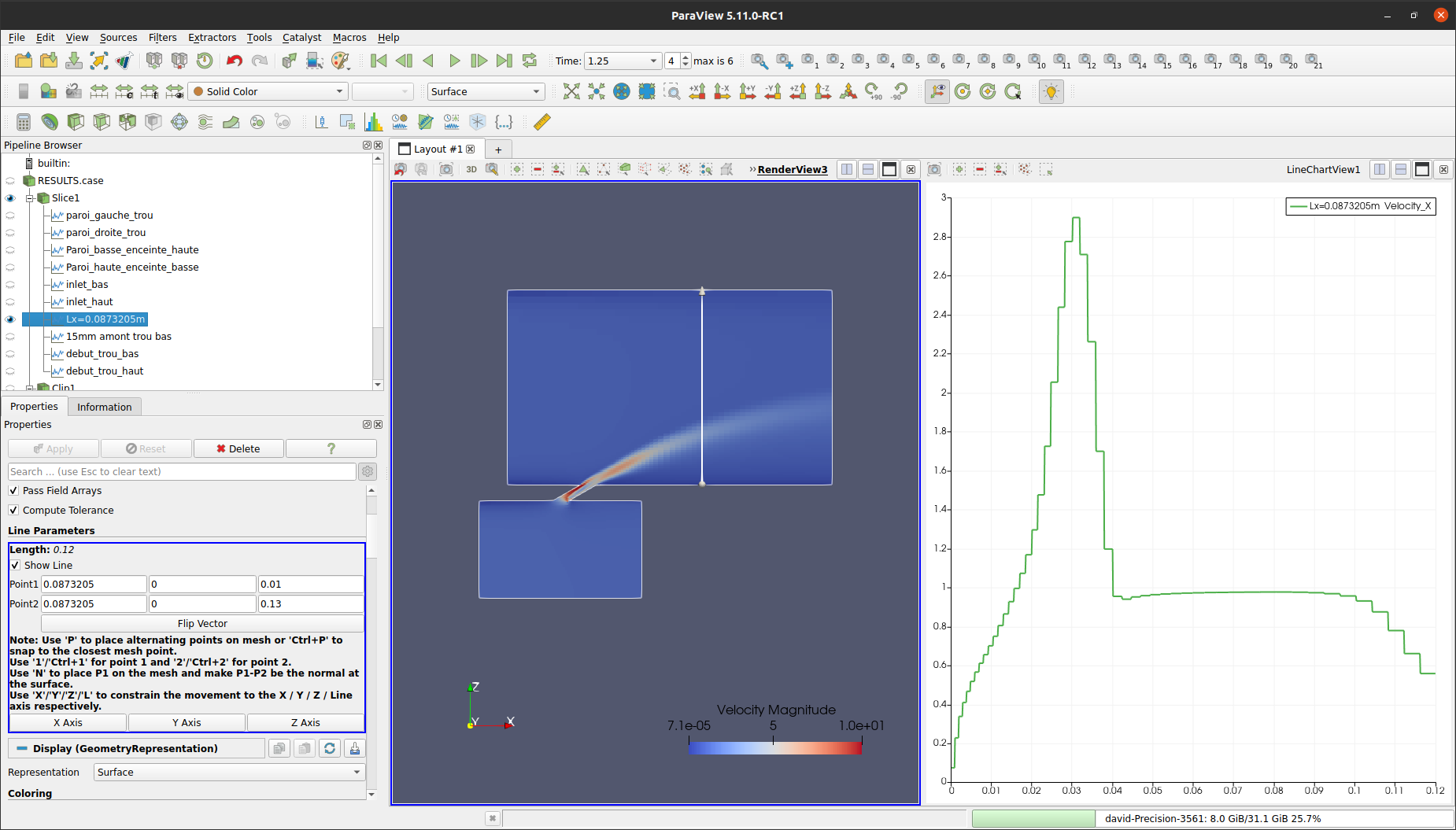
I am new in vtk and I try to extract a profile along a line in my geometry. My issue is that, for certain locations in the streamwise direction, I do not obtain the same profiles with the Paraview visualization and the plot extraction.
It works well and I obtain the same plot with Paraview and vtk extraction for this location (Lx=0.0353205m) :

But not for this one (Lx=0.0873205m) :
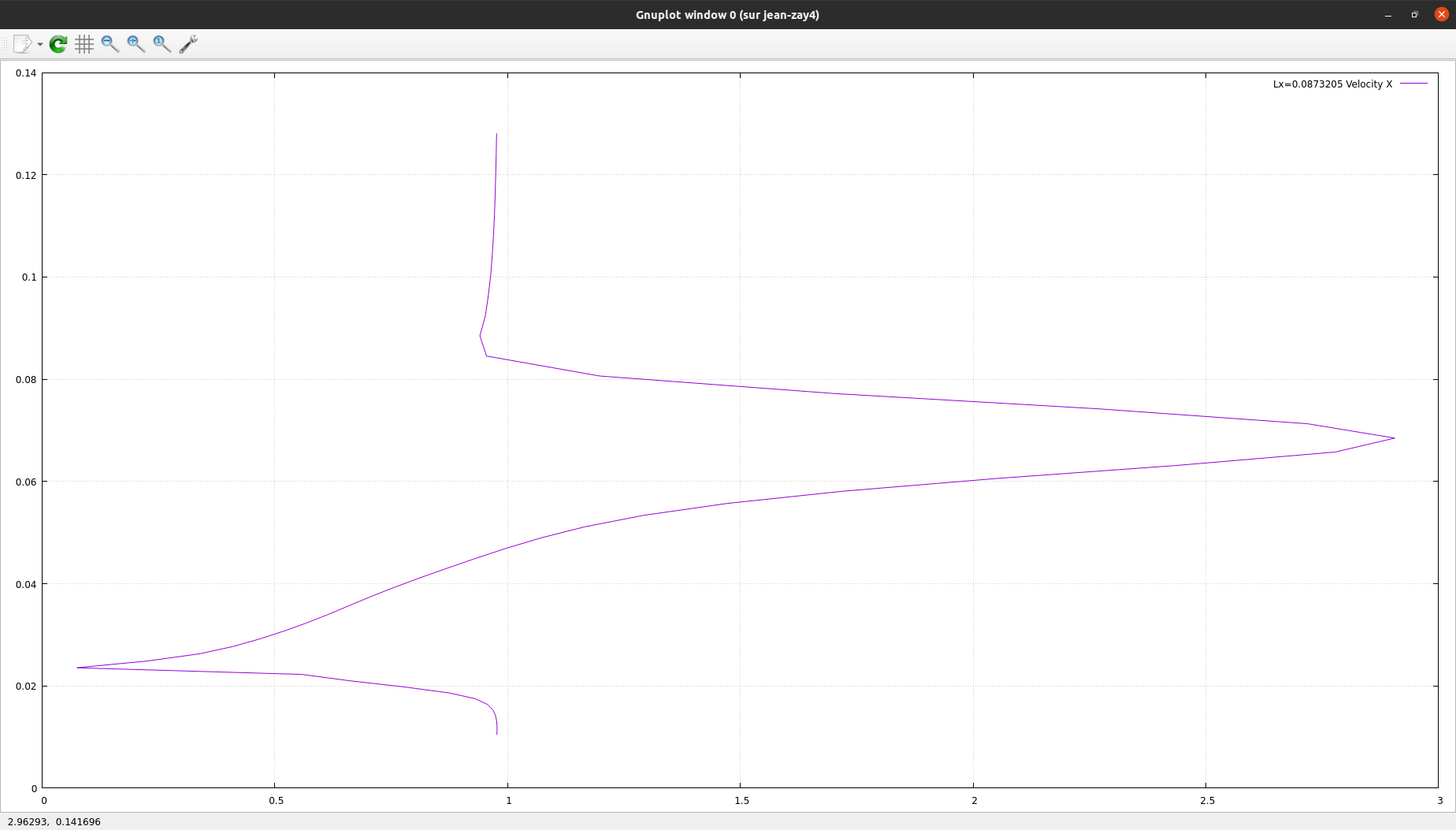
Here is my vtk script. Note that my computation is not periodic in the x, y, or z direction that is why I am not averaging in a particular direction, I draw 2 slices in my 3D geometry to create a line and save the fields associated to this line. My mesh is made of structured cells.
```auto
#!/usr/bin/env python3.8
import numpy as np
import vtk
from vtk.numpy_interface import dataset_adapter as dsa
from vtk.numpy_interface import algorithms as algs
""" I/O parameters """
path='/home/david/Partage_JZ/04-jet0/06_HTLES/01_TEST_HTLES_v534/01_RANS_B_open/RESU/20231219-2125/'
in_folder = path + 'postprocessing/'
out_folder = path + 'Profiles3/'
in_casefile = in_folder + 'RESULTS.case'
time_value = 999999.0 # Select the last time value
fields_vector = (
("Velocity", 0, None),
)
fields = fields_vector
origins_normals_y = (((0.0, 0.0, 0.0), (0, 1, 0)), )
reader = vtk.vtkEnSightGoldBinaryReader()
reader.SetCaseFileName(in_casefile)
reader.ReadAllVariablesOff()
reader.SetTimeValue(time_value)
vector=[0.0873205]
# Can handle several x locations
for Lx in vector:
origins_normals_x = (((Lx, 0.0, 0.0), (1, 0, 0)), )
reader = vtk.vtkEnSightGoldBinaryReader()
reader.SetCaseFileName(in_casefile)
reader.ReadAllVariablesOff()
reader.SetTimeValue(time_value)
# Can handle several fields
for i, field in enumerate(fields):
print(field)
reader.SetCellArrayStatus(field[0], 1)
reader.Update()
fluid_domain = vtk.vtkExtractBlock()
fluid_domain.SetInputConnection(reader.GetOutputPort())
fluid_domain.AddIndex(1)
fluid_domain.SetPruneOutput(True)
fluid_domain.Update()
# Possibly several y plans
for j, org_nor in enumerate(origins_normals_y):
plane1 = vtk.vtkPlane()
plane1.SetOrigin(org_nor[0])
plane1.SetNormal(org_nor[1])
slice1 = vtk.vtkCutter()
slice1.SetCutFunction(plane1)
slice1.SetInputConnection(fluid_domain.GetOutputPort(0))
slice1.GenerateTrianglesOff()
slice1.Update()
# Possibly several x plans
for k, org_nor_x in enumerate(origins_normals_x):
plane2 = vtk.vtkPlane()
plane2.SetOrigin(org_nor_x[0])
plane2.SetNormal(org_nor_x[1])
slice2 = vtk.vtkCutter()
slice2.SetCutFunction(plane2)
slice2.SetInputConnection(slice1.GetOutputPort(0))
slice2.GenerateTrianglesOff()
slice2.Update()
cell_centers = vtk.vtkCellCenters()
cell_centers.SetInputConnection(slice2.GetOutputPort(0))
cell_centers.Update()
index_1 = field[1]
index_2 = field[2]
centers_data = dsa.WrapDataObject(cell_centers.GetOutputDataObject(0))
field_centers = centers_data.PointData[field[0]].Arrays[0][:, index_1, index_2]
z_centers_uniq, z_idx, z_inv, z_cnt = np.unique(
centers_data.Points[:, 2].Arrays[0].round(decimals=16),
return_index=True,
return_inverse=True,
return_counts=True)
np.savetxt(out_folder + field[0] , np.vstack((z_centers_uniq,field_centers[:,0])).T, delimiter=',')
```
Can someone explain me why it is not working for all the locations?
Thanks a lot !
---
### Author:  [@Francois\_Mazen](https://discourse.paraview.org/u/Francois_Mazen)
#### Post date: [December 22, 2023, 8:20am UTC](https://discourse.paraview.org/t/extracting-profiles-with-vtk-working-but-not-always/13584/2 "2023-12-22T08:20:01Z")
Hi @Boone !
Could you please share the data including the pvsm file, in order to reproduce the issue?
Best,
---
### Author:  [@Boone](https://discourse.paraview.org/u/Boone)
#### Post date: [December 22, 2023, 2:56pm UTC](https://discourse.paraview.org/t/extracting-profiles-with-vtk-working-but-not-always/13584/3 "2023-12-22T14:56:17Z")
Hi @Francois_Mazen,
Please find the link to download the data (I archived the data in both .zip and .tar) and the pvsm file: [FileSender](https://filesender.renater.fr/?s=download&token=8b62dca9-d79a-4aef-bffa-9b54a252cc29).
To lighten the file I removed all the quantities but the velocity at the last timestep (1.52905s). Please do not hesitate to ask if you require additional files.
Thank you for you help !
Boone
---
### Author:  [@Francois\_Mazen](https://discourse.paraview.org/u/Francois_Mazen)
#### Post date: [December 22, 2023, 5:11pm UTC](https://discourse.paraview.org/t/extracting-profiles-with-vtk-working-but-not-always/13584/4 "2023-12-22T17:11:34Z")
Thanks for sharing the data. I can get your “wrong” result in ParaView, by creating the exact VTK pipeline from your script with 2 intersecting slices:
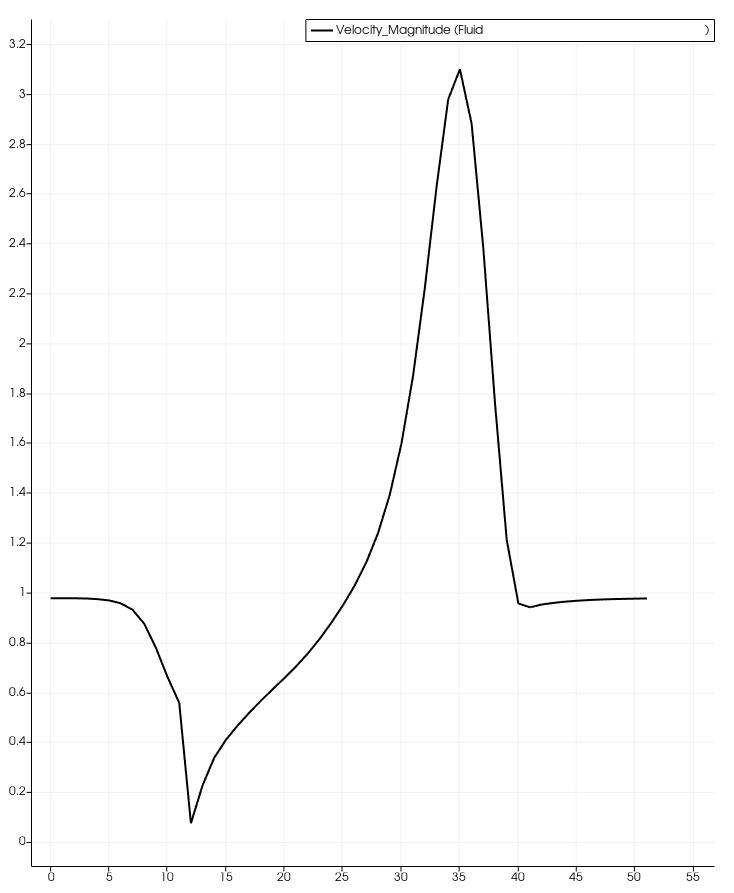
In the vtk script you are using 2 orthogonal slices and export the results, whereas in ParaView you are using the plotOverLine filter. This is basically the root of the difference. If your plan is to extract values over a line, you should use the `vtkProbeLineFilter` instead of 2 slices.
Hope this helps!
---
### Author:  [@Boone](https://discourse.paraview.org/u/Boone)
#### Post date: [December 23, 2023, 6:15pm UTC](https://discourse.paraview.org/t/extracting-profiles-with-vtk-working-but-not-always/13584/5 "2023-12-23T18:15:58Z")
Thank you @Francois_Mazen for your answer. Do you know why it does not provide the same results with 2 slices?
Could you help me with the script including `vtkProbeLineFilter`?
I tried this:
```auto
import numpy as np
import vtk
from vtk.numpy_interface import dataset_adapter as dsa
from vtk.numpy_interface import algorithms as algs
""" I/O parameters """
path='/home/david/Partage_JZ/04-jet0/06_HTLES/01_TEST_HTLES_v534/01_RANS_B_open/RESU/20231219-2125/'
in_folder = path + 'postprocessing/'
out_folder = path + 'Profiles3/'
in_casefile = in_folder + 'RESULTS.case'
time_value = 999999.0 # Select the last time value
fields_vector = (
("Velocity", 0, None),
)
fields = fields_vector
reader = vtk.vtkEnSightGoldBinaryReader()
reader.SetCaseFileName(in_casefile)
reader.ReadAllVariablesOff()
reader.SetTimeValue(time_value)
vector=[0.0353205]
# Can handle several x locations
for Lx in vector:
lineSource = vtk.vtkLineSource()
lineSource.SetPoint1(Lx, 0, 0)
lineSource.SetPoint2(Lx, 0.13, 0)
lineSource.SetResolution(100)
for i, field in enumerate(fields):
# Create a probe filter
probeFilter = vtk.vtkProbeLineFilter()
probeFilter.SetInputConnection(lineSource.GetOutputPort())
probeFilter.SetSourceConnection(reader.GetOutputPort())
index_1 = field[1]
index_2 = field[2]
centers_data = dsa.WrapDataObject(probeFilter.GetOutputDataObject(0))
field_centers = centers_data.PointData[field[0]].Arrays[0][:, index_1, index_2]
z_centers_uniq, z_idx, z_inv, z_cnt = np.unique(
centers_data.Points[:, 2].Arrays[0].round(decimals=16),
return_index=True,
return_inverse=True,
return_counts=True)
np.savetxt(out_folder + field[0] , np.vstack((z_centers_uniq,field_centers[:,0])).T, delimiter=',')
```
but it does not work:
```auto
field_centers = centers_data.PointData[field[0]].Arrays[0][:, index_1, index_2]
AttributeError: 'VTKNoneArray' object has no attribute 'Arrays'
```
Thanks a lot,
Boone
---
### Author:  [@Boone](https://discourse.paraview.org/u/Boone)
#### Post date: [May 30, 2024, 1:32pm UTC](https://discourse.paraview.org/t/extracting-profiles-with-vtk-working-but-not-always/13584/6 "2024-05-30T13:32:36Z")
Hi all,
I am still interested in knowing how to make the script of the previous message work using `vtkProbeLineFilter`. Can anyone help?
Thanks a lot!