# Failing to build superbuild VS2019
**URL:** https://discourse.paraview.org/t/failing-to-build-superbuild-vs2019/8389
**Category:** Development
**Created:** [November 12, 2021, 5:52pm UTC](https://discourse.paraview.org/t/failing-to-build-superbuild-vs2019/8389 "2021-11-12T17:52:22Z")
**Posts on this page:** 13
**Page:** 1
### Author:  [@totte\_karlsson](https://discourse.paraview.org/u/totte_karlsson)
#### Post date: [November 12, 2021, 5:52pm UTC](https://discourse.paraview.org/t/failing-to-build-superbuild-vs2019/8389/1 "2021-11-12T17:52:22Z")
Hello,
I’m new to Paraview and are trying to build the superbuild on a Windows 10 computer using Ninja and VS2019.
I managed to build Paraview, with no GUI as I found out, following the [instructions here](https://gitlab.kitware.com/paraview/paraview-superbuild). Opening the CMake GUI and enabling ‘Enable\_qt5’ I started a new build and now is getting an error about a missing header.
The error starts at step 27(?) and looks like this:
```auto
FAILED: superbuild/paraview/stamp/paraview-build C:/pvbuild/superbuild/paraview/stamp/paraview-build
cmd.exe /C "cd /D C:\pvbuild\superbuild\paraview\build && "C:\Program Files\CMake\bin\cmake.exe" -P C:/pvbuild/superbuild/sb-paraview-build.cmake && "C:\Program Files\CMake\bin\cmake.exe" -E touch C:/pvbuild/superbuild/paraview/stamp/paraview-build"
[1/9101] Generating the wrap hierarchy for VTK::RenderingSceneGraph
[2/9101] Building C object VTK\ThirdParty\h5part\vtkh5part\CMakeFiles\h5part.dir\src\H5Part.c.obj
FAILED: VTK/ThirdParty/h5part/vtkh5part/CMakeFiles/h5part.dir/src/H5Part.c.obj
C:\PROGRA~2\MICROS~3\2019\COMMUN~1\VC\Tools\MSVC\1429~1.301\bin\Hostx64\x64\cl.exe /nologo -DH5_BUILT_AS_DYNAMIC_LIB -D_CRT_NONSTDC_NO_DEPRECATE -D_CRT_SECURE_NO_DEPRECATE -D_CRT_SECURE_NO_WARNINGS -D_SCL_SECURE_NO_DEPRECATE -D_SCL_SECURE_NO_WARNINGS -Dh5part_EXPORTS -IC:\pvbuild\superbuild\paraview\build\VTK\ThirdParty\h5part\vtkh5part -IC:\pvbuild\superbuild\paraview\src\VTK\ThirdParty\h5part\vtkh5part -IC:\pvbuild\superbuild\paraview\build\VTK\ThirdParty\hdf5\vtkhdf5 -IC:\pvbuild\superbuild\paraview\src\VTK\ThirdParty\hdf5\vtkhdf5 -IC:\pvbuild\superbuild\paraview\build\VTK\ThirdParty\hdf5\vtkhdf5\src -IC:\pvbuild\superbuild\paraview\src\VTK\ThirdParty\hdf5\vtkhdf5\src -IC:\pvbuild\superbuild\paraview\build\VTK\ThirdParty\hdf5\vtkhdf5\hl\src -IC:\pvbuild\superbuild\paraview\src\VTK\ThirdParty\hdf5\vtkhdf5\hl\src -IC:\pvbuild\superbuild\paraview\build\VTK\ThirdParty\h5part -IC:\pvbuild\superbuild\paraview\src\VTK\ThirdParty\h5part -IC:\pvbuild\superbuild\paraview\build\VTK\ThirdParty\hdf5 -
IC:\pvbuild\superbuild\paraview\src\VTK\ThirdParty\hdf5 /bigobj /MD /O2 /Ob2 /DNDEBUG -MD /showIncludes /FoVTK\ThirdParty\h5part\vtkh5part\CMakeFiles\h5part.dir\src\H5Part.c.obj /FdVTK\ThirdParty\h5part\vtkh5part\CMakeFiles\h5part.dir\ /FS -c C:\pvbuild\superbuild\paraview\src\VTK\ThirdParty\h5part\vtkh5part\src\H5Part.c
C:\pvbuild\superbuild\paraview\src\VTK\ThirdParty\h5part\vtkh5part\src\H5Part.c(85): fatal error C1083: Cannot open include file: 'unistd.h': No such file or directory
[3/9101] Generating the wrap hierarchy for VTK::RenderingVtkJS
```
Pretty much stuck…
Best Regards,
Totte
---
### Author:  [@mwestphal](https://discourse.paraview.org/u/mwestphal)
#### Post date: [November 12, 2021, 6:32pm UTC](https://discourse.paraview.org/t/failing-to-build-superbuild-vs2019/8389/2 "2021-11-12T18:32:49Z")
No need to use the superbuild unless you have specific needs.
Why not using the binary release ?
[https://www.paraview.org/download/](https://www.paraview.org/download/)
---
### Author:  [@totte\_karlsson](https://discourse.paraview.org/u/totte_karlsson)
#### Post date: [November 12, 2021, 7:29pm UTC](https://discourse.paraview.org/t/failing-to-build-superbuild-vs2019/8389/3 "2021-11-12T19:29:10Z")
Thanks for your response. We (Allen Institute for Brain Science) are creating an application for tracing Neurons and are evaluating using VTK for volume rendering. Volumes are Tiffstacks of imaged brain tissue.
Just opening, such a stack in Paraview, and render it as a volume is exactly what we need. So, we wanted to build Paraview and just step through to perhaps get an idea of the underlying VTK pipeline, widgets etc… and learn.
I’ve tried to build Paraview for a while now, superbuild, or not, but not being successful, so any help is greatly appreciated…
---
### Author:  [@wascott](https://discourse.paraview.org/u/wascott)
#### Post date: [November 12, 2021, 7:55pm UTC](https://discourse.paraview.org/t/failing-to-build-superbuild-vs2019/8389/4 "2021-11-12T19:55:26Z")
@ben.boeckel
---
### Author:  [@mwestphal](https://discourse.paraview.org/u/mwestphal)
#### Post date: [November 12, 2021, 7:59pm UTC](https://discourse.paraview.org/t/failing-to-build-superbuild-vs2019/8389/5 "2021-11-12T19:59:55Z")
Awesome !
Well, building ParaView may not be the ideal first step to learn about VTK pipeline and widgets, but you will find all related info here: [https://gitlab.kitware.com/paraview/paraview/-/blob/master/Documentation/dev/build.md#windows](https://gitlab.kitware.com/paraview/paraview/-/blob/master/Documentation/dev/build.md#windows)
To learn about VTK pipeline, I’d suggest taking a look at these blogs articles:
[https://blog.kitware.com/a-vtk-pipeline-primer-part-1/](https://blog.kitware.com/a-vtk-pipeline-primer-part-1/)
Then play around with examples from:
[https://kitware.github.io/vtk-examples/site/](https://kitware.github.io/vtk-examples/site/)
As for your specific need:
> Volumes are Tiffstacks of imaged brain tissue.
> Just opening, such a stack in Paraview, and render it as a volume is exactly what we need.
You can do that with the binary release of ParaView I linked above.
- File → Open → yourFile, Apply
- Switch representation from surface to volume
Also, read the ParaView tutorial (a .pdf within the binary release, in help menu) and user guide
[https://docs.paraview.org/en/latest/](https://docs.paraview.org/en/latest/)
hth.
---
### Author:  [@totte\_karlsson](https://discourse.paraview.org/u/totte_karlsson)
#### Post date: [November 12, 2021, 8:04pm UTC](https://discourse.paraview.org/t/failing-to-build-superbuild-vs2019/8389/6 "2021-11-12T20:04:55Z")
Thanks for the links Mathieu,
I have used VTK in the past, and are aware of some of its working and design and examples.
I have not rendered volumes however, but only polylines and simple geometric shapes.
This is why I want to step through the code in Paraview to see what classes are involved to get that pretty, default result, in Paraview… just need to get to a successful build. 🙂
Trying to not reinvent the wheel…!
By the way, your link to build paraview is not to the superbuild build. Does this suggest that the superbuild is not working, and one should build Paraview ‘the other way’?
Thanks,
-tk
---
### Author:  [@mwestphal](https://discourse.paraview.org/u/mwestphal)
#### Post date: [November 12, 2021, 8:12pm UTC](https://discourse.paraview.org/t/failing-to-build-superbuild-vs2019/8389/7 "2021-11-12T20:12:47Z")
ParaView may be a bit too complex for that, but this VTK example should do it:
[https://kitware.github.io/vtk-examples/site/Cxx/VolumeRendering/SimpleRayCast/](https://kitware.github.io/vtk-examples/site/Cxx/VolumeRendering/SimpleRayCast/)
Alternatively, F3D implements volume rendering in a very simple way:
[https://gitlab.kitware.com/f3d/f3d/-/blob/master/src/vtkF3DRendererWithColoring.cxx#L425](https://gitlab.kitware.com/f3d/f3d/-/blob/master/src/vtkF3DRendererWithColoring.cxx#L425)
> By the way, your link to build paraview is not to the superbuild build. Does this suggest that the superbuild is not working, and one should build Paraview ‘the other way’?
Superbuild is working and is used everyday to generate the binaries of ParaView, however this is not the simplest way to build ParaView when you want to build it without complex dependencies, and debugging a failing superbuild can be hard. I’d never recommend the superbuild for a first timer building paraview. The paraview build guide is here for that.
---
### Author:  [@totte\_karlsson](https://discourse.paraview.org/u/totte_karlsson)
#### Post date: [November 12, 2021, 9:31pm UTC](https://discourse.paraview.org/t/failing-to-build-superbuild-vs2019/8389/8 "2021-11-12T21:31:45Z")
Thanks for the links!
I’ll check them out, and also will check out the regular Paraview build!
---
### Author:  [@ben.boeckel](https://discourse.paraview.org/u/ben.boeckel)
#### Post date: [November 13, 2021, 11:21pm UTC](https://discourse.paraview.org/t/failing-to-build-superbuild-vs2019/8389/9 "2021-11-13T23:21:52Z")
That `H5Part` file has a typo. Apply this diff:
```diff
diff --git a/ThirdParty/h5part/vtkh5part/src/H5Part.c b/ThirdParty/h5part/vtkh5part/src/H5Part.c
index 228d246600..d74201ef1e 100644
--- a/ThirdParty/h5part/vtkh5part/src/H5Part.c
+++ b/ThirdParty/h5part/vtkh5part/src/H5Part.c
@@ -81,7 +81,7 @@ For further information contact: h5part
#include
#include
-#ifndef WIN32
+#ifndef _WIN32
#include
#else /* WIN32 */
#include
```
I’ll get this into VTK in the meantime.
---
### Author:  [@ben.boeckel](https://discourse.paraview.org/u/ben.boeckel)
#### Post date: [November 13, 2021, 11:29pm UTC](https://discourse.paraview.org/t/failing-to-build-superbuild-vs2019/8389/10 "2021-11-13T23:29:38Z")
MR pushed: [https://gitlab.kitware.com/vtk/vtk/-/merge\_requests/8641](https://gitlab.kitware.com/vtk/vtk/-/merge_requests/8641)
---
### Author:  [@totte\_karlsson](https://discourse.paraview.org/u/totte_karlsson)
#### Post date: [November 15, 2021, 9:13pm UTC](https://discourse.paraview.org/t/failing-to-build-superbuild-vs2019/8389/11 "2021-11-15T21:13:49Z")
Thanks @ben.boeckel ! That error went away and I managed to build a paraview.exe.
When trying to run the executable, Paraview complains about two QT DLL’s, Qt5Network.dll
Qt5Help.dll. That got fixed by putting them on the path (C:\Qt\5.15.2\msvc2019\_64\bin).
Now, when trying to run paraview.exe. I get the following errors:
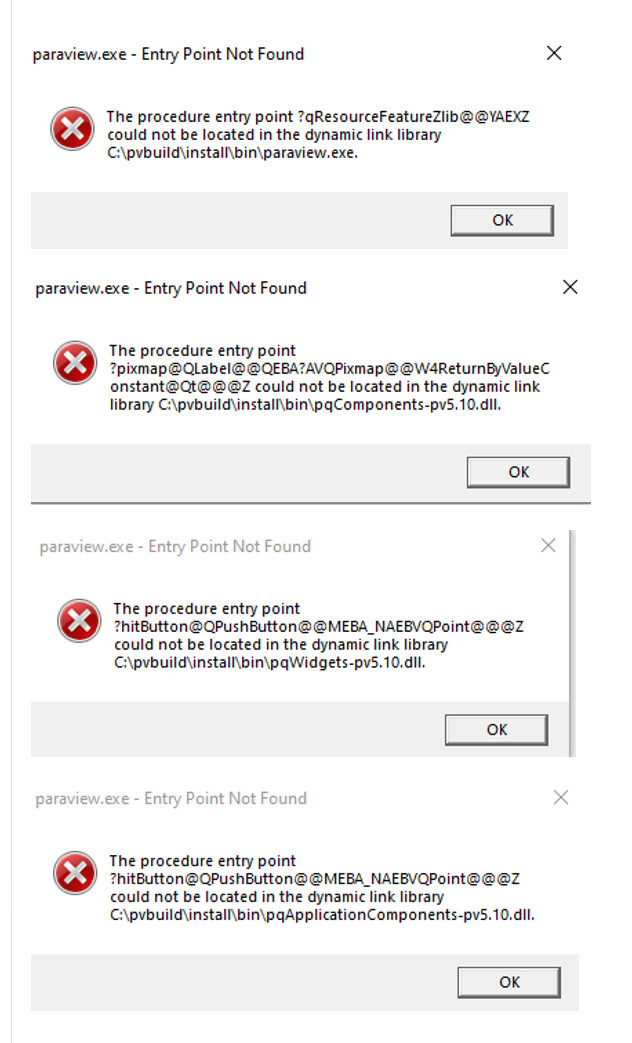
So still, something not right…
---
### Author:  [@ben.boeckel](https://discourse.paraview.org/u/ben.boeckel)
#### Post date: [November 15, 2021, 10:43pm UTC](https://discourse.paraview.org/t/failing-to-build-superbuild-vs2019/8389/12 "2021-11-15T22:43:37Z")
It looks like Qt plugins aren’t being found. I recommend running `ctest -R cpack-paraview-ZIP` to get the superbuild to make a package. It _should_ do what is needed to bundle up the Qt (if `cmake -DPACKAGE_SYSTEM_QT=ON` is used).
---
### Author:  [@totte\_karlsson](https://discourse.paraview.org/u/totte_karlsson)
#### Post date: [November 16, 2021, 1:41am UTC](https://discourse.paraview.org/t/failing-to-build-superbuild-vs2019/8389/13 "2021-11-16T01:41:45Z")
> [@ben.boeckel](#):
>
> ctest -R cpack-paraview-ZIP
That worked! The executable in the generated folder, C:\pvbuild\_CPack\_Packages\win64\ZIP\ParaView-5.10.0-RC1-265-gcc4877b60d-Windows-msvc2017-AMD64\bin runs without troubles.
Curious, it says msvc2017, although I’m using the 2019 VS compiler.
In any case, I can now attach to the Paraview process in visual studio and set breakpoints in the source code. Very useful.
Thanks!