# Field data does not appear in properties view
**URL:** https://discourse.paraview.org/t/field-data-does-not-appear-in-properties-view/9858
**Category:** ParaView Support
**Created:** [June 20, 2022, 1:13pm UTC](https://discourse.paraview.org/t/field-data-does-not-appear-in-properties-view/9858 "2022-06-20T13:13:33Z")
**Posts on this page:** 15
**Page:** 1
### Author:  [@ptoma](https://discourse.paraview.org/u/ptoma)
#### Post date: [June 20, 2022, 1:13pm UTC](https://discourse.paraview.org/t/field-data-does-not-appear-in-properties-view/9858/1 "2022-06-20T13:13:33Z")
Hi, new user here who’s struggling to extract simulation data to .csv using ParaView. When I load my .e files into ParaView, all the point and cell data shows up, but the field data doesn’t. However, the field data does show up in the data arrays portion of the Information tab. I have tried to extract the field data using Extractors, but they just output blank .csv files. I have attached my data below:
[https://drive.google.com/file/d/1kQhxPjpbWIAZqHb\_iBy9qz9rzlv5aiO-/view?usp=sharing](https://drive.google.com/file/d/1kQhxPjpbWIAZqHb_iBy9qz9rzlv5aiO-/view?usp=sharing)
---
### Author:  [@mwestphal](https://discourse.paraview.org/u/mwestphal)
#### Post date: [June 20, 2022, 1:23pm UTC](https://discourse.paraview.org/t/field-data-does-not-appear-in-properties-view/9858/2 "2022-06-20T13:23:16Z")
please share your data on a site that do not require authentication
---
### Author:  [@ptoma](https://discourse.paraview.org/u/ptoma)
#### Post date: [June 20, 2022, 5:37pm UTC](https://discourse.paraview.org/t/field-data-does-not-appear-in-properties-view/9858/3 "2022-06-20T17:37:51Z")
Fixed, thanks.
---
### Author:  [@mwestphal](https://discourse.paraview.org/u/mwestphal)
#### Post date: [June 21, 2022, 7:25am UTC](https://discourse.paraview.org/t/field-data-does-not-appear-in-properties-view/9858/4 "2022-06-21T07:25:52Z")
> [@ptoma](#):
>
> When I load my .e files into ParaView, all the point and cell data shows up, but the field data doesn’t.
I can the field data fine here. What do you mean by the `field data does not show up` ?
---
### Author:  [@ptoma](https://discourse.paraview.org/u/ptoma)
#### Post date: [June 21, 2022, 8:52am UTC](https://discourse.paraview.org/t/field-data-does-not-appear-in-properties-view/9858/5 "2022-06-21T08:52:42Z")
As it, it does not appear in the Properties tab and cannot be selected. Thus, it cannot be exported via Save Data or an Extractor.
---
### Author:  [@mwestphal](https://discourse.paraview.org/u/mwestphal)
#### Post date: [June 21, 2022, 8:54am UTC](https://discourse.paraview.org/t/field-data-does-not-appear-in-properties-view/9858/6 "2022-06-21T08:54:33Z")
Only certains formats supports field data. CSV does not.
---
### Author:  [@ptoma](https://discourse.paraview.org/u/ptoma)
#### Post date: [June 21, 2022, 8:58am UTC](https://discourse.paraview.org/t/field-data-does-not-appear-in-properties-view/9858/7 "2022-06-21T08:58:17Z")
Which formats do? Also, what would I do to make the field data appear in the Properties tab?
---
### Author:  [@mwestphal](https://discourse.paraview.org/u/mwestphal)
#### Post date: [June 21, 2022, 8:59am UTC](https://discourse.paraview.org/t/field-data-does-not-appear-in-properties-view/9858/8 "2022-06-21T08:59:55Z")
> [@ptoma](#):
>
> Also, what would I do to make the field data appear in the Properties tab?
No idea what you mean here, please share a screenshot ?
Native ParaView formats (vt\*, pvd) supports field data without any issues.
---
### Author:  [@ptoma](https://discourse.paraview.org/u/ptoma)
#### Post date: [June 21, 2022, 10:18am UTC](https://discourse.paraview.org/t/field-data-does-not-appear-in-properties-view/9858/9 "2022-06-21T10:18:28Z")

Only the point and cell properties appear in this dialogue, even though the field data should be showing up as well. I know field data exists because I’ve looked at the information tab and the field data appears there.
---
### Author:  [@mwestphal](https://discourse.paraview.org/u/mwestphal)
#### Post date: [June 21, 2022, 11:04am UTC](https://discourse.paraview.org/t/field-data-does-not-appear-in-properties-view/9858/10 "2022-06-21T11:04:25Z")
I’m afraid the exodus reader does not let you select the field data to read, but read it all by default. So no issues here.
---
### Author:  [@ptoma](https://discourse.paraview.org/u/ptoma)
#### Post date: [June 21, 2022, 11:07am UTC](https://discourse.paraview.org/t/field-data-does-not-appear-in-properties-view/9858/11 "2022-06-21T11:07:47Z")
Okay, understood. What’s the best way to actually open the field data? Can you see the values in Paraview? How do you read native ParaView formats such as vt\* or pvd?
---
### Author:  [@mwestphal](https://discourse.paraview.org/u/mwestphal)
#### Post date: [June 21, 2022, 11:13am UTC](https://discourse.paraview.org/t/field-data-does-not-appear-in-properties-view/9858/12 "2022-06-21T11:13:56Z")
Yes, the data is here, you can see it with the spreadsheet view.
---
### Author:  [@ptoma](https://discourse.paraview.org/u/ptoma)
#### Post date: [June 21, 2022, 11:18am UTC](https://discourse.paraview.org/t/field-data-does-not-appear-in-properties-view/9858/13 "2022-06-21T11:18:10Z")
I have tried to view the field data in spreadsheet view and it appears blank.
---
### Author:  [@mwestphal](https://discourse.paraview.org/u/mwestphal)
#### Post date: [June 21, 2022, 11:29am UTC](https://discourse.paraview.org/t/field-data-does-not-appear-in-properties-view/9858/14 "2022-06-21T11:29:46Z")
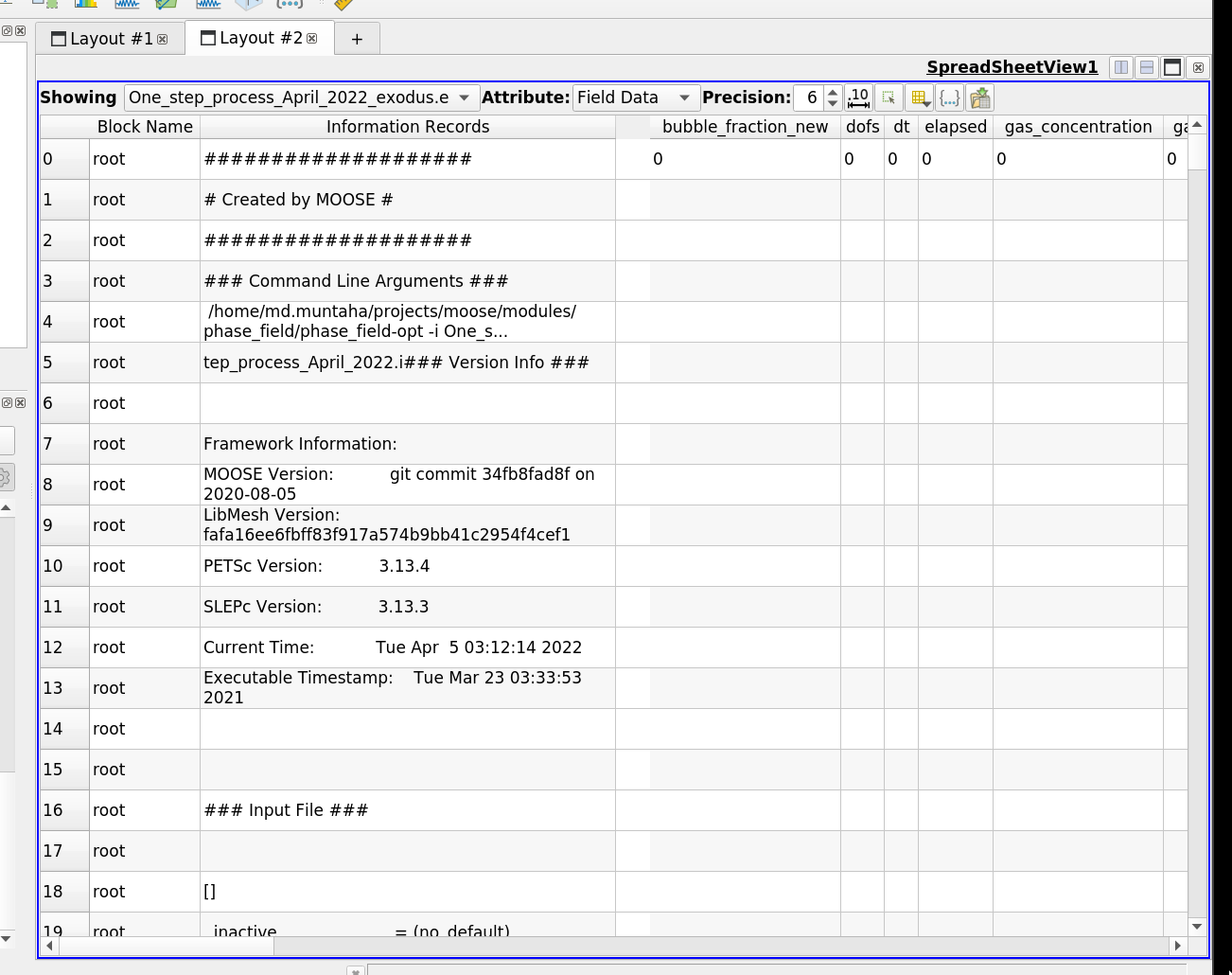
Works great here:
---
### Author:  [@ptoma](https://discourse.paraview.org/u/ptoma)
#### Post date: [June 21, 2022, 11:35am UTC](https://discourse.paraview.org/t/field-data-does-not-appear-in-properties-view/9858/15 "2022-06-21T11:35:42Z")
Oh, now I see what was wrong. I didn’t realize that the variables were being laid out horizontally rather than vertically. Forgive me for my confusion.