# Filter animation using Keyframes
**URL:** https://discourse.paraview.org/t/filter-animation-using-keyframes/6922
**Category:** ParaView Support
**Created:** [April 10, 2021, 1:48pm UTC](https://discourse.paraview.org/t/filter-animation-using-keyframes/6922 "2021-04-10T13:48:14Z")
**Posts on this page:** 3
**Page:** 1
### Author:  [@Captain\_Convergence](https://discourse.paraview.org/u/Captain_Convergence)
#### Post date: [April 10, 2021, 1:48pm UTC](https://discourse.paraview.org/t/filter-animation-using-keyframes/6922/1 "2021-04-10T13:48:14Z")
Dear all,
I am trying to render an animation in a HPC and for this reason I need to do everything by python scripts. I am able to generate a camera movement using Keyframes with a code that looks like this:
**Step 1 ) Generate the Camera Animation**
cameraAnimationCue1 = GetCameraTrack(view=renderView1)
**Step 2 ) Define keyFrames**
keyFrame\_1 = CameraKeyFrame()
keyFrame\_1.KeyTime = 0.0
(…)
**Step 3 ) Assign the keyFrames to the camera animation**
cameraAnimationCue1.KeyFrames = [keyFrame\_1,keyFrame\_2,keyFrame\_3, …]
I was able to do this because I could trace the python code for generating the aforementioned camera motion. However, when I try to apply this to a filter from the “Animation View” menu, I cannot trace the python code that would generate this :
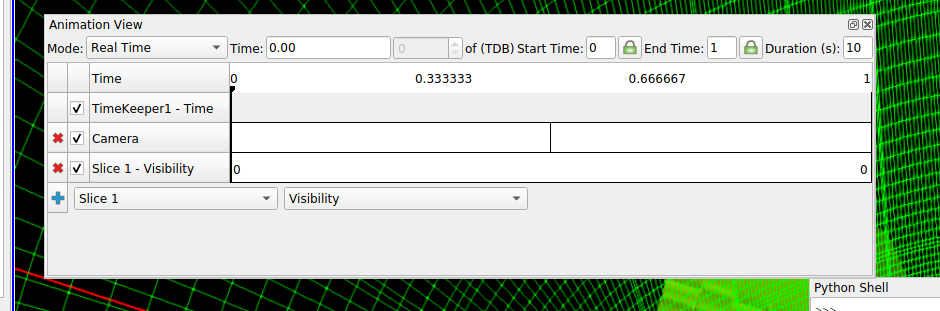
Is is possible to generate an animation of a filter variable (i.e. opacity, visibility, origin…) with keyframes as the Camera movement from a python code? Can someone provide an example of this? I couldn’t find more info about this kind of post-processing using pvbatch.
Thank you in advance!
---
### Author:  [@nicolas.vuaille](https://discourse.paraview.org/u/nicolas.vuaille)
#### Post date: [April 12, 2021, 9:22am UTC](https://discourse.paraview.org/t/filter-animation-using-keyframes/6922/2 "2021-04-12T09:22:49Z")
You should use [GetAnimationTrack](https://kitware.github.io/paraview-docs/latest/python/paraview.simple.html#paraview.simple.GetAnimationTrack) to create (or retrieve if already existing) an animation track.
Then you can create some [KeyFrame](https://kitware.github.io/paraview-docs/latest/python/search.html?q=keyframe&check_keywords=yes&area=default) objects to add them to your track.
> [@Captain\_Convergence](#):
>
> I cannot trace the python code
This is a known bug, see [here](https://gitlab.kitware.com/paraview/paraview/-/issues/20573).
---
### Author:  [@Captain\_Convergence](https://discourse.paraview.org/u/Captain_Convergence)
#### Post date: [April 17, 2021, 11:29am UTC](https://discourse.paraview.org/t/filter-animation-using-keyframes/6922/3 "2021-04-17T11:29:00Z")
Hi Nicolas!
Thank you for your answer! It worked perfectly. In case someone runs into the same issue, I leave here an example to get the opacity of a given filter (slice1 in this case) and generate an animation with 5 keyframes
```python
opacityTrack = GetAnimationTrack("Opacity", 0, slice1)
keyf0 = CompositeKeyFrame()
keyf0.Interpolation = 'Ramp'
keyf0.KeyTime = 0
keyf0.KeyValues=0
keyf1 = CompositeKeyFrame()
keyf1.Interpolation = 'Ramp'
keyf1.KeyTime=0.15
keyf1.KeyValues=0
keyf2 = CompositeKeyFrame()
keyf2.Interpolation = 'Ramp'
keyf2.KeyTime=0.2
keyf2.KeyValues=1
keyf3 = CompositeKeyFrame()
keyf3.Interpolation = 'Ramp'
keyf3.KeyTime=0.8
keyf3.KeyValues=1
keyf4 = CompositeKeyFrame()
keyf4.Interpolation = 'Ramp'
keyf4.KeyTime=0.85
keyf4.KeyValues=0
opacityTrack.KeyFrames=[keyf0,keyf1,keyf2,keyf3,keyf4]
```
Regards 🙂