# Fonts don't scale in split view screenshots saved from Macro
**URL:** https://discourse.paraview.org/t/fonts-dont-scale-in-split-view-screenshots-saved-from-macro/9373
**Category:** ParaView Support
**Created:** [April 6, 2022, 1:47pm UTC](https://discourse.paraview.org/t/fonts-dont-scale-in-split-view-screenshots-saved-from-macro/9373 "2022-04-06T13:47:04Z")
**Posts on this page:** 4
**Page:** 1
### Author:  [@pindakaas](https://discourse.paraview.org/u/pindakaas)
#### Post date: [April 6, 2022, 1:47pm UTC](https://discourse.paraview.org/t/fonts-dont-scale-in-split-view-screenshots-saved-from-macro/9373/1 "2022-04-06T13:47:04Z")
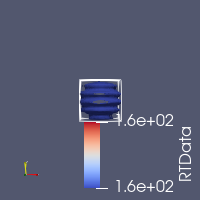
FontScaling=‘Scale fonts proportionally’ in SaveScreenshot function does not work in split views, but only when screenshot is saved from a macro script. The color bar labels and title comes out very large. Tested in 5.9.0 and 5.10.1.
To reproduce:
- Split the view horizontally (both render views)
- Open any dataset showing a color bar in both views
- Trace changing to a smaller layout size (Lock View Size Custom in GUI or GetLayout().SetSize() and saving a screenshot
- Save trace as macro
Macro executed for left view will have properly scaled labels. For right view - not.
Is this a known issue?
---
### Author:  [@maxwelljackson](https://discourse.paraview.org/u/maxwelljackson)
#### Post date: [April 11, 2022, 5:15pm UTC](https://discourse.paraview.org/t/fonts-dont-scale-in-split-view-screenshots-saved-from-macro/9373/2 "2022-04-11T17:15:49Z")
Hi @pindakaas, we think we were able to reproduce this. We just want to make sure we are seeing the same thing.
Image from Macro
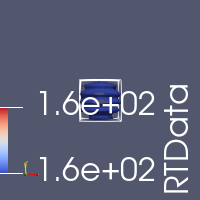
Image from manual screenshot
---
### Author:  [@pindakaas](https://discourse.paraview.org/u/pindakaas)
#### Post date: [April 12, 2022, 6:15am UTC](https://discourse.paraview.org/t/fonts-dont-scale-in-split-view-screenshots-saved-from-macro/9373/3 "2022-04-12T06:15:34Z")
Yes, that’s correct.
---
### Author:  [@maxwelljackson](https://discourse.paraview.org/u/maxwelljackson)
#### Post date: [April 18, 2022, 10:31pm UTC](https://discourse.paraview.org/t/fonts-dont-scale-in-split-view-screenshots-saved-from-macro/9373/4 "2022-04-18T22:31:33Z")
> [@pindakaas](#):
>
> FontScaling=‘Scale fonts proportionally’ in SaveScreenshot function does not work in split views, but only when screenshot is saved from a macro script. The color bar labels and title comes out very large. Tested in 5.9.0 and 5.10.1.
I submitted an issue in gitlab for this
[https://gitlab.kitware.com/paraview/paraview/-/issues/21359](https://gitlab.kitware.com/paraview/paraview/-/issues/21359)