# from paraview.simple import \* =\> ImportError: DLL load failed while importing vtkRemotingApplication

**URL:** https://discourse.paraview.org/t/from-paraview-simple-import-importerror-dll-load-failed-while-importing-vtkremotingapplication/11905
**Category:** Development
**Created:** [April 17, 2023, 10:57am UTC](https://discourse.paraview.org/t/from-paraview-simple-import-importerror-dll-load-failed-while-importing-vtkremotingapplication/11905 "2023-04-17T10:57:08Z")
**Posts on this page:** 16
**Page:** 1

<div class="post-metadata">

### Author: ![Julien](https://discourse.paraview.org/letter_avatar_proxy/v4/letter/j/71e660/32.png) [@Julien](https://discourse.paraview.org/u/Julien)
#### Post date: [April 17, 2023, 10:57am UTC](https://discourse.paraview.org/t/from-paraview-simple-import-importerror-dll-load-failed-while-importing-vtkremotingapplication/11905/1 "2023-04-17T10:57:08Z")

</div>

Hello Everyone,

I am considering using Paraview as an advanced 3D viewer in another software.  
So I prototyped a little thing in Python and Qt5, and it works well as a standalone software (just a tiny prototype helloworld with a 3D sphere).

Now I am trying to integrate that prototype into a python plugin instead of a standalone program, but it fails to import the paraview.simple module.

So, my test case is very simple indeed: from my third party program python console, I am typing:

```auto
from paraview.simple import *

```

and it fails with the following message:

```auto
from paraview.simple import *
Traceback (most recent call last):
  File "C:\PROGRA~1\PARAVI~1.1\bin\Lib\code.py", line 90, in runcode
    exec(code, self.locals)
  File "<input>", line 1, in <module>
  File "C:\PROGRA~1/QGIS32~1.2/apps/qgis/./python\qgis\utils.py", line 888, in _import
    mod = _builtin_import(name, globals, locals, fromlist, level)
  File "C:\PROGRA~1\PARAVI~1.1\bin\Lib\site-packages\paraview\simple.py", line 41, in <module>
    from paraview import servermanager
  File "C:\PROGRA~1/QGIS32~1.2/apps/qgis/./python\qgis\utils.py", line 888, in _import
    mod = _builtin_import(name, globals, locals, fromlist, level)
  File "C:\PROGRA~1\PARAVI~1.1\bin\Lib\site-packages\paraview\servermanager.py", line 60, in <module>
    from paraview.modules.vtkRemotingApplication import *
  File "C:\PROGRA~1/QGIS32~1.2/apps/qgis/./python\qgis\utils.py", line 888, in _import
    mod = _builtin_import(name, globals, locals, fromlist, level)
ImportError: DLL load failed while importing vtkRemotingApplication: La procédure spécifiée est introuvable.

```

Is there any log I can search in to get more detailed infos?  
I am considering rebuilding Paraview and adding a few messages in the init functions of vtkRemotingApplication but it would be great if there is something easier!!

Thanks in advance for any hints!

---

<div class="post-metadata">

### Author: ![nicolas.vuaille](https://discourse.paraview.org/user_avatar/discourse.paraview.org/nicolas.vuaille/32/5873_2.png) [@nicolas.vuaille](https://discourse.paraview.org/u/nicolas.vuaille)
#### Post date: [April 17, 2023, 12:23pm UTC](https://discourse.paraview.org/t/from-paraview-simple-import-importerror-dll-load-failed-while-importing-vtkremotingapplication/11905/2 "2023-04-17T12:23:13Z")

</div>

It sounds like a path problem.

To use ParaView from external program (like python shell), you should set your `PYTHONPATH` accordingly, and maybe your `PATH` (or `LD_LIBRARY_PATH` on linux)

---

<div class="post-metadata">

### Author: ![Julien](https://discourse.paraview.org/letter_avatar_proxy/v4/letter/j/71e660/32.png) [@Julien](https://discourse.paraview.org/u/Julien)
#### Post date: [April 17, 2023, 1:27pm UTC](https://discourse.paraview.org/t/from-paraview-simple-import-importerror-dll-load-failed-while-importing-vtkremotingapplication/11905/3 "2023-04-17T13:27:56Z")

</div>

Thanks a lot for the fast anwser!

That’s what I was thinking too and, at first glance I thought the third party program (QGis) would inherit it from my Windows environment and as it works as a standalone program I thought it was weird.  
Then I noticed that QGis, for some reason, actually overwrites the windows PATH and set it for its own local usage (it’s not adding its own environment, it overwrites it!?). So I was expecting a lot of modifying the QGis path env var in the QGis options, but that didn’t change anything.

As for the PYTHONPATH, it looks untouched by QGis and it’s defined as such on my machine:  
pythonpath in the QGis options:

```auto
C:\PROGRA~1\PARAVI~1.1\bin\Lib;C:\PROGRA~1\PARAVI~1.1\bin\Lib\SITE-P~1\paraview;C:\PROGRA~1\PARAVI~1.1\bin\Lib\SITE-P~1\paraview;

```

pythonpath in my system:

```auto
C:\Program Files\ParaView 5.11.1\bin\Lib;C:\Program Files\ParaView 5.11.1\bin\Lib\site-packages

```

From the QGis python console:

```auto
import sys
print (sys.path)
['C:/PROGRA~1/QGIS32~1.2/apps/qgis/./python'
 'C:/Users/myUSerLogin/AppData/Roaming/QGIS/QGIS3\\profiles\\default/python'
 'C:/Users/myUSerLogin/AppData/Roaming/QGIS/QGIS3\\profiles\\default/python/plugins'
 'C:/PROGRA~1/QGIS32~1.2/apps/qgis/./python/plugins'
 'C:\\PROGRA~1\\PARAVI~1.1\\bin\\Lib'
 'C:\\PROGRA~1\\PARAVI~1.1\\bin\\Lib\\SITE-P~1\\paraview'
 'C:\\PROGRA~1\\PARAVI~1.1\\bin\\Lib\\SITE-P~1'
 'C:\\Users\\myUSerLogin\\Documents'
 'C:\\Program Files\\QGIS 3.24.2\\bin\\python39.zip'
 'C:\\PROGRA~1\\QGIS32~1.2\\apps\\Python39\\DLLs'
 'C:\\PROGRA~1\\QGIS32~1.2\\apps\\Python39\\lib'
 'C:\\Program Files\\QGIS 3.24.2\\bin'
 'C:\\Users\\myUSerLogin\\AppData\\Roaming\\Python\\Python39\\site-packages'
 'C:\\PROGRA~1\\QGIS32~1.2\\apps\\Python39'
 'C:\\PROGRA~1\\QGIS32~1.2\\apps\\Python39\\lib\\site-packages'
 'C:\\PROGRA~1\\QGIS32~1.2\\apps\\Python39\\lib\\site-packages\\GDAL-3.4.2-py3.9-win-amd64.egg'
 'C:\\PROGRA~1\\QGIS32~1.2\\apps\\Python39\\lib\\site-packages\\win32'
 'C:\\PROGRA~1\\QGIS32~1.2\\apps\\Python39\\lib\\site-packages\\win32\\lib'
 'C:\\PROGRA~1\\QGIS32~1.2\\apps\\Python39\\lib\\site-packages\\Pythonwin'
 'C:/Users/myUSerLogin/AppData/Roaming/QGIS/QGIS3\\profiles\\default/python']

```

The paraview site-packages & lib directories are both present in the sys.path python variable: can you see something obvious missing by any chance?

---

<div class="post-metadata">

### Author: ![nicolas.vuaille](https://discourse.paraview.org/user_avatar/discourse.paraview.org/nicolas.vuaille/32/5873_2.png) [@nicolas.vuaille](https://discourse.paraview.org/u/nicolas.vuaille)
#### Post date: [April 17, 2023, 1:42pm UTC](https://discourse.paraview.org/t/from-paraview-simple-import-importerror-dll-load-failed-while-importing-vtkremotingapplication/11905/4 "2023-04-17T13:42:18Z")

</div>

Unfortunately, I’m not expert on the Windows specificity concerning PATH and so.

Did you try to also add your root bin `C:\Program Files\ParaView 5.11.1\bin` ?

---

<div class="post-metadata">

### Author: ![Julien](https://discourse.paraview.org/letter_avatar_proxy/v4/letter/j/71e660/32.png) [@Julien](https://discourse.paraview.org/u/Julien)
#### Post date: [April 17, 2023, 2:54pm UTC](https://discourse.paraview.org/t/from-paraview-simple-import-importerror-dll-load-failed-while-importing-vtkremotingapplication/11905/5 "2023-04-17T14:54:18Z")

</div>

Not too sure, I can’t remember. Probably not.  
I am going to try that a bit later tonight, thanks! (I am in between two meetings right now ^^')

---

<div class="post-metadata">

### Author: ![Julien](https://discourse.paraview.org/letter_avatar_proxy/v4/letter/j/71e660/32.png) [@Julien](https://discourse.paraview.org/u/Julien)
#### Post date: [April 17, 2023, 10:19pm UTC](https://discourse.paraview.org/t/from-paraview-simple-import-importerror-dll-load-failed-while-importing-vtkremotingapplication/11905/6 "2023-04-17T22:19:05Z")

</div>

So,

```auto
C:\PROGRA~1\PARAVI~1.1\bin

```

was already in my system PATH, but not in the PYTHONPATH.  
I added it, and …  
Unfortunately, it returns the same error.

```auto
import sys
print (sys.path)
'C:/PROGRA~1/QGIS32~1.2/apps/qgis/./python'
 'C:/Users/myUSerLogin/AppData/Roaming/QGIS/QGIS3\\profiles\\default/python'
 'C:/Users/myUSerLogin/AppData/Roaming/QGIS/QGIS3\\profiles\\default/python/plugins'
 'C:/PROGRA~1/QGIS32~1.2/apps/qgis/./python/plugins'
 'C:\\PROGRA~1\\PARAVI~1.1\\bin\\Lib'
 'C:\\PROGRA~1\\PARAVI~1.1\\bin\\Lib\\SITE-P~1\\paraview'
 'C:\\PROGRA~1\\PARAVI~1.1\\bin'
 'C:\\PROGRA~1\\PARAVI~1.1\\bin\\Lib\\SITE-P~1'
 'C:\\Users\\myUSerLogin\\Documents'
 'C:\\Program Files\\QGIS 3.24.2\\bin\\python39.zip'
 'C:\\PROGRA~1\\QGIS32~1.2\\apps\\Python39\\DLLs'
 'C:\\PROGRA~1\\QGIS32~1.2\\apps\\Python39\\lib'
 'C:\\Program Files\\QGIS 3.24.2\\bin'
 'C:\\Users\\myUSerLogin\\AppData\\Roaming\\Python\\Python39\\site-packages'
 'C:\\PROGRA~1\\QGIS32~1.2\\apps\\Python39'
 'C:\\PROGRA~1\\QGIS32~1.2\\apps\\Python39\\lib\\site-packages'
 'C:\\PROGRA~1\\QGIS32~1.2\\apps\\Python39\\lib\\site-packages\\GDAL-3.4.2-py3.9-win-amd64.egg'
 'C:\\PROGRA~1\\QGIS32~1.2\\apps\\Python39\\lib\\site-packages\\win32'
 'C:\\PROGRA~1\\QGIS32~1.2\\apps\\Python39\\lib\\site-packages\\win32\\lib'
 'C:\\PROGRA~1\\QGIS32~1.2\\apps\\Python39\\lib\\site-packages\\Pythonwin'
 'C:/Users/myUSerLogin/AppData/Roaming/QGIS/QGIS3\\profiles\\default/python'

```

```auto
from paraview.simple import *
Traceback (most recent call last):
  File "C:\PROGRA~1\PARAVI~1.1\bin\Lib\code.py", line 90, in runcode
    exec(code, self.locals)
  File "<input>", line 1, in <module>
  File "C:\PROGRA~1/QGIS32~1.2/apps/qgis/./python\qgis\utils.py", line 888, in _import
    mod = _builtin_import(name, globals, locals, fromlist, level)
  File "C:\PROGRA~1\PARAVI~1.1\bin\Lib\SITE-P~1\paraview\simple.py", line 41, in <module>
    from paraview import servermanager
  File "C:\PROGRA~1/QGIS32~1.2/apps/qgis/./python\qgis\utils.py", line 888, in _import
    mod = _builtin_import(name, globals, locals, fromlist, level)
  File "C:\PROGRA~1\PARAVI~1.1\bin\Lib\SITE-P~1\paraview\servermanager.py", line 60, in <module>
    from paraview.modules.vtkRemotingApplication import *
  File "C:\PROGRA~1/QGIS32~1.2/apps/qgis/./python\qgis\utils.py", line 888, in _import
    mod = _builtin_import(name, globals, locals, fromlist, level)
ImportError: DLL load failed while importing vtkRemotingApplication: La procédure spécifiée est introuvable.

```

---

<div class="post-metadata">

### Author: ![nicolas.vuaille](https://discourse.paraview.org/user_avatar/discourse.paraview.org/nicolas.vuaille/32/5873_2.png) [@nicolas.vuaille](https://discourse.paraview.org/u/nicolas.vuaille)
#### Post date: [April 18, 2023, 7:37am UTC](https://discourse.paraview.org/t/from-paraview-simple-import-importerror-dll-load-failed-while-importing-vtkremotingapplication/11905/7 "2023-04-18T07:37:18Z")

</div>

So I’m not sure what happen.

To investigate look for `vtkRemotingApplication*.dll` and ensure that any result is in your `PATH`

---

<div class="post-metadata">

### Author: ![Julien](https://discourse.paraview.org/letter_avatar_proxy/v4/letter/j/71e660/32.png) [@Julien](https://discourse.paraview.org/u/Julien)
#### Post date: [April 18, 2023, 10:35am UTC](https://discourse.paraview.org/t/from-paraview-simple-import-importerror-dll-load-failed-while-importing-vtkremotingapplication/11905/8 "2023-04-18T10:35:21Z")

</div>

Apparently it won’t work either.  
I also found an old page where the user had a similar issue and could make it work by changing the current directory to c:/program files/paraview/bin, but that doesn’t work either for me.  
I also tried to change the current directory to C:/PROGRA~1/PARAVI~1.1/bin/Lib/SITE-P~1/paraview/modules since there is a vtkRemotingApplication-pv5.11.dll there too, but that doesn’t work any better.

On the other hand, I noticed Paraview 5.11.1 is using python 3.9.13, whereas my QGis is using python 3.9.5.  
Do you reckon it could be some compatibility issue?  
Maybe I could try to build Paraview with the QGis python version directly?

---

<div class="post-metadata">

### Author: ![nicolas.vuaille](https://discourse.paraview.org/user_avatar/discourse.paraview.org/nicolas.vuaille/32/5873_2.png) [@nicolas.vuaille](https://discourse.paraview.org/u/nicolas.vuaille)
#### Post date: [April 18, 2023, 11:34am UTC](https://discourse.paraview.org/t/from-paraview-simple-import-importerror-dll-load-failed-while-importing-vtkremotingapplication/11905/9 "2023-04-18T11:34:10Z")

</div>

Building ParaView with same python than QGis is at least a good idea, if not even required 🙂

But I can not affirm that it will solve your bug …

Can you try to

```auto
from paraview.simple import *

```

in a simple python interpreter ? So you can verify which env var are needed by python to correctly import pv. Then we may try to port that to QGis ?

---

<div class="post-metadata">

### Author: ![Julien](https://discourse.paraview.org/letter_avatar_proxy/v4/letter/j/71e660/32.png) [@Julien](https://discourse.paraview.org/u/Julien)
#### Post date: [April 18, 2023, 12:04pm UTC](https://discourse.paraview.org/t/from-paraview-simple-import-importerror-dll-load-failed-while-importing-vtkremotingapplication/11905/10 "2023-04-18T12:04:28Z")

</div>

Thanks! 🙂  
I am currently configuring the cmake options, and then we will see what happen

As for the simple python interpreter (the one from QGis but launched as a standalone program, not from the QGis terminal), it works indeed, and it also works from pvpython from Paraview. So it only doesn’t work when launched from QGis, which is a pity, since that’s what I need to do 😃  
I tried to copy the import sys / print(sys.path) paths pvpython to my qgis environment but that didn’t do anything either, apparently.

* * *

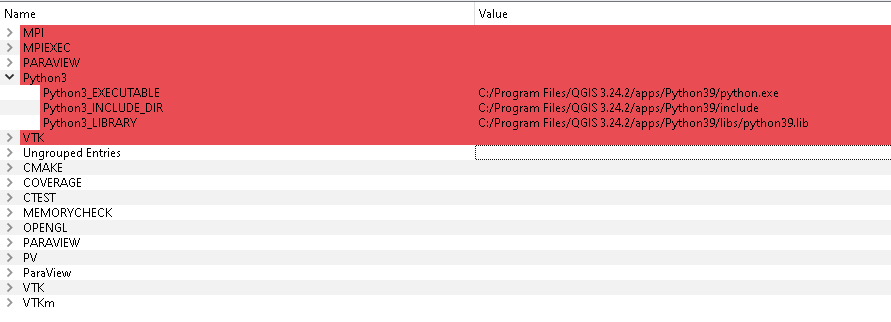
For future references:

> <https://github.com/Kitware/ParaView/blob/master/Documentation/dev/build.md#windows>
 ![image](https://discourse.paraview.org/uploads/default/original/2X/c/c8aa2d5f52ba755f777fe1fd13b2bbc584485846.png)

---

<div class="post-metadata">

### Author: ![nicolas.vuaille](https://discourse.paraview.org/user_avatar/discourse.paraview.org/nicolas.vuaille/32/5873_2.png) [@nicolas.vuaille](https://discourse.paraview.org/u/nicolas.vuaille)
#### Post date: [April 18, 2023, 12:26pm UTC](https://discourse.paraview.org/t/from-paraview-simple-import-importerror-dll-load-failed-while-importing-vtkremotingapplication/11905/11 "2023-04-18T12:26:49Z")

</div>

Ok!

`pvpython` is a simple interpreter with “builtin configuration” to find paraview module without environment tweak, so it is pretty expected that it worked 😛

I think that it is a matter of finding DLLs, so modifying `PYTHONPATH` or `sys.path` from python directly should not impact at this point (I mean, now that the `simple.py` module is found)

---

<div class="post-metadata">

### Author: ![Julien](https://discourse.paraview.org/letter_avatar_proxy/v4/letter/j/71e660/32.png) [@Julien](https://discourse.paraview.org/u/Julien)
#### Post date: [April 18, 2023, 12:32pm UTC](https://discourse.paraview.org/t/from-paraview-simple-import-importerror-dll-load-failed-while-importing-vtkremotingapplication/11905/12 "2023-04-18T12:32:47Z")

</div>

As for pvpython, I guess it’s nice to see something working from time to time 😃  
But seriously, I used pvpython to get a working sys.path and then copying it all to my qgis environment. But as I said, it didn’t work.

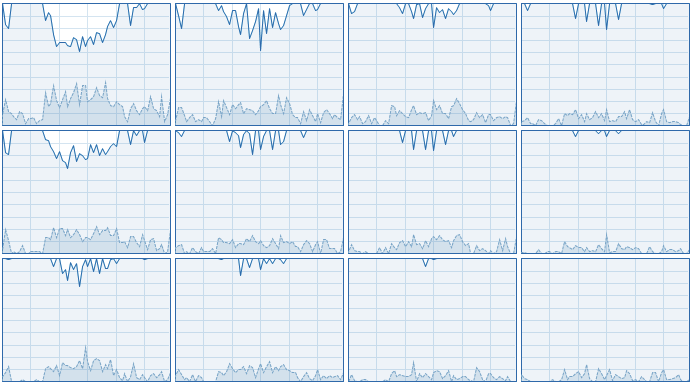
How long is the Paraview allbuild supposed to last? A few tens of minutes, a few hours? (obviously it depends on the PC but on a regular i7 8th generation, what should I expect? Hours?)
 ![image](https://discourse.paraview.org/uploads/default/original/2X/a/a2ca768383d63c4bf21c5c2015b7bdc53ed733ad.png)

edit: Oh, it’s already halfway there, apparently

---

<div class="post-metadata">

### Author: ![Julien](https://discourse.paraview.org/letter_avatar_proxy/v4/letter/j/71e660/32.png) [@Julien](https://discourse.paraview.org/u/Julien)
#### Post date: [April 18, 2023, 12:45pm UTC](https://discourse.paraview.org/t/from-paraview-simple-import-importerror-dll-load-failed-while-importing-vtkremotingapplication/11905/13 "2023-04-18T12:45:26Z")

</div>

For some reason, VS 2019 fails with a lack of heap space (?!) on the commonCore vtkSMP header with vtk\_smp\_implementation\_type set to set to stdthread in cmake, so I am now trying to compile paraview with that parameter being set to “sequential”

Edit: same VS heap space error, now that’s strange.

Edit 2 : now updating VS 😄  
If that doesn’t work, I will try with VS 2022

---

<div class="post-metadata">

### Author: ![Julien](https://discourse.paraview.org/letter_avatar_proxy/v4/letter/j/71e660/32.png) [@Julien](https://discourse.paraview.org/u/Julien)
#### Post date: [April 18, 2023, 3:30pm UTC](https://discourse.paraview.org/t/from-paraview-simple-import-importerror-dll-load-failed-while-importing-vtkremotingapplication/11905/14 "2023-04-18T15:30:21Z")

</div>

\o/

 ![image](https://discourse.paraview.org/uploads/default/original/2X/a/aedf5854c8821abd5389ff80f30f551e754c6578.jpeg)

 ![image](https://discourse.paraview.org/uploads/default/original/2X/5/5f86475896377cbaed11313815b7c05c36f2e4c6.png)

(edit: I am going to sum up the things to do a bit later)

---

<div class="post-metadata">

### Author: ![BrunoV21](https://discourse.paraview.org/user_avatar/discourse.paraview.org/brunov21/32/11839_2.png) [@BrunoV21](https://discourse.paraview.org/u/BrunoV21)
#### Post date: [June 19, 2023, 1:09am UTC](https://discourse.paraview.org/t/from-paraview-simple-import-importerror-dll-load-failed-while-importing-vtkremotingapplication/11905/15 "2023-06-19T01:09:04Z")

</div>

Hello, I found the exact same problem, in my case, I was trying to pair Paraview with jupyter notebook and (once the environmental variables were set) copying the content of the DLLs folder from the Paraview installation directory (`C:\Program Files\ParaView 5.11.1\bin\DLLs`) to the DLLs folder on the conda environment (`C:\Users\GL504GS\.conda\envs\env_name\DLLs`) did the trick.

Just sharing so that others have an easier time overcoming this minor issue.

---

<div class="post-metadata">

### Author: ![Julien](https://discourse.paraview.org/letter_avatar_proxy/v4/letter/j/71e660/32.png) [@Julien](https://discourse.paraview.org/u/Julien)
#### Post date: [June 19, 2023, 10:45am UTC](https://discourse.paraview.org/t/from-paraview-simple-import-importerror-dll-load-failed-while-importing-vtkremotingapplication/11905/16 "2023-06-19T10:45:35Z")

</div>

Thanks Bruno, that could be a nice solution too in case it’s too annoying to recompile Paraview. I will have to test it in QGIS too, I don’t know if it would disturb it? Anyway, thanks for sharing your solution as well!