# Get projection of vector field along normals from an imported STL file, and use it in the Calculator
**URL:** https://discourse.paraview.org/t/get-projection-of-vector-field-along-normals-from-an-imported-stl-file-and-use-it-in-the-calculator/12521
**Category:** ParaView Support
**Created:** [July 16, 2023, 1:05pm UTC](https://discourse.paraview.org/t/get-projection-of-vector-field-along-normals-from-an-imported-stl-file-and-use-it-in-the-calculator/12521 "2023-07-16T13:05:33Z")
**Posts on this page:** 5
**Page:** 1
### Author:  [@Squirrel8475](https://discourse.paraview.org/u/Squirrel8475)
#### Post date: [July 16, 2023, 1:05pm UTC](https://discourse.paraview.org/t/get-projection-of-vector-field-along-normals-from-an-imported-stl-file-and-use-it-in-the-calculator/12521/1 "2023-07-16T13:05:34Z")
Hello,
I would like to get the velocity component of a flow field along the local normals and perps of an imported STL mesh.
1. The pipeline is illustrated in the attached picture. A dummy model is used, the STL mesh is a plane but could have arbitrary shape.
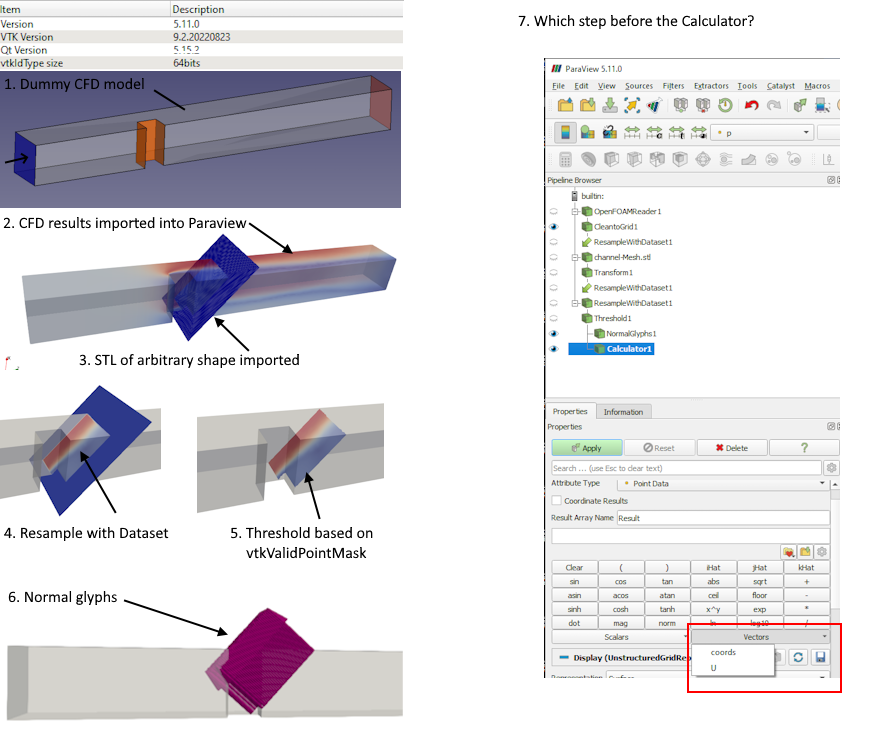
After importing the STL file, “Resample with Dataset” is used to map the results on the STL mesh.
From there “Normal Glyphs” are used to define the Normals of the imported STL mesh.
But I am missing how to proceed to get the normals in the Calculator in order to compute the velocity projection along these normals and perpandiculars.
1. “Surface Vectors”, or “GenerateSurfaceNormals” should do the job too. Shown as Glyphs the produced results have nothing to do with the direction of the imported STL, so I am missing a step here too.
The similar topics are
> [@How to get normals of a 2D line and to integrate along it](https://discourse.paraview.org/t/how-to-get-normals-of-a-2d-line-and-to-integrate-along-it/4389/9):
>
> I’m not worried traversing the cells in a random order but I’m worried about getting consistent direction of normals. I just want to adopt a precautionary approach because I’ll have to use this script with different cases. I can think of a simple common case where the input mesh may be weird. Let’s say the surface of the airfoil is input with two different set of points (blocks or zones): the lower surface and the upper surface sets. The first is entered clockwise and the second is entered cou…
> [@Normals of slices not appearing in the calculator filter](https://discourse.paraview.org/t/normals-of-slices-not-appearing-in-the-calculator-filter/8104/15):
>
> Hi Mathieu, thanks - yes, just in the the Y-normal axis! So Like this: So that I can get something like this for each section: [image] Then I can integrate each section for the desired local lift.
but cannot figure out how to apply in this context
Thank you in advance
---
### Author:  [@Kenneth\_Moreland](https://discourse.paraview.org/u/Kenneth_Moreland)
#### Post date: [July 17, 2023, 3:20pm UTC](https://discourse.paraview.org/t/get-projection-of-vector-field-along-normals-from-an-imported-stl-file-and-use-it-in-the-calculator/12521/2 "2023-07-17T15:20:51Z")
`Generate Surface Normals` should be the right thing to do. In fact, `Normal Glyphs` is a compound filter that uses `Generate Surface Normals` internally, so it makes little sense that one would work and the other would not.
Can you be more specific about how the result is wrong? Can you perhaps share your STL data for us to take a look?
---
### Author:  [@Squirrel8475](https://discourse.paraview.org/u/Squirrel8475)
#### Post date: [July 17, 2023, 3:30pm UTC](https://discourse.paraview.org/t/get-projection-of-vector-field-along-normals-from-an-imported-stl-file-and-use-it-in-the-calculator/12521/3 "2023-07-17T15:30:50Z")
Thank you for your feedback. I’ll try to be more specific: whether I apply one or the other method, there is no ‘’ Normals ‘’ available in the calculator, so I cannot proceed with the calculations I would like to do.
---
### Author:  [@Squirrel8475](https://discourse.paraview.org/u/Squirrel8475)
#### Post date: [July 21, 2023, 11:49am UTC](https://discourse.paraview.org/t/get-projection-of-vector-field-along-normals-from-an-imported-stl-file-and-use-it-in-the-calculator/12521/4 "2023-07-21T11:49:09Z")
[channel-Mesh.stl](https://discourse.paraview.org/uploads/short-url/3bTK5Q5wpwJeNv3Tcf08XqXXfSk.stl) (609.8 KB)
Please find attached the STL file as requested
---
### Author:  [@Squirrel8475](https://discourse.paraview.org/u/Squirrel8475)
#### Post date: [August 6, 2023, 3:00pm UTC](https://discourse.paraview.org/t/get-projection-of-vector-field-along-normals-from-an-imported-stl-file-and-use-it-in-the-calculator/12521/5 "2023-08-06T15:00:45Z")
“Normal Glyphs” is a display filter so it makes sense there is no “Normals” in the “Calculator”. “GenerateSurfaceNormals” leads to the correct results when visualised properly together with the Glyph filter. Happy to close this topic, thank you for you time.