# Glyph editing ParaView 5.6
**URL:** https://discourse.paraview.org/t/glyph-editing-paraview-5-6/3800
**Category:** ParaView Support
**Created:** [March 12, 2020, 2:50pm UTC](https://discourse.paraview.org/t/glyph-editing-paraview-5-6/3800 "2020-03-12T14:50:11Z")
**Posts on this page:** 3
**Page:** 1
### Author:  [@tskiado](https://discourse.paraview.org/u/tskiado)
#### Post date: [March 12, 2020, 2:50pm UTC](https://discourse.paraview.org/t/glyph-editing-paraview-5-6/3800/1 "2020-03-12T14:50:11Z")
I am using ParaView 5.6.0 in Ubuntu 18.04. I can’t figure out a way to edit the arrow glyph I have created from a velocity field. I would like to change the arrowhead size and scale. I can’t find these options in the filter properties menu. Any help would be appreciated.
Thanks a lot!
---
### Author:  [@cory.quammen](https://discourse.paraview.org/u/cory.quammen)
#### Post date: [March 12, 2020, 3:14pm UTC](https://discourse.paraview.org/t/glyph-editing-paraview-5-6/3800/2 "2020-03-12T15:14:01Z")
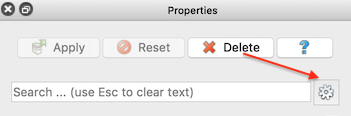
These are advanced properties. You can reveal them by toggling on the little gear icon in the upper right corner of the Properties panel.
---
### Author:  [@tskiado](https://discourse.paraview.org/u/tskiado)
#### Post date: [March 12, 2020, 7:39pm UTC](https://discourse.paraview.org/t/glyph-editing-paraview-5-6/3800/3 "2020-03-12T19:39:17Z")
Thanks a lot!