# How do I make Paraview remember that it should start up maximized?
**URL:** https://discourse.paraview.org/t/how-do-i-make-paraview-remember-that-it-should-start-up-maximized/10147
**Category:** ParaView Support
**Created:** [August 15, 2022, 2:06pm UTC](https://discourse.paraview.org/t/how-do-i-make-paraview-remember-that-it-should-start-up-maximized/10147 "2022-08-15T14:06:48Z")
**Posts on this page:** 7
**Page:** 1
### Author:  [@PetrKryslUCSD](https://discourse.paraview.org/u/PetrKryslUCSD)
#### Post date: [August 15, 2022, 2:06pm UTC](https://discourse.paraview.org/t/how-do-i-make-paraview-remember-that-it-should-start-up-maximized/10147/1 "2022-08-15T14:06:48Z")
How do I make Paraview remember that it should start up in a maximized window?
---
### Author:  [@cory.quammen](https://discourse.paraview.org/u/cory.quammen)
#### Post date: [August 15, 2022, 4:33pm UTC](https://discourse.paraview.org/t/how-do-i-make-paraview-remember-that-it-should-start-up-maximized/10147/2 "2022-08-15T16:33:41Z")
It should start up with the last window geometry you had set, so there shouldn’t be anything to do. If it is not, then there may be a problem with it writing settings.
---
### Author:  [@PetrKryslUCSD](https://discourse.paraview.org/u/PetrKryslUCSD)
#### Post date: [August 15, 2022, 4:40pm UTC](https://discourse.paraview.org/t/how-do-i-make-paraview-remember-that-it-should-start-up-maximized/10147/3 "2022-08-15T16:40:18Z")
How does one to bug this? I used the “Exit” item, an the user settings file seems to be up to date.
---
### Author:  [@PetrKryslUCSD](https://discourse.paraview.org/u/PetrKryslUCSD)
#### Post date: [August 15, 2022, 5:21pm UTC](https://discourse.paraview.org/t/how-do-i-make-paraview-remember-that-it-should-start-up-maximized/10147/4 "2022-08-15T17:21:16Z")
It appears to be the correct (maximized) size, except that it is positioned underneath the taskbar (Windows 10). The taskbar is fixed, not hiding when not focused.
---
### Author:  [@steve\_r](https://discourse.paraview.org/u/steve_r)
#### Post date: [August 19, 2022, 10:38am UTC](https://discourse.paraview.org/t/how-do-i-make-paraview-remember-that-it-should-start-up-maximized/10147/5 "2022-08-19T10:38:50Z")
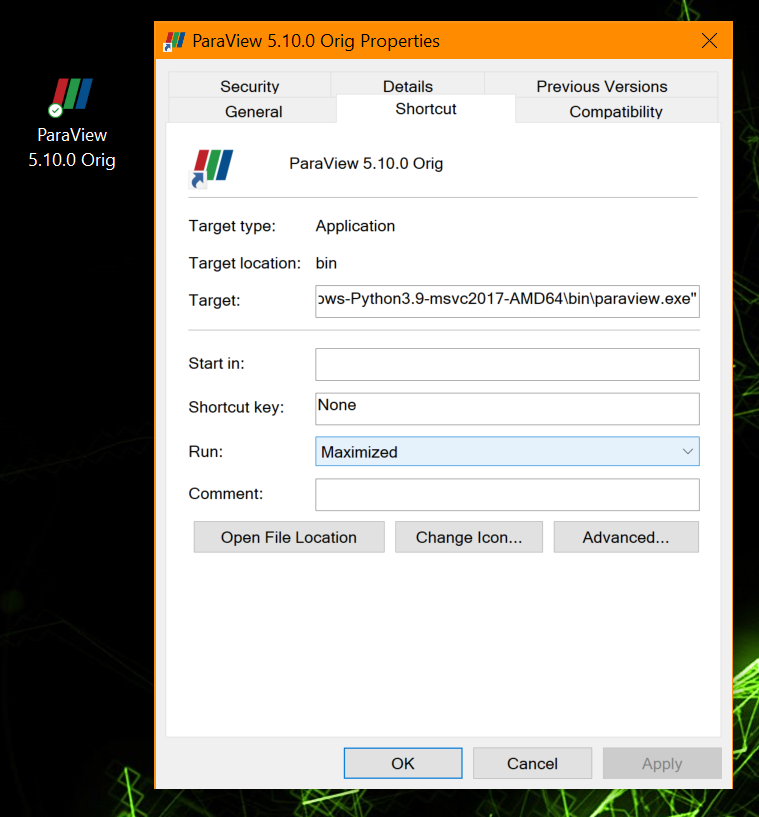
On Windows there is another possibility: create a shortcut to ParaView binary and set its property to “run: maximized”.
---
### Author:  [@jman87](https://discourse.paraview.org/u/jman87)
#### Post date: [April 21, 2023, 3:21pm UTC](https://discourse.paraview.org/t/how-do-i-make-paraview-remember-that-it-should-start-up-maximized/10147/6 "2023-04-21T15:21:10Z")
The “Solution” offered above only works if you’re opening a fresh ParaView session from the shortcut. It does not solve the problem when you want to double-click a file type associated with ParaView, as this still points to the ParaView executable. I even tried associating the file type with the Shortcut but no luck. What I’m seeing is what @PetrKryslUCSD originally described, which is that the window appears to be the maximum size, but it’s a floating window rather than a “maximized” window, so part of it is hanging off the screen so you still have to click maximize every time so you can see the whole screen.
It seems like this is something ParaView should have a setting for and it should be somewhere in the GUI that’s easy to find.
---
### Author:  [@steve\_r](https://discourse.paraview.org/u/steve_r)
#### Post date: [July 25, 2023, 4:31pm UTC](https://discourse.paraview.org/t/how-do-i-make-paraview-remember-that-it-should-start-up-maximized/10147/7 "2023-07-25T16:31:41Z")
On Windows, you could create a batch script that starts Paraview maximized, and associate that with your file types instead of the plain “paraview.exe”.