# How to access Spreadsheet data
**URL:** https://discourse.paraview.org/t/how-to-access-spreadsheet-data/1176
**Category:** ParaView Support
**Created:** [January 24, 2019, 4:17pm UTC](https://discourse.paraview.org/t/how-to-access-spreadsheet-data/1176 "2019-01-24T16:17:47Z")
**Posts on this page:** 5
**Page:** 1
### Author:  [@lpz\_michele](https://discourse.paraview.org/u/lpz_michele)
#### Post date: [January 24, 2019, 4:17pm UTC](https://discourse.paraview.org/t/how-to-access-spreadsheet-data/1176/1 "2019-01-24T16:17:47Z")
Hello everyone!
I have used OpenFOAM for a CFD simulation and right now I am manually trying to obtain the data I need. One of those is the Area averaged Velocity:
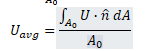
In order:
- I have used the slice tool to get the area of interest
- Used the “generate Surface normal” filter
- Calculated with the calculator filter the quantity abs(U.Normals)
- Implemented an integration by means of “IntegrateVariables”, activating the “divide per cell area/volume” function
I can correctly compute the area averaged velocity, but I need to isolate the value from the spreadsheet row in order to use this value in successive operations.
How can I do that?
thanks in advance for your help 🙂
---
### Author:  [@cory.quammen](https://discourse.paraview.org/u/cory.quammen)
#### Post date: [January 24, 2019, 4:34pm UTC](https://discourse.paraview.org/t/how-to-access-spreadsheet-data/1176/2 "2019-01-24T16:34:53Z")
> [@lpz\_michele](#):
>
> I need to isolate the value from the spreadsheet row in order to use this value in successive operations.
Do you want to use the value as a property value in a filter? That’s not easy, I’m afraid.
Or do you want to use it in a subsequent filtering operation? You can use the **Programmable Filter** to access the value in the table.
---
### Author:  [@lpz\_michele](https://discourse.paraview.org/u/lpz_michele)
#### Post date: [January 24, 2019, 4:50pm UTC](https://discourse.paraview.org/t/how-to-access-spreadsheet-data/1176/3 "2019-01-24T16:50:44Z")
Hi and thank you for your very fast reply! I need it in order to calculate a flow uniformity index. I used the Catalyst script generator. Ideally, I would like to select a 2D Surface (a slice) and to obtain a flow uniformity index. The script generated by catalyst is the following:
# create a new ‘Generate Surface Normals’
generateSurfaceNormals = GenerateSurfaceNormals(Input=slice)
# create a new ‘Calculator’
phiCalc = Calculator(Input=generateSurfaceNormals)
phiCalc.ResultArrayName = ‘phiCalc’
phiCalc.Function = 'abs(mag(U)-UavgAveraged
# create a new ‘Calculator’
uavg = Calculator(Input=generateSurfaceNormals)
uavg.ResultArrayName = ‘Uavg’
uavg.Function = ‘abs(U.Normals)’
# create a new ‘Point Data to Cell Data’
pointDatatoCellData1 = PointDatatoCellData(Input=uavg)
# create a new ‘Integrate Variables’
integrateVariables1 = IntegrateVariables(Input=pointDatatoCellData1)
integrateVariables1.DivideCellDataByVolume = 1
# create a new ‘Point Data to Cell Data’
pointDatatoCellData2 = PointDatatoCellData(Input=phiCalc)
# create a new ‘Integrate Variables’
integrateVariables2 = IntegrateVariables(Input=pointDatatoCellData2)
From the final integration the area averaged phiCalc (let’s say phiCalcAveraged) should be collected, in order to compute:
UI=1-phiCalcAveraged/(2\*UavgAveraged)
How can I implement it?🙂
---
### Author:  [@cory.quammen](https://discourse.paraview.org/u/cory.quammen)
#### Post date: [February 5, 2019, 3:57pm UTC](https://discourse.paraview.org/t/how-to-access-spreadsheet-data/1176/4 "2019-02-05T15:57:32Z")
Sorry for the delay in response.
You’ll need to `Fetch` the results of the integrate variables filter from the server proxy layer and use them in the expression. It’ll look like this:
```python
from vtkmodules.numpy_interface import dataset_adapter as dsa
local_integrateVariables1 = dsa.WrapDataObject(servermanager.Fetch(integrateVariables1))
UavgAveraged = local_integrateVariables1.CellData['Uavg'][0]
```
You’ll do the same for the second **Integrate Variables** filter.
---
### Author:  [@cfd\_payne](https://discourse.paraview.org/u/cfd_payne)
#### Post date: [November 17, 2021, 9:24am UTC](https://discourse.paraview.org/t/how-to-access-spreadsheet-data/1176/5 "2021-11-17T09:24:41Z")
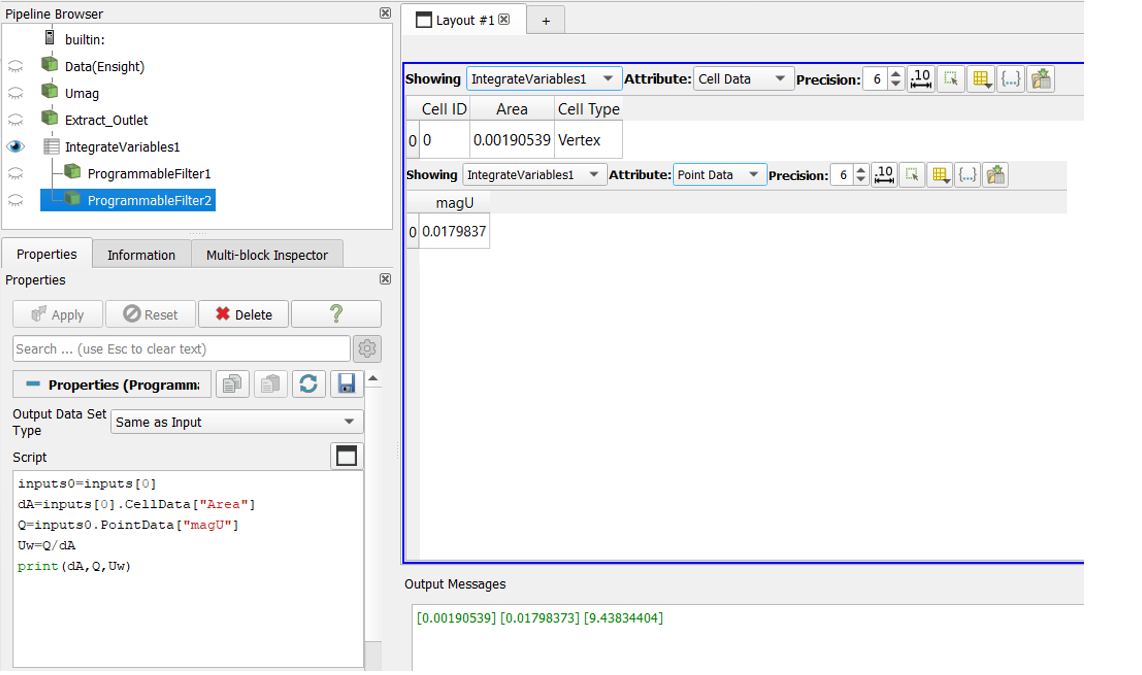
Alternate method:-
> [@cory.quammen](#):
>
> You’ll need to `Fetch` the results of the integrate variables filter from the server proxy layer and use them in the expression. It’ll look like this:
>
> ```auto
>
> ```
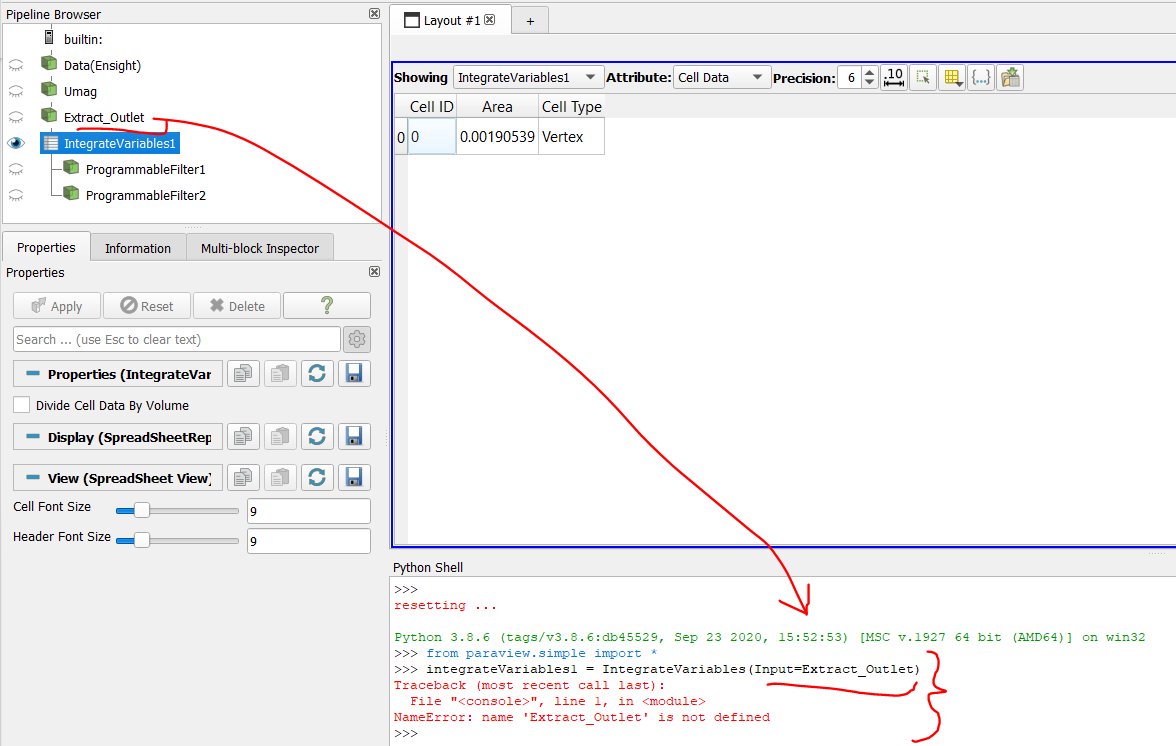
Can we Fetch the values from dsa