# How to access to OPS SCALE FUNCTION
**URL:** https://discourse.paraview.org/t/how-to-access-to-ops-scale-function/8739
**Category:** ParaView Support
**Created:** [January 6, 2022, 12:29pm UTC](https://discourse.paraview.org/t/how-to-access-to-ops-scale-function/8739 "2022-01-06T12:29:26Z")
**Posts on this page:** 5
**Page:** 1
### Author:  [@Salah\_eddine](https://discourse.paraview.org/u/Salah_eddine)
#### Post date: [January 6, 2022, 12:29pm UTC](https://discourse.paraview.org/t/how-to-access-to-ops-scale-function/8739/1 "2022-01-06T12:29:26Z")
Hello,
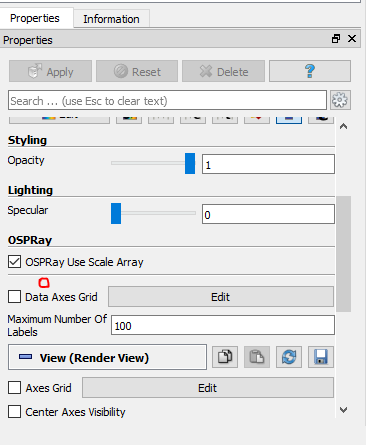
I am in the process of making a simulation by Paraview, which will require OPS SCALE FUNCTION. I have installed different versions of the software. However, I failed to find it.
Please tell me how to access this feature?
Best regards
---
### Author:  [@mwestphal](https://discourse.paraview.org/u/mwestphal)
#### Post date: [January 6, 2022, 1:05pm UTC](https://discourse.paraview.org/t/how-to-access-to-ops-scale-function/8739/2 "2022-01-06T13:05:07Z")
@timothee.chabat
---
### Author:  [@timothee.chabat](https://discourse.paraview.org/u/timothee.chabat)
#### Post date: [January 6, 2022, 1:17pm UTC](https://discourse.paraview.org/t/how-to-access-to-ops-scale-function/8739/3 "2022-01-06T13:17:22Z")
This doesn’t look like the property editor I know, what version are you using ?
For ParaView 5.9 and 5.10, activate the advanced option and go to section `Display Properties -> Ray Tracing -> Scaling Mode`. If you choose the `Each Scaled` mode, you’ll be able to edit the scale function and select the data array used for the scaling.
---
### Author:  [@timothee.chabat](https://discourse.paraview.org/u/timothee.chabat)
#### Post date: [January 6, 2022, 1:22pm UTC](https://discourse.paraview.org/t/how-to-access-to-ops-scale-function/8739/4 "2022-01-06T13:22:40Z")
See [OSPRay scaling points - #6 by Michael](https://discourse.paraview.org/t/ospray-scaling-points/992/6) for a similar discussion around this feature.
---
### Author:  [@Salah\_eddine](https://discourse.paraview.org/u/Salah_eddine)
#### Post date: [January 6, 2022, 2:56pm UTC](https://discourse.paraview.org/t/how-to-access-to-ops-scale-function/8739/5 "2022-01-06T14:56:13Z")
thanks a lot for your help