### Author:  [@Superbee](https://discourse.paraview.org/u/Superbee)
#### Post date: [December 10, 2019, 4:45pm UTC](https://discourse.paraview.org/t/how-to-change-axisofsymmetry-in-paraview/3158/1 "2019-12-10T16:45:10Z")
Hi Paraview community,
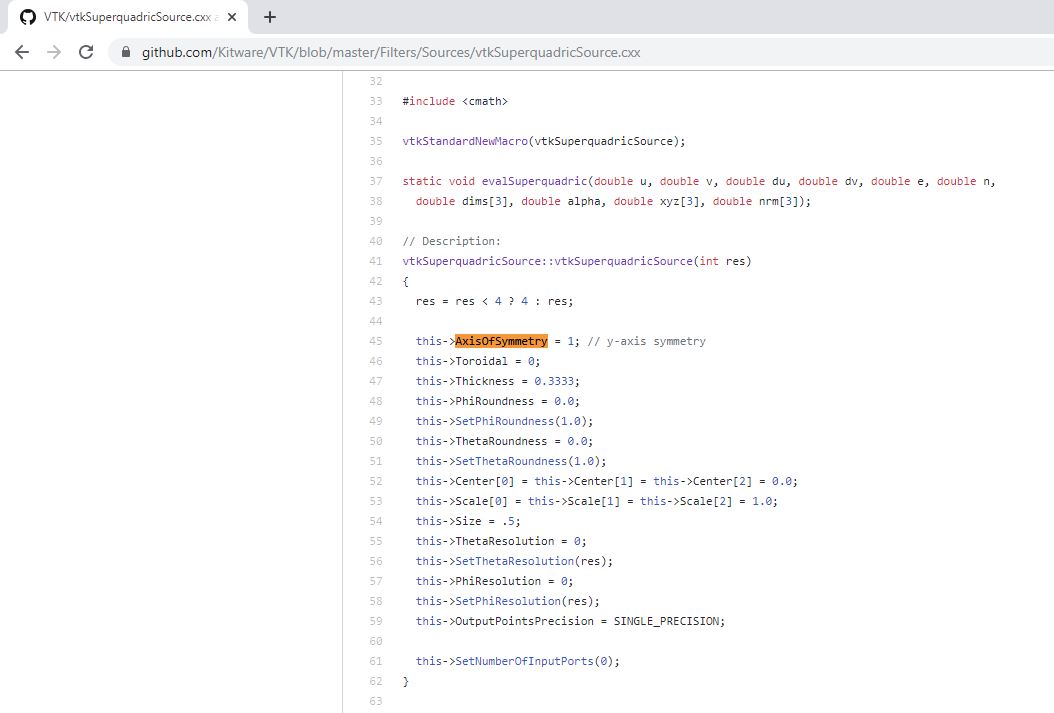
In the file, I want to change the **AxisOfSymmetry** from 1 to 2, can anyone suggest an easy way to change it in Paraview? Thanks!
!!
vtkSuperquadricSource::vtkSuperquadricSource(int res)
{
res = res \< 4 ? 4 : res;
this-\>AxisOfSymmetry = 1; // y-axis symmetry
!!
>
---
### Author:  [@mwestphal](https://discourse.paraview.org/u/mwestphal)
#### Post date: [December 10, 2019, 4:53pm UTC](https://discourse.paraview.org/t/how-to-change-axisofsymmetry-in-paraview/3158/2 "2019-12-10T16:53:42Z")
You can do that by creating a very simple XML only plugin.
[https://www.paraview.org/Wiki/ParaView/Plugin\_HowTo#XML\_Only](https://www.paraview.org/Wiki/ParaView/Plugin_HowTo#XML_Only)
---
### Author:  [@Superbee](https://discourse.paraview.org/u/Superbee)
#### Post date: [December 10, 2019, 5:03pm UTC](https://discourse.paraview.org/t/how-to-change-axisofsymmetry-in-paraview/3158/3 "2019-12-10T17:03:03Z")
Thanks Mathieu! I have looked at the method you suggested. While it seems a little difficult for me to understand the code. Do you have any other example/document for me to learn how to write the plugin? I am using paraview 5.6, I hope to do it in the GUI.
---
### Author:  [@mwestphal](https://discourse.paraview.org/u/mwestphal)
#### Post date: [December 11, 2019, 9:31am UTC](https://discourse.paraview.org/t/how-to-change-axisofsymmetry-in-paraview/3158/4 "2019-12-11T09:31:51Z")
Here you go :
- Save [SuperquadricAxisOfSymmetry.xml](https://discourse.paraview.org/uploads/short-url/fjmaVsXDRrj3J3N7Mgu3MntmQsc.xml) somewhere on your computer
- Open ParaView
- Tools -\> Manage Plugin -\> Load New -\> SuperquadricAxisOfSymmetry.xml
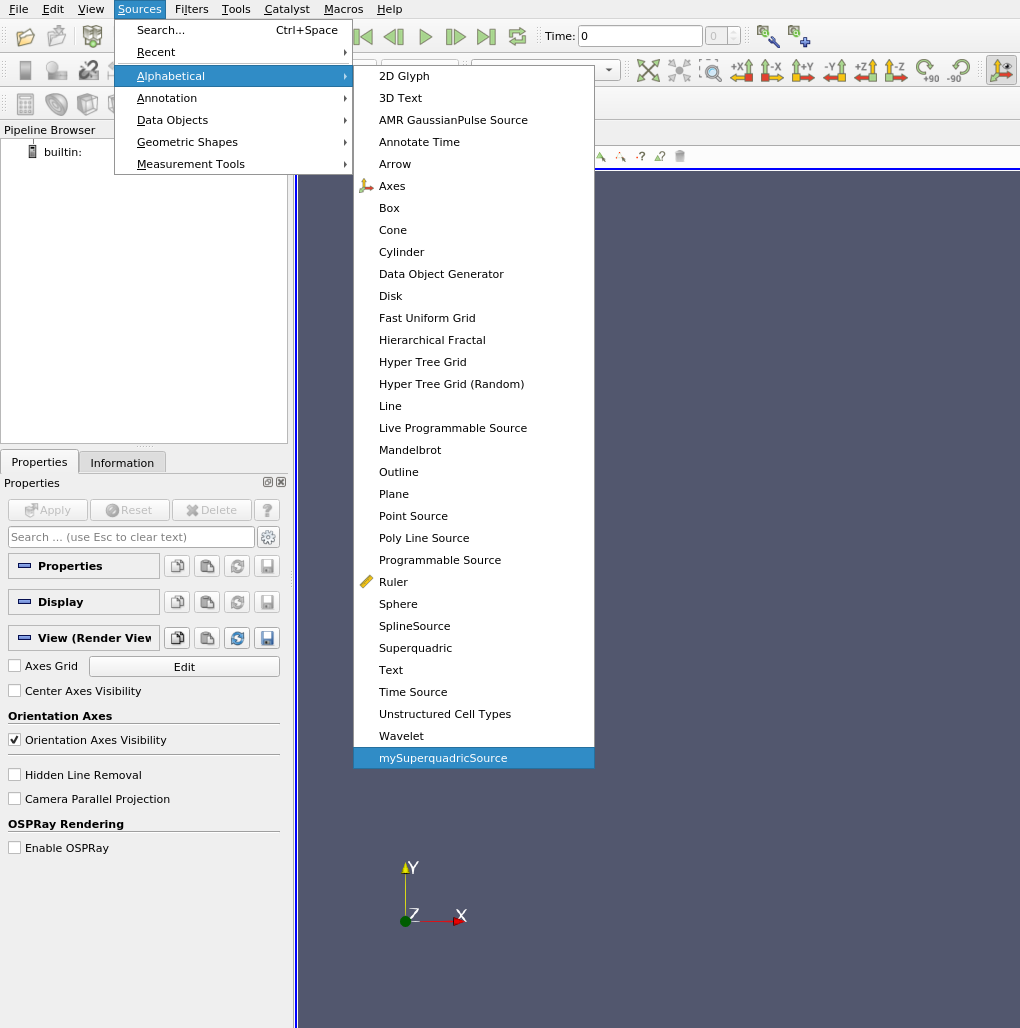
- Sources -\> Alphabetical -\> mySuperquadricSource
---
### Author:  [@Superbee](https://discourse.paraview.org/u/Superbee)
#### Post date: [December 11, 2019, 4:39pm UTC](https://discourse.paraview.org/t/how-to-change-axisofsymmetry-in-paraview/3158/5 "2019-12-11T16:39:53Z")
Thanks Mathieu for your help. I can successfully load the file your provided, while I could not see it. (I tested other examples, they can be seen.)
One more question, since I need to use TensorGlyph ( in TensorGlyph—\>select superquadric), how to make this change (AxisOfSymmetry=2) also works for TensorGlyph?
---
### Author:  [@mwestphal](https://discourse.paraview.org/u/mwestphal)
#### Post date: [December 11, 2019, 4:59pm UTC](https://discourse.paraview.org/t/how-to-change-axisofsymmetry-in-paraview/3158/6 "2019-12-11T16:59:47Z")
> while I could not see it.
What do you mean ?
> One more question, since I need to use TensorGlyph ( in TensorGlyph—\>select superquadric), how to make this change (AxisOfSymmetry=2) also works for TensorGlyph?
Once again, you need to do that in the xml plugin and point to your new superquadric source
---
### Author:  [@Superbee](https://discourse.paraview.org/u/Superbee)
#### Post date: [December 11, 2019, 5:04pm UTC](https://discourse.paraview.org/t/how-to-change-axisofsymmetry-in-paraview/3158/7 "2019-12-11T17:04:14Z")
I mean from **Alphabetical** , I can not find **mySuperquadricSource**. (I have tryed other examples, I can find them.).
Thanks again!
---
### Author:  [@mwestphal](https://discourse.paraview.org/u/mwestphal)
#### Post date: [December 11, 2019, 5:06pm UTC](https://discourse.paraview.org/t/how-to-change-axisofsymmetry-in-paraview/3158/8 "2019-12-11T17:06:59Z")
---
### Author:  [@Superbee](https://discourse.paraview.org/u/Superbee)
#### Post date: [December 11, 2019, 6:07pm UTC](https://discourse.paraview.org/t/how-to-change-axisofsymmetry-in-paraview/3158/9 "2019-12-11T18:07:13Z")
I restarted ParaView 😅 and I am able to find it!! It works!!! I really appreciated your help.