# How to change orientation of skybox with paraview (like vtk renderer)
**URL:** https://discourse.paraview.org/t/how-to-change-orientation-of-skybox-with-paraview-like-vtk-renderer/13758
**Category:** In Situ Support
**Created:** [January 21, 2024, 1:54pm UTC](https://discourse.paraview.org/t/how-to-change-orientation-of-skybox-with-paraview-like-vtk-renderer/13758 "2024-01-21T13:54:27Z")
**Posts on this page:** 7
**Page:** 1
### Author:  [@Kim\_Namhyun](https://discourse.paraview.org/u/Kim_Namhyun)
#### Post date: [January 21, 2024, 1:54pm UTC](https://discourse.paraview.org/t/how-to-change-orientation-of-skybox-with-paraview-like-vtk-renderer/13758/1 "2024-01-21T13:54:27Z")
I am testing skybox with python paraview.simple
I notice that orientation up of skybox is always Y-axis. (I expect that Z-axis)
So, when I load 3d model skybox looks like being ratated.
I found the solution with vtk renderer if I use vtkRenderer.
```auto
this->SkyboxActor->SetFloorPlane(0,0,1, 0.0);
this->SkyboxActor->SetFloorRight(-1,0,0);
```
([Turn environment map to z-up - Development - VTK](https://discourse.vtk.org/t/turn-environment-map-to-z-up/12432))
This way, I can see skybox’s up-orientation is Z-axis
However, I don’t know how to do this with paraview python module
with paraview trace tool, I can show skybox with below code.
```auto
view = simple.CreateView('RenderVIew')
view.UseColorPalleteForBackground = 0
view.BackgroundColorMode = 'skybox'
view.UseEnvironmentLighting = 1
back_texture = simple.CreateTexture('.....hdr')
view.BackgroundTexture = back_texture
```
Now, I don’t know how to code to change orientation of skybox in vtkPVRenderView.
Please help me…
Thanks in advance
---
### Author:  [@mwestphal](https://discourse.paraview.org/u/mwestphal)
#### Post date: [January 22, 2024, 8:20am UTC](https://discourse.paraview.org/t/how-to-change-orientation-of-skybox-with-paraview-like-vtk-renderer/13758/2 "2024-01-22T08:20:52Z")
I’m afraid this is not exposed in ParaView, it should be pretty simple to add though.
@Lucas_Givord
---
### Author:  [@Alexandre\_Minot](https://discourse.paraview.org/u/Alexandre_Minot)
#### Post date: [January 22, 2024, 2:30pm UTC](https://discourse.paraview.org/t/how-to-change-orientation-of-skybox-with-paraview-like-vtk-renderer/13758/3 "2024-01-22T14:30:33Z")
I ran into the same issue. In the mean time, you can instead rotate the data you want to display using the Transforming section of the property pane:
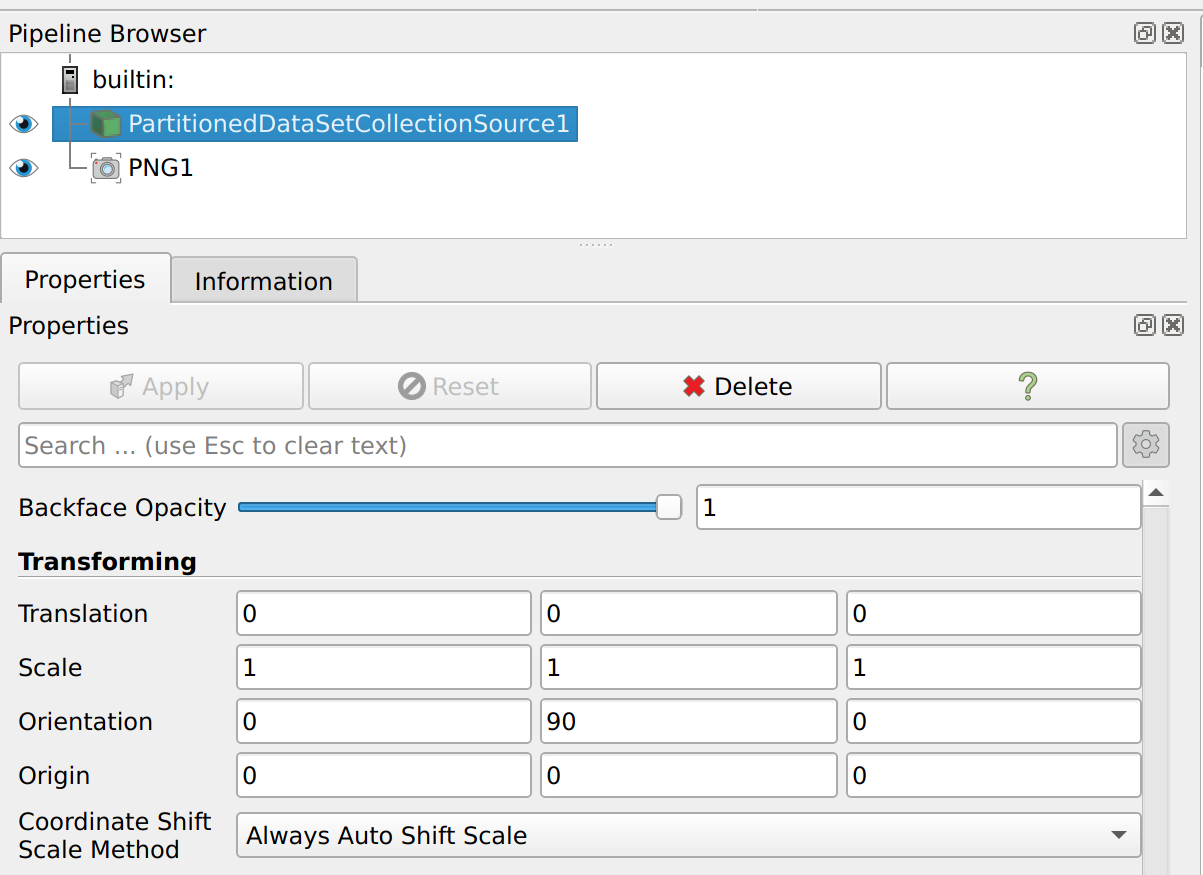
```auto
# trace defaults for the display properties.
partitionedDataSetCollectionSource1Display.Representation = 'Surface'
partitionedDataSetCollectionSource1Display.ColorArrayName = ['POINTS', 'Scalars']
partitionedDataSetCollectionSource1Display.LookupTable = scalarsLUT
partitionedDataSetCollectionSource1Display.SelectTCoordArray = 'None'
partitionedDataSetCollectionSource1Display.SelectNormalArray = 'Normals'
partitionedDataSetCollectionSource1Display.SelectTangentArray = 'None'
partitionedDataSetCollectionSource1Display.Orientation = [0.0, 90.0, 0.0]
```
---
### Author:  [@Kim\_Namhyun](https://discourse.paraview.org/u/Kim_Namhyun)
#### Post date: [January 23, 2024, 1:19am UTC](https://discourse.paraview.org/t/how-to-change-orientation-of-skybox-with-paraview-like-vtk-renderer/13758/4 "2024-01-23T01:19:02Z")
Thank you Alex.
@Alexandre_Minot
I tried this already.
It makes remaning default up vector of view as Y-Axis and we can rotate 3d structure.
However, same situation happens again when I make child pipeline from structure like as creating filter.
So, this could not be the solution for me ☹
Anyway, thank you!
---
### Author:  [@Kim\_Namhyun](https://discourse.paraview.org/u/Kim_Namhyun)
#### Post date: [January 23, 2024, 1:22am UTC](https://discourse.paraview.org/t/how-to-change-orientation-of-skybox-with-paraview-like-vtk-renderer/13758/5 "2024-01-23T01:22:15Z")
I tried also something like hack? trick?
I retrieve actor(vtkSkybox?) from view like below and then change property of FloorPlane and FloorRight.
Script seems working but skybox rendered wiered. (LOL)
I expected lucky magic… haha
```auto
renderer = view.GetRenderer()
actors = renderer.GetActors()
actors.InitTraversal()
while True:
actor = actors.GetNextItemAsObject()
if not actor:
break
if actor. __class__. __name__ == 'vtkOpenGLSkybox':
actor.SetFloorPlane(0, 0, 1, 0.0)
actor.SetFloorRight(-1, 0, 0)
break
print(actor. __class__. __name__ )
```
---
### Author:  [@tgalland](https://discourse.paraview.org/u/tgalland)
#### Post date: [January 23, 2024, 10:06am UTC](https://discourse.paraview.org/t/how-to-change-orientation-of-skybox-with-paraview-like-vtk-renderer/13758/6 "2024-01-23T10:06:31Z")
In a similar vein, if you want to keep the transformation with subsequent filters, you can try applying a `Transform` filter on your data directly (here only the representation of current source is rotated, hence it does not apply on the rest of your pipeline)
---
### Author:  [@Kim\_Namhyun](https://discourse.paraview.org/u/Kim_Namhyun)
#### Post date: [January 26, 2024, 6:16am UTC](https://discourse.paraview.org/t/how-to-change-orientation-of-skybox-with-paraview-like-vtk-renderer/13758/7 "2024-01-26T06:16:55Z")
Thank you for your reply.
I am afraid it’s not hevy when I load really huge models.
I usually load very heavy structures.
I have to test it is affordable
Thank you