# How to display particles entirely on a slice?
**URL:** https://discourse.paraview.org/t/how-to-display-particles-entirely-on-a-slice/11916
**Category:** ParaView Support
**Created:** [April 18, 2023, 12:09pm UTC](https://discourse.paraview.org/t/how-to-display-particles-entirely-on-a-slice/11916 "2023-04-18T12:09:25Z")
**Posts on this page:** 6
**Page:** 1
### Author:  [@lowentropy](https://discourse.paraview.org/u/lowentropy)
#### Post date: [April 18, 2023, 12:09pm UTC](https://discourse.paraview.org/t/how-to-display-particles-entirely-on-a-slice/11916/1 "2023-04-18T12:09:25Z")
I have read the topic of how to display particles on a slice?[How to display lagrangian particles on a slice?](https://discourse.paraview.org/t/how-to-display-lagrangian-particles-on-a-slice/10174)
Now I have used **Clip** filters for my visulization. But i notice the particles(draw with pointgaussian) can not show entirely. Particles whose center is under the plane is covered by the plane.
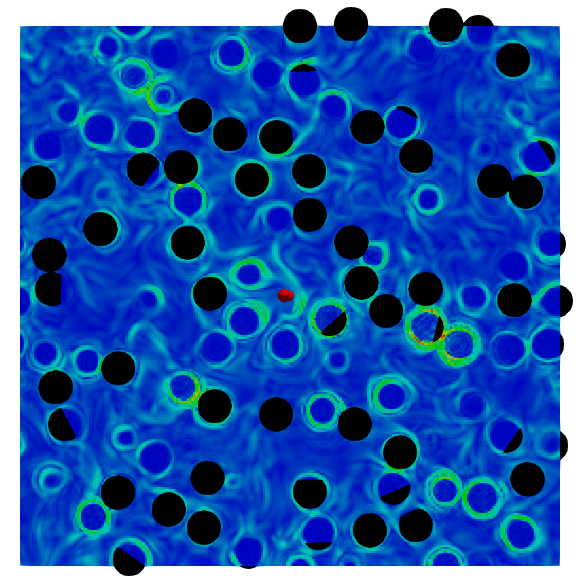
I wonder how to achieve my needs to entirely display particles on a slice.
Thanks a lot.
---
### Author:  [@nicolas.vuaille](https://discourse.paraview.org/u/nicolas.vuaille)
#### Post date: [April 18, 2023, 1:14pm UTC](https://discourse.paraview.org/t/how-to-display-particles-entirely-on-a-slice/11916/2 "2023-04-18T13:14:34Z")
`Point Gaussian` is just a matter of display: particles are still only a point, i.e. a position without any actual size. So if you want to create sphere for each particle and expect the slice to cut the spheres, use `Glyph` filter to create those sphere before `Slice` them
---
### Author:  [@lowentropy](https://discourse.paraview.org/u/lowentropy)
#### Post date: [April 19, 2023, 2:16am UTC](https://discourse.paraview.org/t/how-to-display-particles-entirely-on-a-slice/11916/3 "2023-04-19T02:16:03Z")
Thank you for your advice, i will try Glyph
---
### Author:  [@lowentropy](https://discourse.paraview.org/u/lowentropy)
#### Post date: [April 19, 2023, 2:35am UTC](https://discourse.paraview.org/t/how-to-display-particles-entirely-on-a-slice/11916/4 "2023-04-19T02:35:47Z")
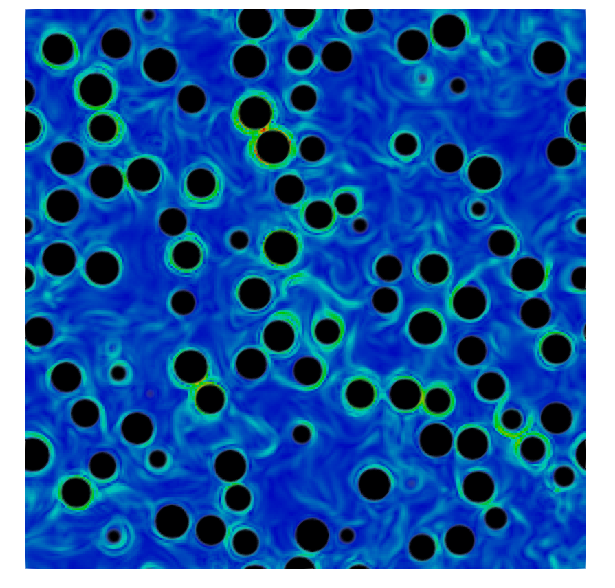
Using Glyph to make a sphere also have the same problem because the sphere is hollow inside. Now i display my results by overlaping two layers with different opacities.
---
### Author:  [@Kenneth\_Moreland](https://discourse.paraview.org/u/Kenneth_Moreland)
#### Post date: [April 19, 2023, 5:06pm UTC](https://discourse.paraview.org/t/how-to-display-particles-entirely-on-a-slice/11916/5 "2023-04-19T17:06:34Z")
You could use `Clip` instead of `Slice` to remove just the back side of the glyphs. But wouldn’t it work to do neither and just render the glyphs as is. Sure, the glyphs will poke out the back side of the plane, but you won’t be able to see that because the plane will obscure that. (I thought that was the whole point of asking the question to begin with.
---
### Author:  [@lowentropy](https://discourse.paraview.org/u/lowentropy)
#### Post date: [April 21, 2023, 9:31am UTC](https://discourse.paraview.org/t/how-to-display-particles-entirely-on-a-slice/11916/6 "2023-04-21T09:31:50Z")
thank you for your advice. I use **clip** because i need to display particles around the plane, just like what i post before. if i just render the glyphs, sphere at the top will cover the bottom. And then i found **glyphs** can only make the shell rather the volume of the sphere. So at last i overlapped two layer of 2d graphs to make it.