### Author:  [@mwestphal](https://discourse.paraview.org/u/mwestphal)
#### Post date: [June 9, 2020, 7:05am UTC](https://discourse.paraview.org/t/how-to-get-paraview-dark-ui-any-os-any-release/4545/1 "2020-06-09T07:05:47Z")
**GENERIC SOLUTION**
It is possible to modify the aspect of the ParaView UI, eg like this:
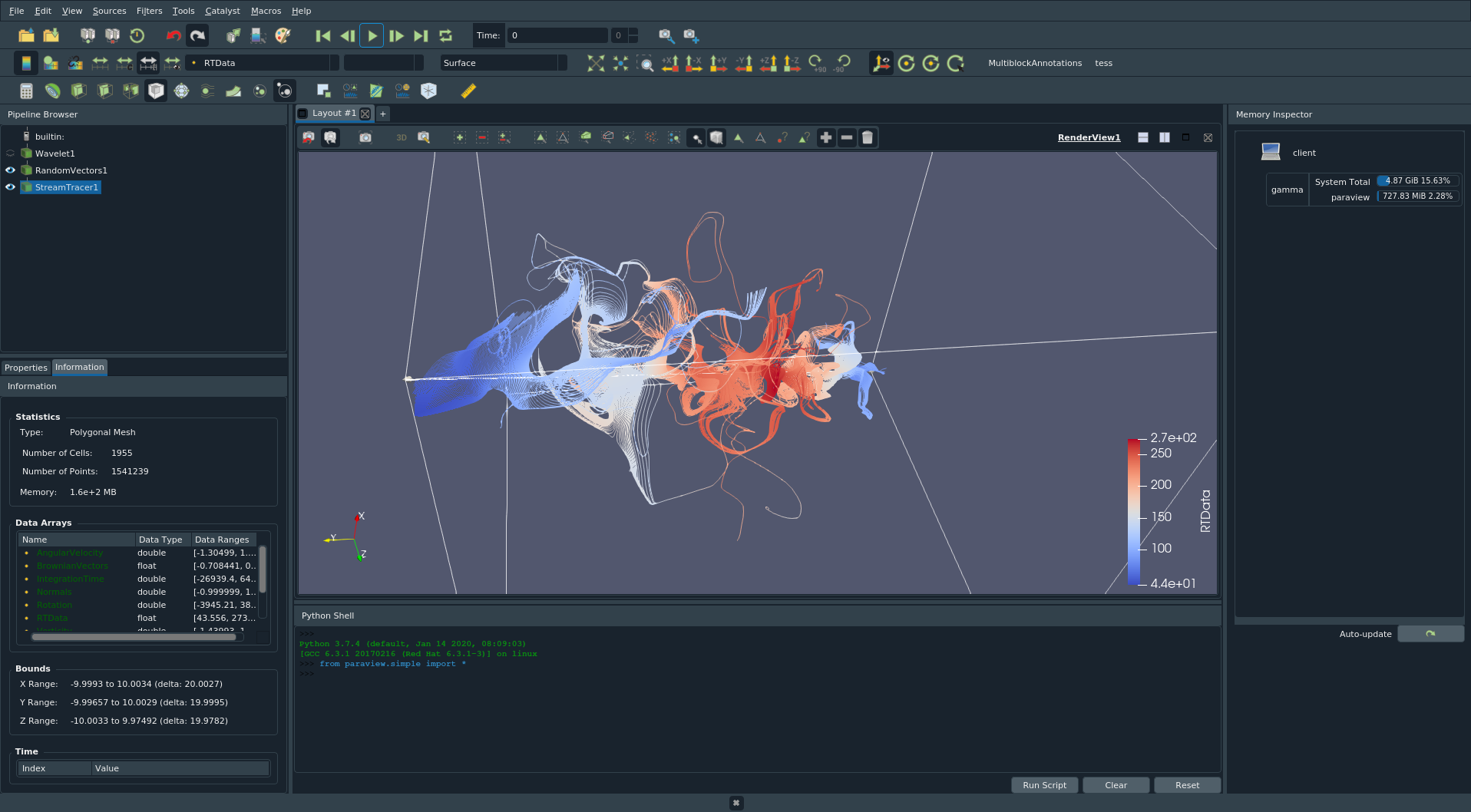
Download this Qt [style.qss](https://discourse.paraview.org/uploads/short-url/wmw6wNSscYAHU6Rb970mb1gD1sd.qss) (49.2 KB) from [QDarkStyleSheet](https://github.com/ColinDuquesnoy/QDarkStyleSheet) and then run ParaView with the following argument.
`paraview -style=default -stylesheet=/absolute/path/to/style.qss`
On Windows, one could then create a shortcut with the command.
On Linux, one could then create a shell script with the command.
This style is not perfect, so if you improve it, please feel free to share it.
===============================================
**LINUX + SYSTEM QT ONLY SOLUTION**
On Linux and with System Qt only, it is possible to use Qt5ct in order to have a full integration of your Qt system stylee, like this :
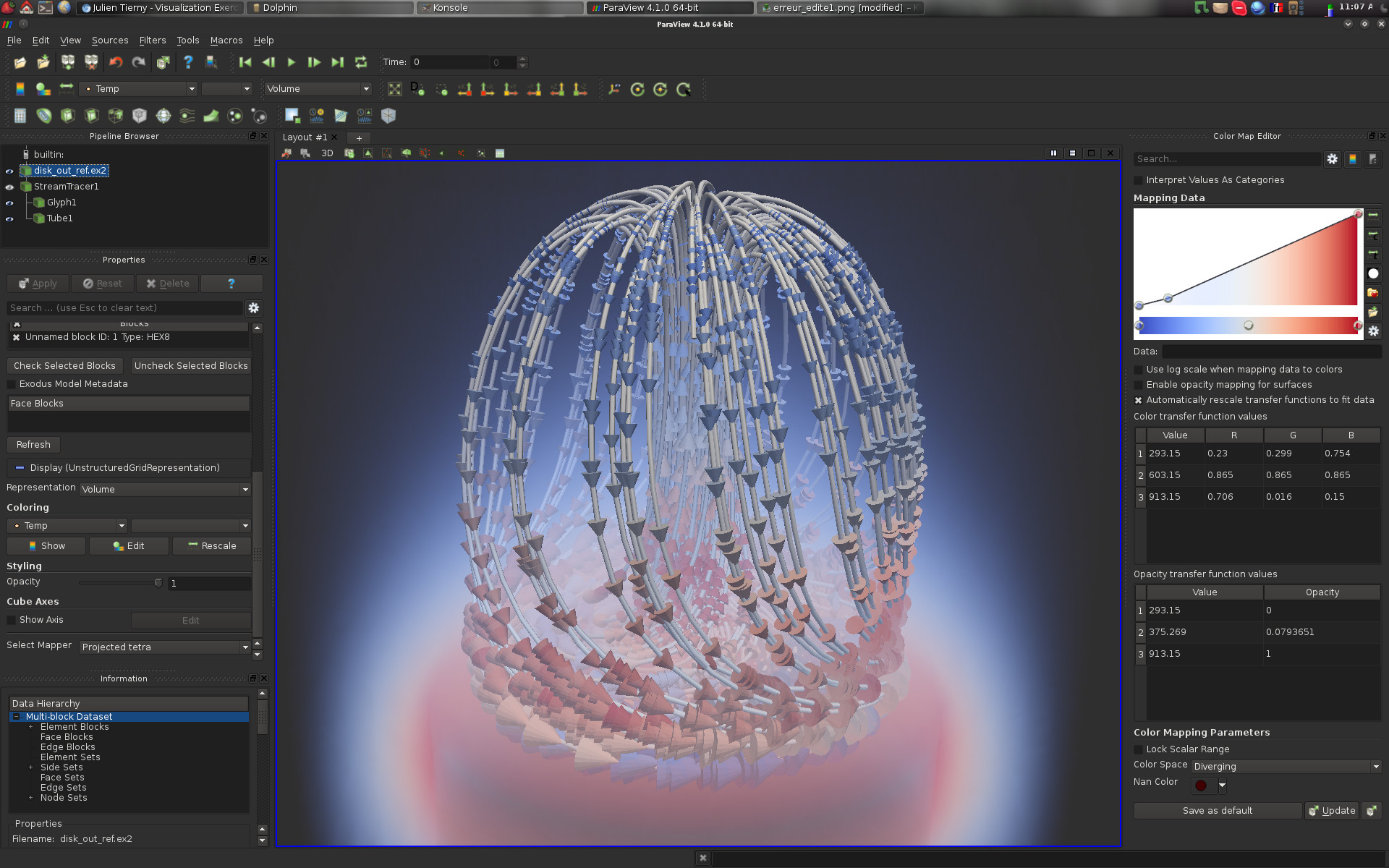
This trick works only on Linux and only if ParaView use the system Qt, e.g. when building ParaView or installing with a package manager.
This **do not work** with the ParaView binary release.
- Install `qt5ct` and `breeze`
- Run `qt5ct`.
- Select “Breeze” style with custom “Darker” color scheme
- export QT\_QPA\_PLATFORMTHEME=qt5ct
- run ParaView
---
### Author:  [@mwestphal](https://discourse.paraview.org/u/mwestphal)
#### Post date: [June 9, 2020, 7:06am UTC](https://discourse.paraview.org/t/how-to-get-paraview-dark-ui-any-os-any-release/4545/2 "2020-06-09T07:06:55Z")
See here for a feature request to add this feature in ParaView: [https://gitlab.kitware.com/paraview/paraview/-/issues/19980](https://gitlab.kitware.com/paraview/paraview/-/issues/19980)
---
### Author:  [@steve\_r](https://discourse.paraview.org/u/steve_r)
#### Post date: [June 26, 2020, 10:19am UTC](https://discourse.paraview.org/t/how-to-get-paraview-dark-ui-any-os-any-release/4545/3 "2020-06-26T10:19:16Z")
Hi Mathieu,
I’m new to Paraview, and started using it on a Windows 10 Laptop.
I was immediately looking to enable a dark UI theme, which I’m used to work with in other programs. Unfortunately, your trick doesn’t work on Windows.
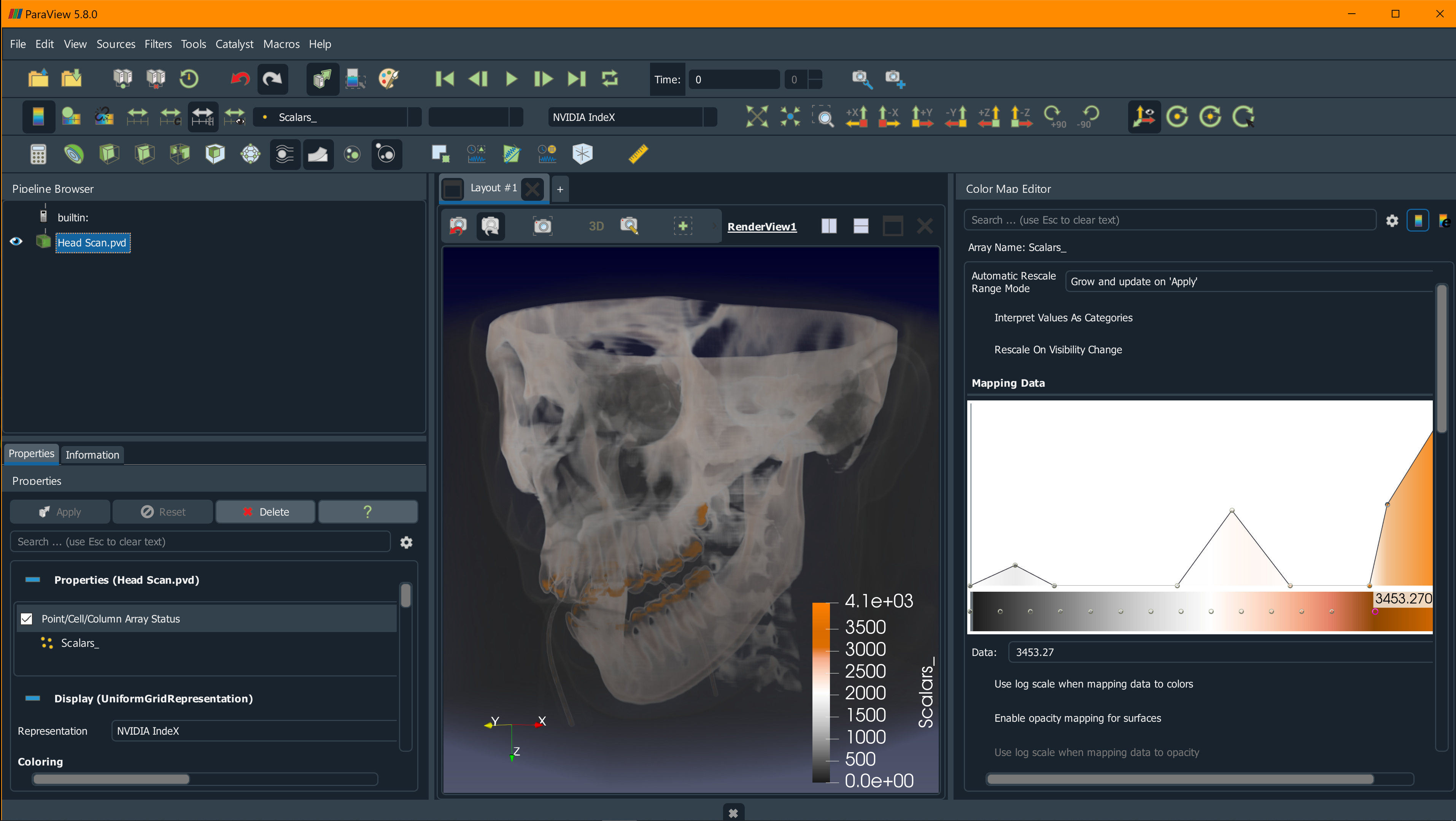
Paraview ships with the WindowsVista Qt style, which I wasn’t able to adjust easily. However, it turns out that it’s possible to override the style and apply a custom stylesheet to get a pleasingly dark look. I took the [qdarkstyle](https://awesomeopensource.com/project/ColinDuquesnoy/QDarkStyleSheet) from the web and got the following result.
---
### Author:  [@mwestphal](https://discourse.paraview.org/u/mwestphal)
#### Post date: [June 29, 2020, 3:59am UTC](https://discourse.paraview.org/t/how-to-get-paraview-dark-ui-any-os-any-release/4545/4 "2020-06-29T03:59:37Z")
Awesome ! I will give it a go and update my post accordingly.
---
### Author:  [@mwestphal](https://discourse.paraview.org/u/mwestphal)
#### Post date: [July 3, 2020, 9:41am UTC](https://discourse.paraview.org/t/how-to-get-paraview-dark-ui-any-os-any-release/4545/5 "2020-07-03T09:41:31Z")
It looks like this requires direct modifications of ParaView source code, isn’t it ?
---
### Author:  [@steve\_r](https://discourse.paraview.org/u/steve_r)
#### Post date: [July 3, 2020, 12:25pm UTC](https://discourse.paraview.org/t/how-to-get-paraview-dark-ui-any-os-any-release/4545/6 "2020-07-03T12:25:01Z")
Mathieu,
fortunately No, it’s possible without touching the binary (otherwise I wouldn’t have done it) 😉
All you need is a decent .qss style sheet and then apply the override on the Paraview command-line like:
`paraview -style=default -stylesheet=.qss`
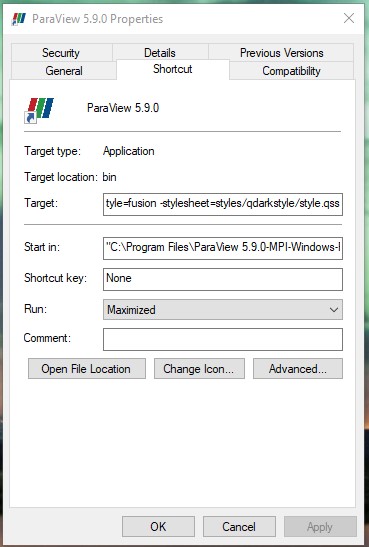
On Windows, to make it convenient, I created a shortcut on the Desktop and adjusted the command-line (see screenshot):
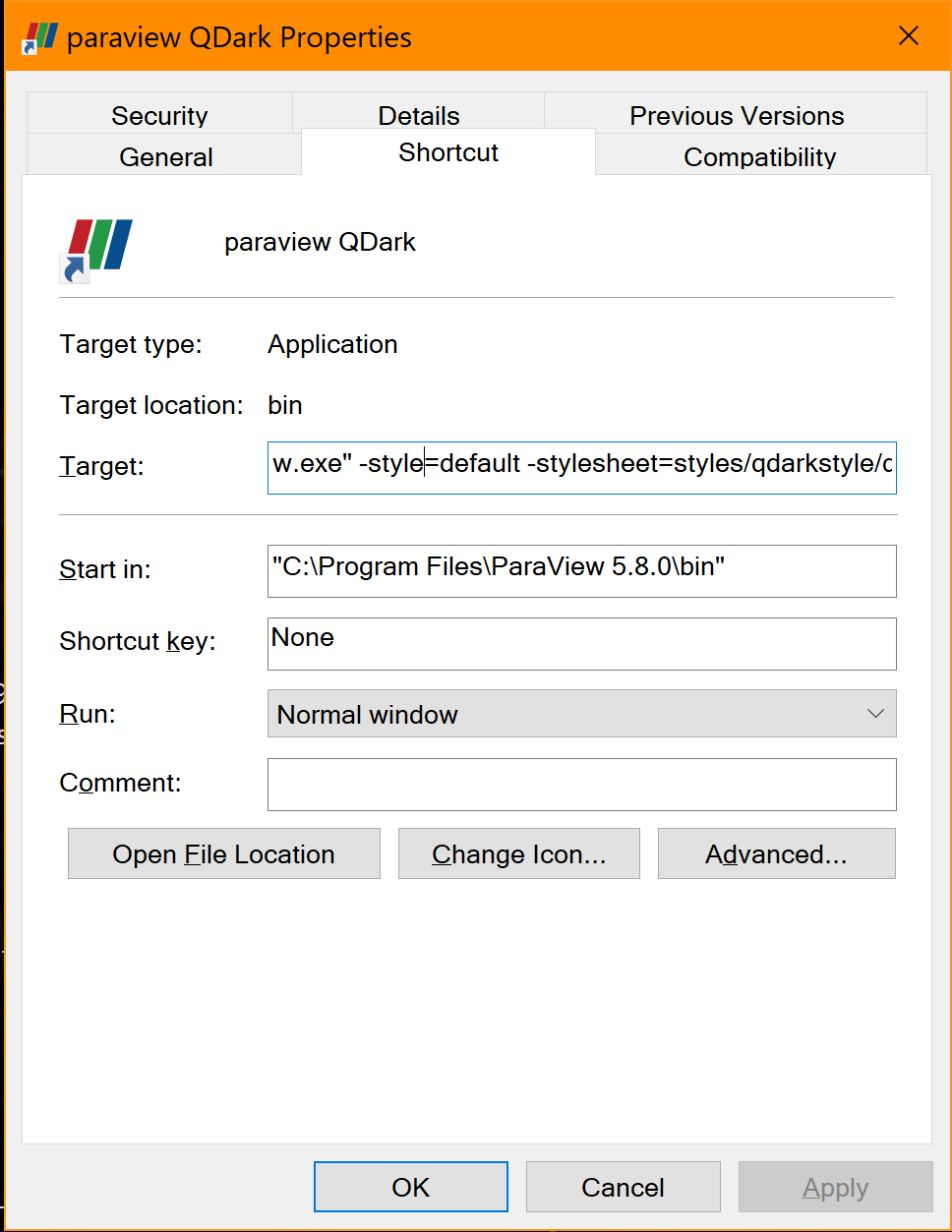
To use the QDarkStyle, I created a “qdarkstyle” sub-folder in Paraview’s “bin/styles” folder, and copied the .qss file there. Then I could reference the .qss file relative to the “bin” folder as
`-stylesheet=styles/qdarkstyle/style.qss`
BTW, this stylesheet seems to be one of the most complete Qt “dark” styles I could find. It’s a good reference, and perhaps I will come up with my own “dark scheme” soon 😀
---
### Author:  [@mwestphal](https://discourse.paraview.org/u/mwestphal)
#### Post date: [July 3, 2020, 12:40pm UTC](https://discourse.paraview.org/t/how-to-get-paraview-dark-ui-any-os-any-release/4545/7 "2020-07-03T12:40:56Z")
This is working perfectly !
I will give it a go on Linux and MacOS to see if this is cross platform, and then update the post.
---
### Author:  [@mwestphal](https://discourse.paraview.org/u/mwestphal)
#### Post date: [July 7, 2020, 1:50pm UTC](https://discourse.paraview.org/t/how-to-get-paraview-dark-ui-any-os-any-release/4545/8 "2020-07-07T13:50:22Z")
I’ve updated the post with the new generic solution.
---
### Author:  [@mconti](https://discourse.paraview.org/u/mconti)
#### Post date: [February 3, 2021, 8:45pm UTC](https://discourse.paraview.org/t/how-to-get-paraview-dark-ui-any-os-any-release/4545/9 "2021-02-03T20:45:47Z")
Hey y’all, thanks to this post a while back I made a custom QT stylesheet for windows that I really enjoyed, although it no longer works for me after updating to 5.9 since I think the QT version has changed. Has anyone gotten their stylesheet to work with 5.9 on windows?
---
### Author:  [@mwestphal](https://discourse.paraview.org/u/mwestphal)
#### Post date: [February 4, 2021, 8:46am UTC](https://discourse.paraview.org/t/how-to-get-paraview-dark-ui-any-os-any-release/4545/10 "2021-02-04T08:46:43Z")
Although there is a few warnings, the style provided in the above post seems to still work.
---
### Author:  [@steve\_r](https://discourse.paraview.org/u/steve_r)
#### Post date: [February 5, 2021, 1:00pm UTC](https://discourse.paraview.org/t/how-to-get-paraview-dark-ui-any-os-any-release/4545/11 "2021-02-05T13:00:39Z")
I saw the same issue in ParaView 5.9 when using the “default” style on Win 10. Changing to either “windows” or “fusion” style fixed it for me, like this:
`paraview -style=fusion -stylesheet=.qss`
The “fusion” style works best with high-DPI scaling on Win 10 according to Qt docs, while “windows” style might have issues with certain scaling values.
---
### Author:  [@mconti](https://discourse.paraview.org/u/mconti)
#### Post date: [February 11, 2021, 7:50pm UTC](https://discourse.paraview.org/t/how-to-get-paraview-dark-ui-any-os-any-release/4545/12 "2021-02-11T19:50:22Z")
Hey Steffen, changing style from “default” to “fusion” fixed the issue for me. Appreciate the help
---
### Author:  [@lockan](https://discourse.paraview.org/u/lockan)
#### Post date: [May 3, 2021, 11:16pm UTC](https://discourse.paraview.org/t/how-to-get-paraview-dark-ui-any-os-any-release/4545/13 "2021-05-03T23:16:15Z")
Hey, I’ve tried following the above steps for a Windows 10 install of the 5.9 MPI binary and it isn’t working. Any ideas? Here’s the shortcut properties:
---
### Author:  [@mwestphal](https://discourse.paraview.org/u/mwestphal)
#### Post date: [May 4, 2021, 7:27am UTC](https://discourse.paraview.org/t/how-to-get-paraview-dark-ui-any-os-any-release/4545/14 "2021-05-04T07:27:24Z")
-stylesheet should point to an absolute path to the style.
Something like:
C:\path\to\style.qss
---
### Author:  [@lockan](https://discourse.paraview.org/u/lockan)
#### Post date: [May 4, 2021, 2:03pm UTC](https://discourse.paraview.org/t/how-to-get-paraview-dark-ui-any-os-any-release/4545/15 "2021-05-04T14:03:23Z")
Aaah, I’d tried that earlier but not with the style set to Fusion. Perfect, thank you!
---
### Author:  [@ionboi](https://discourse.paraview.org/u/ionboi)
#### Post date: [November 11, 2021, 2:40pm UTC](https://discourse.paraview.org/t/how-to-get-paraview-dark-ui-any-os-any-release/4545/16 "2021-11-11T14:40:55Z")
Hello,
Thanks for the instructions, I got it to work. Unfortunately, checkboxes appear invisible after applying the dark style.qss.
QCheckbox is included in the qss file though, so that shouldn’t be the problem. Do you know of a fix for this?
Thanks!
---
### Author:  [@steve\_r](https://discourse.paraview.org/u/steve_r)
#### Post date: [November 16, 2021, 12:40pm UTC](https://discourse.paraview.org/t/how-to-get-paraview-dark-ui-any-os-any-release/4545/17 "2021-11-16T12:40:22Z")
The QSS styles behave slightly differently between ParaView versions. Which PV version do you use?
---
### Author:  [@ionboi](https://discourse.paraview.org/u/ionboi)
#### Post date: [November 16, 2021, 1:09pm UTC](https://discourse.paraview.org/t/how-to-get-paraview-dark-ui-any-os-any-release/4545/18 "2021-11-16T13:09:25Z")
I am using version 5.10.0
---
### Author:  [@lhofmann](https://discourse.paraview.org/u/lhofmann)
#### Post date: [November 16, 2021, 3:22pm UTC](https://discourse.paraview.org/t/how-to-get-paraview-dark-ui-any-os-any-release/4545/19 "2021-11-16T15:22:08Z")
The problem is that the stylesheet contains references to icons (`:/qss_icons/rc/...`), which are missing.
You would need to replace these by relative paths (relative to the qss file), and store the icons next to the stylesheet on disk.
I have done this for a few stylesheets here: [paraview-stylesheets.tar.gz](https://discourse.paraview.org/uploads/short-url/apsI0WKoQ01Q3hf3cWUZVjOIc5q.gz) (299.4 KB)
They can be used with paraview as described in the original post.
---
### Author:  [@cfd\_payne](https://discourse.paraview.org/u/cfd_payne)
#### Post date: [November 17, 2021, 6:14am UTC](https://discourse.paraview.org/t/how-to-get-paraview-dark-ui-any-os-any-release/4545/20 "2021-11-17T06:14:22Z")
Hello All,
Have been using the Darktheme per below Mathieu’s suggestion on Win10,PV 5.9.1
> [@mwestphal](#):
>
> It is possible to modify the aspect of the ParaView UI, eg like this:
Here’s a comparison of Default vs Dark
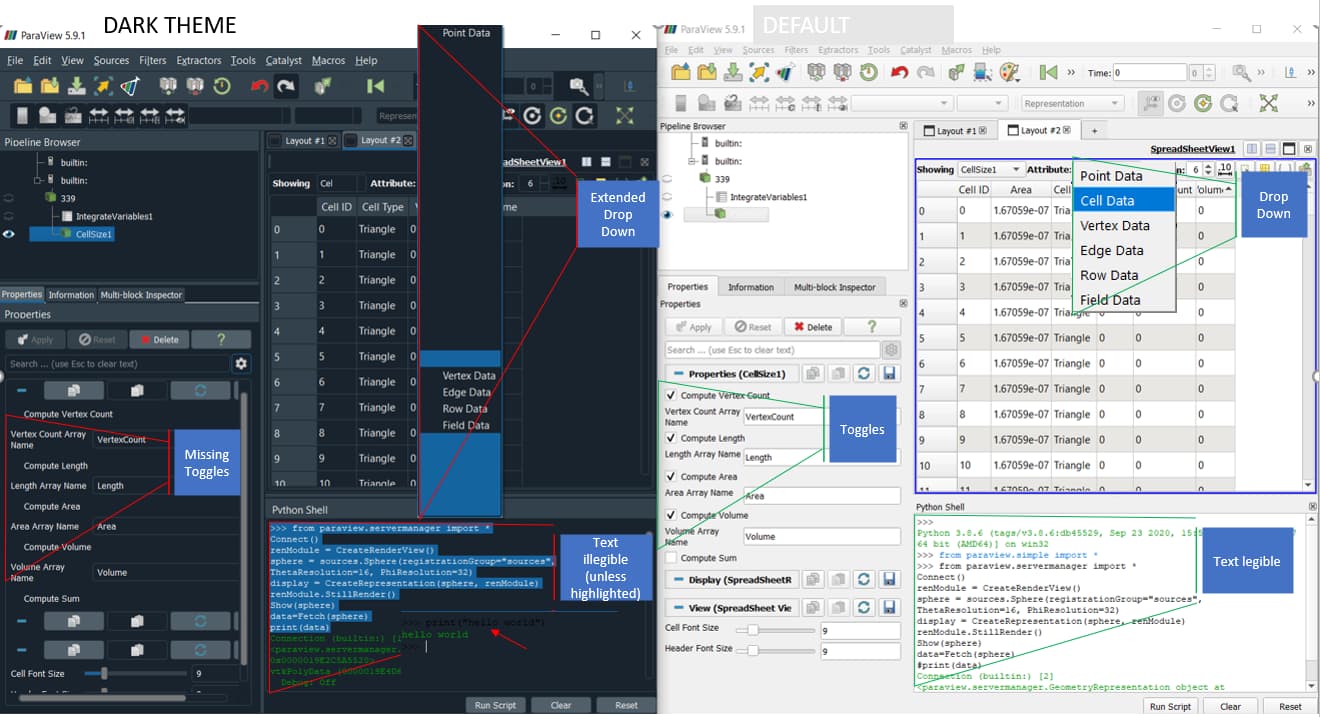
Can you please suggest how to improve on the highlighted bits.
[Next page](https://discourse.paraview.org/t/how-to-get-paraview-dark-ui-any-os-any-release/4545.md?page=2)