# How to hide unwanted lattice grids during post processing?
**URL:** https://discourse.paraview.org/t/how-to-hide-unwanted-lattice-grids-during-post-processing/2030
**Category:** ParaView Support
**Created:** [June 13, 2019, 6:06am UTC](https://discourse.paraview.org/t/how-to-hide-unwanted-lattice-grids-during-post-processing/2030 "2019-06-13T06:06:50Z")
**Posts on this page:** 3
**Page:** 1
### Author:  [@Dinushika1992](https://discourse.paraview.org/u/Dinushika1992)
#### Post date: [June 13, 2019, 6:06am UTC](https://discourse.paraview.org/t/how-to-hide-unwanted-lattice-grids-during-post-processing/2030/1 "2019-06-13T06:06:50Z")
Hi,
I’m doing post prospering with paraview. For the better view of the image I want to hide some lattice nodes (Blue color points in the image). I want to see only the other points (orange and red color ones. Actually it represents a constricted pipe) in the image. Could you please help me solve my problem?
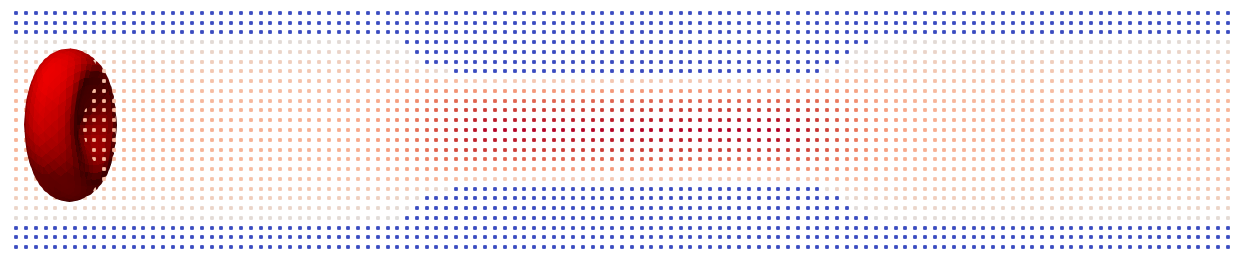
Thank you!
---
### Author:  [@mwestphal](https://discourse.paraview.org/u/mwestphal)
#### Post date: [June 13, 2019, 7:40am UTC](https://discourse.paraview.org/t/how-to-hide-unwanted-lattice-grids-during-post-processing/2030/2 "2019-06-13T07:40:50Z")
Edit -\> Find Data should allow you to select the points by value. You can then just use ExtractSelection
---
### Author:  [@Dinushika1992](https://discourse.paraview.org/u/Dinushika1992)
#### Post date: [June 14, 2019, 3:59am UTC](https://discourse.paraview.org/t/how-to-hide-unwanted-lattice-grids-during-post-processing/2030/3 "2019-06-14T03:59:50Z")
Thank you very much Mathieu.