# how to kill wrongly run mpiexec server
**URL:** https://discourse.paraview.org/t/how-to-kill-wrongly-run-mpiexec-server/17296
**Category:** ParaView Support
**Created:** [November 7, 2025, 9:03am UTC](https://discourse.paraview.org/t/how-to-kill-wrongly-run-mpiexec-server/17296 "2025-11-07T09:03:51Z")
**Posts on this page:** 7
**Page:** 1
### Author:  [@otaolafr](https://discourse.paraview.org/u/otaolafr)
#### Post date: [November 7, 2025, 9:03am UTC](https://discourse.paraview.org/t/how-to-kill-wrongly-run-mpiexec-server/17296/1 "2025-11-07T09:03:51Z")
Hello,
i wanted to use in paraview in parallel (please if it is not the correct way, what would it be?).
I have paraview 6.0.1 MPI-Linux-Python3.12-x86\_64 version downloaded from the tar file.
first I run:
`mpiexec -np 8 pvserver`
which printed:
`Waiting for client... `
`Connection URL: cs://workpc:11111 `
`Accepting connection(s): workpc:11111`
then leaved that terminal alone (not closing it nor killing it)
and opened paraview in another terminal, then hit connect→add server and leaved the default options; which look like this:
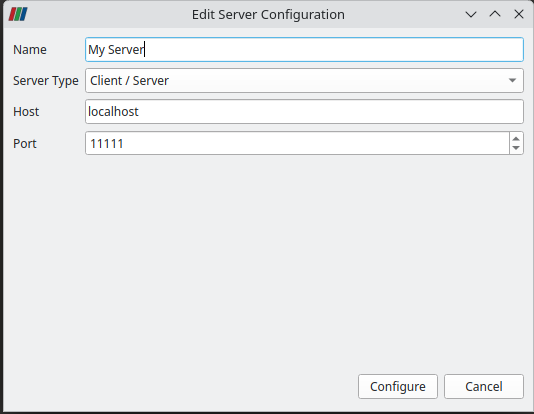
then tried to connect but I was getting the same output in the two terminals (the one of paraview and the one of mpiexec):
`( 45.269s) [pvserver.0]vtkSocketCommunicator.c:474 ERR| vtkSocketCommunicator (0x56449b4328c0): Client/server version hash mismatch. ( 45.269s) [pvserver.0]vtkTCPNetworkAccessMana:313 ERR| vtkTCPNetworkAccessManager (0x56449b0a08f0): **********************************************************************Connection failed during handshake. vtkSocketCommunicator::GetVersion() returns different values on the two connecting processes (Current value: 100).**********************************************************************`
with the same current value
then I got the feedback that I should use the mpiexec that came with paraview /bin/mpiexec, but when i run (from the bin folder of paraview):
`./mpiexec -np 8 pvserver `
`Waiting for client... `
`Connection URL: cs://workpc:11111 `
`Accepting connection(s): workpc:11111 `
`Waiting for client... `
`Connection URL: cs://workpc:11111 `
`( 1.625s) [pvserver] vtkSocket.cxx:213 ERR| vtkServerSocket (0x6546255cac00): Socket error in call to bind. Address already in use. `
`( 1.625s) [pvserver]vtkTCPNetworkAccessMana:443 ERR| vtkTCPNetworkAccessManager (0x6546252308f0): Failed to set up server socket. `
`Exiting...`
but i can not find to have a pvserver process on the htop terminal. nor killall pvserver is working (getting pvserver: no process found)
what is the solution for this? is there a simpler way to run in parallel all the time paraview?
---
### Author:  [@mwestphal](https://discourse.paraview.org/u/mwestphal)
#### Post date: [November 7, 2025, 9:29am UTC](https://discourse.paraview.org/t/how-to-kill-wrongly-run-mpiexec-server/17296/2 "2025-11-07T09:29:04Z")
look for pvserver and pvserver-real process and kill them all before starting again using the provided mpiexec
---
### Author:  [@otaolafr](https://discourse.paraview.org/u/otaolafr)
#### Post date: [November 7, 2025, 9:40am UTC](https://discourse.paraview.org/t/how-to-kill-wrongly-run-mpiexec-server/17296/3 "2025-11-07T09:40:17Z")
well, thats the thing, nor pvserver nor pvserver-real are found in htop…. nor killall…
---
### Author:  [@mwestphal](https://discourse.paraview.org/u/mwestphal)
#### Post date: [November 7, 2025, 9:58am UTC](https://discourse.paraview.org/t/how-to-kill-wrongly-run-mpiexec-server/17296/4 "2025-11-07T09:58:21Z")
I think you have a locally installed pvserver causing issues, please use this command:
```auto
cd path/to/paraview/bin
./mpiexec -np 8 ./pvserver
```
---
### Author:  [@otaolafr](https://discourse.paraview.org/u/otaolafr)
#### Post date: [November 7, 2025, 10:08am UTC](https://discourse.paraview.org/t/how-to-kill-wrongly-run-mpiexec-server/17296/5 "2025-11-07T10:08:31Z")
this worked, emmm i did not installed pvserver separatly.
maybe the paraview comming with openFOAM?
---
### Author:  [@mwestphal](https://discourse.paraview.org/u/mwestphal)
#### Post date: [November 7, 2025, 10:13am UTC](https://discourse.paraview.org/t/how-to-kill-wrongly-run-mpiexec-server/17296/6 "2025-11-07T10:13:01Z")
`which pvserver` will tell you.
---
### Author:  [@otaolafr](https://discourse.paraview.org/u/otaolafr)
#### Post date: [November 7, 2025, 10:18am UTC](https://discourse.paraview.org/t/how-to-kill-wrongly-run-mpiexec-server/17296/7 "2025-11-07T10:18:26Z")
> which pvserver
> /usr/bin/pvserver
strange, it is a brand new pc, that i am using since yesterday i installed the OS myself, dont know why there is this binary as i did not installed paraview otherway than simply extracting the tar file, maybe while installing openfoam.
EDIT: can confirm that comes from openfoam, i checked the version of the /usr/bin/paraview and it is 5.13 which is not the version i work with, thanks in any case.