# How to load large size files in paraview?
**URL:** https://discourse.paraview.org/t/how-to-load-large-size-files-in-paraview/3893
**Category:** ParaView Support
**Created:** [March 26, 2020, 2:51pm UTC](https://discourse.paraview.org/t/how-to-load-large-size-files-in-paraview/3893 "2020-03-26T14:51:36Z")
**Posts on this page:** 19
**Page:** 1
### Author:  [@Vijit\_Kanjilal](https://discourse.paraview.org/u/Vijit_Kanjilal)
#### Post date: [March 26, 2020, 2:51pm UTC](https://discourse.paraview.org/t/how-to-load-large-size-files-in-paraview/3893/1 "2020-03-26T14:51:36Z")
I am trying to open hdf5 files of size 14 GB each in paraview but whenever I try to load the data, Paraview is closing giving the error message ‘server side has disconnected’. I am using SahasraT and running paraview using 960 processors.
For smaller size data everything is fine. Please help me resolve this issue.
---
### Author:  [@mwestphal](https://discourse.paraview.org/u/mwestphal)
#### Post date: [March 27, 2020, 2:57am UTC](https://discourse.paraview.org/t/how-to-load-large-size-files-in-paraview/3893/2 "2020-03-27T02:57:14Z")
There is two possibilities here.
- This is indeed a a large size file issue and you are running out of memory server side
- There is an issue with the file in itself, not with the actual size of the file.
Monitor your memory server side and you will know.
---
### Author:  [@Vijit\_Kanjilal](https://discourse.paraview.org/u/Vijit_Kanjilal)
#### Post date: [March 27, 2020, 5:41am UTC](https://discourse.paraview.org/t/how-to-load-large-size-files-in-paraview/3893/3 "2020-03-27T05:41:40Z")
The file is okay as I am running python scripts to analyze the files.
Can you suggest me how can I load such big data files in Paraview?
---
### Author:  [@mwestphal](https://discourse.paraview.org/u/mwestphal)
#### Post date: [March 27, 2020, 5:57am UTC](https://discourse.paraview.org/t/how-to-load-large-size-files-in-paraview/3893/4 "2020-03-27T05:57:25Z")
please provide an error message and check memory usage.
---
### Author:  [@Vijit\_Kanjilal](https://discourse.paraview.org/u/Vijit_Kanjilal)
#### Post date: [March 27, 2020, 6:28am UTC](https://discourse.paraview.org/t/how-to-load-large-size-files-in-paraview/3893/5 "2020-03-27T06:28:01Z")
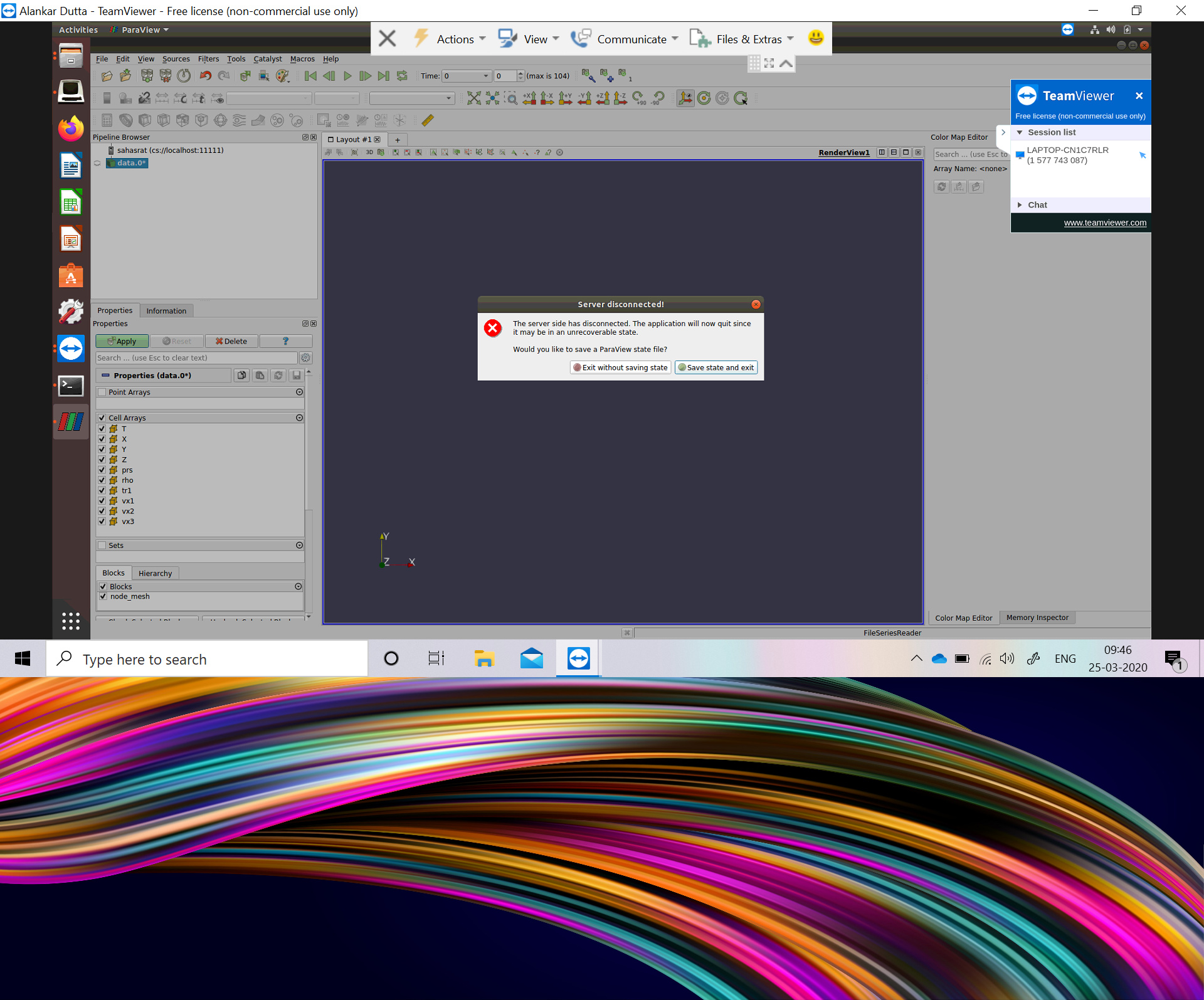
I have shared the screenshot
---
### Author:  [@mwestphal](https://discourse.paraview.org/u/mwestphal)
#### Post date: [March 27, 2020, 6:35am UTC](https://discourse.paraview.org/t/how-to-load-large-size-files-in-paraview/3893/6 "2020-03-27T06:35:40Z")
You are running paraview in client server mode.
How do you run the server ? Do you have access of the terminal where the server is most likely running from ?
---
### Author:  [@Vijit\_Kanjilal](https://discourse.paraview.org/u/Vijit_Kanjilal)
#### Post date: [March 27, 2020, 7:34am UTC](https://discourse.paraview.org/t/how-to-load-large-size-files-in-paraview/3893/7 "2020-03-27T07:34:50Z")
I have Paraview compiled on server which is a Cray XC40 system. Here I’m attaching the job script that I’m submitting for running the server. Once the job is through and the server is setup, I’m connecting to it via a client on my machine through standard port forwarding with ssh. I’m facing no issues on loading smaller resolution but otherwise identical dataset.
[job\_pv](https://discourse.paraview.org/uploads/short-url/tS0qvCaaJjy2tLwXedgGQij0GcQ) (694 Bytes)
---
### Author:  [@mwestphal](https://discourse.paraview.org/u/mwestphal)
#### Post date: [March 27, 2020, 7:41am UTC](https://discourse.paraview.org/t/how-to-load-large-size-files-in-paraview/3893/8 "2020-03-27T07:41:33Z")
can you run the client from a terminal ? you should be able to see if there was error on the server before it crashes.
---
### Author:  [@Vijit\_Kanjilal](https://discourse.paraview.org/u/Vijit_Kanjilal)
#### Post date: [March 29, 2020, 7:57pm UTC](https://discourse.paraview.org/t/how-to-load-large-size-files-in-paraview/3893/9 "2020-03-29T19:57:37Z")
Has the issue given in the following link resolved till date? My problem is exactly similar to this:
[https://www.paraview.org/pipermail/paraview/2015-February/033209.html](https://www.paraview.org/pipermail/paraview/2015-February/033209.html)
---
### Author:  [@Vijit\_Kanjilal](https://discourse.paraview.org/u/Vijit_Kanjilal)
#### Post date: [April 4, 2020, 10:48am UTC](https://discourse.paraview.org/t/how-to-load-large-size-files-in-paraview/3893/10 "2020-04-04T10:48:39Z")
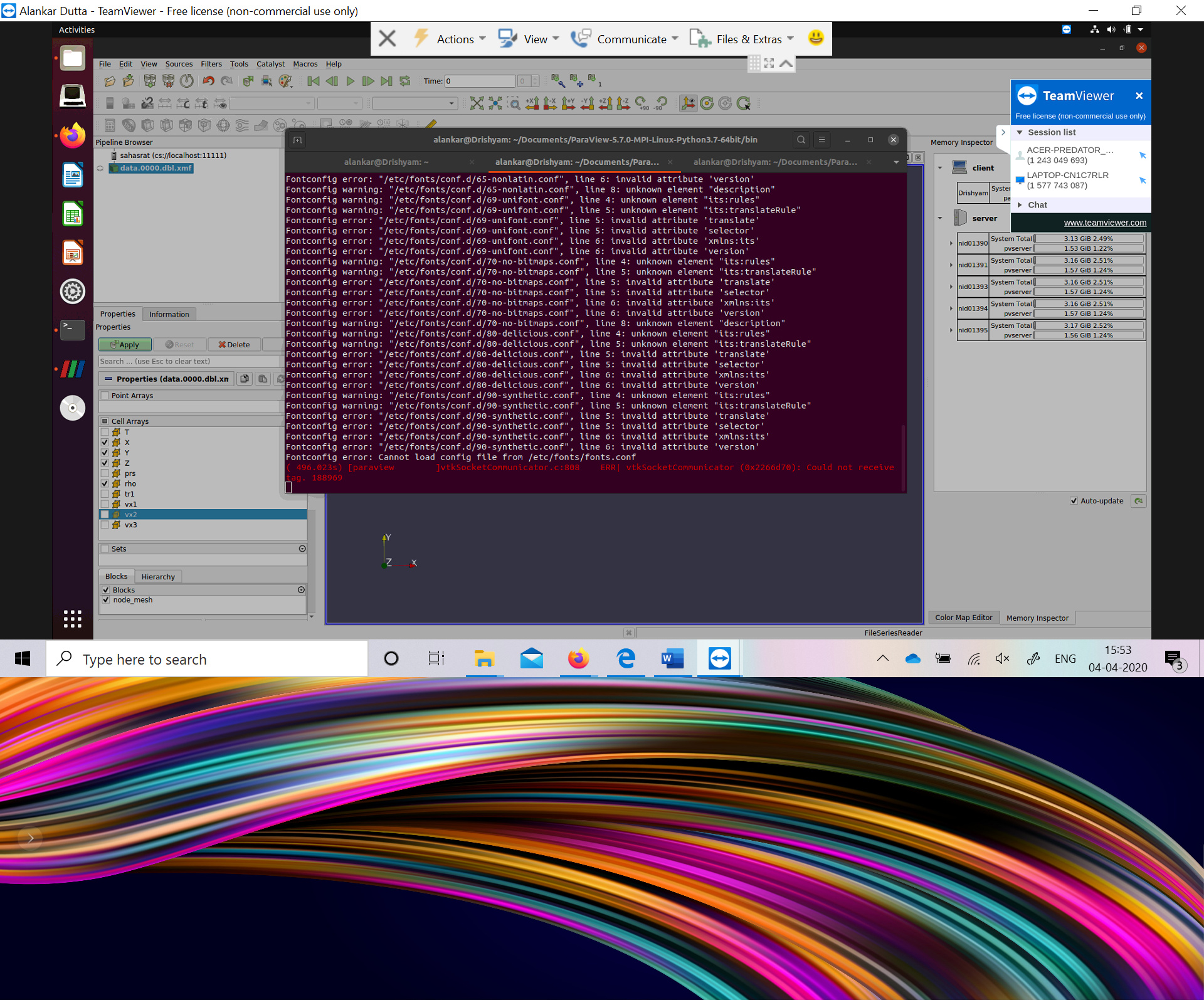
As suggested by you, I ran Paraview client from terminal and got the following error message:
( 496.023s) [paraview]vtkSocketCommunicator.c:808 ERR| vtkSocketCommunicator (0x2266d70): Could not receive tag. 188969
I am also attaching the screenshots.
---
### Author:  [@mwestphal](https://discourse.paraview.org/u/mwestphal)
#### Post date: [April 6, 2020, 6:33am UTC](https://discourse.paraview.org/t/how-to-load-large-size-files-in-paraview/3893/11 "2020-04-06T06:33:52Z")
Sadly, it is not very informative.
Do you have access to the terminal running the server ?
---
### Author:  [@Vijit\_Kanjilal](https://discourse.paraview.org/u/Vijit_Kanjilal)
#### Post date: [April 6, 2020, 6:33pm UTC](https://discourse.paraview.org/t/how-to-load-large-size-files-in-paraview/3893/12 "2020-04-06T18:33:01Z")
Yes I have access to the server terminal. I am submitting a job for pvserver using the jobscript I shared in Cray XC40. Then from the client side I am using “ssh phyvijitk@sahasrat.serc.iisc.ernet.in -L 11111:nid01390:11111” to port forward the server node to the client side (I get the “nid01390:11111” info from the output dumped by the pvserver as Accepting connections). Then on the client side I connect to the pvserver using localhost:11111 from inside the Paraview gui in client mahine
---
### Author:  [@mwestphal](https://discourse.paraview.org/u/mwestphal)
#### Post date: [April 7, 2020, 3:34am UTC](https://discourse.paraview.org/t/how-to-load-large-size-files-in-paraview/3893/13 "2020-04-07T03:34:39Z")
> [@Vijit\_Kanjilal](#):
>
> get the “nid01390:11111” info from the output dumped by the pvserver as Accepting connections)
Anything more from this terminal before the crash ?
---
### Author:  [@Vijit\_Kanjilal](https://discourse.paraview.org/u/Vijit_Kanjilal)
#### Post date: [April 13, 2020, 1:45pm UTC](https://discourse.paraview.org/t/how-to-load-large-size-files-in-paraview/3893/14 "2020-04-13T13:45:04Z")
Sorry for the delay in response. The job was on queue for long. Here’s what the connection info file gave on trying to load the xmf file (with companion hdf5 file around 14.8 GB).
Waiting for client…
Connection URL: cs://nid00633:11111
Accepting connection(s): nid00633:11111
Client connected.
Application 64641 exit signals: Killed
Application 64641 resources: utime ~224s, stime ~305s, Rss ~44364, inblocks ~4640160, outblocks ~0
---
### Author:  [@mwestphal](https://discourse.paraview.org/u/mwestphal)
#### Post date: [April 14, 2020, 3:13am UTC](https://discourse.paraview.org/t/how-to-load-large-size-files-in-paraview/3893/15 "2020-04-14T03:13:42Z")
Well, you have to do that again but monitor the server memory usage and see if it exceed what you are allowed to use.
---
### Author:  [@Vijit\_Kanjilal](https://discourse.paraview.org/u/Vijit_Kanjilal)
#### Post date: [April 24, 2020, 8:40am UTC](https://discourse.paraview.org/t/how-to-load-large-size-files-in-paraview/3893/16 "2020-04-24T08:40:46Z")
I was going through some of the online articles couldn’t find anything useful to have a memory monitoring on Cray subsystem on which I’m submitting my Paraview jobs. Can you suggest anything useful in this regard?
---
### Author:  [@mwestphal](https://discourse.paraview.org/u/mwestphal)
#### Post date: [April 24, 2020, 10:44am UTC](https://discourse.paraview.org/t/how-to-load-large-size-files-in-paraview/3893/17 "2020-04-24T10:44:32Z")
I know nothing about Cray system. There is no `htop` ?
---
### Author:  [@FabianDe](https://discourse.paraview.org/u/FabianDe)
#### Post date: [July 15, 2020, 8:17pm UTC](https://discourse.paraview.org/t/how-to-load-large-size-files-in-paraview/3893/18 "2020-07-15T20:17:58Z")
I’m having a similar issue where ParaView is crashing trying to open a 309GB HDF5 file, even though I have a node with 2.1TB memory. Has this issue been resolved or did someone find a way around this?
---
### Author:  [@dutta-alankar](https://discourse.paraview.org/u/dutta-alankar)
#### Post date: [May 23, 2022, 6:01pm UTC](https://discourse.paraview.org/t/how-to-load-large-size-files-in-paraview/3893/19 "2022-05-23T18:01:42Z")
What I do is that I load one hdf5 file at a time and convert it to .pvd file unload and load the next in a batch script without the GUI. After that, the .pvd files ran without crashing on loading for visualization.