# How to make full use of Two GPUs
**URL:** https://discourse.paraview.org/t/how-to-make-full-use-of-two-gpus/4630
**Category:** ParaView Support
**Created:** [June 21, 2020, 11:39am UTC](https://discourse.paraview.org/t/how-to-make-full-use-of-two-gpus/4630 "2020-06-21T11:39:58Z")
**Posts on this page:** 6
**Page:** 1
### Author:  [@sharon](https://discourse.paraview.org/u/sharon)
#### Post date: [June 21, 2020, 11:39am UTC](https://discourse.paraview.org/t/how-to-make-full-use-of-two-gpus/4630/1 "2020-06-21T11:39:58Z")
Dear Experts,
There are two GPUs on my computer:
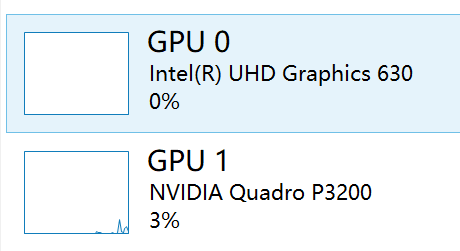
and i want to make full use of them, and try to launch pvserver by below command:
mpiexec.exe -n 2 .\pvserver.exe -display :0.0 --force-offscreen-rendering : -n 2 .\pvserver.exe -display :0.1 --force-offscreen-rendering
but when i manipulate 3D in paraview, and found only 1 GPU is used, since the other GPU usage is always 0%,
My question is how can i make full use of my two GPUs?
---
### Author:  [@sharon](https://discourse.paraview.org/u/sharon)
#### Post date: [July 3, 2020, 9:45am UTC](https://discourse.paraview.org/t/how-to-make-full-use-of-two-gpus/4630/2 "2020-07-03T09:45:52Z")
Help!
---
### Author:  [@mwestphal](https://discourse.paraview.org/u/mwestphal)
#### Post date: [July 3, 2020, 9:47am UTC](https://discourse.paraview.org/t/how-to-make-full-use-of-two-gpus/4630/3 "2020-07-03T09:47:43Z")
Your command seems correct.
[https://www.paraview.org/Wiki/Setting\_up\_a\_ParaView\_Server](https://www.paraview.org/Wiki/Setting_up_a_ParaView_Server)
---
### Author:  [@sharon](https://discourse.paraview.org/u/sharon)
#### Post date: [July 3, 2020, 9:49am UTC](https://discourse.paraview.org/t/how-to-make-full-use-of-two-gpus/4630/4 "2020-07-03T09:49:23Z")
Thank you Mathieu!
But from GPU usage one is always 0%…seems not used at all…
---
### Author:  [@steve\_r](https://discourse.paraview.org/u/steve_r)
#### Post date: [July 3, 2020, 4:04pm UTC](https://discourse.paraview.org/t/how-to-make-full-use-of-two-gpus/4630/5 "2020-07-03T16:04:33Z")
With such a setup, low-end + hi-end GPU of different vendors in a single machine, I would suggest to rather split into:
- use low-end GPU for OpenGL
- use hi-end GPU for GPU Volume / NVIDIA IndeX / NVIDIA OptiX etc.
It’s possible that this is selected semi-automatically through default graphics driver / NVIDIA settings. The primary GPU should be displayed in the ParaView \> About box, under OpenGL renderer. The NVIDIA renderers will use the hi-end GPU by default (if not told otherwise).
_Steffen_
---
### Author:  [@sharon](https://discourse.paraview.org/u/sharon)
#### Post date: [July 5, 2020, 10:09am UTC](https://discourse.paraview.org/t/how-to-make-full-use-of-two-gpus/4630/6 "2020-07-05T10:09:16Z")
Hi Steffen,
Thank you for your suggesting, though i have found the setting where i can set to use different GPU,
you suggestion is helpful!
Best Regards!