# How to move the mesh in paraview?
**URL:** https://discourse.paraview.org/t/how-to-move-the-mesh-in-paraview/6824
**Category:** ParaView Support
**Tags:** vtk
**Created:** [March 30, 2021, 7:37am UTC](https://discourse.paraview.org/t/how-to-move-the-mesh-in-paraview/6824 "2021-03-30T07:37:21Z")
**Posts on this page:** 3
**Page:** 1
### Author:  [@hkchm](https://discourse.paraview.org/u/hkchm)
#### Post date: [March 30, 2021, 7:37am UTC](https://discourse.paraview.org/t/how-to-move-the-mesh-in-paraview/6824/1 "2021-03-30T07:37:21Z")
Dear all,
I run a FEM program of fluid-structure interaction, and attain the result of .vtk. After exporting the data to paraview, there are five variables presented. p\_fluid is pressure of fluid, x\_dis, y\_dis are dispalcement of mesh in x and y direction, and x\_velo, y\_velo are velocity of fluid in x and y direction. Data in paraview is followed:
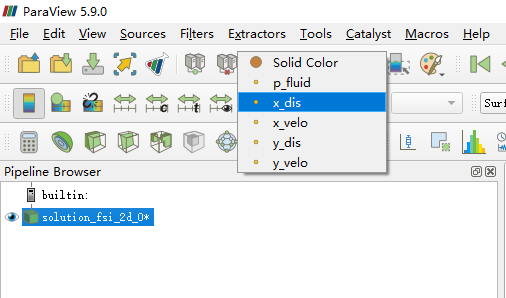
The mesh in these .vtk are initial mesh, which are stationary, that means I play the animation in paraview of the results, the elastic beam followed by a cylinder hole is stationary. The .vtk data is below.
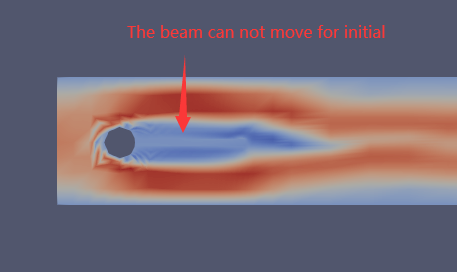
Now, I want to move my mesh by add the displacements(x\_dis, y\_dis) to the initial mesh in paraview, So that I can play the animation with a moving mesh.
Could anyone help me out? Is it possible?
Thank you for all,
Chen
[Step\_fsi\_ale\_harmonic.7z](https://discourse.paraview.org/uploads/short-url/hmylvRZddtSl4fADMlLiMFEY2m9.7z) (3.7 MB)
---
### Author:  [@mwestphal](https://discourse.paraview.org/u/mwestphal)
#### Post date: [March 30, 2021, 1:18pm UTC](https://discourse.paraview.org/t/how-to-move-the-mesh-in-paraview/6824/2 "2021-03-30T13:18:02Z")
- Open your files, Apply
- Filter → Calculator
- Use the following expression: `x_dis*iHat+y_dis*jHat`, Apply
- Warp by vector, select Result, and set scaleFactor (eg: 10), Apply
- Play animation
---
### Author:  [@hkchm](https://discourse.paraview.org/u/hkchm)
#### Post date: [March 30, 2021, 3:11pm UTC](https://discourse.paraview.org/t/how-to-move-the-mesh-in-paraview/6824/3 "2021-03-30T15:11:05Z")
Thank you for your response, it’s really helpful!