# How to remove OUTPUT MSG dialog box
**URL:** https://discourse.paraview.org/t/how-to-remove-output-msg-dialog-box/11953
**Category:** ParaView Support
**Created:** [April 23, 2023, 12:39pm UTC](https://discourse.paraview.org/t/how-to-remove-output-msg-dialog-box/11953 "2023-04-23T12:39:03Z")
**Posts on this page:** 12
**Page:** 1
### Author:  [@Pranay](https://discourse.paraview.org/u/Pranay)
#### Post date: [April 23, 2023, 12:39pm UTC](https://discourse.paraview.org/t/how-to-remove-output-msg-dialog-box/11953/1 "2023-04-23T12:39:03Z")
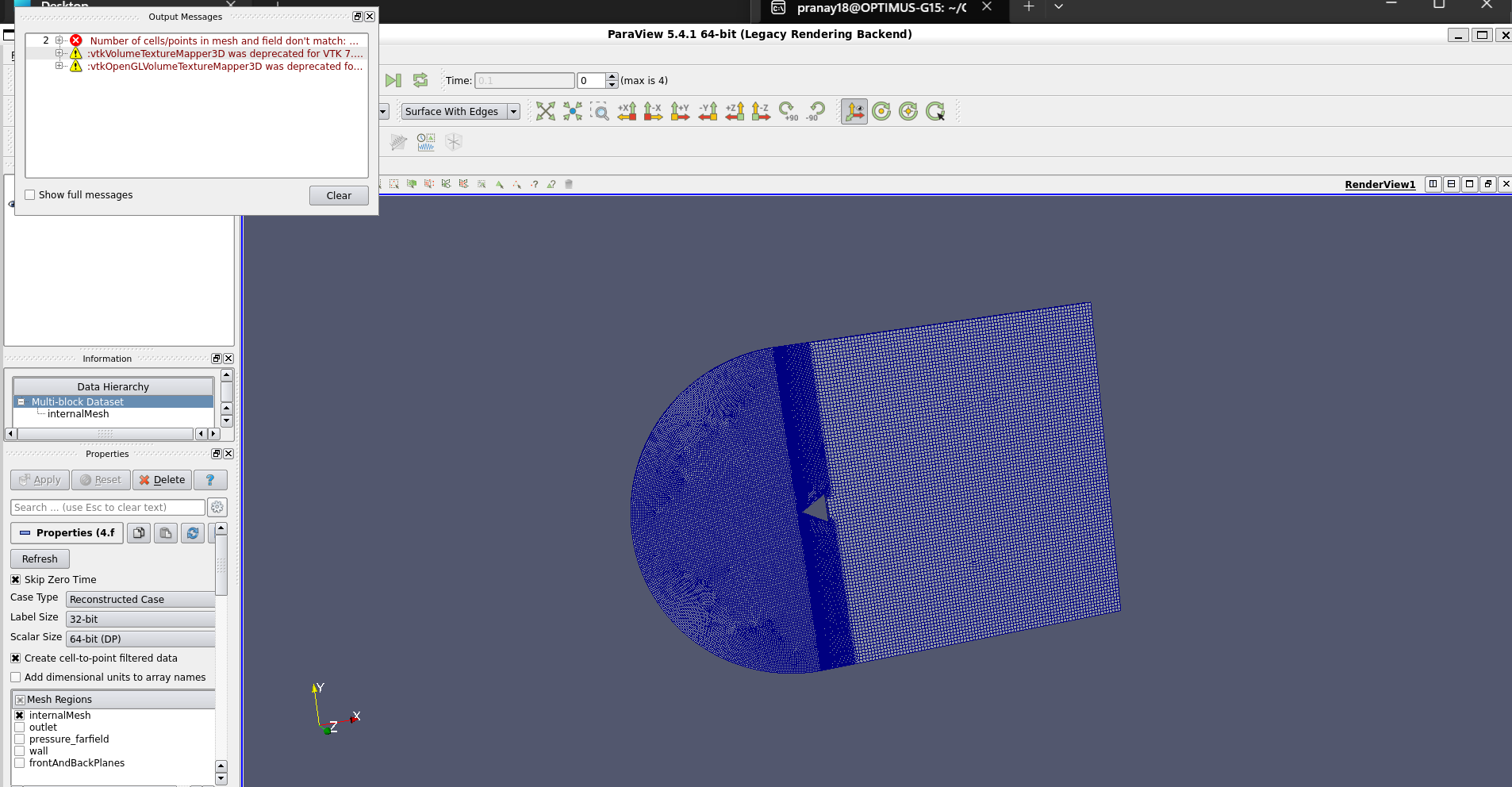
I am running paraview on wsl ubuntu. I am trying to close the dialog box of output msgs but just to fail. ‘X’ button does not work nor does clear no anything. Why is it so? How to resolve it?
---
### Author:  [@ben.boeckel](https://discourse.paraview.org/u/ben.boeckel)
#### Post date: [April 23, 2023, 8:06pm UTC](https://discourse.paraview.org/t/how-to-remove-output-msg-dialog-box/11953/2 "2023-04-23T20:06:46Z")
Strange. Seems like some kind of event might not be getting through? Can you try docking it in the window and then closing it? You might also be able to turn it off via either the `View` or `Window` menu (I can’t remember which off-hand).
---
### Author:  [@lrv](https://discourse.paraview.org/u/lrv)
#### Post date: [October 17, 2023, 1:53pm UTC](https://discourse.paraview.org/t/how-to-remove-output-msg-dialog-box/11953/3 "2023-10-17T13:53:25Z")
Same type of problem here while using WSL. In my case, the message below is also displayed in the terminal.
Has anyone found a solution? This is super annoying.
```plaintext
( 32.069s) [paraview]
vtkTextureObject.cxx:1025 ERR|
vtkTextureObject (0x562e7b04b720): Attempt to use a texture buffer exceeding your hardware's limits.
This can happen when trying to color by cell data with a large dataset.
Hardware limit is 65536 values while 71240 was requested.
```
---
### Author:  [@aron.helser](https://discourse.paraview.org/u/aron.helser)
#### Post date: [October 18, 2023, 1:25am UTC](https://discourse.paraview.org/t/how-to-remove-output-msg-dialog-box/11953/4 "2023-10-18T01:25:18Z")
I see a similar message about texture buffers and I also have issues with the window not wanting to stay in front, and not wanting to accept mouse events. I haven’t found a solution yet, except to move the window to the lower right of the screen before using the mouse on the menus. It is a very strange behavior, probably due to a bug in event translation between windows and WSL. AFAIK there is no fix yet.
---
### Author:  [@lrv](https://discourse.paraview.org/u/lrv)
#### Post date: [October 18, 2023, 12:31pm UTC](https://discourse.paraview.org/t/how-to-remove-output-msg-dialog-box/11953/5 "2023-10-18T12:31:33Z")
Thank you for your comment @aron.helser.
I also have a similar crash when importing the vtk library in python. I suppose this stems from the same problem. E.g.
```python
import vtkmodules.all as vtk
reader = vtk.vtkXMLUnstructuredGridReader()
reader.SetFileName('file.vtu')
reader.Update()
mapper = vtk.vtkDataSetMapper()
mapper.SetInputConnection(reader.GetOutputPort())
actor = vtk.vtkActor()
actor.SetMapper(mapper)
renderer = vtk.vtkRenderer()
render_window = vtk.vtkRenderWindow()
render_window.AddRenderer(renderer)
render_window_interactor = vtk.vtkRenderWindowInteractor()
render_window_interactor.SetRenderWindow(render_window)
renderer.AddActor(actor)
renderer.SetBackground(0.1, 0.1, 0.1)
renderer.ResetCamera()
render_window.Render()
render_window_interactor.Start()
```
gives an error in the 2 last lines of code
```auto
libGL error: MESA-LOADER: failed to open swrast: /usr/lib/dri/swrast_dri.so: cannot open shared object file: No such file or directory (search paths /usr/lib/x86_64-linux-gnu/dri:\$${ORIGIN}/dri:/usr/lib/dri, suffix _dri)
libGL error: failed to load driver: swrast
2023-10-18 14:20:19.377 ( 0.222s) [A6E60740]vtkXOpenGLRenderWindow.:651 ERR| vtkXOpenGLRenderWindow (0x2c30a30): Cannot create GLX context. Aborting.
```
Actually, visualizing results with paraview/vtk library is the last bit to move my workflow to Linux (WSL) altogether, so I’m longing for a solution. Please let us know when there’s a fix! 🙂
---
### Author:  [@Lourencosm](https://discourse.paraview.org/u/Lourencosm)
#### Post date: [November 22, 2023, 4:46pm UTC](https://discourse.paraview.org/t/how-to-remove-output-msg-dialog-box/11953/6 "2023-11-22T16:46:40Z")
Regarding “message output”, if you Edit\>‘Reset to default setting’, then this window gets docked can be close. But everything gets messed if it is dragged and undocked.
“Choose preset” window also doesn’t accept mouse events. i guess it has to do with some type of not-docked windows.
Also, if a docked window (properties, information, etc…) is drag/undocked, afterwards doesn’t accept mouse events anymore.
---
### Author:  [@Lourencosm](https://discourse.paraview.org/u/Lourencosm)
#### Post date: [November 24, 2023, 12:15pm UTC](https://discourse.paraview.org/t/how-to-remove-output-msg-dialog-box/11953/7 "2023-11-24T12:15:07Z")
“Choose preset” window problem only occurs in ParaView version 5.12.0.
Same behaviour in Ubuntu 22.04 and OpenSuse 15.5 running in WSL.
---
### Author:  [@ben.boeckel](https://discourse.paraview.org/u/ben.boeckel)
#### Post date: [November 24, 2023, 12:43pm UTC](https://discourse.paraview.org/t/how-to-remove-output-msg-dialog-box/11953/8 "2023-11-24T12:43:02Z")
Perhaps there’s some configuration interfering? Does `paraview --dr` also have this problem? If so, can you please document how to make it occur from that state and file [an issue](https://gitlab.kitware.com/paraview/paraview/-/issues)?
---
### Author:  [@Lourencosm](https://discourse.paraview.org/u/Lourencosm)
#### Post date: [November 24, 2023, 1:15pm UTC](https://discourse.paraview.org/t/how-to-remove-output-msg-dialog-box/11953/9 "2023-11-24T13:15:13Z")
Yes, also occurs with “paraview --dr”.
It has nothing to do with specific states or files. This occurs in WSL2, under Windows 11, using both Ubuntu 22.04 and OpenSuse 15.5. It’s very easy to replicate.
To sum up,
1. The ‘Output Messages’ window when undocked, you can’t dock it any more or resize it, but you can still close it or select the checkboxes. If it pops up automatically, it becomes completely non-responsive. The only option is to close it in the ‘View’ menu. It’s annoying because you’re not able to choose where it will pop up. ‘Edit’ \> ‘Reset To Default Settings’ is the only way i found to dock it again.
2. In v5.12.0, the ‘Color Map Editor’ \> ‘Choose Preset’ window is always non-responsive to mouse events, and even with TAB you can’t move to all checkboxes. It gets stuck in the default color presets displayed, and you can’t select the other groups o presets (linear, diverging, etc). This problem doesn’t occur in 5.11.2.
---
### Author:  [@ben.boeckel](https://discourse.paraview.org/u/ben.boeckel)
#### Post date: [November 24, 2023, 1:23pm UTC](https://discourse.paraview.org/t/how-to-remove-output-msg-dialog-box/11953/10 "2023-11-24T13:23:45Z")
Please file an issue so that we can track it there. I don’t have WSL2 around, so I can’t test it myself.
---
### Author:  [@Lourencosm](https://discourse.paraview.org/u/Lourencosm)
#### Post date: [November 24, 2023, 4:30pm UTC](https://discourse.paraview.org/t/how-to-remove-output-msg-dialog-box/11953/11 "2023-11-24T16:30:04Z")
done. Thank you!
---
### Author:  [@ben.boeckel](https://discourse.paraview.org/u/ben.boeckel)
#### Post date: [November 24, 2023, 4:46pm UTC](https://discourse.paraview.org/t/how-to-remove-output-msg-dialog-box/11953/12 "2023-11-24T16:46:14Z")
I see [https://gitlab.kitware.com/paraview/paraview/-/issues/22385](https://gitlab.kitware.com/paraview/paraview/-/issues/22385), thanks.