# How to remove the boundary between different types of mesh
**URL:** https://discourse.paraview.org/t/how-to-remove-the-boundary-between-different-types-of-mesh/11734
**Category:** ParaView Support
**Created:** [March 28, 2023, 11:39am UTC](https://discourse.paraview.org/t/how-to-remove-the-boundary-between-different-types-of-mesh/11734 "2023-03-28T11:39:57Z")
**Posts on this page:** 2
**Page:** 1
### Author:  [@pearlpirate](https://discourse.paraview.org/u/pearlpirate)
#### Post date: [March 28, 2023, 11:39am UTC](https://discourse.paraview.org/t/how-to-remove-the-boundary-between-different-types-of-mesh/11734/1 "2023-03-28T11:39:57Z")
Hello there,
I’m currently using paraview to post-processing my data from Fluent. I exported the data in CGNS format. I use a combination of structured and unstructured mesh which are connected by an interface. When I do the post-processing, the interface becomes a surface, also when I draw the iso-surface, there is a black boundary line between the unstructured and structured region. It really looks ugly. So I am wondering if anyone knows how to remove this black line and kindly help me. Thank you very much.
Regards,
Ben
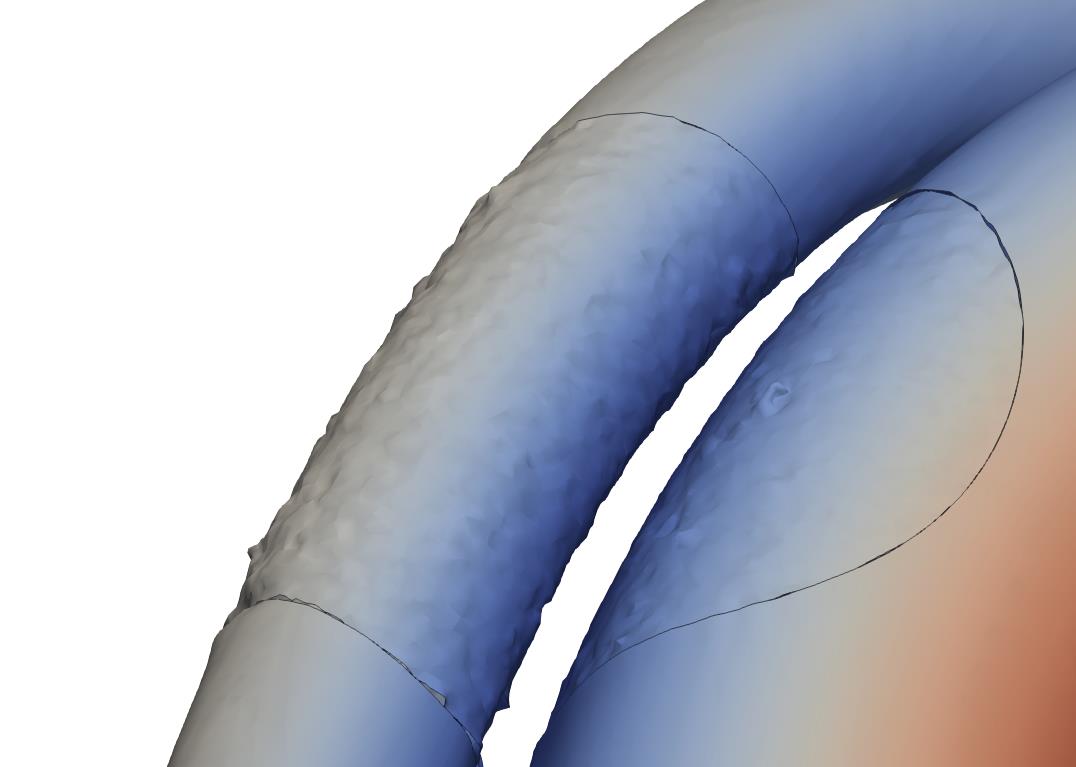
---
### Author:  [@mwestphal](https://discourse.paraview.org/u/mwestphal)
#### Post date: [March 28, 2023, 11:42am UTC](https://discourse.paraview.org/t/how-to-remove-the-boundary-between-different-types-of-mesh/11734/2 "2023-03-28T11:42:26Z")
@Charles_Gueunet