# How to rename OpenFOAM patches directly from Paraview?
**URL:** https://discourse.paraview.org/t/how-to-rename-openfoam-patches-directly-from-paraview/7666
**Category:** ParaView Support
**Created:** [July 22, 2021, 10:37am UTC](https://discourse.paraview.org/t/how-to-rename-openfoam-patches-directly-from-paraview/7666 "2021-07-22T10:37:07Z")
**Posts on this page:** 8
**Page:** 1
### Author:  [@falco](https://discourse.paraview.org/u/falco)
#### Post date: [July 22, 2021, 10:37am UTC](https://discourse.paraview.org/t/how-to-rename-openfoam-patches-directly-from-paraview/7666/1 "2021-07-22T10:37:07Z")
Hello,
I am using OpenFOAM to conduct several simulations. In most cases, I constantly use the ‘`autoPatch`’ utility to divide external faces of the mesh into patches based on a given angle. The utility will rename the resulting patches: `auto0`, `auto1`, `auto2`, etc. then I need to rename those names to meaningful counterparts, e.g. `auto0` should be renamed to `inlet`, and `auto5` should be renamed to `airfoil`, etc.
My workflow is as follows:
Step 1: run the autoPatch utility:` autoPatch -overwrite 85`
Step 2: create a dummy file: `touch my_case.foam`
Step 3: Open that file using ParaView.
Step 4: Inside Paraview, as you can see in the screenshot, I need to visualize each `auto0` to `autoN` (N is an integer) to see what it should be renamed to:
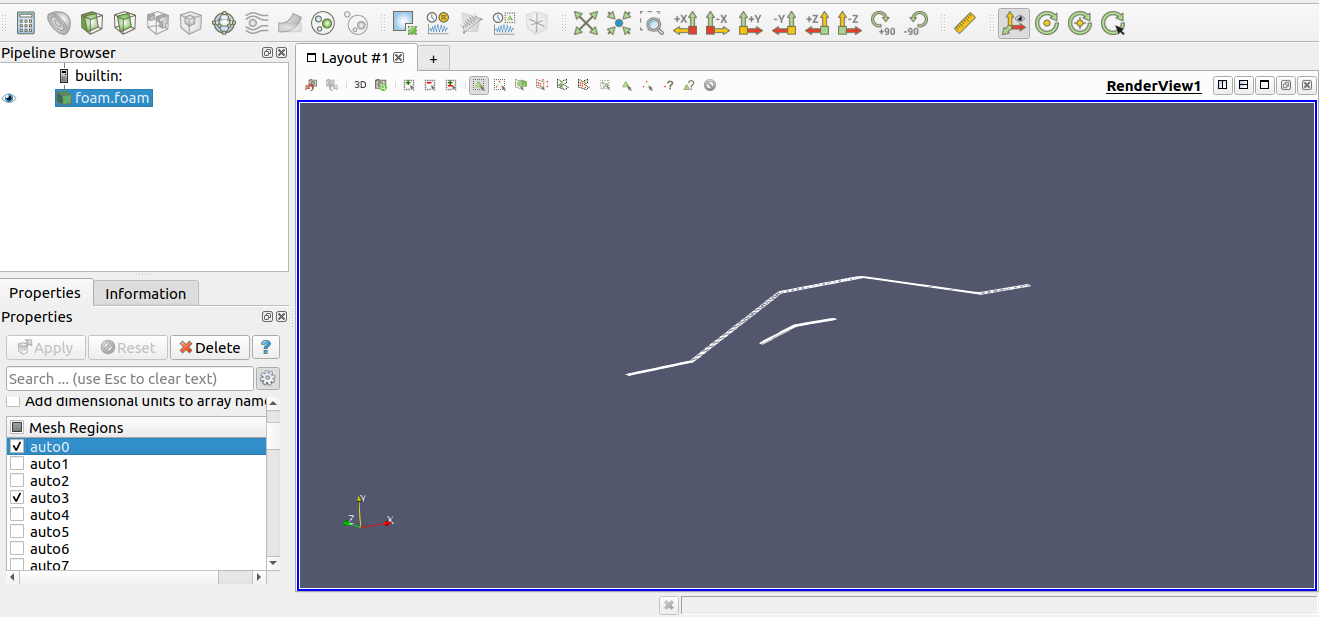
Step 5: I need to write down manually in a piece of paper or in a text document the following tables (of course, it depends on the mesh):
```auto
auto0 ---> inlet
auto1 ----> wall
auto2 -----> airfoil
...etc.
```
Then I need to open the `./consant/polyMesh/boundary` file to rename those occurences or using a command such as `sed`, e.g: : `sed -i s/auto0/inlet/ ./constant/polyMesh/boundary`
**My question is** :
As you can see, the last two steps are tedious and are prone to errors. The ideal solution in my case is to right-click on the patch (auto0, auto1, etc.) in Paraview and choose **rename** , then Paraview will automatically update the boundary conditions file (`./constant/polyMesh/boundary`).
Paraview, unfortunately, doesn’t provide the “rename” option as I described it above, But I would really like to know to achieve that inside Paraview either by creating a plugin or anything that could help.
Any suggestions on how to achieve that? I appreciate your help.
---
### Author:  [@bloerp](https://discourse.paraview.org/u/bloerp)
#### Post date: [July 22, 2021, 4:14pm UTC](https://discourse.paraview.org/t/how-to-rename-openfoam-patches-directly-from-paraview/7666/2 "2021-07-22T16:14:19Z")
You can use createPatch -overwrite to rename patches on the fly inside OpenFOAM. Using a createPatchDict like this:
```auto
matchTolerance 1E-3;
pointSync false;
patches
(
{
name inlet;
patchInfo
{
type patch;
}
constructFrom patches;
patches (auto0);
}
{
name outlet;
patchInfo
{
type patch;
}
constructFrom patches;
patches (auto1);
}
);
```
You could also use topoSet and define planes or boxes etc, to circumvent autoPatch. Split your stl file for snappy directly etc. So this is best solved within OpenFoam. So this shouldn’t be done in paraview altogether.
Programming this inside paraview is more complicated than learning how to mesh without autoPatch.
---
### Author:  [@falco](https://discourse.paraview.org/u/falco)
#### Post date: [July 22, 2021, 4:30pm UTC](https://discourse.paraview.org/t/how-to-rename-openfoam-patches-directly-from-paraview/7666/3 "2021-07-22T16:30:53Z")
Thank you for the reply. Unfortunately, you are missing the point of my question. I don’t know upfront the meaning of each generated patches (auto0, auto1, …etc). So I need to open the mesh in Paraview to inspect it **visually** in order to know the corresponds of each patch.
Therefore, It doesn’t matter if I use createPatchDict or any other alternatives. It would be much better to rename the patches from within Paraview itself because one will be very confident that he is not making mistakes.
TLDR; You can’t use `createPatchDict` file before knowing the meaning of auto0, auto1, auto2, etc. To do so, you need to visualize them in Paraview. In addition using `createPatch` is an overkill when you can simply edit the `boundary` file in `constant/polyMesh` directory.
Thanks
---
### Author:  [@bloerp](https://discourse.paraview.org/u/bloerp)
#### Post date: [July 22, 2021, 5:57pm UTC](https://discourse.paraview.org/t/how-to-rename-openfoam-patches-directly-from-paraview/7666/4 "2021-07-22T17:57:12Z")
I am fully aware of your question. The problem is that you are asking for something difficult to program. Something which is not inherently easy to implement in paraview, but with the right knowledge extremely easy to implement in OpenFoam. Please eleborate on where your meshes are generated from. There are tons of options, like normal direction, bounding boxes of your patches, size etc. And of course why your data needs to be auto patched in the first place. There are likely many options i can give you to automate this directly without the need to open paraview and judge them yourself. It seems you are trying to mesh an airfoil, which means that the inlets and outlets are always the outer part, while the airfoil itself is always a closed loop surrounded by material etc.
---
### Author:  [@falco](https://discourse.paraview.org/u/falco)
#### Post date: [July 22, 2021, 9:48pm UTC](https://discourse.paraview.org/t/how-to-rename-openfoam-patches-directly-from-paraview/7666/5 "2021-07-22T21:48:14Z")
Hi again,
I receive several meshes where the boundary conditions are not separated it means: all the outer faces are named with a single name, namely: `defaultFaces` (And I can’t do anything about that issue). The meshes are generally very complex and may contain up to 20 faces (boundary conditions to be specified). So I must use the `autoPatch` utility to get those faces separated and to be used as boundary conditions.
The `autoPatch` generated faces (auto0, auto1, etc.) are **completely random** (at least for me and there is no way to know their physical meaning without visualizing them).
I am just asking for suggestions on how to do that, maybe using a python macro script? is it possible to create small GUI windows inside Paraview using Python? if that’s possible, I am pretty sure I will be able to solve my problem by invoking some bach commands using the subprocess module.
I agree with you that if the mesh is a simple one as is the case of an airfoil there should be an easy way to automate that but in my case, as I mentioned above, the meshes are generally complex (think of, compressors, wind turbines, heat exchangers) where it is impossible to rename the generated faces to meaningful names without visualization.
---
### Author:  [@olesenm](https://discourse.paraview.org/u/olesenm)
#### Post date: [July 23, 2021, 12:09pm UTC](https://discourse.paraview.org/t/how-to-rename-openfoam-patches-directly-from-paraview/7666/6 "2021-07-23T12:09:27Z")
Sure, this would be convenient, but there is no way to handle this at all. The names you get displayed within paraview (eg, auto0, auto1, auto2 …) are created from parsing the OpenFOAM boundary dictionary. This is a read-only operation. Even if you somehow managed to create a function to perform the renaming and rewrite the OpenFOAM boundary file, you would have a name mismatch with the various fields (all time directories, multiprocessor).
The slightly better paper and pencil method is what you will need.
- load the mesh in paraview
- use “Save State…” to save to some file. Eg, myrename.pvsm
- extract the “MeshRegions” property. This contains the patch names.
- edit your own _oldPatch_ to _newPatch_ table from this
---
### Author:  [@falco](https://discourse.paraview.org/u/falco)
#### Post date: [July 27, 2021, 9:41am UTC](https://discourse.paraview.org/t/how-to-rename-openfoam-patches-directly-from-paraview/7666/7 "2021-07-27T09:41:49Z")
Thank you dear @olesenm for your answer.
> [@olesenm](#):
>
> Even if you somehow managed to create a function to perform the renaming and rewrite the OpenFOAM boundary file, you would have a name mismatch with the various fields (all time directories, multiprocessor).
In my case, I set up the “OpenFOAM case” from scratch (0 folder is not yet setup, not decomposed, etc.).
For the moment, I will stick with what you have suggested.
Thank you.
---
### Author:  [@mwestphal](https://discourse.paraview.org/u/mwestphal)
#### Post date: [August 2, 2021, 9:32am UTC](https://discourse.paraview.org/t/how-to-rename-openfoam-patches-directly-from-paraview/7666/8 "2021-08-02T09:32:35Z")
In any case, a RenameBlocks filter would make sense in ParaView I think.